
A Kubernetes Deployment keeps a set of identical Pods running and replaces them gradually when you ship a new version. 5 things to know before you trust it with a release:
Bottom line
- Deployment = the desired state of an app, usually a stateless one. Which image, how many copies, how to replace them. A controller moves the cluster to that state
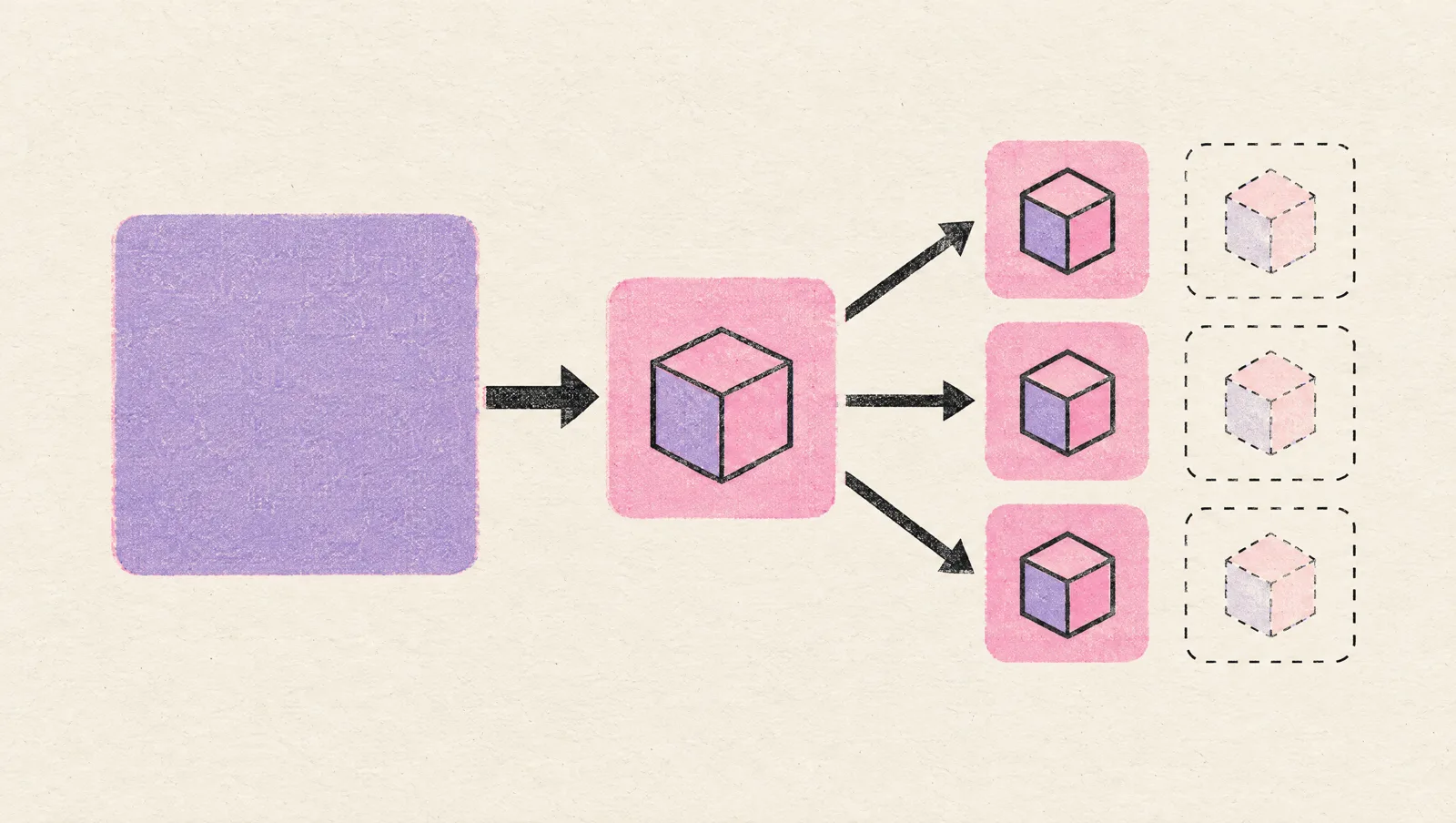
- Deployment → ReplicaSet → Pods. Every version of your Pod template gets its own ReplicaSet. A rollout scales the new one up and the old one down
- A rollout starts ONLY when
.spec.templatechanges. Scaling does not start one, and a rollback restores the template and nothing else - Readiness is the brake. The rollout waits for new Pods to become ready. A Pod with no readiness probe counts as ready the moment its containers run
- A stuck rollout is reported and left alone. After 600 seconds without progress you get a condition. Kubernetes does not roll back for you
A small Deployment that works, on Kubernetes v1.37:
apiVersion: apps/v1
kind: Deployment
metadata:
  name: web
  labels:
    app: web
spec:
  replicas: 3
  selector:
    matchLabels:
      app: web
  template:
    metadata:
      labels:
        app: web
    spec:
      containers:
      - name: web
        image: registry.example.com/web:1.4.2
        ports:
        - containerPort: 8080
The 4 commands you will use most:
kubectl apply -f deployment.yaml
kubectl rollout status deployment/web
kubectl rollout history deployment/web
kubectl rollout undo deployment/web
Rollouts that hang, or releases that drop requests? Get a free DevOps assessment: a senior engineer reviews your CI/CD, infra, Kubernetes, cloud cost and on-call setup.
Find your situation:
- You are writing your first manifest: a Deployment YAML you can copy
- A rollout is stuck right now: read the conditions and the 6 causes
- You need to go back to the previous version: roll back with kubectl rollout
- Releases drop a few requests every time: readiness and termination
- You are choosing between a Deployment and a StatefulSet: the comparison table
- You want every field with its default: the 10 spec fields
A Deployment manages ReplicaSets, and ReplicaSets manage Pods
You declare a state. The Deployment controller changes the actual state to match it, at a controlled rate.
Deployment = which Pod template, how many replicas, how to replace them.
ReplicaSet = keep N Pods of exactly 1 template version alive.
Pod = the containers that run.
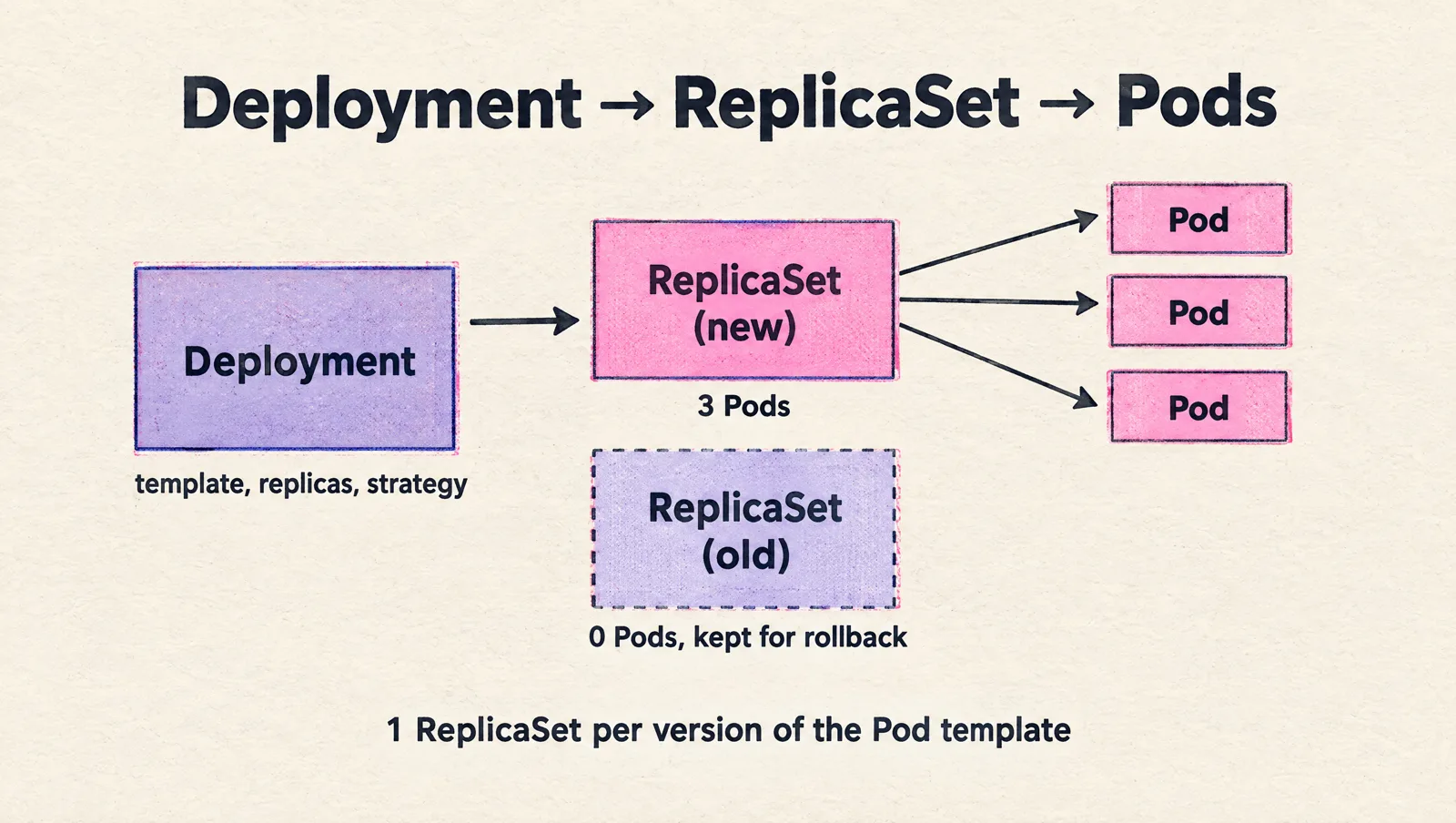
The chain shows up in the names:
$ kubectl get deployment,rs,pods -l app=web
NAME                  READY   UP-TO-DATE   AVAILABLE
deployment.apps/web   3/3     3            3

NAME                             DESIRED   CURRENT   READY
replicaset.apps/web-75675f5897   3         3         3

NAME                       READY   STATUS
pod/web-75675f5897-7ci7o   1/1     Running
pod/web-75675f5897-kzszj   1/1     Running
pod/web-75675f5897-qqcnn   1/1     Running
A ReplicaSet created by a Deployment is named [deployment name]-[hash].
The hash is the pod-template-hash label: a hash of the Pod template that the controller adds to the ReplicaSet, to its selector and to every Pod. Leave that label alone.
The 3 columns of kubectl get deployments that matter:
- READY: ready replicas out of desired replicas
- UP-TO-DATE: replicas already on the newest template
- AVAILABLE: replicas your users can reach
2 rules follow from the chain:
- Edit the Deployment and never the ReplicaSets it owns. The docs say the same
- Deleting a Deployment deletes its Pods.
kubectl delete deployment web --cascade=orphankeeps them
Kill a Pod, or lose a node, and the ReplicaSet creates a replacement on a node that has room. A bare Pod gets no such favor: when its node dies, it stays dead.
A Deployment YAML you can copy
Only 2 fields are required: .spec.selector and .spec.template. Everything else has a default.
The defaults keep a demo alive. This is the version I would put in front of customers:
apiVersion: apps/v1
kind: Deployment
metadata:
  name: web
  labels:
    app: web
spec:
  replicas: 3
  revisionHistoryLimit: 5
  progressDeadlineSeconds: 300
  minReadySeconds: 10
  selector:
    matchLabels:
      app: web
  strategy:
    type: RollingUpdate
    rollingUpdate:
      maxSurge: 1
      maxUnavailable: 0
  template:
    metadata:
      labels:
        app: web
    spec:
      terminationGracePeriodSeconds: 45
      topologySpreadConstraints:
      - maxSkew: 1
        topologyKey: topology.kubernetes.io/zone
        whenUnsatisfiable: ScheduleAnyway
        labelSelector:
          matchLabels:
            app: web
        matchLabelKeys:
        - pod-template-hash
      containers:
      - name: web
        image: registry.example.com/web:1.4.2
        ports:
        - containerPort: 8080
        resources:
          requests:
            cpu: 250m
            memory: 256Mi
          limits:
            memory: 256Mi
        readinessProbe:
          httpGet:
            path: /healthz
            port: 8080
          periodSeconds: 5
        lifecycle:
          preStop:
            sleep:
              seconds: 10
What each addition buys you:
| Line | Why it is there |
|---|---|
maxUnavailable: 0, maxSurge: 1 | Capacity never drops during a rollout. 1 extra Pod at a time |
readinessProbe | The rollout and the Service wait for the app, where the default waits only for the process |
minReadySeconds: 10 | A Pod that crashes 3 seconds after start never counts as available |
progressDeadlineSeconds: 300 | The pipeline hears about a stuck rollout after 5 minutes, where the default is 10 |
preStop sleep | Old Pods keep serving while the endpoints update, then get the stop signal |
resources.requests | The scheduler places Pods by requests, and CPU autoscaling needs them |
topologySpreadConstraints | Asks the scheduler to spread replicas across zones. ScheduleAnyway is a preference, DoNotSchedule makes it a rule. matchLabelKeys is beta and on by default |
| A fixed image tag | :latest makes a rollback hard, and the docs advise against it in production |
The numbers in it are starting points. The requests and limits guide covers how to size the resources block.
3 details that surprise people:
- The selector must match the template labels, or the API rejects the Deployment
- The selector is immutable in
apps/v1. To change it you delete the Deployment and create it again - The Pod template of a Deployment accepts only
restartPolicy: Always
And 1 that hurts: Kubernetes does not stop 2 controllers from using overlapping selectors. If another Deployment selects app: web, the 2 controllers fight over the same Pods. Give every Deployment labels that are its own.
Only a template change starts a rollout
Rollout = a new ReplicaSet for a new Pod template.
The docs are exact about the trigger: a rollout starts if and only if .spec.template changes.
| You change | New ReplicaSet | New revision |
|---|---|---|
| Image, env, resources, labels or annotations of the template | Yes | Yes |
replicas | No | No |
strategy, minReadySeconds, revisionHistoryLimit | No | No |
| A ConfigMap or Secret the Pods read | No | No |
The last row is the one that bites. The ConfigMap sits outside the template, so editing it changes no Deployment and running Pods keep the environment variables they started with. (Files from a mounted ConfigMap do update in place, after a delay.)
That is what kubectl rollout restart is for (more on it below).
What happens on kubectl set image deployment/web web=registry.example.com/web:1.4.3:
Template changes → new hash → new ReplicaSet at 0 → new scales up, old scales down → old ReplicaSet stays at 0 replicas as history
The old ReplicaSet is the rollback. A Deployment keeps 10 of them by default (revisionHistoryLimit). Set it to 0 and there is nothing to roll back to.
2 edge cases the docs name:
- Rollover: update again in the middle of a rollout and the controller starts a third ReplicaSet at once. The half-finished one is scaled down with the old one. It does not wait
- Proportional scaling: scale in the middle of a rollout and the extra replicas are split across the active ReplicaSets, the larger share to the larger one
Rolling update math: maxSurge and maxUnavailable
A Deployment has exactly 2 strategies:
- RollingUpdate (the default): new Pods come up while old ones go down. Both versions serve traffic for a while
- Recreate: every old Pod is killed before a new one is created. There is downtime
RollingUpdate is steered by 2 numbers, and both default to 25%:
- maxSurge: how many Pods above
replicasmay exist. A percentage rounds up - maxUnavailable: how many Pods below
replicasmay be unavailable. A percentage rounds down
The rounding is why small Deployments behave differently from what "25%" suggests:
| Replicas | maxSurge 25% | maxUnavailable 25% | During the rollout |
|---|---|---|---|
| 3 | 1 | 0 | At least 3 available, at most 4 in total |
| 4 | 1 | 1 | Between 3 and 5 |
| 10 | 3 | 2 | At least 8 available, at most 13 in total |
With 3 replicas and the defaults, the documented sequence is:
new 1 → old 2 → new 2 → old 1 → new 3 → old 0
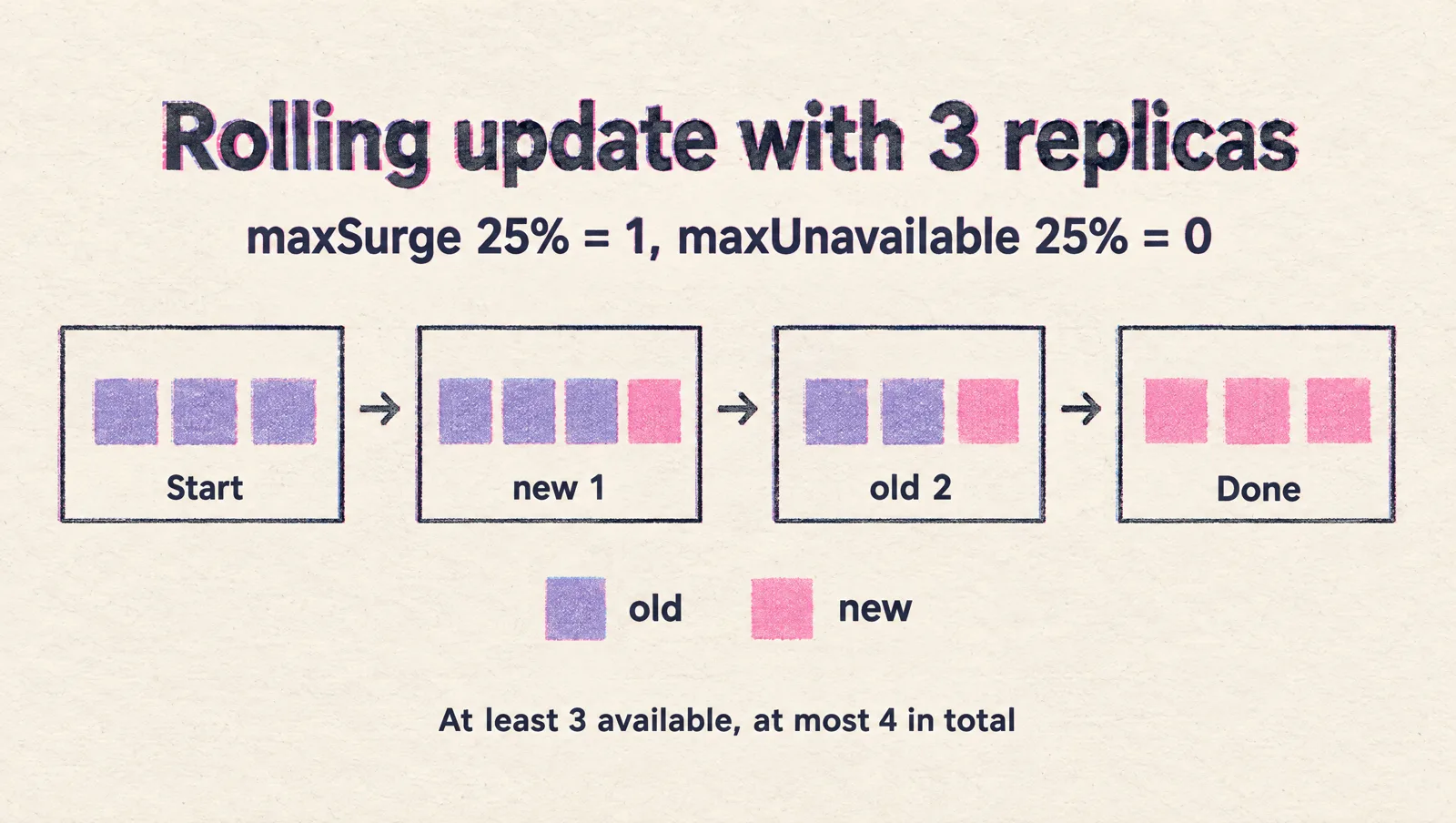
The controller never kills an old Pod until enough new ones are up, and never creates a new Pod until enough old ones are gone.
The 2 numbers cannot both be 0 (nothing could move).
How I pick them:
| Goal | maxSurge | maxUnavailable |
|---|---|---|
| Never lose capacity (most web services) | 1 or 25% | 0 |
| The cluster has no spare room for extra Pods | 0 | 1 |
| 50 replicas and you want it fast | 25% | 25% |
| 2 versions must never run together | Use Recreate | |
1 thing the numbers leave out: Pods that are still shutting down.
A terminating Pod is no longer counted as available, yet it still holds CPU and memory until it exits. So a rollout can briefly use more than replicas + maxSurge worth of resources. Since v1.35 the Deployment reports them in status.terminatingReplicas (beta, on by default).
Recreate has fine print too. Its "old first, then new" promise holds for upgrades only. Delete a Pod by hand and the replacement is created at once, before the old one is gone. For "at most 1 copy, always", the docs point you to a StatefulSet.
Rolling, Recreate, blue green and canary are compared in the deployment strategies guide.
Readiness and termination decide whether a rollout drops requests
A rolling update is as careful as your readiness signal. Argo's docs say it in 1 line: the rolling update gives you a basic set of safety guarantees, and they are readiness probes.
Available = ready for at least minReadySeconds (default 0).
With no probe configured, the probe result counts as success. So a Pod with no readiness probe is ready as soon as its containers run, whether the app inside can answer or cannot.
What each probe does when it fails:
| Probe | On failure | Effect on a rollout |
|---|---|---|
| Readiness | Pod leaves the Service endpoints. No restart | The rollout waits |
| Startup | The container is killed. Liveness and readiness are held back until it passes | The rollout waits |
| Liveness | The container is restarted | None directly. A bad one causes restart loops |
Probe defaults: every 10 seconds, 1 second timeout, 3 failures in a row to fail. The liveness probes guide has the settings that avoid restart loops.
The other half is how the old Pods leave. When a Pod is deleted:
- The Pod is marked terminating and the grace period starts (
terminationGracePeriodSeconds, 30 seconds by default) - At the same time, its endpoint is marked
ready: falseso Services stop sending new traffic - The
preStophook runs, if there is one - The container gets SIGTERM
- When the grace period ends, whatever is still running gets SIGKILL
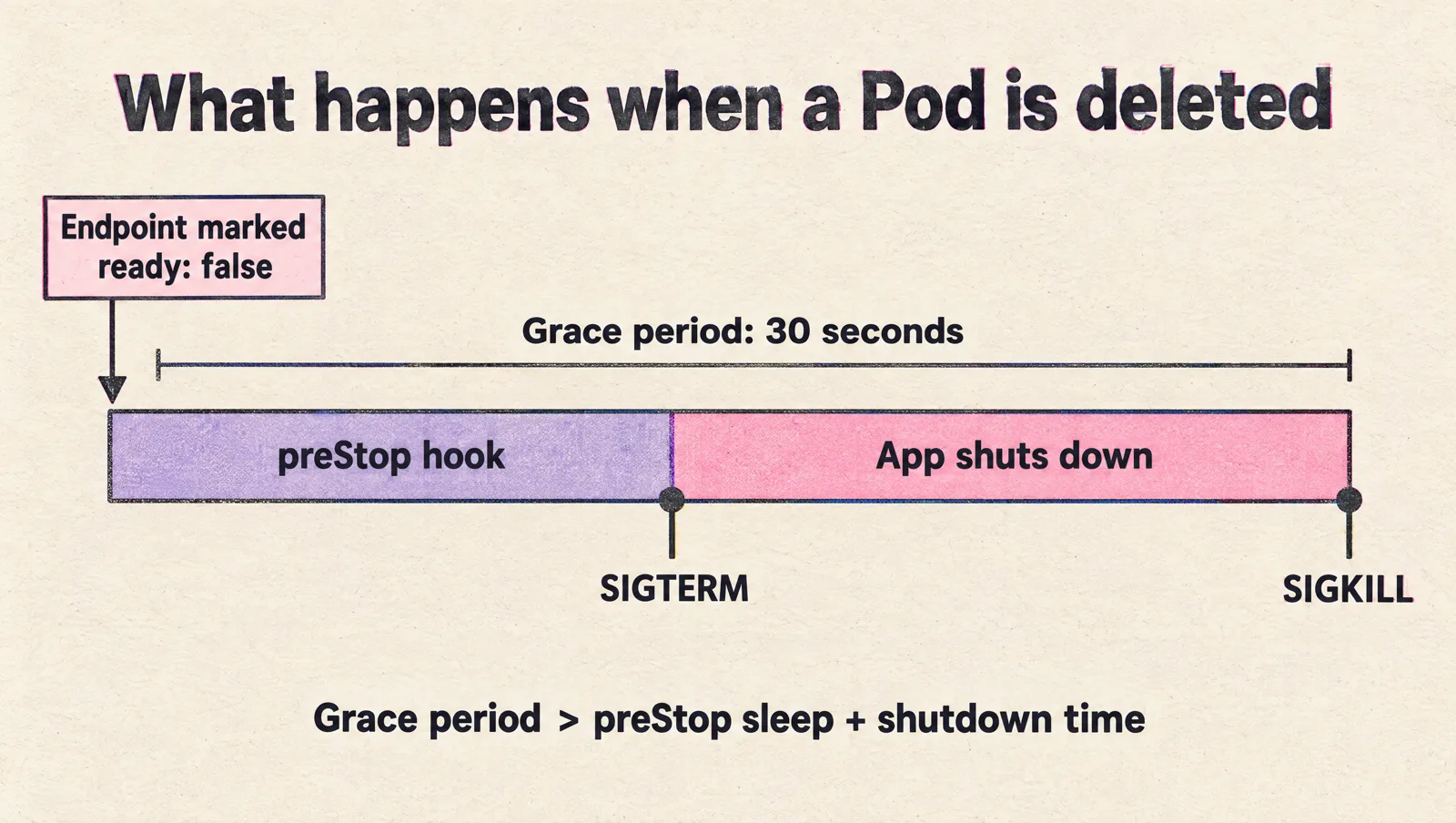
Steps 2 and 3 run in parallel. That is the gap where requests die: the app gets SIGTERM while a load balancer still holds its address.
The fix is a preStop sleep. I use 5 to 15 seconds. The Pod keeps serving while the endpoints update, then shuts down.
The grace period countdown includes the hook. The docs' example: a 60 second grace period, a hook that takes 55 seconds and an app that needs 10 seconds to stop = the app is killed 5 seconds early. (If the hook itself is still running when the grace period ends, the kubelet adds 2 seconds, once. Do not plan around it.)
Grace period > preStop sleep + the time your app needs to finish its requests.
A stuck rollout is reported and never rolled back
progressDeadlineSeconds defaults to 600. If a rollout makes no progress for that long, the Deployment gets this condition:
Type:    Progressing
Status:  False
Reason:  ProgressDeadlineExceeded
That is all it does. The docs are explicit: Kubernetes takes no action on a stalled Deployment other than reporting the condition. It keeps retrying, and the old Pods that maxUnavailable did not release keep serving.
(A smoke detector with no sprinkler.)
The good news is in the same design: a bad rollout stops on its own. In the docs' example of an image tag with a typo, 1 new Pod sits in ImagePullBackOff and the 3 old Pods keep running.
How to read a Deployment's conditions:
| Condition | Reason | Meaning |
|---|---|---|
| Progressing = True | ReplicaSetUpdated | A rollout is running |
| Progressing = True | NewReplicaSetAvailable | The rollout is complete |
| Progressing = False | ProgressDeadlineExceeded | Stuck |
| Available = True | MinimumReplicasAvailable | Enough Pods are up for the strategy |
| ReplicaFailure = True | FailedCreate | Pods cannot be created, a quota for example |
Progressing stays True after a rollout completes, so read the reason and never the status alone.
The docs list 6 causes of a failed Deployment. The symptoms next to them are where I would look first:
| Cause | What you see | Where to look |
|---|---|---|
| Image pull errors | ImagePullBackOff, the wait between pulls grows up to 5 minutes | kubectl describe pod: image name, pull secret |
| Readiness probe failures | Pods Running, 0/1 ready | The probe path and port, the app logs |
| Application runtime misconfiguration | CrashLoopBackOff: restarts after 10 s, 20 s, 40 s, up to 5 minutes by default | kubectl logs --previous |
| Insufficient quota | ReplicaFailure, "exceeded quota" | kubectl describe deployment for the condition, kubectl get deployment web -o yaml for the message |
| Limit ranges | Pods rejected at admission | kubectl describe rs |
| Insufficient permissions | Pods never created | Events on the ReplicaSet |
A seventh from daily life: Pods stuck in Pending because no node has room for the surge Pod. kubectl describe pod shows the scheduler's reason.
In a pipeline, make the rollout the test:
kubectl apply -f deployment.yaml
kubectl rollout status deployment/web --timeout=5m || {
  kubectl rollout undo deployment/web
  exit 1
}
kubectl rollout status exits 0 when the rollout completes. It exits non-zero in 2 cases: the Deployment passed its progress deadline, or --timeout ran out first.
Progress deadline = time with no progress. --timeout = total time you are willing to wait.
Set --timeout above your longest healthy rollout, or the script undoes a release that was only slow.
That exit code is your automatic rollback, the one Kubernetes leaves to you.
The command names live in the kubectl cheat sheet.
Roll back, restart and pause with kubectl rollout
kubectl rollout works on Deployments, DaemonSets and StatefulSets. It has 6 subcommands (pause and resume are for Deployments only). The 7 forms you will type:
| Command | What it does |
|---|---|
kubectl rollout status deployment/web | Watches until the rollout is done or failed |
kubectl rollout history deployment/web | Lists the revisions |
kubectl rollout history deployment/web --revision=2 | Shows the Pod template of revision 2 |
kubectl rollout undo deployment/web | Goes back to the previous revision |
kubectl rollout undo deployment/web --to-revision=2 | Goes back to revision 2 |
kubectl rollout restart deployment/web | Replaces every Pod with the same template |
kubectl rollout pause / resume deployment/web | Holds rollouts, then releases them |
Rollback
Rollback = scale an old ReplicaSet back up.
It restores the Pod template only. The replica count and the strategy stay as they are.
It also creates a new revision. In the docs' example, going back to revision 2 turns it into revision 4.
The CHANGE-CAUSE column of the history is empty (<none>) until you fill it. The old --record flag is deprecated. Set the annotation:
kubectl annotate deployment/web kubernetes.io/change-cause="web 1.4.3, payment retry fix"My position on rollout undo: use it to stop the bleeding, then revert the commit.
After an undo, the cluster runs 1.4.2 and Git says 1.4.3. The next kubectl apply or GitOps sync ships the broken version again. kubectl has warned about exactly this since v1.36 when you undo a resource managed with kubectl apply.
Restart
kubectl rollout restart adds a kubectl.kubernetes.io/restartedAt annotation to the Pod template.
The template changed, so a normal rolling update runs: same image, new Pods, same surge and readiness rules.
When to use it: a ConfigMap or Secret changed, or you want fresh Pods without downtime. Deleting Pods by hand skips the rollout rules. Restart keeps them.
Pause
Pause to make several template changes and pay for 1 rollout:
kubectl rollout pause deployment/web
kubectl set image deployment/web web=registry.example.com/web:1.4.3
kubectl set resources deployment/web -c web --requests=cpu=500m
kubectl rollout resume deployment/web
Existing Pods keep running while it is paused. 2 limits: a paused Deployment cannot be rolled back until you resume it, and its progress deadline is not checked.
The 10 spec fields and their defaults
| Field | Default | What it controls |
|---|---|---|
replicas | 1 | How many Pods |
selector | Required | Which Pods belong to it. Immutable |
template | Required | The Pod. Changing it starts a rollout |
strategy.type | RollingUpdate | RollingUpdate or Recreate |
strategy.rollingUpdate.maxSurge | 25%, rounds up | Extra Pods allowed during a rollout |
strategy.rollingUpdate.maxUnavailable | 25%, rounds down | Missing Pods allowed during a rollout |
minReadySeconds | 0 | How long a Pod must stay ready to count as available |
progressDeadlineSeconds | 600 | When a rollout is reported as stuck. Must be greater than minReadySeconds |
revisionHistoryLimit | 10 | Old ReplicaSets kept for rollback |
paused | false | Template changes start no rollout while true |
If you learned Deployments before 2019: the old API versions (extensions/v1beta1, apps/v1beta1, apps/v1beta2) have not been served since v1.16. The oldest, extensions/v1beta1, had different defaults: surge and unavailable of 1, no progress deadline, every old ReplicaSet kept. One of the official basics tutorials still says the default is "one".
Scaling, the HorizontalPodAutoscaler and PodDisruptionBudgets
Scaling is 1 command, and it starts no rollout:
kubectl scale deployment/web --replicas=5--replicas=0 removes every Pod and keeps the Deployment and its ReplicaSet. Useful for parking an environment overnight.
With an autoscaler, delete the replicas line
The HorizontalPodAutoscaler (HPA) writes .spec.replicas on the Deployment. Your manifest writes it too.
HPA scales to 9 → you run kubectl apply with replicas: 3 → 6 Pods are killed → HPA scales back up
The docs' advice: when an HPA manages a Deployment, leave spec.replicas out of the manifest.
1 trap on the way there. If the Deployment was created with kubectl apply, deleting the line and applying scales it to 1 Pod, once (1 is the default of the field).
The docs' way around it:
kubectl apply edit-last-applied deployment/webRemove spec.replicas in the editor and save. No Pod count changes at this step. Then delete the line from the manifest. From that point an apply keeps whatever the autoscaler set.
Utilization targets need resource requests on the containers. The HPA guide covers the settings that stop the count from flapping.
A PodDisruptionBudget does not slow a rollout
A PodDisruptionBudget (PDB) limits how many Pods are down at once from voluntary evictions: a node drain, a cluster upgrade, the autoscaler removing a node.
What it does not limit, in the docs' words: rolling updates. Pods that are down during a rollout count against the budget, and the rollout goes on anyway.
Deleting a Deployment or a Pod bypasses the budget too. The Eviction API is what enforces it (kubectl drain uses it).
Rollouts = maxUnavailable on the Deployment.
Node drains = a PDB.
You need both. A PDB that allows 0 evictions means a node drain never finishes, which the node draining guide walks through.
Deployment vs StatefulSet, DaemonSet, Job and a bare Pod
| Workload | Use it when | Pod names |
|---|---|---|
| Deployment | Any Pod can replace any other: APIs, web apps, workers | web-75675f5897-kzszj |
| StatefulSet | Each Pod needs a stable identity and its own volume: databases, queues | web-0, web-1, web-2 |
| DaemonSet | 1 copy on every node (or on some): log shippers, node agents | 1 per node |
| Job / CronJob | The work runs to completion, once or on a schedule | Pods that are expected to exit |
| Bare Pod | Debugging, for a few minutes | The one you typed |
| ReplicaSet | Almost never directly. It cannot do a rolling update | Managed by the Deployment |
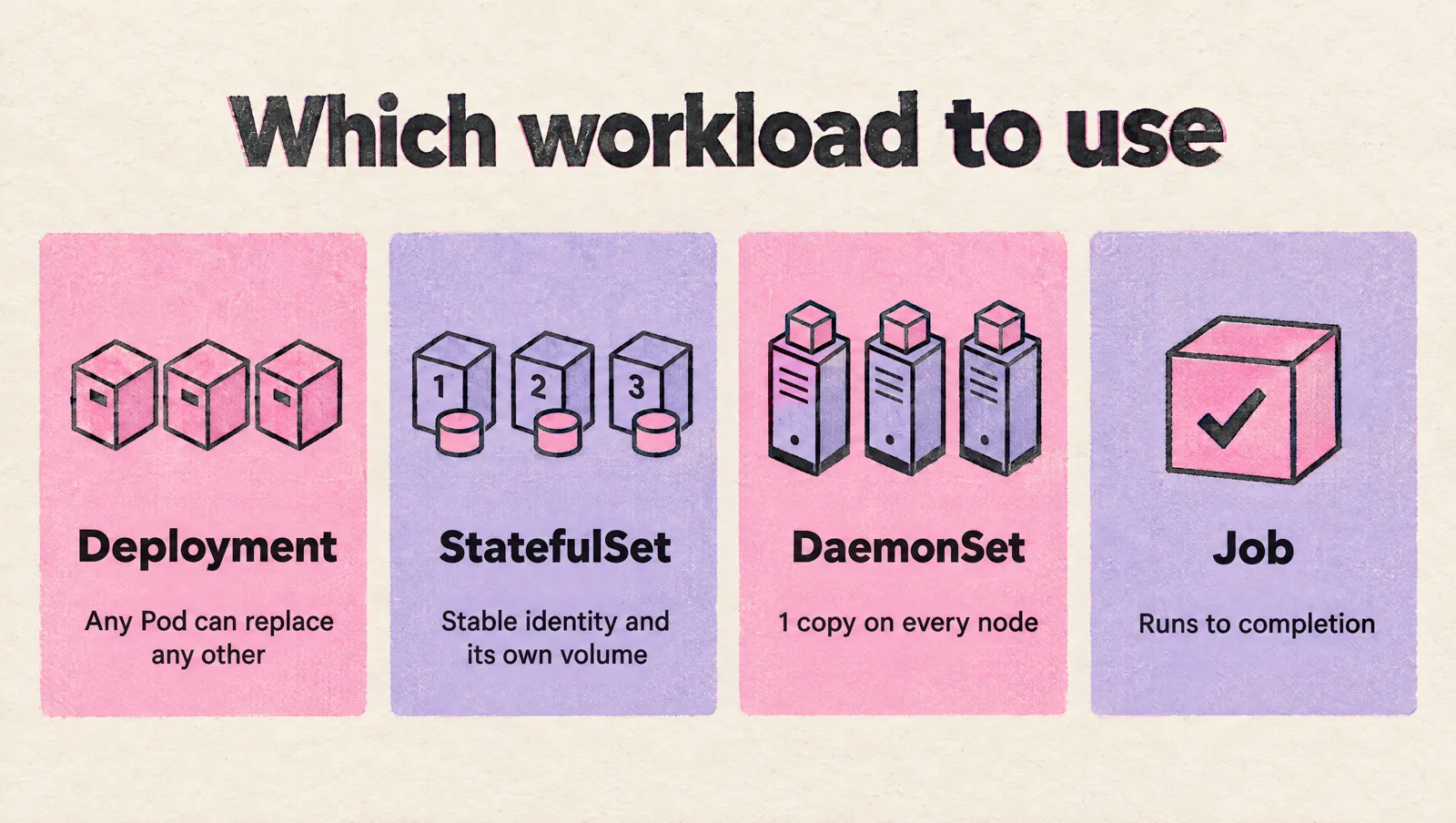
The test from the StatefulSet docs: if the app needs no stable identity and no ordered rollout, use a Deployment.
The docs recommend a controller even for a single Pod. replicas: 1 in a Deployment still gets you self-healing and rollouts.
A Deployment with a volume
"Deployments are for stateless apps only" is stricter than the docs. They run a single MySQL instance as a Deployment with a PersistentVolumeClaim.
The 2 conditions they attach:
replicas: 1, and do not scale it. Every replica of a Deployment shares the same claimstrategy: Recreate, because a rolling update would run 2 Pods on 1 volume
If each replica needs its own disk, that is a StatefulSet with volumeClaimTemplates: 1 claim per Pod.
Canary and blue green need more than a Deployment
A Deployment knows 2 strategies. Canary and blue green are patterns you build around it.
The native canary from the Kubernetes docs:
- 2 Deployments with a shared label (
app: web) and a different one (track: stable,track: canary) - 1 Service that selects only the shared label
- Traffic splits by Pod count: 3 stable + 1 canary = about 25% to the canary
It works, and it has 2 limits: the split is as fine as your replica count, and a human reads the dashboards and decides.
What the 2 progressive delivery controllers add:
| Argo Rollouts | Flagger | |
|---|---|---|
| How it attaches | A Rollout resource that replaces the Deployment, or references one | A Canary resource that targets your Deployment |
| Strategies | Canary and blue green | Canary, A/B and blue green |
| Decides with | Steps (setWeight, pause) and metric analysis that aborts on failure | Metrics such as success rate and request duration, then promote or roll back |
| Latest release (Nov 28, 2026) | v1.10.2 | v1.45.0 |
Both are graduated Cloud Native Computing Foundation (CNCF) projects (Flagger as part of Flux).
My rule: start with a plain Deployment, a real readiness probe and a pipeline that checks rollout status. Add a controller the day a bad release that passes its readiness probe costs you money.
The setup for that day is in the zero-downtime releases guide with Helm and Argo Rollouts.
What changed for Deployments in Kubernetes v1.35 to v1.37
The Deployment API has been stable since apps/v1. The recent changes are small and useful to know:
- v1.35 (Dec 2025):
status.terminatingReplicason Deployments and ReplicaSets became beta and on by default. You can see how many Pods are still shutting down - v1.36 (Apr 2026): kubectl warns when you run
rollout undoon a resource managed withkubectl apply - v1.37 (Aug 2026): the HPA can scale a workload to 0 (beta, on by default, with object and external metrics only), and StatefulSets got a Recreate strategy modeled on the Deployment one (alpha)
Still a proposal: a podReplacementPolicy field that would let a Deployment wait for old Pods to finish terminating before it creates new ones. It is absent from the v1.37 API reference.
Checklist before a Deployment goes to production
Always:
- A fixed image tag or digest. Never
:latest - A readiness probe that checks what a user request needs
maxUnavailable: 0, unless the service has capacity to spare- At least 2 replicas, with a topology spread constraint across zones
- CPU and memory requests on every container
- A
preStopsleep, and a grace period longer than the sleep plus the shutdown - No
replicasline when an HPA owns the count (removed withedit-last-appliedfirst) - A PDB for node drains
kubectl rollout statusin the pipeline, with a timeout and a failure path- Rollbacks end with a reverted commit
Kubernetes Deployment FAQ
What is a Kubernetes Deployment?
A Deployment is the Kubernetes object that describes the desired state of a set of identical Pods: the Pod template, the number of replicas and the update strategy. Its controller creates a ReplicaSet for each version of the template and replaces Pods gradually when the template changes.
What is the difference between a Deployment and a Pod?
A Pod is 1 running instance. A Deployment keeps N of them alive and replaces them when you ship a new version. A bare Pod that loses its node is gone, and a Pod owned by a Deployment is created again on another node.
What is the difference between a Deployment and a ReplicaSet?
A ReplicaSet keeps a fixed number of Pods of 1 template running, and changing its template does not touch the Pods that exist. A Deployment owns ReplicaSets and adds rollouts, history and rollbacks. You create Deployments and let them create the ReplicaSets.
How do I restart a Kubernetes Deployment?
Run kubectl rollout restart deployment/NAME. It adds a timestamp annotation to the Pod template, which starts a normal rolling update with the same image, so the restart follows your surge and readiness settings.
How do I roll back a Kubernetes Deployment?
Run kubectl rollout undo deployment/NAME for the previous revision, or add --to-revision=N for a specific one from kubectl rollout history. Then revert the change in Git, or the next apply ships the same version again.
Does Kubernetes roll back a failed Deployment automatically?
No. After progressDeadlineSeconds (600 by default) it sets the Progressing condition to False with the reason ProgressDeadlineExceeded and keeps retrying. An automatic rollback comes from your pipeline, or from Argo Rollouts or Flagger.
Is a rolling update zero downtime?
Yes, with a readiness probe that reflects the app, a graceful shutdown and enough capacity left during the update (maxUnavailable: 0 is the safe setting). Without a readiness probe, a Pod counts as ready when its containers start, and traffic reaches an app that may still be booting.
Should a database run as a Deployment or a StatefulSet?
A StatefulSet, when it has more than 1 replica: each Pod gets a stable name and its own volume. A single instance can run as a Deployment with 1 replica, a PersistentVolumeClaim and the Recreate strategy, which is how the Kubernetes docs run their MySQL example.
A recap
If you take away 1 thing, let it be this:
A Deployment moves as fast as it is allowed and as safely as it is told. The telling is yours: a readiness probe, 2 rollout numbers, a graceful shutdown and a pipeline that reads the exit code.
You don't need a DevOps expert for that. The YAML above and the checklist cover most services.
If you would like a second pair of eyes on your rollouts anyway (yes, I sell DevOps engineers), the free DevOps assessment is where a senior engineer reviews your Kubernetes and CI/CD setup.
Related guides: deployment strategies, Kubernetes vs Docker and Kubernetes namespaces.