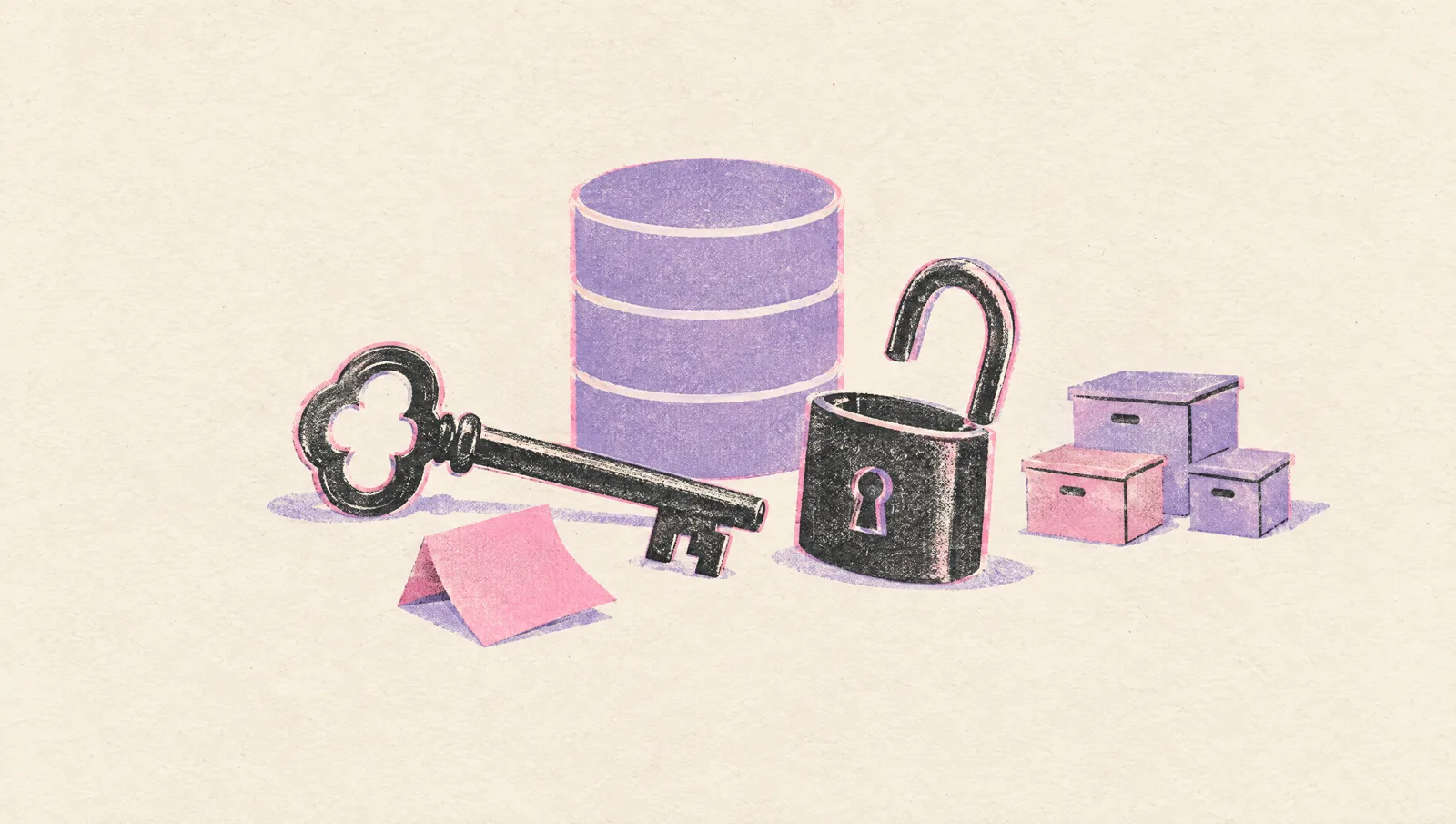

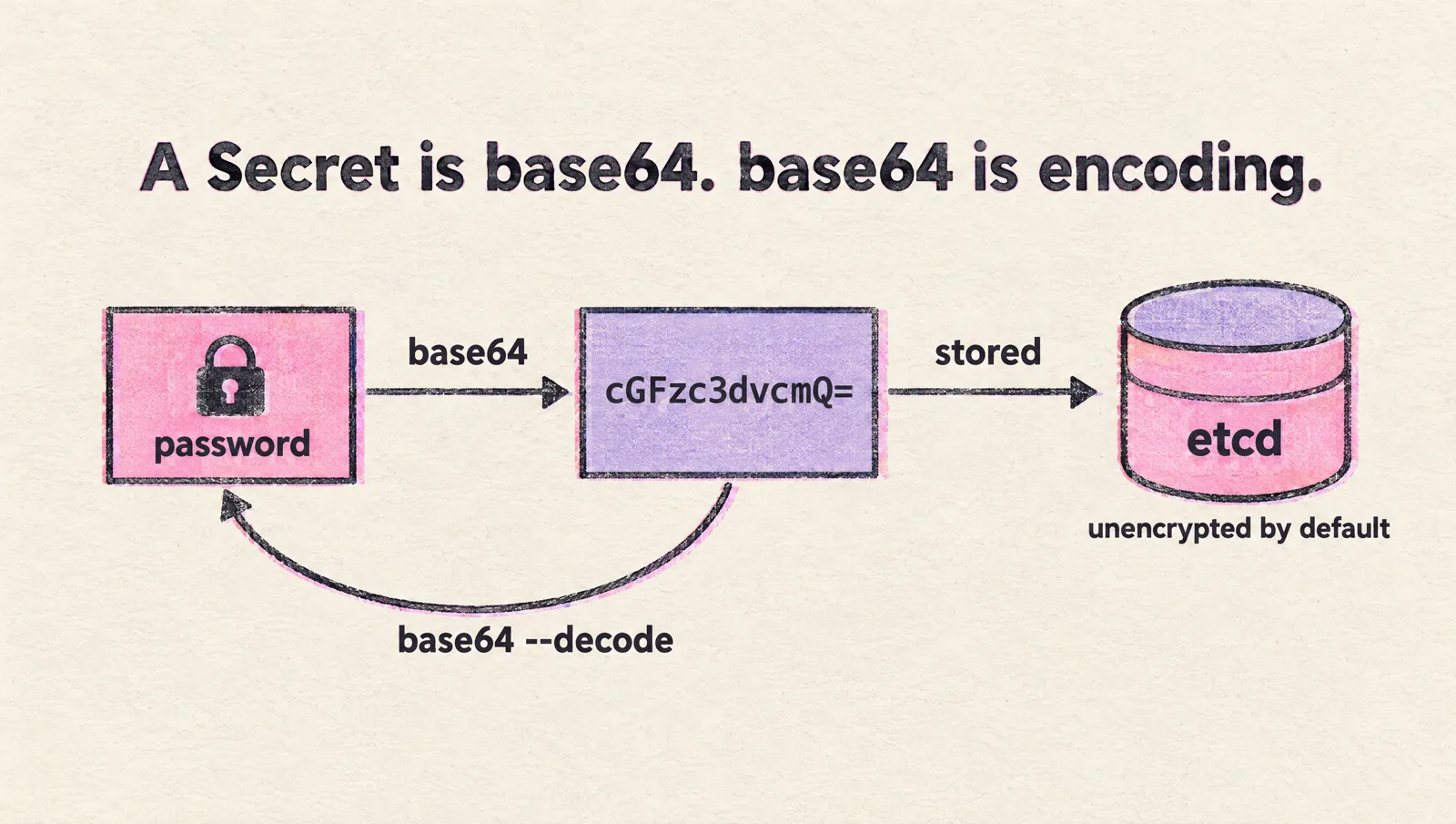
A Kubernetes Secret is encoded in base64, and base64 is undone by 1 command that ships with every laptop:
Bottom line
- Secret = a small object for a password, a token or a key. The Kubernetes docs: base64 "provides no additional confidentiality over plain text"
- It protects less than the name says. By default Secrets are "stored unencrypted" in etcd, the cluster's database
- Your cloud covers part of that. EKS, GKE and AKS encrypt the storage under etcd by default. EKS (Kubernetes 1.28 and higher) also encrypts every Secret with KMS by default
- Whoever can create a Pod can read the Secret. In the same namespace, with no permission on Secrets at all
- The real value lives outside Git. In a secrets manager, synced into the cluster by a tool
What to do, by where you are today:
| Your situation | What I would do |
|---|---|
| Secret manifests are committed to Git as plain YAML | Rotate those values (deleting the file leaves them in the history), then move to 1 of the 4 tools below |
| You run on EKS, GKE or AKS | Keep the value in the cloud's secrets manager and sync it with External Secrets Operator |
| You run your own control plane | Turn on encryption at rest with a KMS v2 provider |
| Developers have "edit" on a namespace | They can read every Secret in it. The built-in edit role allows it directly |
| An app still uses the old password after a rotation | Restart it. Environment variables do not update |
Create a Secret, and read it back:
kubectl create secret generic db-credentials \
  --namespace shop \
  --from-literal=username=shop \
  --from-literal=password='S!B\*d$zDsb='

kubectl get secret db-credentials --namespace shop \
  -o jsonpath='{.data.password}' | base64 --decode
The second command is the whole "security" of base64.
Every version, default and quote in this guide comes from the Kubernetes documentation, the AWS, Google and Microsoft docs, the Flux, Argo CD and HashiCorp docs and the tools' own repositories, as read on November 25, 2026 (Kubernetes is at v1.37).
Not sure who can read the Secrets in your production cluster? In a free assessment, a senior engineer reviews your CI/CD, infra, Kubernetes, cloud cost and on-call setup, the secrets handling included.
Find your situation:
- You are new to Secrets: start at a Secret is a base64 object
- You need the commands: go to create a Secret with kubectl
- You rotated a value and the app did not notice: go to how updates reach a Pod
- You are reviewing access: go to who can read a Secret
- You were asked "are our Secrets encrypted?": go to encryption at rest
- You use GitOps and Secrets are the exception: go to the 4 tools
- A Pod will not start: go to fix a Pod that cannot get its Secret
A Secret is a base64 object in the cluster database
The docs' definition: "A Secret is an object that contains a small amount of sensitive data such as a password, a token, or a key."
It exists so that the password does not sit in the container image or in the Pod spec.
That is the whole promise. Separation, with a few handling rules on top.
The same Secret as a manifest:
apiVersion: v1
kind: Secret
metadata:
  name: db-credentials
  namespace: shop
type: Opaque
stringData:
  username: shop
  password: "S!B\\*d$zDsb="
There are 2 fields for the values:
| Field | You write | Good to know |
|---|---|---|
data | base64 strings | What the API returns when you read the Secret |
stringData | Plain strings | Write-only. Merged into data, and it wins when a key is in both |
base64 = a way to carry binary data in a text field. Encoding, with no key and no confidentiality.
(A Secret in base64 is a password written backwards on a sticky note.)
3 details that save an hour each:
- Size: "Individual Secrets are limited to 1MiB in size." A Secret is for credentials, a file store is for files
- Newlines:
echo "value" | base64encodes a trailing newline into the password. Useecho -n - Server-side apply: the docs warn that
stringData"does not work well with server-side apply". Usedatathere
A Secret looks like a ConfigMap on purpose. The docs: "Secrets are similar to ConfigMaps but are specifically intended to hold confidential data."
The difference is in the handling. A Secret is only sent to a node when a Pod on that node needs it, and the kubelet keeps it in memory (tmpfs) "so that the confidential data is not written to durable storage".
Pick the Secret type by what will read it
The type field tells Kubernetes which keys to expect.
There are 8 built-in types:
| Type | Holds | Keys |
|---|---|---|
Opaque | Anything. The default | Yours |
kubernetes.io/tls | A certificate and its key | tls.crt, tls.key |
kubernetes.io/dockerconfigjson | Registry credentials | .dockerconfigjson |
kubernetes.io/dockercfg | Registry credentials, legacy format | .dockercfg |
kubernetes.io/basic-auth | A user name and a password | username, password |
kubernetes.io/ssh-auth | An SSH private key | ssh-privatekey |
kubernetes.io/service-account-token | A long-lived ServiceAccount token (legacy) | token, filled in by a controller |
bootstrap.kubernetes.io/token | A node bootstrap token | token-id, token-secret |
The rule I use: if another component reads the Secret, use that component's type. Otherwise Opaque.
- An Ingress or a Gateway reads it:
kubernetes.io/tls(how that Secret is used is in the Kubernetes Ingress guide) - The kubelet reads it to pull an image:
kubernetes.io/dockerconfigjson - Your application reads it: Opaque
The type is a shape check and nothing more.
For a TLS Secret the docs say the API server "doesn't actually validate the values for each key". An expired certificate is accepted like a valid one.
Create a Secret with kubectl and read it back
4 commands cover almost every case:
# From values on the command line
kubectl create secret generic db-credentials \
  --from-literal=username=shop \
  --from-literal=password='S!B\*d$zDsb='

# From files (the key is the file name, or key=path)
kubectl create secret generic app-keys \
  --from-file=ssh-privatekey=./id_ed25519

# From a .env file of key=val lines
kubectl create secret generic app-env --from-env-file=./prod.env

# TLS and registry credentials
kubectl create secret tls shop-tls --cert=./tls.crt --key=./tls.key
kubectl create secret docker-registry regcred \
  --docker-server=registry.example.com \
  --docker-username=ci --docker-password='...'
Single quotes matter. The docs: "You must use single quotes '' to escape special characters such as $, \, *, =, and ! in your strings."
Without them your shell rewrites the password before kubectl sees it.
Reading is where people get surprised.
| Command | Shows |
|---|---|
kubectl get secret db-credentials | Name, type, number of keys, age |
kubectl describe secret db-credentials | Key names and sizes (password: 12 bytes) |
kubectl get secret db-credentials -o yaml | Every value, in base64 |
kubectl get secret db-credentials -o jsonpath='{.data.password}' | base64 --decode | 1 value, in plain text |
Decode in 1 piped command, as above.
Why? Because pasting the encoded value into a second command puts it in your shell history, where "anyone with access to your computer could find the command and decode the secret" (the docs again).
For manifests kept in Git with Kustomize, secretGenerator builds the Secret from files or literals and appends a hash of the data to its name (database-creds-5hdh7hhgfk).
A changed value = a new name = a rollout of every workload in that kustomization that references it.
That solves the update problem two sections below. It does not solve where the plain value is stored.
(More everyday commands are in the kubectl cheat sheet.)
Give a Secret to a Pod in 4 ways
| Way | Field | Use it for |
|---|---|---|
| 1 environment variable per key | env[].valueFrom.secretKeyRef | Apps that read config from the environment |
| Every key as a variable | envFrom[].secretRef | A Secret made from a .env file |
| Files in a directory | volumes[].secret | Certificates, key files, anything that rotates |
| Registry login | imagePullSecrets | Private images. Read by the kubelet, never by your app |
The first and the third in one Pod:
apiVersion: v1
kind: Pod
metadata:
  name: api
  namespace: shop
spec:
  containers:
  - name: api
    image: registry.example.com/shop/api:1.4.2
    env:
    - name: DB_PASSWORD
      valueFrom:
        secretKeyRef:
          name: db-credentials
          key: password
    volumeMounts:
    - name: tls
      mountPath: /etc/tls
      readOnly: true
  volumes:
  - name: tls
    secret:
      secretName: shop-tls
      defaultMode: 0400
  imagePullSecrets:
  - name: regcred
Files from a Secret volume get mode 0644 unless you set defaultMode. A private key deserves 0400 when the container runs as root, and 0440 with an fsGroup when it does not (or the app cannot read its own key).
The Secret has to be in the Pod's namespace. There is no cross-namespace reference.
And Secrets are required by default: "None of a Pod's containers will start until all non-optional Secrets are available."
Add optional: true to a reference only when the app runs correctly without it.
One trap with envFrom: a key that is not a valid variable name is skipped, and "the Pod is allowed to start". No error. Just a Warning event (InvalidEnvironmentVariableNames) and a missing variable.
My default: a volume for anything that rotates, an environment variable for the rest.
An updated Secret reaches a Pod in 3 different ways
You rotated the database password and updated the Secret.
What the running Pod sees depends on how it consumes it:
| Consumed as | After the Secret changes |
|---|---|
| Volume mount | Updated, eventually. Up to "the kubelet sync period + cache propagation delay" |
Volume mount with subPath | Never updated |
| Environment variable | Not updated "unless it is restarted" |
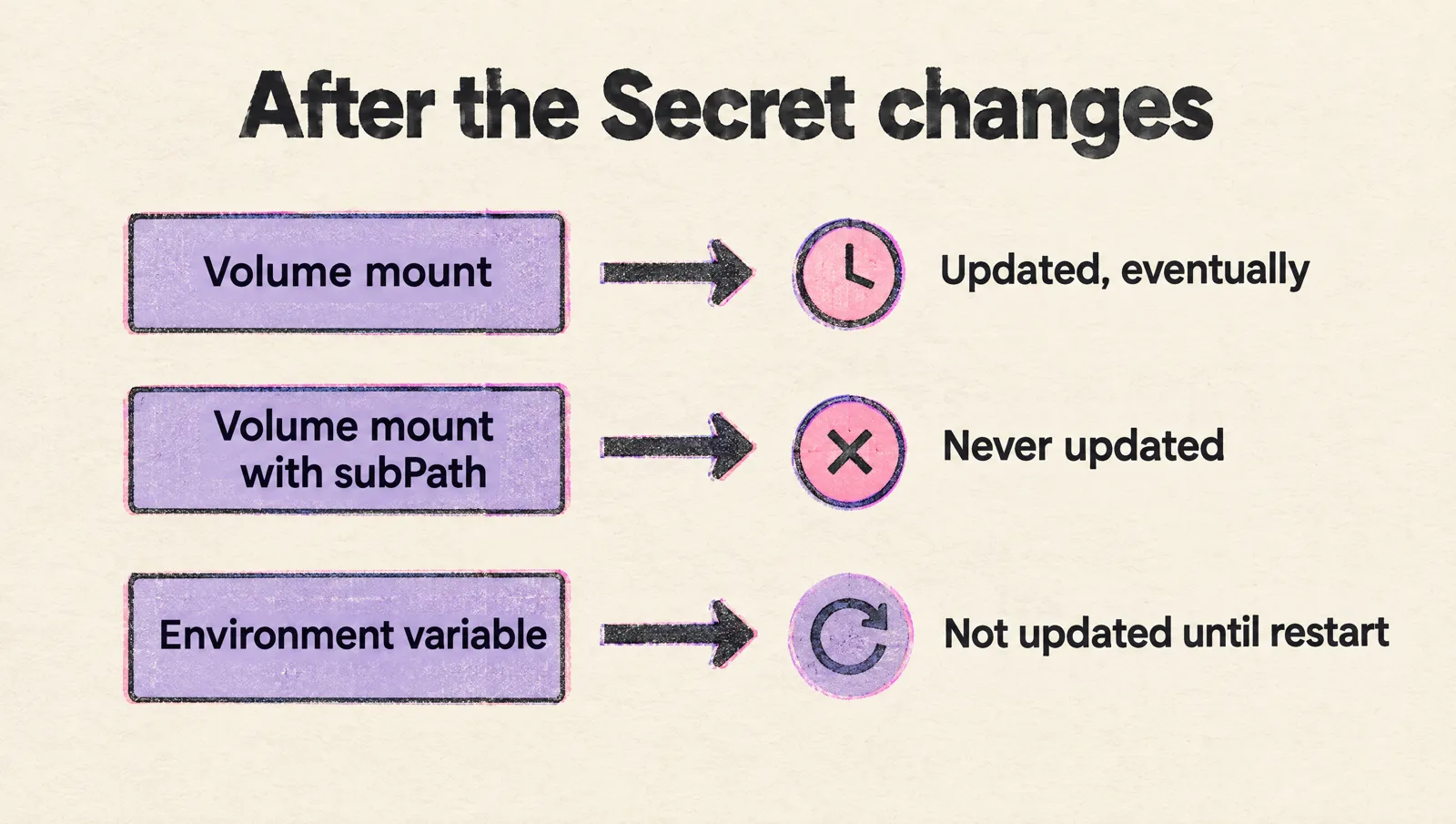
So "Secrets update automatically" is true for 1 row out of 3.
And even in that row, the file changes while the process keeps the old value in memory until it reads the file again.
The fix is a restart:
kubectl rollout restart deployment/api --namespace shopOr make the restart automatic. Reloader (v1.4.25 today, with a v2 in beta) is a controller that "automatically triggers rollouts of workloads" when a Secret or ConfigMap they reference is updated.
1 annotation on the Deployment turns it on:
metadata:
  annotations:
    reloader.stakater.com/auto: "true"
The opposite choice is to forbid updates.
immutable: true (stable since Kubernetes v1.21) makes a Secret read-only. The docs: it "protects you from accidental (or unwanted) updates that could cause applications outages".
It is a one-way door: "it is not possible to revert this change nor to mutate the contents of the data field. You can only delete and recreate the Secret."
The performance benefit people quote applies to clusters with "at least tens of thousands of unique Secret to Pod mounts". For everyone else, immutable is a safety setting.
Immutable Secrets pair well with the Kustomize name hash: every change is a new Secret and a normal rollout (rollouts themselves are in the deployment strategies guide).
Know who can read a Secret
More people than the RBAC (role-based access control) rules suggest.
The docs list most of them. I added what each one needs:
| Who | How |
|---|---|
Anyone with get on Secrets | Reads the Secret by name |
Anyone with list or watch | A list "response includes the contents of all Secrets" |
| Anyone who can create a Pod in the namespace | Mounts the Secret in a Pod and prints it. A Deployment or a Job works too |
| Anyone who can exec into a Pod that uses it | Reads the file or the variable from inside the container |
A container running with privileged: true | It "can access all Secrets used on that node" |
| Anyone with access to etcd or its backups | Reads the database directly. This is what encryption at rest is for |
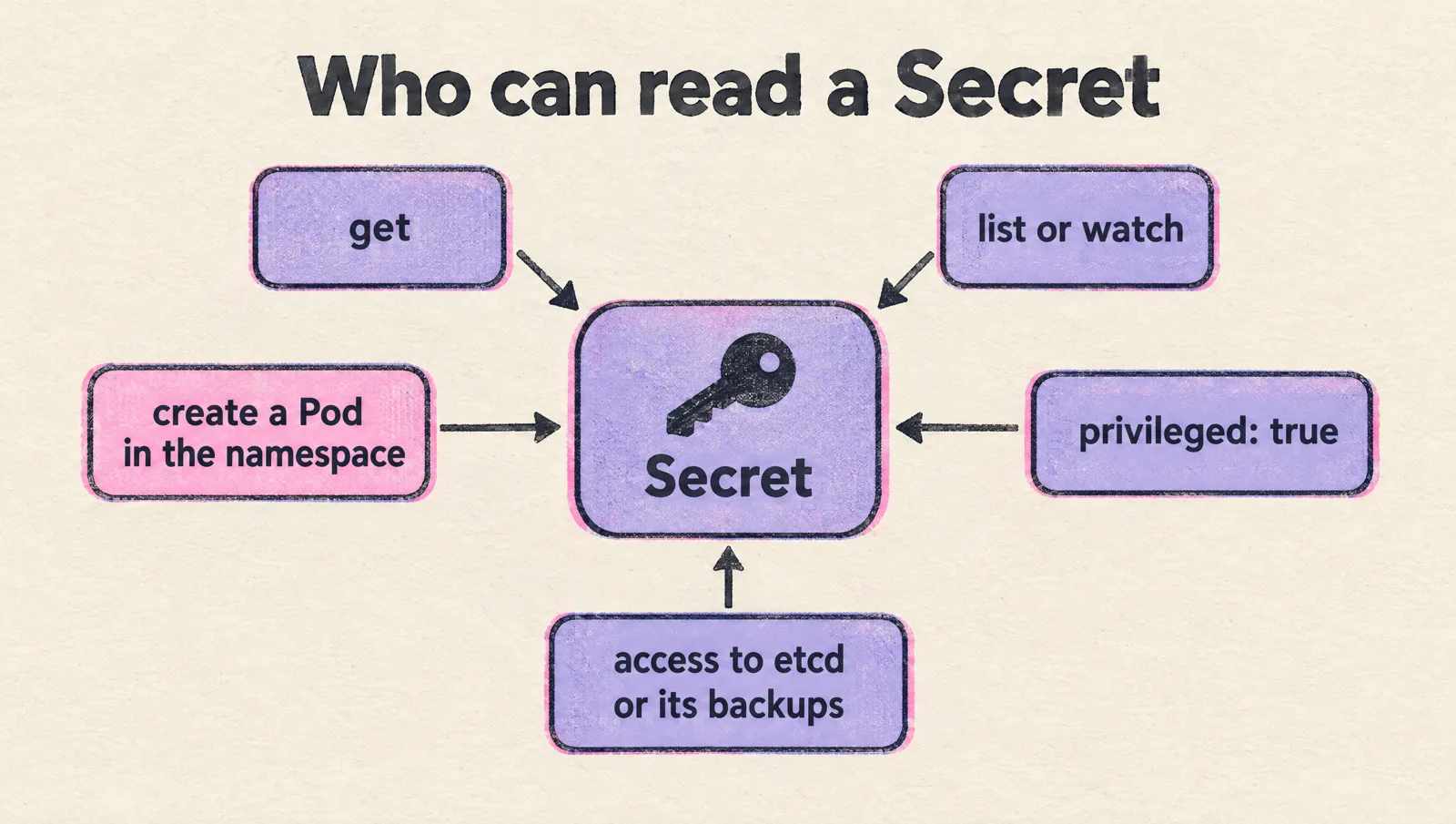
The third row is the one teams miss.
The docs say it twice: anyone "authorized to create a Pod in a namespace can use that access to read any Secret in that namespace", and "even if cluster policies do not allow a user to read the Secret directly".
Create workloads = read Secrets.
So the unit of isolation is the namespace. Two teams that must not see each other's credentials get two namespaces.
Count your controllers too. External Secrets Operator, Sealed Secrets and Reloader all read Secrets across the cluster.
Check what an identity can do:
kubectl auth can-i list secrets --namespace shop \
  --as system:serviceaccount:shop:api

kubectl auth can-i create pods --namespace shop --as jane@example.com
And a Role that gives 1 workload 1 Secret, with get only:
apiVersion: rbac.authorization.k8s.io/v1
kind: Role
metadata:
  name: read-db-credentials
  namespace: shop
rules:
- apiGroups: [""]
  resources: ["secrets"]
  resourceNames: ["db-credentials"]
  verbs: ["get"]
(Bind it to the workload's ServiceAccount with a RoleBinding.)
Most applications need no Role at all. The kubelet delivers the Secret to the Pod, and the app never calls the API.
The docs' rule for the rest: keep watch and list for "the most privileged, system-level components".
Encryption at rest has 2 layers, and your cloud did the first
"Are our Secrets encrypted at rest?" has 2 answers, because there are 2 layers:
- Storage layer = the disk under etcd is encrypted. It protects against a stolen disk or snapshot
- Kubernetes layer = the API server encrypts each Secret before it writes it to etcd. It also protects against someone who reads etcd itself, or an etcd backup file
Neither changes anything for kubectl get secret. The API server decrypts for everyone RBAC allows.
The common advice is "you must enable it". On a managed cluster, check first which layer is already on:
| Cluster | Storage layer | Kubernetes layer |
|---|---|---|
| Amazon EKS | On for every cluster: etcd data is "encrypted at the disk level" | On by default from Kubernetes 1.28: "default envelope encryption for all Kubernetes API data", with an AWS owned key or your own KMS key |
| Google GKE | On by default: GKE "encrypts customer content stored at rest, including Secrets" | Opt-in: application-layer secrets encryption with your key in Cloud KMS |
| Azure AKS | On by default: Azure Storage encryption, "always enabled" | Opt-in: a KMS layer with keys in Azure Key Vault |
| Your own control plane | Yours to set up | Off: the API server stores "plain-text representations of resources" until you add an EncryptionConfiguration |
On AKS, the newer KMS experience (platform-managed or customer-managed keys) needs Kubernetes 1.33 or later, and its how-to page is still marked Preview.
On your own control plane, you pick a provider. The Kubernetes docs grade them:
| Provider | Strength in the docs | The docs' note |
|---|---|---|
identity | None | The default. No encryption |
aescbc | Weak | "Not recommended due to CBC's vulnerability to padding oracle attacks" |
aesgcm | Must be rotated every 200,000 writes | Not recommended without automated key rotation |
secretbox | Strong | The key still sits on the control plane host |
kms v1 | Strongest | Deprecated since v1.28, disabled by default since v1.29 |
kms v2 | Strongest | "A good choice if using a third party tool for key management". Stable from v1.29 |
Many tutorials still show aescbc with a key pasted into the file.
The docs on that setup: it "only moderately improves your security posture, compared to no encryption", because the key lies next to the data it protects.
Use KMS v2, so the key lives outside the cluster:
apiVersion: apiserver.config.k8s.io/v1
kind: EncryptionConfiguration
resources:
  - resources:
      - secrets
    providers:
      - kms:
          apiVersion: v2
          name: my-kms-plugin
          endpoint: unix:///var/run/kms/plugin.sock
      - identity: {}
3 rules for this file:
- The first provider encrypts. All of them are tried for reading. With
identityfirst, nothing is encrypted - The API server loads it from the path in
--encryption-provider-config - Old Secrets stay as they were until they are written again
The docs' command for the third rule:
kubectl get secrets --all-namespaces -o json | kubectl replace -f -The order matters:
- A KMS plugin listens on that socket on every control plane node
- Every API server gets the file and a restart
- You run the command as an administrator who can read and write every Secret. On a conflict error, run it again: the docs call it "safe to run that command more than once"
- You confirm it finished with no errors. Only then remove
identity, and restart each API server in turn
Remove identity too early, and every Secret that was never rewritten becomes unreadable.
Keep Secrets out of Git with 1 of 4 tools
You keep everything in Git. Deployments, Services, the lot (that is GitOps).
Then comes the Secret, and a manifest with base64 in it is a manifest with the password in it.
The Flux docs put it plainly: "Storing Secrets in Git repositories in plain text or base64 is unsafe, regardless of the visibility or access restrictions of the repository."
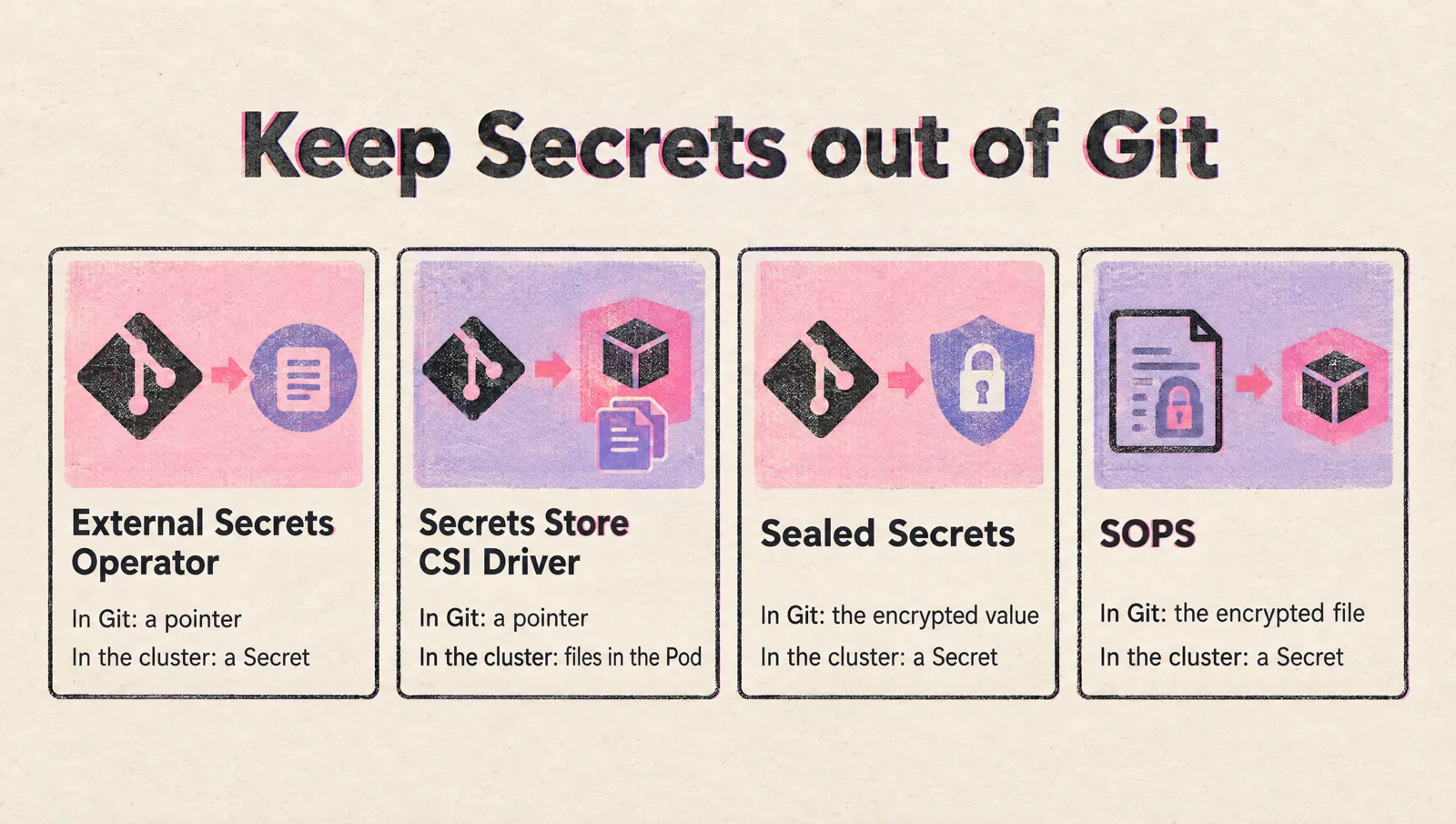
There are 2 families of answers. Encrypt the file, or keep the value somewhere else and fetch it.
| Tool | In Git | In the cluster | Status today |
|---|---|---|---|
| External Secrets Operator | A pointer (ExternalSecret) | A Secret, synced from your secrets manager | v2.15.0. CNCF Sandbox |
| Secrets Store CSI Driver | A pointer (SecretProviderClass) | Files in the Pod, with no Secret object | v1.6.2. Sync to a Secret and rotation are alpha |
| Sealed Secrets | The encrypted value (SealedSecret) | A Secret, decrypted by the controller | v0.41.2 |
| SOPS | The encrypted file | A Secret, decrypted at deploy time | v3.13.3. CNCF Sandbox |
External Secrets Operator: the value stays in your secrets manager
It "reads information from external APIs and automatically injects the values into a Kubernetes Secret".
External APIs = AWS Secrets Manager, Google Secret Manager, Azure Key Vault, HashiCorp Vault and many more.
A SecretStore says how to reach the store. An ExternalSecret says what to fetch:
apiVersion: external-secrets.io/v1
kind: ExternalSecret
metadata:
  name: db-credentials
  namespace: shop
spec:
  refreshInterval: 1h
  secretStoreRef:
    name: aws-secrets-manager
    kind: ClusterSecretStore
  target:
    name: db-credentials
  data:
  - secretKey: password
    remoteRef:
      key: prod/shop/db
      property: password
Check the first line of any example you copy. external-secrets.io/v1beta1 stopped being served in v0.17.0 (May 2025), and tutorials that were "updated" in 2026 still carry it.
Two things to know before you depend on it.
In August 2025 the maintainers stopped releases until more maintainers joined. They resumed in September 2025 and have shipped every few weeks since.
And only the current minor version is supported, so plan to upgrade it often.
Secrets Store CSI Driver: no Secret object at all
It mounts "secrets, keys, and certs stored in enterprise-grade external secrets stores into their pods as a volume".
The value goes from the store to a file in the Pod. Nothing lands in etcd, as long as the sync feature below stays off.
That is the reason to choose it, and it is also the cost: no Secret object means no secretKeyRef, so no environment variables.
The feature that brings them back ("Sync with Kubernetes Secrets") is listed under alpha functionality on the project's own page. So is rotation, which is off by default.
On EKS the AWS provider for it is an EKS add-on (aws-secrets-store-csi-driver-provider).
Sealed Secrets: the encrypted value lives in Git
The project states its problem in 1 line: "I can manage all my K8s config in git, except Secrets."
kubeseal encrypts a Secret with the controller's public key. Only the controller in that cluster can decrypt it.
kubectl create secret generic db-credentials --namespace shop \
  --from-literal=password='S!B\*d$zDsb=' \
  --dry-run=client -o yaml | kubeseal --format yaml > sealed-db-credentials.yaml
(kubeseal expects the controller under its default name in kube-system. Installed elsewhere, pass --controller-name and --controller-namespace.)
The output is safe to commit. By default it is "strict": it only unseals with the same name in the same namespace.
The controller adds a new sealing key every 30 days and keeps the old ones. A rebuilt cluster without those keys cannot read a single SealedSecret.
So back them up after every renewal (last month's backup cannot open what was sealed this month), and guard the backup like the most sensitive secret you have: it opens every SealedSecret in your Git history.
SOPS: an encrypted file and a key
SOPS is "an editor of encrypted files" that encrypts with AWS KMS, GCP KMS, Azure Key Vault, age or PGP.
sops --age=age1example... --encrypt \
  --encrypted-regex '^(data|stringData)$' --in-place secret.yaml
Keys stay readable, values are encrypted, and a pull request shows which key changed.
Flux decrypts SOPS files "by itself, without the need of additional controllers".
Argo CD takes the other side. Its docs "strongly recommend" tools that fill in the Secret on the destination cluster (it names Sealed Secrets, External Secrets Operator and the CSI driver) and "strongly caution against" decrypting during manifest generation, because generated manifests sit "in plaintext in its Redis cache".
How I would pick
- You are on a cloud: the cloud's secrets manager + External Secrets Operator. This is my default
- A rule says the value must never be in etcd: Secrets Store CSI Driver, files only
- You have no secrets manager and use Flux: SOPS with age or a KMS key
- You have no secrets manager and use Argo CD: Sealed Secrets
- You already run Vault: the Vault Secrets Operator (v1.6.2), which "synchronizes secrets from Vault to native Kubernetes Secrets"
HashiCorp documents 3 integrations for Vault: that operator, a CSI provider, and the Agent Injector, which runs a sidecar and renders secrets "to a shared memory volume".
One rule covers all of them: 1 place holds the real value, and everything else is a copy that can be rebuilt.
(The wider topic has its own page: secrets management.)
ServiceAccount tokens stopped being Secrets
If you learned Kubernetes before 2022, you remember a default-token-xxxxx Secret in every namespace.
Before v1.24, Kubernetes generated a token Secret for every ServiceAccount. Those tokens never expired.
The docs now call that "a legacy mechanism".
What a Pod gets today:
- → A token from the TokenRequest API, mounted through a projected volume
- → Requested for 1 hour, and refreshed by the kubelet before it expires
- → Bound to the Pod: it stops working when the Pod is deleted
Before you promise an auditor "1 hour", decode a token from your own cluster. The API server can extend the expiry of these tokens (the --service-account-extend-token-expiration flag, on by default).
Old auto-generated tokens that stay unused for a year are marked invalid (from v1.29), and later removed.
You can still create a kubernetes.io/service-account-token Secret by hand. The docs allow it only when "the security exposure of persisting a non-expiring token credential in a readable API object is acceptable to you".
For a CI system that needs a token, kubectl create token gives a short-lived one.
Fix a Pod that cannot get its Secret
Start with the events at the bottom of kubectl describe pod. The kubelet "reports an Event for that Pod, including details of the problem fetching the Secret".
| What you see | Usual cause | Check |
|---|---|---|
Pod stuck in CreateContainerConfigError | An environment variable points at a Secret or a key that does not exist | The name, the namespace and the key in secretKeyRef |
Pod stuck in ContainerCreating with a FailedMount event | A volume points at a Secret that does not exist | secretName, and that the Secret is in the Pod's namespace |
ImagePullBackOff on a private image | A pull "from a private registry without imagePullSecret", or with a wrong one | imagePullSecrets on the Pod or on its ServiceAccount |
| The app gets "access denied" with the right password | A trailing newline was encoded with it | Decode and pipe to wc -c. Recreate with echo -n |
| The app still uses the old value | Environment variable or subPath mount | Restart the workload |
| 1 variable is missing and the Pod runs | envFrom skipped a key that is not a valid variable name | The Pod's events, then the key names in the Secret |
illegal base64 data on apply | A plain value under data | Move it to stringData or encode it. A plain value that happens to be valid base64 is accepted, and decoded into garbage |
(What that first status means is in the glossary: CreateContainerConfigError.)
The Secrets checklist
Always:
- The real value lives in 1 place outside Git
- No Secret manifest with
dataorstringDatais committed unencrypted - You know at which layer your cluster encrypts Secrets at rest, and with whose key
- 1 namespace per trust boundary
listandwatchon Secrets belong to system components and cluster admins, never to a team role- Anything that rotates is mounted as a volume, without
subPath - A rotation ends with a restart, by hand or by Reloader
- Private keys are mounted with a tight
defaultMode(0400 or 0440), never the default 0644 - Every value was created with
echo -nor--from-literal - The application never logs the value
Kubernetes Secrets FAQ
Are Kubernetes Secrets encrypted?
Not by default. The values are base64 encoded, and Kubernetes stores them unencrypted in etcd unless encryption at rest is configured. EKS, GKE and AKS encrypt the storage under etcd, EKS (Kubernetes 1.28 and higher) also encrypts each Secret with KMS by default, and on your own control plane you turn it on with an EncryptionConfiguration.
Are Kubernetes Secrets secure?
They are as secure as your RBAC and your etcd. A Secret keeps a password out of the image and the Pod spec, and that is all. Anyone who can create a Pod in the namespace can read it.
What is the difference between a ConfigMap and a Secret?
Both hold key and value pairs for Pods. A Secret is meant for confidential data: it is only sent to nodes that need it, it is kept in memory on the node, kubectl hides its values by default, and it can be encrypted at rest and locked down with RBAC separately.
What is the maximum size of a Kubernetes Secret?
1MiB per Secret. The limit exists "to discourage creation of very large Secrets that could exhaust the API server and kubelet memory". A namespace can also be limited in the number of Secrets with a resource quota.
How do I decode a Kubernetes Secret?
With kubectl get secret NAME -o jsonpath='{.data.KEY}' | base64 --decode. Keep it as 1 piped command so the encoded value does not land in your shell history.
How do I list the Secrets in Kubernetes?
With kubectl get secrets for the current namespace, or kubectl get secrets --all-namespaces. The output shows names, types and key counts, never the values.
Do Pods pick up a changed Secret without a restart?
Only when the Secret is mounted as a volume without subPath, and then after a delay. Environment variables keep the old value until the container restarts.
Should I use External Secrets Operator or Sealed Secrets?
External Secrets Operator when you have a secrets manager, which on a cloud you do. Sealed Secrets when you have none and want the encrypted value in Git next to everything else.
A Recap!
If you take away 1 thing from this guide, let it be this:
A Secret separates the password from the code. Protecting it is your job.
- base64 = encoding. Anyone who can read the object can read the value
- Create a Pod = read the Secrets of that namespace
- Encryption at rest has 2 layers. Check which one your cloud gives you before you build anything
- A volume updates eventually. An environment variable needs a restart
- Git gets a pointer or an encrypted file. Never the value
You don't NEED anyone for this. The checklist above is the whole job, and the 4 tools are all open source.
If you would rather have someone who has done it look at your setup first (yes, I sell DevOps engineers), start with the free assessment.