

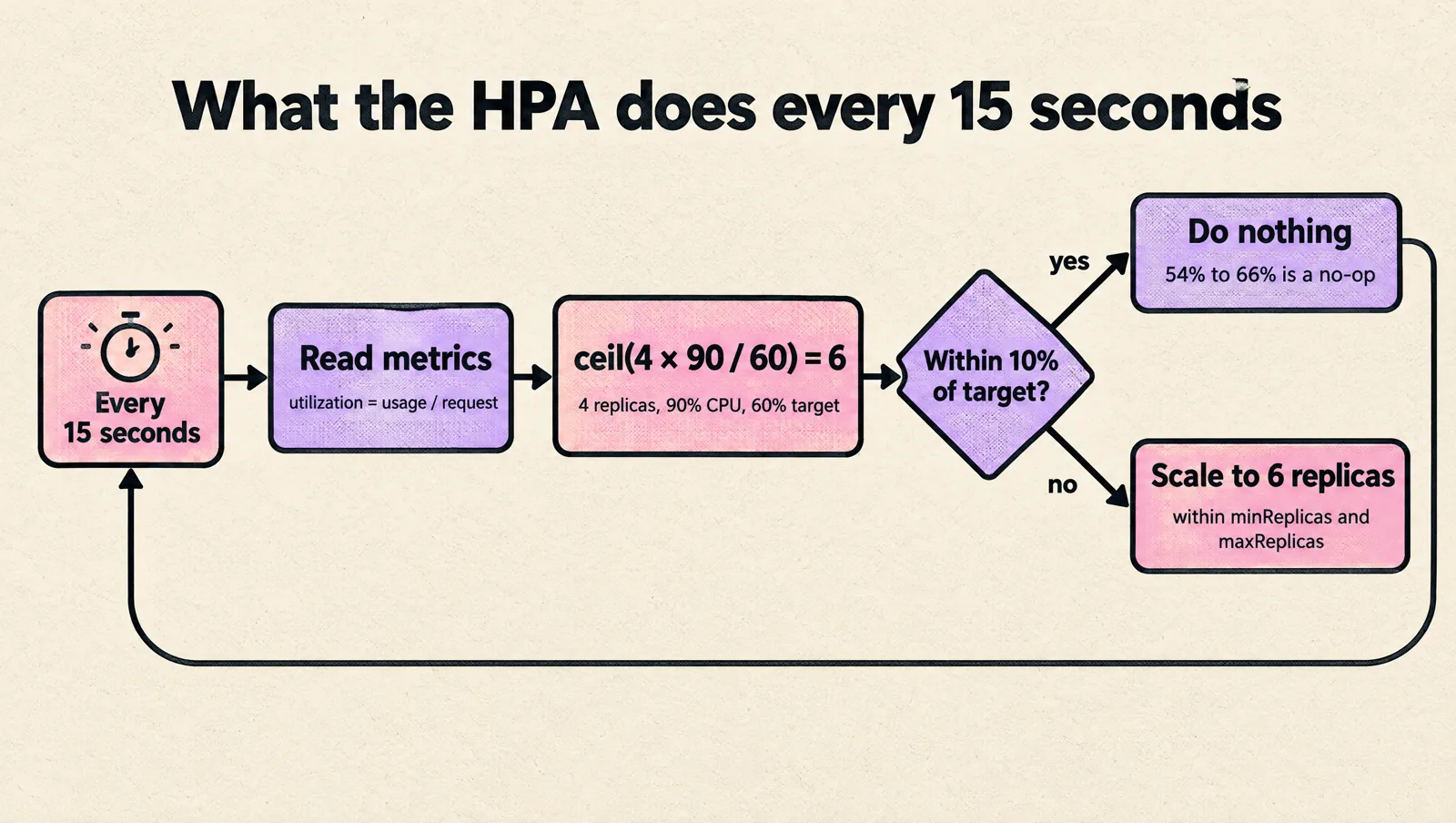
The Kubernetes Horizontal Pod Autoscaler (HPA) adds or removes pod replicas for a Deployment, StatefulSet or other scalable workload based on a metric such as CPU utilization. Every 15 seconds it compares the current metric to your target, computes ceil(currentReplicas × current / target), and scales within your minReplicas and maxReplicas.
That is the whole idea. Most of the trouble comes later, when replica counts start bouncing up and down, targets show <unknown>, or a GitOps tool keeps resetting the replica count. This guide covers how the algorithm really behaves (including the parts most tutorials skip), copy-paste manifests for the common cases, the behavior settings that stop scaling flaps, how HPA fits with VPA, KEDA, Karpenter and Argo Rollouts, and a troubleshooting table built from the actual controller error messages.
Versions referenced: Kubernetes 1.37 (the current release in October 2026), metrics-server v0.9.0 and KEDA v2.21. The autoscaling/v2 API used throughout has been stable since Kubernetes 1.23, so everything here works on any supported cluster unless a section says otherwise.
Kubernetes autoscalers compared: HPA, VPA, KEDA and node autoscalers
"Kubernetes autoscaling" means four different things, and mixing them up causes most bad designs. The HPA only changes the number of pods. It never changes pod size and never adds nodes.
| Autoscaler | What it changes | Typical signal | Use it when |
|---|---|---|---|
| Horizontal Pod Autoscaler (HPA) | Replica count of a workload | CPU or memory utilization, custom or external metrics | Stateless services where more pods means more capacity |
| Vertical Pod Autoscaler (VPA) | CPU and memory requests of each pod | Historical usage | Right-sizing requests, or workloads that cannot scale out |
| KEDA | Replica count, including to and from zero (it creates and manages an HPA for you) | Event sources: queue length, Kafka lag, cron, Prometheus queries, cloud services | Queue consumers and event-driven workers |
| Cluster Autoscaler or Karpenter | Number and type of nodes | Pending pods that cannot be scheduled | Always, if the HPA can create more pods than your nodes can hold |
The usual production setup is HPA (or KEDA) for pods plus Cluster Autoscaler or Karpenter for nodes. If the node layer is missing, the HPA happily creates pods that sit in Pending, and you get the cost of a scale-up decision without the capacity. Our guide on setting up Kubernetes autoscaling without cost surprises covers the node side.
How the Horizontal Pod Autoscaler algorithm works
The HPA is a control loop inside kube-controller-manager. It does not react to events. It wakes up on an interval (--horizontal-pod-autoscaler-sync-period, 15 seconds by default), reads metrics, and computes a desired replica count:
desiredReplicas = ceil( currentReplicas × currentMetricValue / desiredMetricValue )Example: 4 replicas averaging 90% CPU utilization against a 60% target gives ceil(4 × 90 / 60) = ceil(6.0) = 6 replicas. At 45% utilization it gives ceil(4 × 45 / 60) = 3.
For resource metrics, "utilization" is usage divided by the container's request, not its limit and not node capacity. A pod requesting 250m CPU and using 200m is at 80%. This single fact explains a large share of HPA surprises: change the request and you change the scaling math, even though nothing about the traffic changed.
The details that shape real behavior
The formula is the easy part. These rules, all from the Kubernetes documentation, decide what actually happens:
- Tolerance. If the ratio
current / targetis within 10% of 1.0, the HPA does nothing. With a 60% CPU target, anything between 54% and 66% is a no-op. This dead band is your first protection against jitter. - Unready pods are set aside. When scaling on CPU, pods that are not yet ready, or whose latest metric sample predates readiness, are excluded from the average. If the result would be a scale up, those pods are then assumed to use 0% of the target, which dampens the scale up.
- Missing metrics are treated conservatively. Pods with no metric are assumed to use 100% of the target when the HPA is considering a scale down, and 0% when considering a scale up. If that reverses the direction or lands inside the tolerance, the HPA skips the action.
- Startup windows.
--horizontal-pod-autoscaler-initial-readiness-delay(default 30 seconds) and--horizontal-pod-autoscaler-cpu-initialization-period(default 5 minutes) control how the controller treats CPU samples from freshly started pods. These are control plane flags, so on EKS, GKE or AKS you cannot change them. Design the workload around the defaults instead. - Multiple metrics take the maximum. With CPU and a requests-per-second metric, the HPA computes a desired count for each and uses the highest. If one metric cannot be fetched and the others suggest a scale down, the scale down is skipped. Scale up still works.
- Status shows the raw value.
kubectl get hpareports the original average, not the adjusted one used for the decision. That is why the TARGETS column can look like it should trigger a scale and nothing happens. - Scale down is smoothed by default. The HPA keeps the highest recommendation from the last 5 minutes before scaling down. That default stabilization window is why replicas linger after a spike.
Prerequisites: metrics-server and resource requests
Resource metrics (CPU and memory) come from the metrics.k8s.io API, which metrics-server provides. Many managed clusters ship it, many do not. Check first:
kubectl get apiservice v1beta1.metrics.k8s.io
kubectl top pods -n production
If kubectl top fails, install metrics-server:
kubectl apply -f https://github.com/kubernetes-sigs/metrics-server/releases/latest/download/components.yamlThen make sure every container in the target pods has a CPU request (and a memory request if you scale on memory). The HPA computes utilization per pod across all its containers, so a single sidecar without a request breaks CPU utilization scaling for the whole workload. If your requests are guesses, fix them before tuning the HPA. Our guide to Kubernetes requests and limits shows how to size them from real usage.
Create your first HPA
The fastest way is kubectl autoscale. Recent kubectl versions use --cpu with a percentage (the older --cpu-percent flag is deprecated):
kubectl autoscale deployment api -n production --min=3 --max=20 --cpu=60%For anything you run in production, keep the HPA in version control as YAML instead:
apiVersion: autoscaling/v2
kind: HorizontalPodAutoscaler
metadata:
  name: api
  namespace: production
spec:
  scaleTargetRef:
    apiVersion: apps/v1
    kind: Deployment
    name: api
  minReplicas: 3
  maxReplicas: 20
  metrics:
    - type: Resource
      resource:
        name: cpu
        target:
          type: Utilization
          averageUtilization: 60
Watch it work:
kubectl get hpa api -n production --watch
kubectl describe hpa api -n production
describe is where the useful information lives: current metrics, the three status conditions (AbleToScale, ScalingActive, ScalingLimited) and recent scaling events with reasons.
Remove spec.replicas when the HPA owns the count
The Kubernetes docs recommend removing spec.replicas from the Deployment once an HPA manages it. Otherwise every kubectl apply, Helm upgrade or Argo CD sync resets the replica count to the value in Git, the HPA scales it back, and you get a sawtooth that looks exactly like flapping. In Helm charts, the common pattern is to render replicas only when autoscaling is disabled. In Argo CD, you can also add /spec/replicas to ignoreDifferences for the Deployment.
HPA metric types: resource, container, pods, object and external
The autoscaling/v2 API supports five metric source types. Pick the one that measures the real bottleneck, not the one that is easiest to wire up.
| Type | What it measures | Needs | Good for |
|---|---|---|---|
Resource | CPU or memory across the whole pod, as utilization or average value | metrics-server | CPU-bound web services |
ContainerResource | CPU or memory of one named container | metrics-server, Kubernetes 1.30 or newer (stable) | Pods with sidecars (service mesh proxies, log shippers) that distort the pod average |
Pods | A custom per-pod metric averaged across pods | A custom metrics adapter such as Prometheus Adapter | Requests per second or in-flight requests per pod |
Object | A metric describing another Kubernetes object | A custom metrics adapter | Requests per second on an Ingress |
External | A metric from outside the cluster | An external metrics adapter (KEDA provides one) | Queue depth, Pub/Sub backlog, Kafka lag |
Scaling only the application container when a sidecar is present:
metrics:
  - type: ContainerResource
    containerResource:
      name: cpu
      container: app
      target:
        type: Utilization
        averageUtilization: 60
Scaling on a per-pod custom metric (for example, exposed by Prometheus Adapter as http_requests_per_second):
metrics:
  - type: Pods
    pods:
      metric:
        name: http_requests_per_second
      target:
        type: AverageValue
        averageValue: "50"
A few rules of thumb from running these in production:
- CPU is a good signal when traffic turns directly into CPU work: serialization, compression, TLS, rendering.
- Memory is a poor scaling signal for most runtimes. The JVM, Go, Node.js and Python rarely give memory back quickly after load drops, so a memory-based HPA scales up easily and then refuses to scale down. Use it only when memory per pod clearly falls as you add pods.
- Requests per second or in-flight requests beat CPU for I/O-bound APIs that spend their time waiting on databases or other services.
- Queue depth or lag is the right signal for workers. A worker blocked on a slow dependency shows low CPU while the queue grows, so CPU scaling never fires. Use KEDA here.
Why HPAs flap, and how to stop it
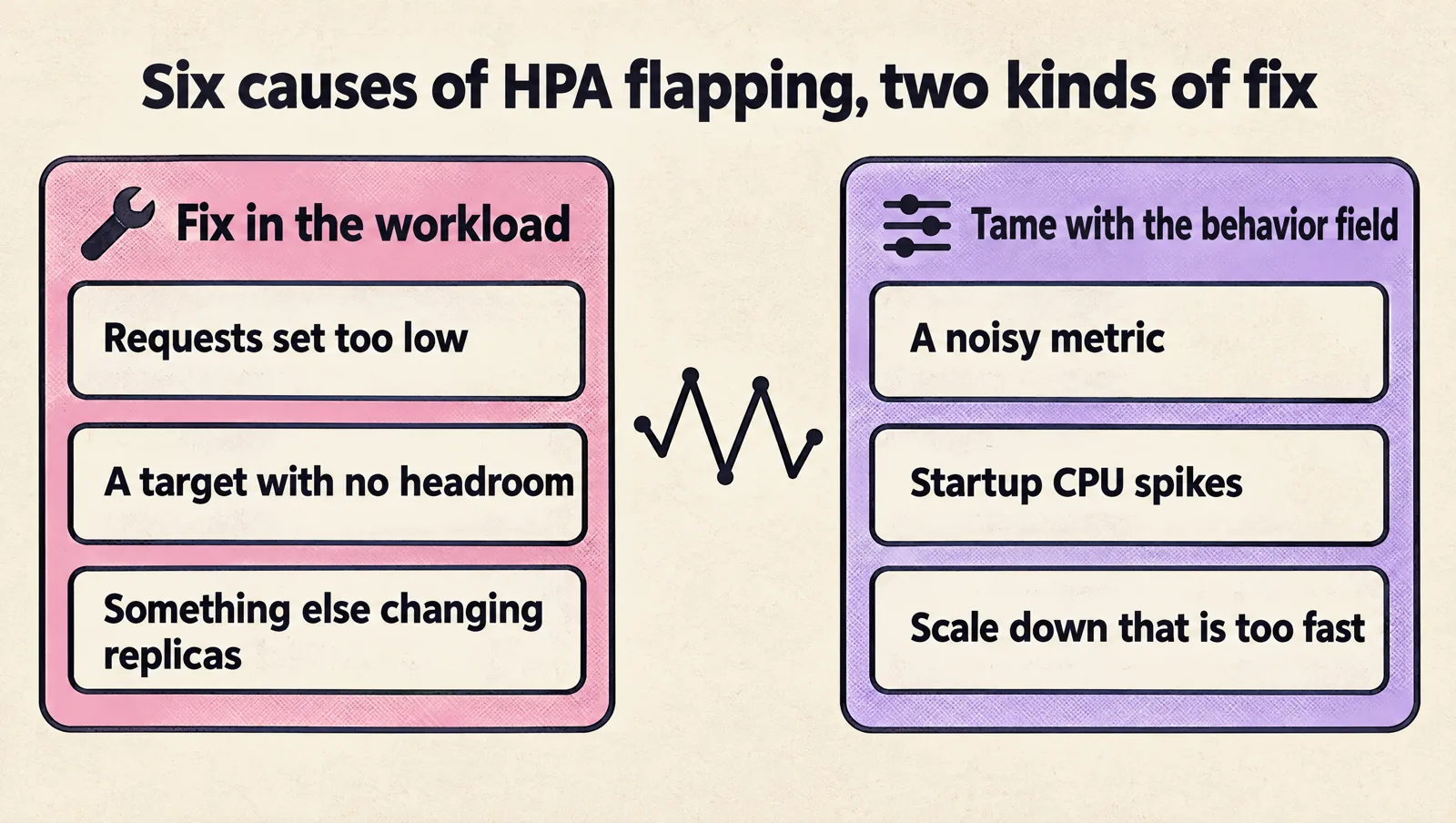
Flapping means the replica count oscillates: up on a spike, down a minute later, up again. Users feel it as latency spikes during scale ups, connection churn during scale downs, and a cluster that never settles. The causes are almost always one of these:
- Requests set too low. A pod that normally uses 300m with a 100m request sits at 300% utilization at idle. Small traffic changes swing the ratio wildly. Fix the request first.
- A noisy metric. Per-second request rates, garbage collection pauses and batchy traffic produce sharp short peaks. The HPA sees them every 15 seconds and reacts.
- Startup CPU spikes. JIT compilation, cache warm-up and connection pool creation make new pods look overloaded, which triggers more scale up, which starts more pods.
- Scale down that is too fast. Removing many pods at once pushes the survivors over the target, and the HPA adds them back.
- A target with no headroom. A 90% CPU target leaves nothing for the minute or two it takes a new pod to become ready.
- Something else is changing replicas. A GitOps sync resetting
spec.replicas, two HPAs pointing at the same Deployment, or KEDA and a hand-written HPA on the same target.
Causes 1, 5 and 6 are configuration errors you fix in the workload. Causes 2, 3 and 4 are what the behavior field exists for.
HPA behavior: stabilization windows and scaling policies
The behavior field lets you control scale up and scale down separately. Each direction has a stabilization window, one or more rate-limiting policies, and a selectPolicy that decides which policy wins. Fields you do not set are merged with these defaults:
behavior:
  scaleDown:
    stabilizationWindowSeconds: 300
    policies:
      - type: Percent
        value: 100
        periodSeconds: 15
  scaleUp:
    stabilizationWindowSeconds: 0
    policies:
      - type: Percent
        value: 100
        periodSeconds: 15
      - type: Pods
        value: 4
        periodSeconds: 15
    selectPolicy: Max
In words: by default the HPA can double the replica count (or add 4 pods, whichever is more) every 15 seconds with no delay, and can remove every pod above minReplicas in one step once the 5-minute scale-down window has passed. That is aggressive in both directions.
What each field does
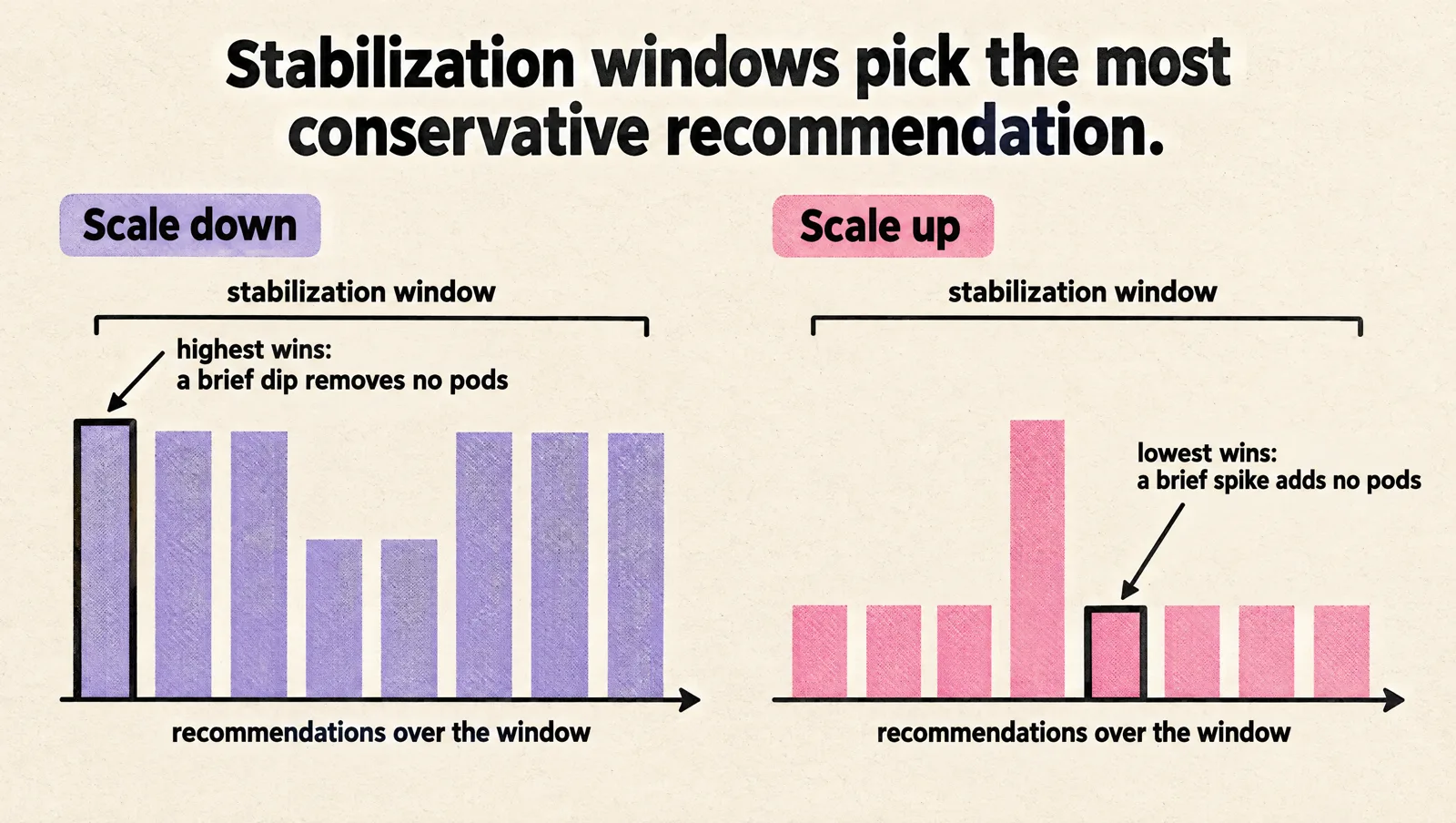
stabilizationWindowSeconds: the HPA looks at all recommendations made during this window and uses the most conservative one. For scale down that is the highest recommendation, so a brief dip does not remove pods. For scale up it is the lowest, so a brief spike does not add pods.policies: rate limits.type: Pods, value: 4, periodSeconds: 60means at most 4 pods per minute.type: Percent, value: 10, periodSeconds: 60means at most 10% of current replicas per minute (fractions are rounded up, so 10% of 72 replicas allows 8).selectPolicy:Maxpicks the policy allowing the biggest change,Minthe smallest, andDisabledturns off scaling in that direction entirely.tolerance(per direction): overrides the cluster-wide 10% dead band for this HPA. It is beta in Kubernetes 1.35 and 1.36 and generally available from 1.37, so check your cluster version before relying on it.
Anti-flap profiles you can copy
Starting points, not final answers. Tune them with the load test in the next section.
| Workload | Scale up | Scale down | Why |
|---|---|---|---|
| Latency-sensitive API, fast startup (under 30 seconds) | No window, max of 100% or 4 pods per 60 seconds | 300 second window, 20% per 60 seconds | React fast to real load, shed capacity slowly |
| Slow-starting service (JVM, large caches) | 60 second window, 50% per 60 seconds | 600 second window, 10% per 60 seconds | Stop startup spikes from compounding; keep warm pods |
| Spiky, bursty traffic | No window, 100% per 30 seconds | 900 second window, 1 pod per 120 seconds | Bursts return; keeping capacity is cheaper than churn |
| Batch or queue worker on CPU | No window, 4 pods per 60 seconds | 300 second window, 25% per 60 seconds | Usually better on KEDA with queue depth |
The latency-sensitive API profile as YAML:
apiVersion: autoscaling/v2
kind: HorizontalPodAutoscaler
metadata:
  name: api
  namespace: production
spec:
  scaleTargetRef:
    apiVersion: apps/v1
    kind: Deployment
    name: api
  minReplicas: 3
  maxReplicas: 30
  metrics:
    - type: Resource
      resource:
        name: cpu
        target:
          type: Utilization
          averageUtilization: 60
  behavior:
    scaleUp:
      stabilizationWindowSeconds: 0
      selectPolicy: Max
      policies:
        - type: Percent
          value: 100
          periodSeconds: 60
        - type: Pods
          value: 4
          periodSeconds: 60
    scaleDown:
      stabilizationWindowSeconds: 300
      selectPolicy: Min
      policies:
        - type: Percent
          value: 20
          periodSeconds: 60
        - type: Pods
          value: 2
          periodSeconds: 60
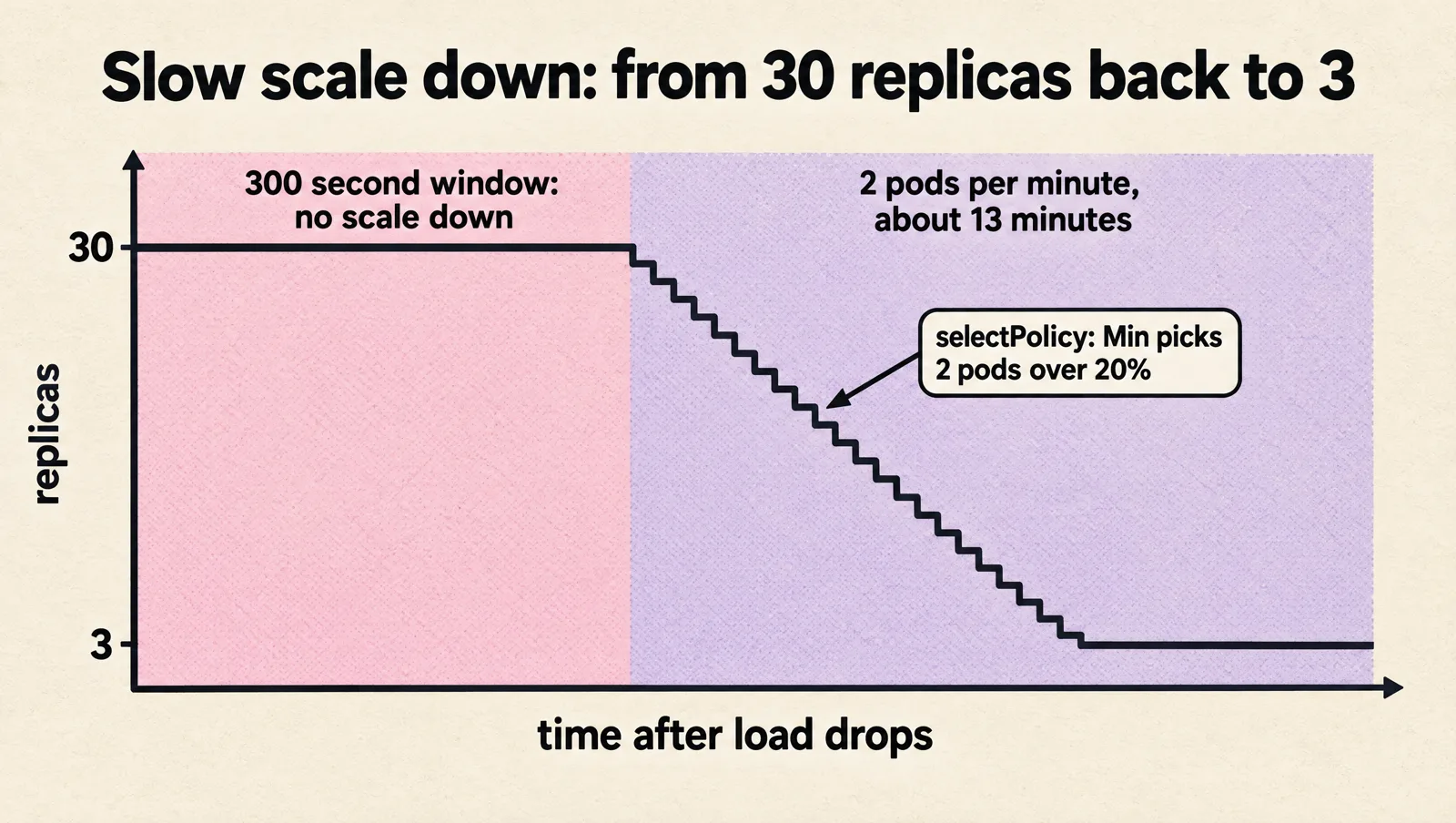
With selectPolicy: Min on scale down, the HPA removes whichever is smaller, 20% or 2 pods, per minute. At 30 replicas that is 2 pods a minute, so once the 5-minute window has passed it takes about 13 more minutes to return to 3. That is deliberate: slow scale down is the cheapest insurance against flapping.
How to pick the target utilization
The target is really a headroom setting. Ask how much traffic can grow in the time it takes a new pod to become ready and serve. If traffic can rise 50% in the two minutes it takes to start a pod, existing pods need room to absorb that, so a target near 100 / 1.5, about 65% of the point where latency degrades, is the ceiling. If your service degrades at 80% CPU, that gives roughly 50% to 55%.
Most CPU-bound services land between 50% and 70%. Below 50% you pay for a lot of idle capacity. Above 75% you are betting that scale ups always finish before the next spike.
Test HPA behavior before production traffic does
Do not trust an HPA you have not watched under load. In a staging environment with realistic requests:
# terminal 1: decisions and events
kubectl get hpa api -n staging --watch
kubectl get events -n staging --field-selector involvedObject.name=api --watch

# terminal 2: pods coming and going
kubectl get pods -n staging -l app=api --watch

# terminal 3: load from outside the cluster for 10 minutes, then stop
hey -z 10m -c 100 https://staging.example.com/api/health-heavy
Record five things: time to first scale up, replicas added per minute, whether new pods were ready before the next decision, whether latency recovered, and how replicas stepped down after the load stopped. If replicas climb past what the load needs, your scale up is outrunning readiness. If they drop and come straight back, slow the scale down.
HPA with VPA, KEDA, Karpenter and Argo Rollouts
HPA and VPA
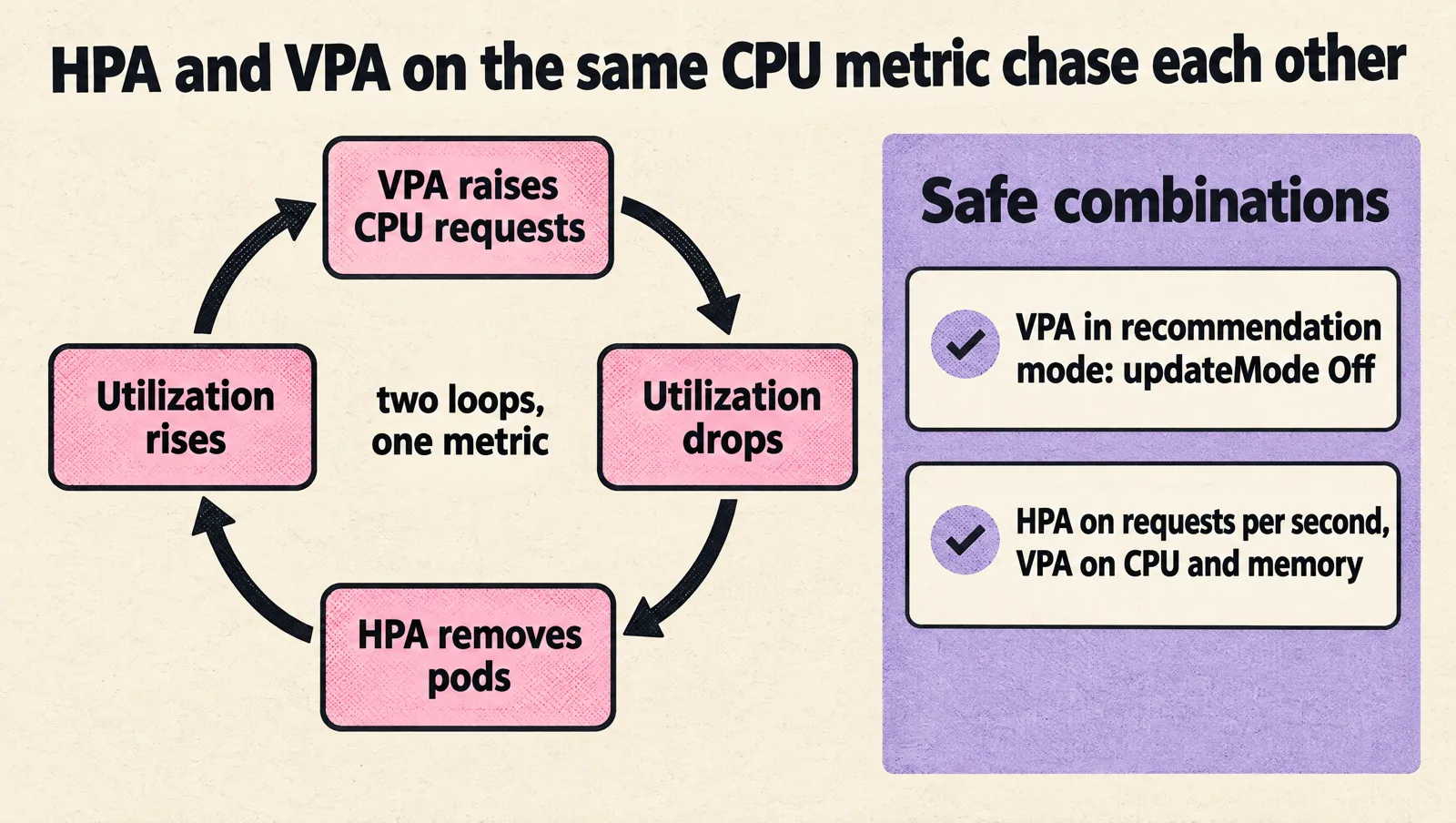
Do not let both act on the same resource metric. If the HPA scales on CPU utilization and VPA raises CPU requests, utilization drops, the HPA removes pods, utilization rises, and the two loops chase each other. Safe combinations are VPA in recommendation-only mode (updateMode: "Off") to inform your requests, or HPA on a custom metric such as requests per second while VPA manages CPU and memory.
HPA and KEDA
KEDA is not a competitor to the HPA. A KEDA ScaledObject creates and manages an HPA for you and feeds it external metrics from its 70+ built-in scalers, plus it handles activation from zero replicas. Never point your own HPA and a KEDA ScaledObject at the same Deployment. Choose KEDA when the signal lives outside the pod (queues, streams, schedules) or when you need scale to zero.
HPA and node autoscaling
When the HPA adds pods that do not fit, they stay Pending until Cluster Autoscaler or Karpenter adds a node, which commonly takes one to several minutes. Your scale-up speed is therefore the slower of pod startup and node provisioning. If that is too slow for your traffic pattern, raise minReplicas, lower the target, or keep a little spare node capacity with low-priority placeholder pods that real workloads can preempt (see our guide to Kubernetes PriorityClasses).
HPA during rollouts
During a rolling update the HPA scales the Deployment, and the Deployment controller spreads replicas across old and new ReplicaSets. Startup CPU from new pods can trigger scale ups mid-rollout, so the slow-starting profile above helps here too. If you use progressive delivery, point scaleTargetRef at the Rollout instead of a Deployment (apiVersion: argoproj.io/v1alpha1, kind: Rollout). Our Argo Rollouts guide covers how canary and blue-green steps interact with the HPA.
Can the HPA scale to zero?
Only for object and external metrics, and only with the HPAScaleToZero feature gate. That gate was alpha (off by default) from Kubernetes 1.16 to 1.36 and became beta, on by default, in 1.37. CPU and memory cannot scale to zero because they can only be measured on running pods. On older clusters, or for anything event driven, use KEDA, which has supported scale to zero for years.
HPA troubleshooting: error messages and fixes
These are the messages the HPA controller actually emits, as seen in kubectl describe hpa.
| Symptom or message | Cause | Fix |
|---|---|---|
TARGETS shows <unknown>/60% | No metrics yet, metrics-server missing, or a container without a request | Wait one or two minutes after creation; run kubectl top pods; add requests to every container |
failed to get cpu utilization: missing request for cpu in container X of Pod Y | A container (often a sidecar or init-injected proxy) has no CPU request | Add a CPU request to every container, or switch to ContainerResource |
unable to get metrics for resource cpu: ... with reason FailedGetResourceMetric | The metrics.k8s.io API is unavailable | Check kubectl get apiservice v1beta1.metrics.k8s.io and the metrics-server pod logs |
did not receive metrics for targeted pods (pods might be unready) | Pods are crash looping or never become ready | Fix readiness first; see our guide to liveness probes without restart loops |
ScalingLimited True TooManyReplicas | The desired count hit maxReplicas | Raise maxReplicas only if downstream systems (database, cache, APIs) can take it |
ScaleDownStabilized while load is low | The scale-down window is holding the highest recent recommendation | Expected. Shorten the window only if idle cost matters more than churn |
| Replicas jump back to a fixed number after every deploy | spec.replicas in the manifest overrides the HPA on each apply or sync | Remove spec.replicas, or ignore it in Argo CD |
| Memory HPA never scales down | The runtime keeps memory after load drops | Scale on CPU or a work metric instead |
| More pods, same latency | The bottleneck is a database, lock or external API | Cap maxReplicas at downstream capacity, add pooling and backpressure |
Production HPA checklist
- Every container in the target has a CPU request based on measured usage.
spec.replicasis removed from the Deployment manifest, or ignored by your GitOps tool.minReplicasis at least 2 (3 for multi-zone services) and covers normal traffic.maxReplicasis set from downstream capacity and node budget, not from a round number.- The metric matches the bottleneck: CPU for compute, requests per pod for I/O-bound APIs, queue depth (via KEDA) for workers.
- Scale up is faster than scale down, and scale down has a window of at least 300 seconds.
- Readiness probes reflect real readiness, and startup time is known.
- A node autoscaler is in place and its provisioning time is part of your scale-up budget.
- VPA is not changing the same resource the HPA scales on.
- You have watched the HPA through a load test and a scale down.
Kubernetes HPA FAQ
Is HPA useful for Kubernetes?
Yes, for stateless workloads where more pods means more capacity. It lets you run fewer replicas at quiet times and absorb peaks without manual intervention. It is the wrong tool for stateful systems that cannot simply add replicas, and for workloads whose bottleneck is outside the pod.
What is a good HPA CPU threshold?
Most CPU-bound services work well between 50% and 70% of the CPU request. Use the headroom calculation above: the slower your pods and nodes start, and the faster your traffic grows, the lower the target should be.
What is the difference between HPA and VPA?
The HPA changes how many pods run. VPA changes how much CPU and memory each pod requests. They can work together if they act on different signals, for example HPA on requests per second and VPA on resources, or VPA in recommendation mode only.
What is the difference between KEDA and HPA?
KEDA builds on the HPA. It creates an HPA for you, feeds it metrics from event sources like queues and streams, and adds scale to zero. Use plain HPA for CPU or custom metrics on services; use KEDA for event-driven workers.
How often does the HPA check metrics?
Every 15 seconds by default. Metrics-server itself scrapes kubelets on its own interval, so the data the HPA sees can be somewhat older than that.
Why does my HPA show unknown targets?
Either metrics are not available yet (normal for a minute or two after creation), metrics-server is missing or broken, or at least one container in the pods has no request for the resource you scale on. kubectl describe hpa shows which one.
Why is my HPA not scaling down?
The 5-minute default scale-down stabilization window, a metric still above the target minus the 10% tolerance, a memory metric that never drops, or a second metric that keeps the maximum recommendation high. Check the conditions and events in kubectl describe hpa.
Can I use HPA and a fixed replica count in Helm?
Not on the same object. Render replicas in the Deployment only when autoscaling is disabled, so a Helm upgrade does not reset the HPA's decision.
If your autoscaling still behaves unpredictably after this, the cause is usually in the workload or the node layer rather than the HPA itself. MeteorOps engineers tune this for startups as part of Kubernetes consulting.