


A Kubernetes liveness probe tells the kubelet when to restart a container; a readiness probe only removes the pod from Service traffic and never restarts it. To avoid restart loops, keep liveness checks local to the process, move dependency checks to readiness, use a startupProbe for slow boots, and set timeouts of 2 to 3 seconds.
The goal is not to make liveness probes pass more often. It is to use them only for conditions a restart can actually fix, and to give the application enough time to prove it is truly wedged before Kubernetes kills it.
Liveness vs readiness vs startup probes
| Probe | Question it answers | What happens on failure | What it should check |
|---|---|---|---|
livenessProbe | Is the process wedged beyond recovery? | The kubelet kills and restarts the container (per restartPolicy). | Local process health only: event loop responsive, no fatal internal state. |
readinessProbe | Can this pod take traffic right now? | The pod is removed from Service endpoints. No restart. | Dependencies, warm caches, draining state. |
startupProbe | Has the app finished booting? | Liveness and readiness are held back until it passes. If it never passes within failureThreshold x periodSeconds, the container is restarted. | Initialization complete: migrations, cache load, model load. |

Understand what a liveness probe is allowed to do
A liveness probe answers one narrow question: “Should Kubernetes restart this container?” If the probe fails enough times, the kubelet restarts the container according to the pod’s restart policy. That is powerful, but it is also blunt.
A liveness probe should detect problems such as:
- A process deadlock where the application stops serving all useful work.
- A stuck event loop that no longer responds locally.
- A broken internal state that only a process restart can clear.
- A worker process that is alive at the operating system level but cannot make progress.
A liveness probe should usually avoid checking:
- Database reachability.
- Message broker availability.
- Third-party API status.
- Availability of another internal service.
- Long-running migrations or warm-up tasks.
If the database is unavailable and every pod fails its liveness probe because of that database check, Kubernetes will restart every pod. The restart will not fix the database. It will add load, increase cold starts, clear in-memory caches, and make recovery harder.

Use the right probe for the right job:
- startupProbe: gives slow-starting containers time to initialize before liveness checks begin.
- readinessProbe: controls whether the pod receives traffic.
- livenessProbe: restarts the container when it is truly unhealthy.
If you manage Kubernetes manifests through infrastructure as code, keep this distinction explicit in your modules or templates. The same principle applies whether you apply raw YAML, use Helm, or deploy Kubernetes resources using Terraform.
Start with a safe baseline configuration
Begin with conservative thresholds, then tighten them after observing real startup time and failure behavior. Do not copy probe values across services without checking how each service starts, warms up, and handles load.
Here is a risky liveness probe:
apiVersion: apps/v1
kind: Deployment
metadata:
  name: api
spec:
  replicas: 3
  selector:
    matchLabels:
      app: api
  template:
    metadata:
      labels:
        app: api
    spec:
      containers:
        - name: api
          image: example/api:1.0.0
          ports:
            - containerPort: 8080
          livenessProbe:
            httpGet:
              path: /health
              port: 8080
            initialDelaySeconds: 5
            periodSeconds: 5
            timeoutSeconds: 1
            failureThreshold: 3
This can restart the container after roughly 20 seconds: 5 seconds of initial delay, then 3 failed probes spaced 5 seconds apart. If the service sometimes needs 45 seconds to load configuration, run migrations, compile templates, or warm caches, this pod can restart forever.
A safer pattern separates startup, readiness, and liveness:
apiVersion: apps/v1
kind: Deployment
metadata:
  name: api
spec:
  replicas: 3
  selector:
    matchLabels:
      app: api
  template:
    metadata:
      labels:
        app: api
    spec:
      containers:
        - name: api
          image: example/api:1.0.0
          ports:
            - name: http
              containerPort: 8080

          startupProbe:
            httpGet:
              path: /startupz
              port: http
            periodSeconds: 5
            timeoutSeconds: 2
            failureThreshold: 24

          readinessProbe:
            httpGet:
              path: /readyz
              port: http
            periodSeconds: 5
            timeoutSeconds: 2
            failureThreshold: 3
            successThreshold: 1

          livenessProbe:
            httpGet:
              path: /livez
              port: http
            periodSeconds: 10
            timeoutSeconds: 2
            failureThreshold: 3
In this example, the startup probe allows up to about 120 seconds for startup: 24 failures multiplied by a 5-second period. While the startup probe is still failing, Kubernetes does not run the liveness probe. After startup succeeds, liveness begins.

This matters for applications with variable boot times, such as Java services, applications that load large models, services that hydrate caches, or workers that recover state during startup.
Use practical threshold math before shipping
You should be able to explain every probe value in a deployment review. If the answer is “we copied it,” the probe is not tuned.
Use this rough calculation:
restart window ≈ initialDelaySeconds + (failureThreshold × periodSeconds)For a liveness probe like this:
livenessProbe:
  httpGet:
    path: /livez
    port: http
  initialDelaySeconds: 30
  periodSeconds: 10
  timeoutSeconds: 2
  failureThreshold: 3
Kubernetes may restart the container after about 60 seconds of failing liveness checks. That may be fine for a stateless API with a 10-second normal startup time. It may be too aggressive for a batch worker that can pause during garbage collection, checkpoint recovery, or CPU pressure.
Use these starting points as a practical baseline, then adjust with real data:
- startupProbe: set
failureThreshold × periodSecondshigher than your slow but acceptable startup time. If p95 startup is 70 seconds, start around 120 seconds. - readinessProbe: keep it responsive. A period of 5 to 10 seconds is common because it controls traffic routing.
- livenessProbe: keep it less aggressive than readiness. A period of 10 to 30 seconds with a failure threshold of 3 is a safer default for many services.
- timeoutSeconds: avoid the default of 1 second for applications that can pause briefly under load. Start with 2 or 3 seconds if you have no better data.
- initialDelaySeconds: prefer
startupProbefor startup handling. UseinitialDelaySecondsonly when startup behavior is simple and predictable.
Probe tuning should live next to deployment configuration, not in someone’s notes. If your platform team provisions services and dependencies through Kubernetes-native control planes, document probe defaults in the same place you manage patterns such as deploying AWS resources using Crossplane on Kubernetes.
Design health endpoints that match probe intent
The endpoint behind the probe matters more than the YAML. A clean probe configuration still fails if /health does too much work.
A good pattern is to expose separate endpoints:
/livez: checks that the process can respond and has not entered a fatal internal state./readyz: checks whether the application can serve traffic right now./startupz: checks whether initialization has completed.
For example, an HTTP service might implement behavior like this:
GET /livez
200 OK if the process event loop is responsive
500 only if the process is internally unrecoverable

GET /readyz
200 OK if the service can accept traffic
503 if required dependencies are unavailable or the app is draining

GET /startupz
200 OK after bootstrapping is complete
503 while migrations, cache loading, or state recovery are still running
Here is a minimal Node.js example that keeps liveness local and pushes dependency checks into readiness:
import express from "express";

const app = express();

let started = false;
let shuttingDown = false;

async function checkDatabase() {
  // Replace with a cheap ping or connection-pool status check.
  // Do not run expensive queries here.
  return true;
}

app.get("/startupz", (req, res) => {
  if (started) {
    return res.status(200).send("ok");
  }

  return res.status(503).send("starting");
});

app.get("/livez", (req, res) => {
  // Keep this local. Do not check the database, cache, or third-party APIs.
  return res.status(200).send("ok");
});

app.get("/readyz", async (req, res) => {
  if (shuttingDown || !started) {
    return res.status(503).send("not ready");
  }

  const databaseOk = await checkDatabase();

  if (!databaseOk) {
    return res.status(503).send("database unavailable");
  }

  return res.status(200).send("ok");
});

process.on("SIGTERM", () => {
  shuttingDown = true;
  setTimeout(() => process.exit(0), 10_000);
});

app.listen(8080, async () => {
  // Run startup work here.
  started = true;
});
For worker services without HTTP servers, an exec probe can work, but use it carefully. Every probe spawns a process inside the container. At scale, expensive exec probes can add measurable overhead.
livenessProbe:
  exec:
    command:
      - /bin/sh
      - -c
      - test -f /tmp/worker-alive
  periodSeconds: 15
  timeoutSeconds: 2
  failureThreshold: 4
If you use an exec probe, keep the command fast and deterministic. Avoid commands that call external systems, perform file tree scans, invoke package managers, or depend on shells that may not exist in minimal images.
Roll out probe changes with evidence
Treat probe changes like production behavior changes. They can cause restarts, remove pods from service, and change rollout timing.
Use this rollout process:
- Measure current startup time. Check container logs, application metrics, and Kubernetes events. Record typical and slow startup durations.
- Add or tune
startupProbe. Make sure the allowed startup window exceeds slow but valid startup. - Split liveness and readiness endpoints. Keep restart logic separate from traffic-routing logic.
- Deploy to a small scope first. Use one environment, one namespace, or one replica set before changing every workload.
- Watch events during rollout. Confirm that restarts are not increasing unexpectedly.
- Load test or replay traffic if possible. Validate that probes still pass during CPU pressure, garbage collection pauses, and dependency latency.
Useful commands:
kubectl get pods -n appkubectl describe pod -n app api-7c9f6d8f7f-x2abckubectl logs -n app api-7c9f6d8f7f-x2abc --previouskubectl get events -n app --sort-by=.lastTimestampLook for messages like:
Liveness probe failed: HTTP probe failed with statuscode: 503
Back-off restarting failed container
Readiness probe failed: Get "http://10.0.1.25:8080/readyz": context deadline exceeded
If --previous logs show that the application was still starting when it was killed, your startup window is too short or your liveness probe is starting too early. If logs show request latency spikes before liveness failures, your timeout may be too low or the endpoint may share overloaded application threads.
When Kubernetes is part of a larger platform rollout, probe settings should be reviewed with resource requests, limits, rollout strategy, and dependency provisioning. For example, an application deployed on Amazon Elastic Kubernetes Service (EKS) can still fail because a probe ignores slow boot behavior, even if the cluster itself is healthy. The same operational checks apply when you deploy Apache Airflow on AWS EKS or run a custom API service.
Avoid the common liveness probe traps
Most restart loops come from a few repeatable mistakes.
Trap 1: Dependency checks in liveness
If /livez fails when PostgreSQL, Redis, Kafka, or an external API is unavailable, you are asking Kubernetes to restart your application because another system has a problem.
Move dependency checks to readiness:
readinessProbe:
  httpGet:
    path: /readyz
    port: http
  periodSeconds: 5
  timeoutSeconds: 2
  failureThreshold: 3

livenessProbe:
  httpGet:
    path: /livez
    port: http
  periodSeconds: 15
  timeoutSeconds: 2
  failureThreshold: 4
Trap 2: No startup probe for slow applications
initialDelaySeconds can work for simple services, but it is a fixed delay. It does not adapt to real startup progress. A startupProbe lets Kubernetes wait until startup succeeds, then begins liveness checks.
Use startup probes for services with:
- Large dependency injection graphs.
- Database migrations or schema checks.
- Cache warm-up.
- Model loading.
- State recovery after shutdown.
Trap 3: Timeout too low under CPU pressure
The default timeoutSeconds is 1 second. That can be too low for applications under CPU throttling, garbage collection, or temporary I/O pressure.
If probes fail during load but the application recovers without a restart, increase timeoutSeconds, increase failureThreshold, or make the probe endpoint cheaper. Also check CPU limits. A pod with a tight CPU limit can fail probes because the process cannot get scheduled quickly enough.
Trap 4: Redirects, auth, or middleware on health routes
Health endpoints should avoid authentication middleware, redirects, rate limits, and expensive request logging. The kubelet counts any status from 200 to 399 as success, so 401, 403 and 5xx responses fail the probe. Redirects to the same host are followed; a redirect to a different host is treated as success with a warning event, which can hide a broken endpoint.
Make health routes boring:
- Return directly from the application.
- Do not require tokens.
- Do not redirect HTTP to HTTPS inside the pod unless the probe is configured for HTTPS.
- Do not call external services from liveness.
Trap 5: Probe port does not match the container
Named ports reduce mistakes when container ports change:
ports:
  - name: http
    containerPort: 8080

livenessProbe:
  httpGet:
    path: /livez
    port: http
If you use service meshes or sidecars, confirm whether the kubelet probes the application container directly or whether probe rewriting is active. Misconfigured sidecar behavior can make a healthy application look unhealthy.
Fix the common probe error messages
These are the exact strings you will see in kubectl describe pod and kubectl get events, with what they usually mean.
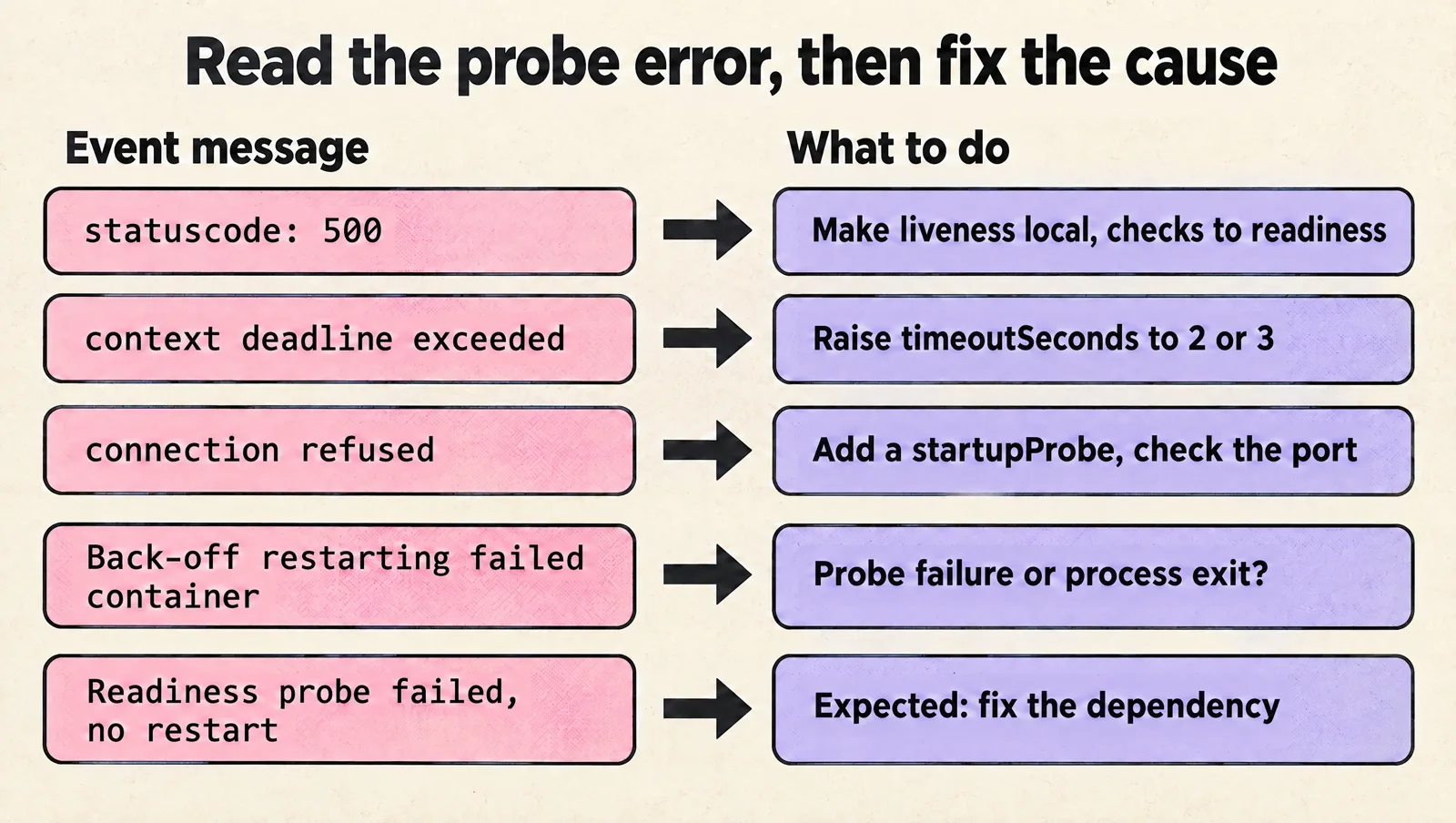
Liveness probe failed: HTTP probe failed with statuscode: 500
The endpoint answered, but with an error. Usually /livez runs dependency checks (database, cache, another service) that are down. Make liveness local and move those checks to readiness. If the app really returns 500 because it is broken, check kubectl logs POD --previous for the cause of the crash before tuning anything.
Liveness probe failed: Get "http://10.0.1.25:8080/livez": context deadline exceeded (Client.Timeout exceeded while awaiting headers)
The endpoint did not answer within timeoutSeconds (default 1 second). Common causes are CPU throttling from a tight CPU limit, garbage collection pauses, or the health route sharing a saturated thread pool. Raise timeoutSeconds to 2 or 3, raise failureThreshold, and check CPU throttling metrics.
Liveness probe failed: dial tcp 10.0.1.25:8080: connect: connection refused
Nothing is listening yet, or the probe points at the wrong port. During startup this means the liveness probe started too early: add a startupProbe. Otherwise, check that the probe port matches the container port, ideally by using a named port.
Back-off restarting failed container
The container restarted several times and the kubelet is now waiting with an exponential back-off (up to 5 minutes) before the next attempt. The pod shows CrashLoopBackOff. Find whether the restarts come from probe failures (events say "Container api failed liveness probe, will be restarted") or from the process exiting on its own (exit code in kubectl describe pod).
Readiness probe failed but the container is not restarting
That is expected. Readiness failures only remove the pod from Service endpoints. If the pod never becomes ready, fix the dependency or the readiness logic; restarts will not help.
Use this final checklist before merging
Before you merge a liveness probe change, verify these points:
/livezchecks only local process health./readyzhandles dependency checks and traffic eligibility./startupzexists for slow or variable startup.- The startup window is longer than slow but valid startup time.
- The liveness restart window is long enough to survive short pauses.
timeoutSecondsis realistic for your runtime and CPU limits.- Health endpoints bypass auth, redirects, and expensive middleware.
- Probe failures are visible in logs, metrics, or Kubernetes events.
- The rollout plan limits blast radius.
FAQ
Does a readiness probe failure restart the container?
No. Only liveness and startup probe failures restart a container. A failing readiness probe removes the pod from Service endpoints until it passes again.
Does a startup probe failure restart the container?
Yes. If the startup probe keeps failing past failureThreshold x periodSeconds, the kubelet kills the container and restarts it, just like a liveness failure.
What are good default liveness probe values?
A practical starting point is periodSeconds: 10, timeoutSeconds: 2 and failureThreshold: 3, with a startupProbe covering your slowest normal boot. Tune from observed startup time and pause behavior, not copied defaults. The official reference is the Kubernetes guide to configuring liveness, readiness and startup probes.
Should a liveness probe check the database?
No. If the database goes down, every pod fails liveness and restarts at once, which adds load and slows recovery without fixing anything. Check dependencies in readiness.
Can I use the same endpoint for liveness and readiness?
You can, but it is a common source of restart loops. Separate /livez and /readyz endpoints let readiness react to dependencies while liveness stays local.
Liveness probes are useful when they restart containers that cannot recover on their own. They become dangerous when they replace readiness checks, dependency monitoring, or startup handling. Start conservative, separate probe responsibilities, watch real failure events, and tune based on observed behavior rather than copied defaults.