

To drain a Kubernetes node safely, run kubectl cordon NODE, check that every critical workload has a Pod Disruption Budget and spare replicas on other nodes, then run kubectl drain NODE --ignore-daemonsets --delete-emptydir-data --timeout=10m. Drain uses the Eviction API, so PDBs block unsafe evictions. Finish with kubectl uncordon NODE.
Drains usually happen under pressure: a kernel patch, a node pool replacement, an unhealthy instance, or a cluster upgrade waiting on one stubborn workload. This guide covers what the command really does, the flags that matter, how to protect critical and stateful pods, and the failure modes you will hit in production.
Cordon vs drain vs delete at a glance
| Action | Command | What it does | Respects PDBs |
|---|---|---|---|
| Cordon | kubectl cordon NODE | Marks the node unschedulable. Running pods stay. | Not applicable |
| Drain | kubectl drain NODE --ignore-daemonsets | Cordons, then evicts pods so controllers recreate them elsewhere. | Yes, through the Eviction API |
Drain with --disable-eviction | kubectl drain NODE --disable-eviction | Deletes pods directly instead of evicting them. | No |
| Uncordon | kubectl uncordon NODE | Makes the node schedulable again. There is no "undrain": evicted pods do not move back on their own. | Not applicable |
| Delete node | kubectl delete node NODE | Removes the Node object. Pods on it are cleaned up without eviction. | No |
Understand what kubectl drain actually does
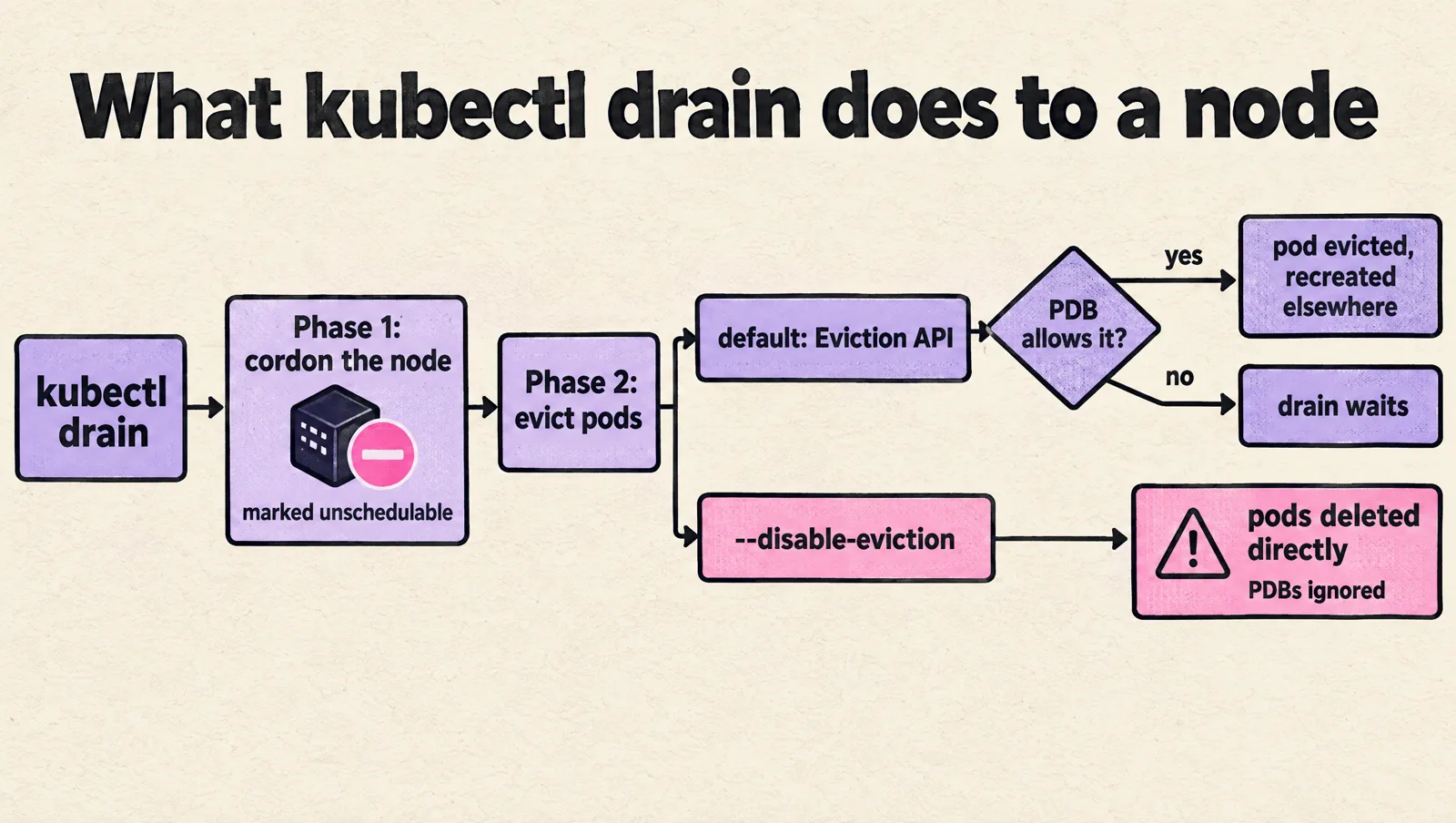
A drain has two separate phases:
- Cordon the node: Kubernetes marks the node unschedulable so new pods do not land there.
- Evict or delete existing pods: Kubernetes asks workload-owned pods to leave the node so their controllers can recreate them elsewhere.
The common command looks like this:
kubectl drain NODE_NAME --ignore-daemonsets --delete-emptydir-dataBy default, kubectl drain uses the Kubernetes Eviction API for managed pods. That matters because the Eviction API respects Pod Disruption Budgets, usually called PDBs. If a PDB says a workload cannot lose another pod right now, the drain waits instead of forcing the eviction.
Several flags change that behavior, and some are dangerous in production:
--ignore-daemonsets: required in most drains because DaemonSet pods are managed by a DaemonSet and normally run on every eligible node.--delete-emptydir-data: allows eviction of pods usingemptyDir. Data inemptyDiris node-local and will be lost.--force: allows deletion of pods not managed by a controller. Use this only when you have verified the pod can be safely removed.--disable-eviction: bypasses the Eviction API and deletes pods directly. This ignores PDBs. Avoid it when protecting critical workloads.--pod-selector: limits the drain to pods matching a label selector. This is useful for selective drains, but it does not make the node empty.
A key gotcha: draining does not guarantee zero downtime. It only coordinates voluntary disruption. If a critical workload has one replica and the node must reboot, there is no Kubernetes flag that can preserve availability. You must add capacity, add replicas, or schedule downtime.
Classify pods before touching the node
Start with an inventory. Pick the node you plan to drain and list every pod on it:
NODE="ip-10-0-12-34.ec2.internal"

kubectl get pods -A \
  --field-selector spec.nodeName="$NODE" \
  -o wide
For a more useful view, include labels and owners:
kubectl get pods -A \
  --field-selector spec.nodeName="$NODE" \
  --show-labels
Then inspect anything that looks critical:
kubectl describe pod -n payments payments-api-7d7cb9dbb9-8x2nqClassify workloads into practical buckets:
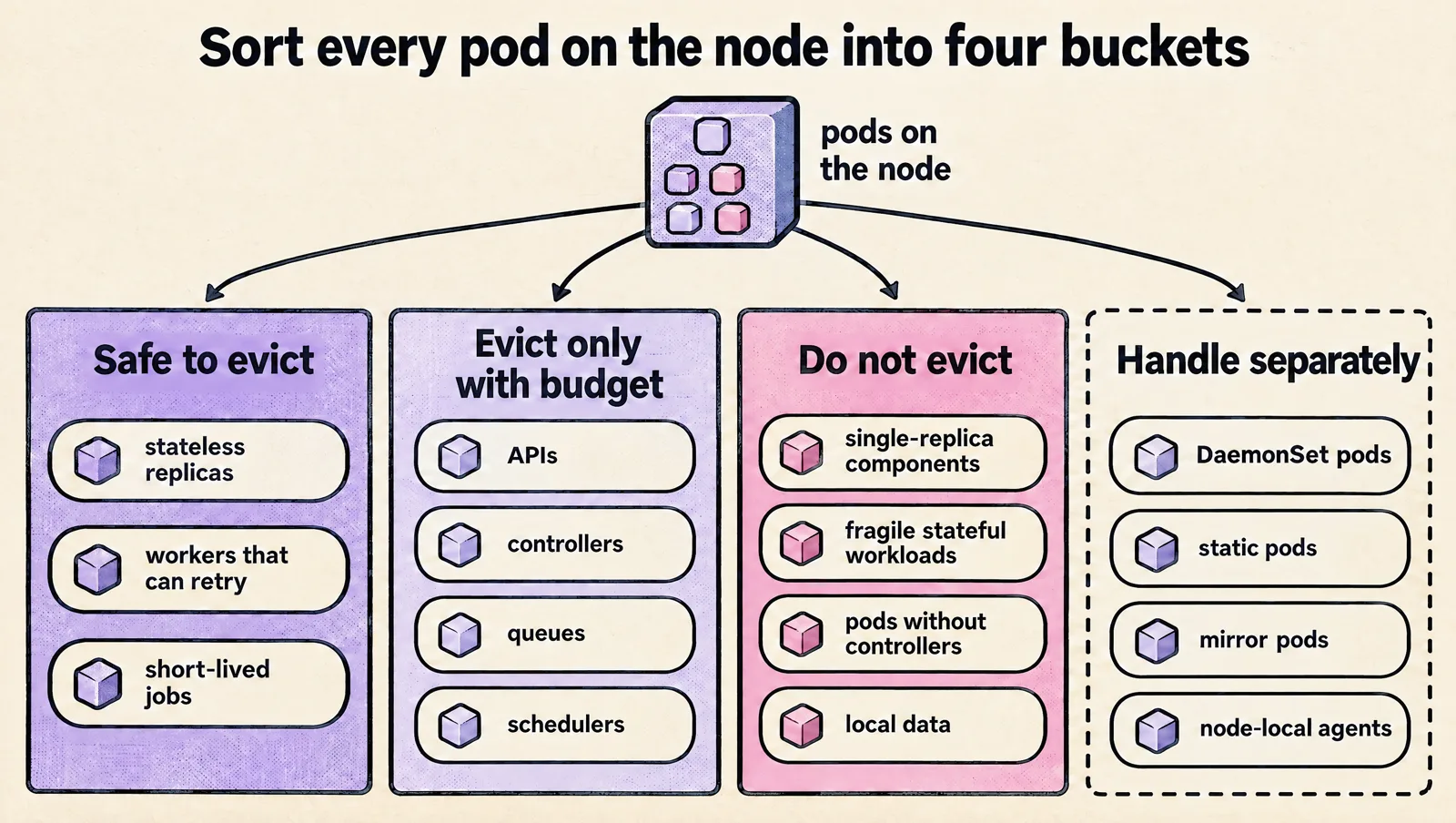
- Safe to evict: stateless replicas, workers that can retry, short-lived jobs, horizontally scaled services with healthy replicas on other nodes.
- Evict only with budget: APIs, controllers, queues, and schedulers that can tolerate losing one pod but not several at once.
- Do not evict during normal maintenance: single-replica control components, fragile stateful workloads, one-off pods without controllers, or workloads with local data.
- Handle separately: DaemonSet pods, static pods, mirror pods, and node-local agents.
Add explicit labels so your runbooks and automation can make decisions without relying on names:
apiVersion: apps/v1
kind: Deployment
metadata:
  name: payments-api
  namespace: payments
spec:
  selector:
    matchLabels:
      app: payments-api
  template:
    metadata:
      labels:
        app: payments-api
        ops.example.com/criticality: critical
        ops.example.com/evictable: "false"
    spec:
      containers:
        - name: app
          image: example/payments-api:1.0.0
For workloads you know are safe to move during maintenance, label them clearly:
kubectl label deployment -n workers thumbnail-worker \
  ops.example.com/evictable=true \
  ops.example.com/criticality=standard
Labels also help when your Kubernetes resources are managed through infrastructure as code. If you keep these labels and PDBs in version control, the same review process can protect your drain behavior. This is especially useful when you deploy Kubernetes resources using Terraform and want operational policy to travel with the workload definition.
Use Pod Disruption Budgets to block unsafe evictions
A Pod Disruption Budget tells Kubernetes how many pods in a selected workload must remain available during voluntary disruptions. Drains, node upgrades, and some autoscaling operations use voluntary eviction, so PDBs are your main guardrail.
For a critical deployment with three replicas, you can require at least two available pods:
apiVersion: policy/v1
kind: PodDisruptionBudget
metadata:
  name: payments-api
  namespace: payments
spec:
  minAvailable: 2
  selector:
    matchLabels:
      app: payments-api
Or you can allow at most one unavailable pod:
apiVersion: policy/v1
kind: PodDisruptionBudget
metadata:
  name: payments-api
  namespace: payments
spec:
  maxUnavailable: 1
  selector:
    matchLabels:
      app: payments-api
Use integers for critical workloads. Percentages can surprise you because Kubernetes rounds values. For example, maxUnavailable: 30% on a single replica can allow one unavailable pod, which means the whole workload can go down during a voluntary disruption.
Check PDBs before draining:
kubectl get pdb -A

kubectl describe pdb -n payments payments-api
Look at these fields:
- Allowed disruptions: if this is
0, eviction should be blocked. - Current healthy: how many selected pods are ready now.
- Desired healthy: how many pods must remain healthy.
- Selector: whether the PDB actually matches the pods you care about.
If pods in the budget are stuck unhealthy (for example in CrashLoopBackOff), they can block a drain forever even though they serve no traffic. Since Kubernetes 1.31 the unhealthyPodEvictionPolicy: AlwaysAllow field is stable: it lets the drain evict pods that are not ready, while still protecting healthy ones.
apiVersion: policy/v1
kind: PodDisruptionBudget
metadata:
  name: payments-api
  namespace: payments
spec:
  maxUnavailable: 1
  unhealthyPodEvictionPolicy: AlwaysAllow
  selector:
    matchLabels:
      app: payments-api
A common failure mode is a PDB selector that matches no pods. Kubernetes accepts the object, but it protects nothing. Always verify the selector:
kubectl get pods -n payments -l app=payments-apiFor a single-replica critical workload, a PDB can prevent accidental eviction:
apiVersion: policy/v1
kind: PodDisruptionBudget
metadata:
  name: payments-api
  namespace: payments
spec:
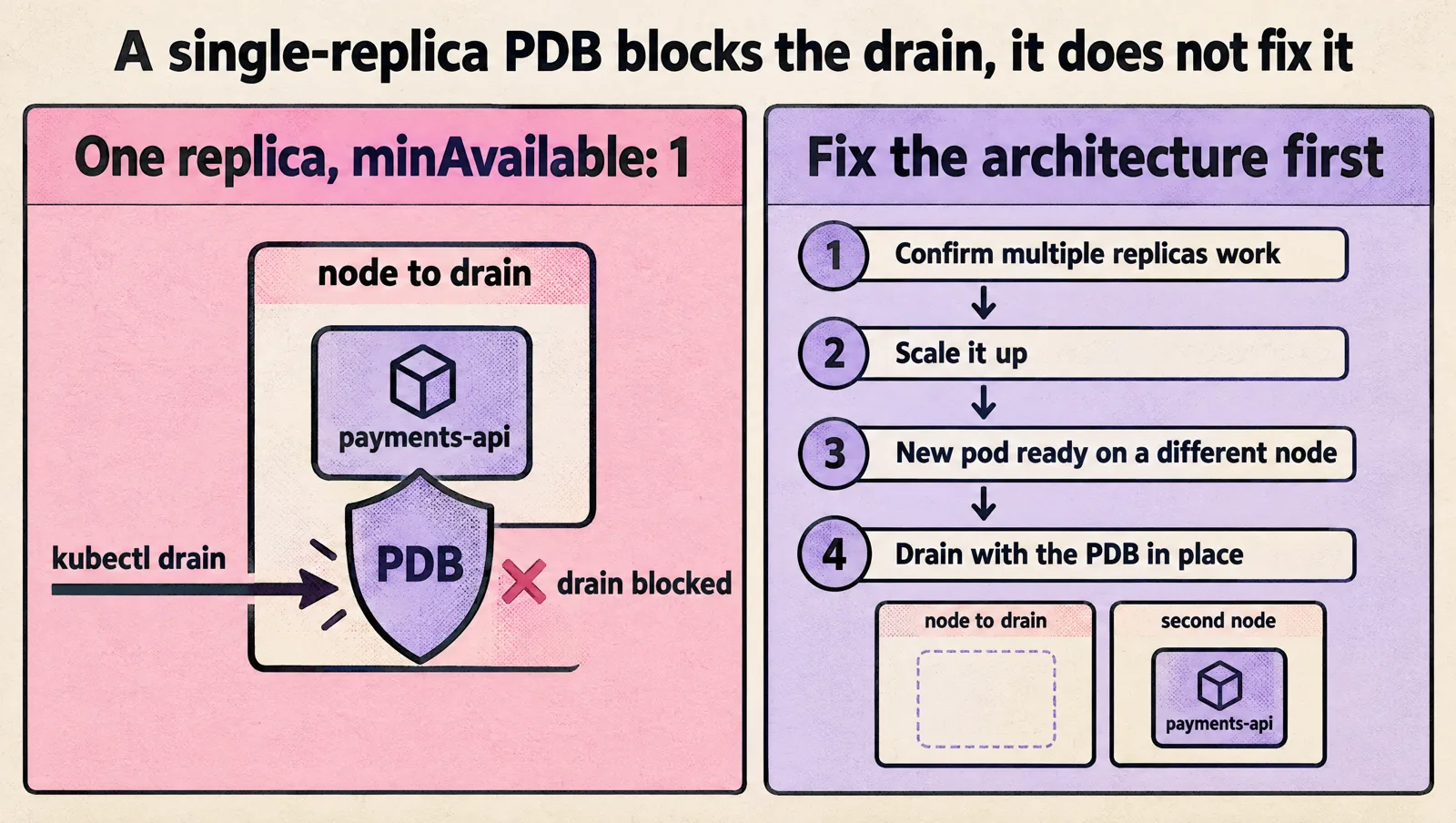
  minAvailable: 1
  selector:
    matchLabels:
      app: payments-api
This protects the workload by blocking the drain. It does not make the maintenance succeed. If the node must be replaced, fix the architecture first:
- Confirm the app supports multiple replicas.
- Scale it up.
- Wait until the new pod is ready on a different node.
- Drain with the PDB still in place.
kubectl scale deployment -n payments payments-api --replicas=2

kubectl rollout status deployment -n payments payments-api

kubectl get pods -n payments -l app=payments-api -o wide
If you run stateful systems, be more conservative. A PDB with maxUnavailable: 1 is common, but it is not enough by itself. Check volume attachment behavior, zone placement, leader election, quorum, and startup time before draining nodes that host stateful pods.
Run a safe drain procedure
Use a repeatable runbook. Do not start with kubectl drain and hope the cluster sorts it out.
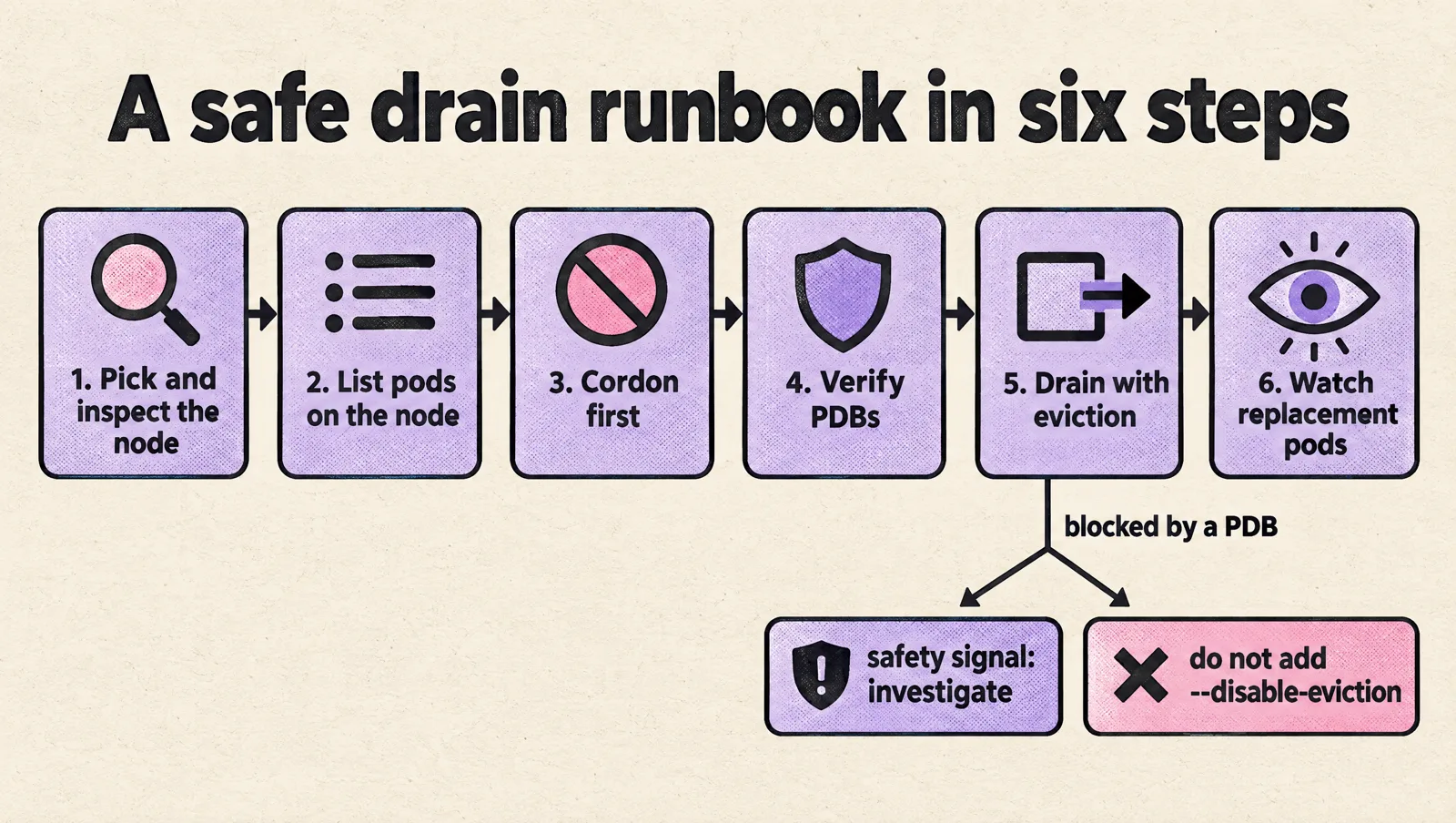
1. Pick the node and inspect it
NODE="ip-10-0-12-34.ec2.internal"

kubectl get node "$NODE" -o wide
kubectl describe node "$NODE"
Check for taints, conditions, allocatable resources, and recent events. If the node is already NotReady, some pods may be stuck terminating or unknown. That changes the risk profile.
2. List pods on the node
kubectl get pods -A \
  --field-selector spec.nodeName="$NODE" \
  -o wide
Flag anything with:
- one replica,
- no controller owner,
emptyDirdata,- local persistent volumes,
- strict node affinity,
- no matching PDB,
- a PDB with
Allowed disruptionsequal to0.
3. Cordon first
kubectl cordon "$NODE"Cordoning buys you stability. New pods stop landing on the node while you investigate or wait for replicas to become healthy elsewhere.
Confirm the node is unschedulable:
kubectl get node "$NODE"4. Verify critical workloads are protected
kubectl get pdb -A

kubectl get pods -A \
  --field-selector spec.nodeName="$NODE" \
  --show-labels
If a critical pod has no PDB, add one before the drain. If the workload has one replica and needs to stay available, scale it or move it intentionally before touching the node.
5. Drain with eviction enabled
For a normal drain, use the Eviction API and let PDBs do their job:
kubectl drain "$NODE" \
  --ignore-daemonsets \
  --delete-emptydir-data \
  --grace-period=120 \
  --timeout=10m
If the command blocks because of a PDB, treat that as a successful safety signal. Kubernetes is telling you the drain would violate an availability rule.
Do not respond by adding --disable-eviction. That removes the protection you created.
6. Watch replacement pods
kubectl get pods -A -o wide --watchIn another terminal, watch events:
kubectl get events -A --sort-by=.lastTimestampIf replacement pods stay pending, check capacity and scheduling constraints:
kubectl describe pod -n payments payments-api-NEW_POD_NAMECommon causes include insufficient CPU or memory, required node affinity, missing tolerations, topology spread constraints, persistent volume zone conflicts, or image pull failures.
Use selective drains when the node must stay partially active
Sometimes you do not need to empty the whole node. For example, you may want to move standard workloads off a node while leaving a critical singleton in place until a maintenance window. In that case, use labels and --pod-selector.
Label pods or workload templates that are safe to evict:
kubectl label deployment -n workers image-worker \
  ops.example.com/evictable=true
Then drain only matching pods:
kubectl drain "$NODE" \
  --ignore-daemonsets \
  --delete-emptydir-data \
  --pod-selector='ops.example.com/evictable=true' \
  --timeout=10m
This is useful for reducing risk before full maintenance. It is not a full node drain. Pods that do not match the selector will remain on the node, and they will still be interrupted if you reboot, terminate, or detach the node.
You can also invert the selector, but use this carefully:
kubectl drain "$NODE" \
  --ignore-daemonsets \
  --delete-emptydir-data \
  --pod-selector='ops.example.com/criticality!=critical' \
  --timeout=10m
The risk with negative selectors is unlabeled pods. A pod without ops.example.com/criticality can match criticality!=critical. For production, positive selection is usually safer:
--pod-selector='ops.example.com/evictable=true'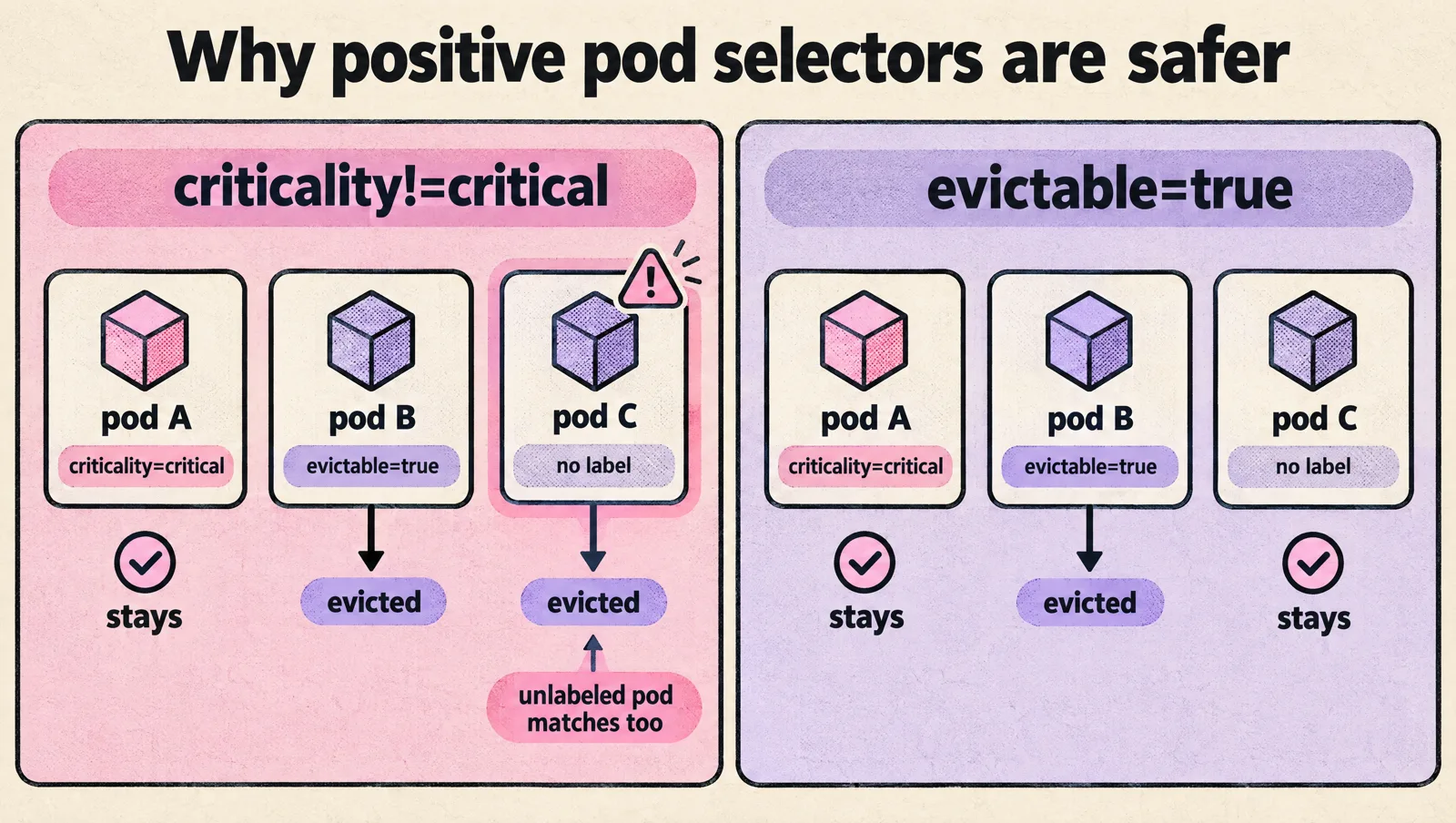
If you run platform services such as schedulers, workflow engines, or controllers, label them intentionally and give them PDBs. For example, a deployment pattern for Apache Airflow on Kubernetes should account for scheduler and webserver availability before node maintenance. The same principle applies when you deploy Apache Airflow on AWS Elastic Kubernetes Service and later need to rotate the nodes underneath it.
Know the failure modes before they page you
Most bad drains are caused by a small set of predictable issues.
PDB blocks the drain
This is often correct. Check the PDB:
kubectl describe pdb -n payments payments-apiThen decide whether to:
- wait for unhealthy pods to recover,
- scale the workload up,
- move another replica first,
- change the PDB through review,
- schedule downtime if the service cannot tolerate disruption.
Replacement pods are pending
The drain may evict pods successfully, but the cluster may not have a valid place to run replacements. Check pod scheduling events:
kubectl describe pod -n payments payments-api-NEW_POD_NAMELook for messages such as insufficient resources, node affinity mismatch, taint rejection, or volume node affinity conflict.
If your workload depends on cloud resources provisioned through Kubernetes APIs, verify those resources separately before moving pods. Teams using Crossplane should treat infrastructure readiness as part of the drain checklist, especially if the app depends on managed databases, buckets, or queues. The same operating model applies when you deploy AWS resources using Crossplane on Kubernetes.
A pod has no controller
A standalone pod will not be recreated automatically. kubectl drain refuses to delete it unless you pass --force. Before using --force, find out why the pod exists:
kubectl get pod -n default debug-shell -o yamlIf it is a temporary debug pod, delete it. If it is running something important, convert it to a Deployment, Job, StatefulSet, or another controller-managed workload before maintenance.
emptyDir data is lost
The --delete-emptydir-data flag permits eviction of pods with emptyDir volumes. It does not preserve that data. This is fine for caches and scratch space. It is unsafe for anything that acts as durable storage.
Check volumes before draining critical pods:
kubectl get pod -n payments payments-api-7d7cb9dbb9-8x2nq -o jsonpath='{.spec.volumes}'DaemonSet pods remain
DaemonSet pods are expected to remain during a drain. If you are replacing the node, they disappear when the node goes away. If you need to update a node agent, update the DaemonSet itself instead of trying to drain it like a normal workload.
PriorityClass does not stop eviction
PriorityClass influences scheduling and preemption. It does not make a pod immune to drain eviction. Use it for scheduling importance, but use PDBs and drain policy for disruption control.
Build the policy into your normal workflow
A safe drain should not depend on an engineer remembering every exception during an incident. Put the controls next to the workloads.
- Add PDBs for every service that must survive voluntary disruption.
- Use integer PDB values for critical services.
- Label workloads with clear maintenance intent, such as
ops.example.com/evictable=true. - Avoid single-replica critical services unless downtime is acceptable.
- Keep node affinity and topology spread constraints realistic.
- Test drains on non-production node pools before using the runbook in production.
- Block direct use of
--disable-evictionin automation unless the workflow is explicitly for destructive recovery.
For automation, encode the preflight checks. A simple script can fail before it starts a drain if critical pods are unprotected:
#!/usr/bin/env bash
set -euo pipefail

NODE="${1:?usage: drain-preflight.sh NODE_NAME}"

echo "Pods on node:"
kubectl get pods -A \
  --field-selector spec.nodeName="$NODE" \
  -o custom-columns='NAMESPACE:.metadata.namespace,NAME:.metadata.name,PHASE:.status.phase,NODE:.spec.nodeName'

echo
echo "PDBs:"
kubectl get pdb -A

echo
echo "Critical pods on node:"
kubectl get pods -A \
  --field-selector spec.nodeName="$NODE" \
  -l ops.example.com/criticality=critical \
  -o wide

echo
echo "If critical pods appear above, verify:"
echo "1. They have a matching PDB."
echo "2. Allowed disruptions is greater than 0, or the drain is expected to block."
echo "3. Replacement capacity exists on other nodes."
echo "4. No local-only data will be lost."
This script does not prove the drain is safe, but it forces the right questions before anyone runs the destructive command.
FAQ
How do I drain a node that runs a StatefulSet pod without losing data availability?
Give the StatefulSet a PDB with maxUnavailable: 1 (or minAvailable equal to quorum), make sure the other replicas are ready, and drain one node at a time. The pod is recreated with the same name and PVC on another node. For zonal block storage such as EBS, the replacement node must be in the same availability zone as the volume, or the pod stays Pending with a volume node affinity conflict.
What do --ignore-daemonsets and --delete-emptydir-data mean?
--ignore-daemonsets lets the drain continue even though DaemonSet pods cannot be moved (their controller would recreate them on the same node). --delete-emptydir-data allows eviction of pods that use emptyDir volumes, and that node-local data is deleted. Both are standard for routine drains, as documented in the kubectl drain reference.
Does kubectl drain ignore Pod Disruption Budgets?
No. By default drain evicts through the Eviction API and waits while a PDB reports 0 allowed disruptions. Only --disable-eviction bypasses PDBs, and --force only covers pods without a controller. Use --timeout so a blocked drain fails instead of hanging.
How do I undo a drain?
Run kubectl uncordon NODE. The node accepts new pods again, but the scheduler does not move evicted pods back. They return only as new pods get scheduled, for example on the next rollout.
How do I prevent data loss when pods are evicted during a node-pressure event?
Node-pressure eviction is not a drain: the kubelet evicts pods to protect the node and does not respect PDBs. Prevent it with realistic memory requests and limits, ephemeral storage limits, and by keeping durable data on PersistentVolumes instead of emptyDir or the container filesystem.
Does PriorityClass protect a pod from being drained?
No. PriorityClass affects scheduling and preemption, not voluntary eviction. Use PDBs and drain selectors to control disruption.
Takeaway
To drain Kubernetes nodes without evicting critical workloads, do three things consistently: classify workloads with labels, protect availability with Pod Disruption Budgets, and use drain commands that respect the Eviction API. If a PDB blocks the drain, treat it as a guardrail, not an obstacle.
Your next step should be simple: pick one production namespace, add or verify PDBs for its critical deployments, label which workloads are safe to evict, and test the drain runbook on a non-critical node. Once that works, roll the same pattern through the rest of the cluster.