
Enterprise security questionnaires ask for 2 numbers, your RTO and your RPO. In most startups both are a guess:
Bottom line
RTO (Recovery Time Objective) = how long your service may be down after a failure.
RPO (Recovery Point Objective) = how much data you may lose, measured as time before the failure.
RTO is set by how you run the system: redundancy, automation, runbooks, people.
RPO is set by how you copy the data: the time between copies plus the lag of the copy.
For a B2B SaaS in 1 cloud region with a managed database, the targets I set:
| Tier | What is in it | RTO | RPO |
|---|---|---|---|
| 1 | Product API, auth, primary database, customer uploads | 1 hour | 5 minutes |
| 2 | Async workers, internal admin, billing jobs, CI | 4 hours | 1 hour |
| 3 | Analytics, data warehouse, old logs, staging | 1 business day | 24 hours |
A Multi-AZ database with point-in-time recovery meets the Tier 1 row. Most startups already pay for both and have measured neither.
The rule of this article: a recovery target nobody has measured is a wish. Pick the numbers, write them down, then run a restore drill and time it.
Below: how each number is built, what the 4 recovery patterns cost, how to measure, and a 1 page plan you can paste into a questionnaire.
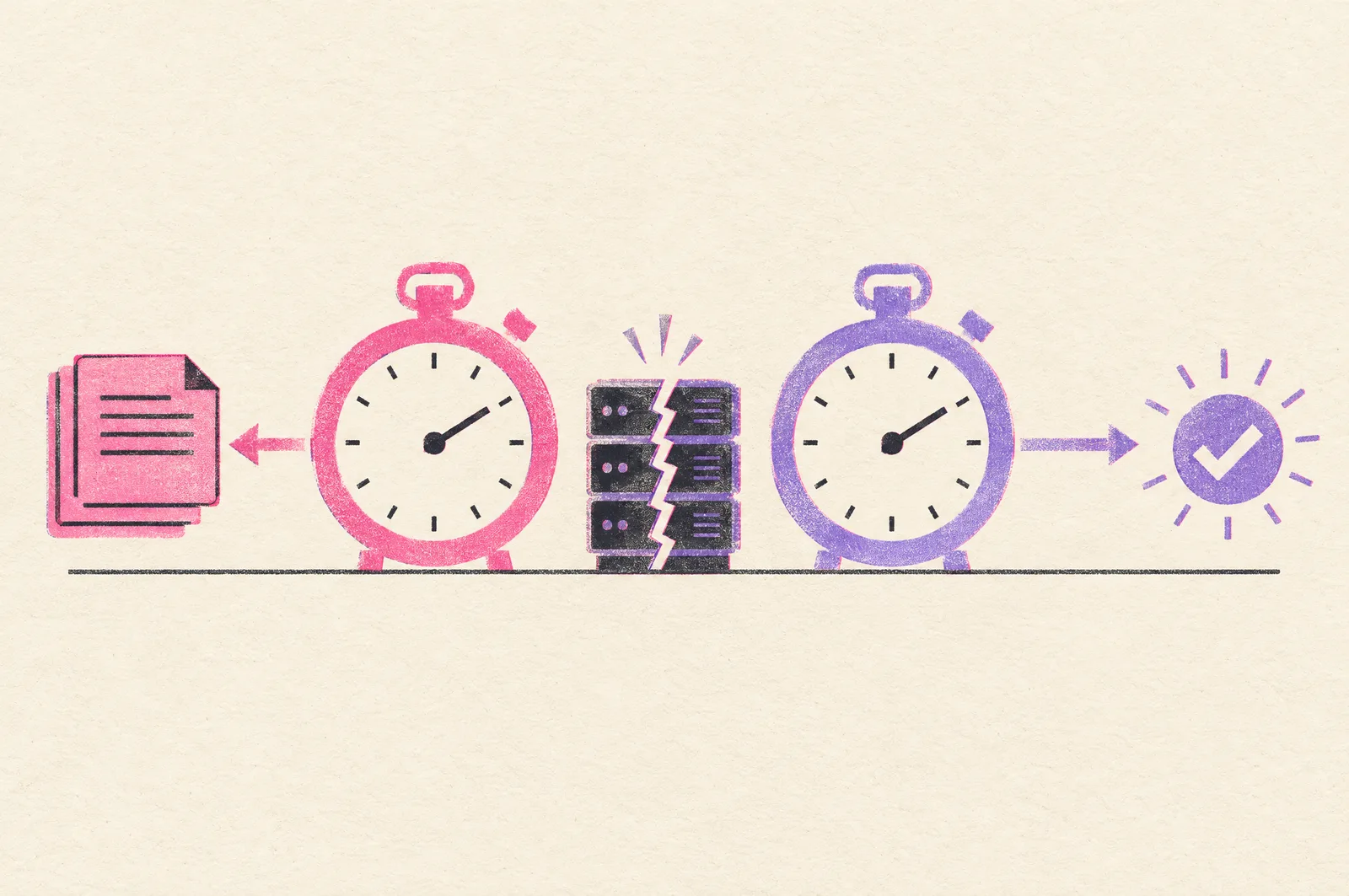
RTO and RPO are 2 clocks around the same failure
Picture the failure as a point on a timeline.
RPO runs backward from it: how old is the newest copy of the data you can still use?
RTO runs forward from it: how long until users are served again?
last good copy →
(RPO)
→ failure →
→ detect → decide → restore → verify → reconnect →
(RTO)
→ traffic back
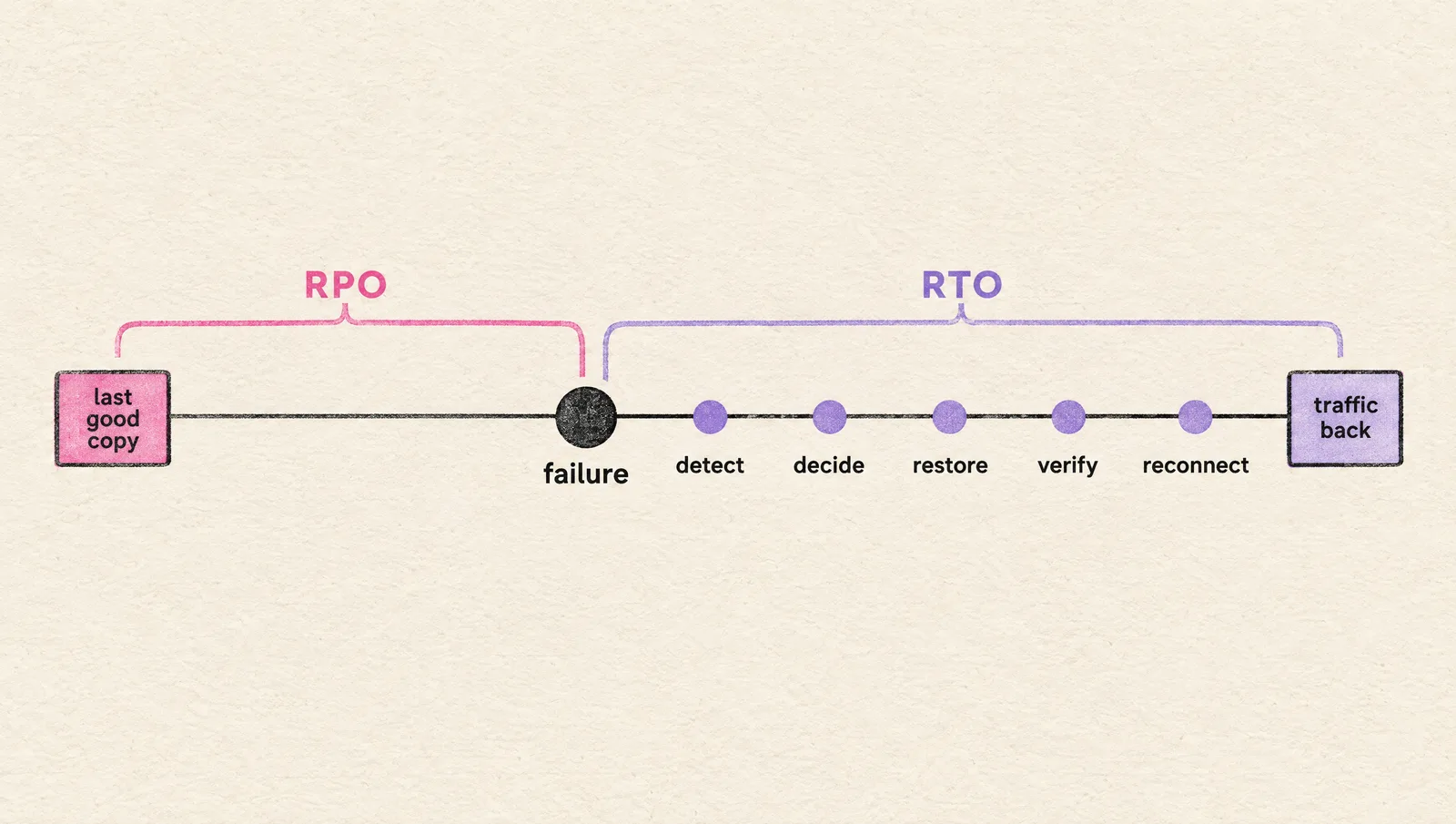
The 2 clocks are independent.
A nightly backup restored in 20 minutes = RTO 20 minutes, RPO 24 hours.
A synchronous replica with no runbook = RPO 0, RTO "whenever someone wakes up".
Both are objectives, so both are promises.
The measured versions have their own names: recovery time actual and recovery point actual.
The gap between the promise and the measurement is where every bad incident review starts.
Why both numbers end up in a questionnaire
Your enterprise customer has an RTO of their own. Your service is a dependency inside it.
SOC 2's availability criteria ask for the same 3 things, in order: backups, recovery infrastructure, and a tested recovery plan.
So the buyer asks, the auditor asks, and the number you give becomes a clause in the service level agreement (SLA). Give one you have measured.
Set the targets from the cost of being down, per system
One RTO for the whole company is wrong twice: too expensive for the analytics database and too slow for the product API.
Tier the systems. 3 tiers are enough for a company under 200 engineers:
- Tier 1: what customers touch and what it writes to. The product API, auth, the primary database, the object storage behind uploads
- Tier 2: what the business runs on. Async workers, internal admin, billing jobs, the CI that ships the fix
- Tier 3: what can wait a day. Analytics, the data warehouse, logs older than the incident, staging
Then 2 questions per tier, answered by the person who owns the revenue, with you in the room:
- How long can this be down before we lose customers, money or a compliance obligation? That answer is the RTO.
- How much of the data written since the last copy can we re-enter, re-process or lose? That answer is the RPO.
Rule: if 1 hour of downtime costs more than 1 month of the setup that prevents it, buy the setup.
Write the answers in a table. This is the shape, filled for a typical B2B SaaS:
| System | Tier | RTO | RPO | Met by |
|---|---|---|---|---|
| Product API and primary database | 1 | 1 hour | 5 minutes | Multi-AZ, point-in-time recovery, the stack in IaC |
| Customer uploads (object storage) | 1 | 1 hour | 15 minutes | Versioning, cross-region replication |
| Async workers, internal admin | 2 | 4 hours | 1 hour | Redeploy from Git, hourly snapshots, queue replay |
| Analytics, data warehouse | 3 | 1 business day | 24 hours | Nightly snapshot, rebuild from the sources |
If you cannot name the person who agreed to lose 5 minutes of data, the RPO is a default you inherited.
RPO is backup arithmetic
RPO = the time between copies + the lag of the copy.
Nothing else moves it. The numbers below are AWS's, from its own documentation; GCP and Azure have the same mechanisms under other names.
| Copy mechanism | RPO you get | Covers | Leaves open |
|---|---|---|---|
| Nightly snapshot | Up to 24 hours | Deletion, corruption, region loss if copied out | Everything written today |
| RDS automated backups with point-in-time recovery (transaction logs shipped every 5 minutes) | About 5 minutes | Deletion, a bad migration, corruption | Region loss, unless the backups are copied out |
| Multi-AZ synchronous standby | 0 | Instance loss, AZ loss | A DROP TABLE (the standby replicates it too) |
| Cross-region asynchronous replica (Aurora Global Database, typical lag under 1 second) | About 1 second | Region loss | Corruption (replicated too) |
| S3 versioning plus cross-region replication (most objects in seconds, 99.9% within 15 minutes with Replication Time Control) | Seconds to 15 minutes | Deletion, region loss | Deletes are replicated only if you turn that on |
| EBS snapshots on a schedule (incremental, stored in S3) | Your schedule | Volume loss | Everything, until you schedule them: AWS does not back up EBS on its own |
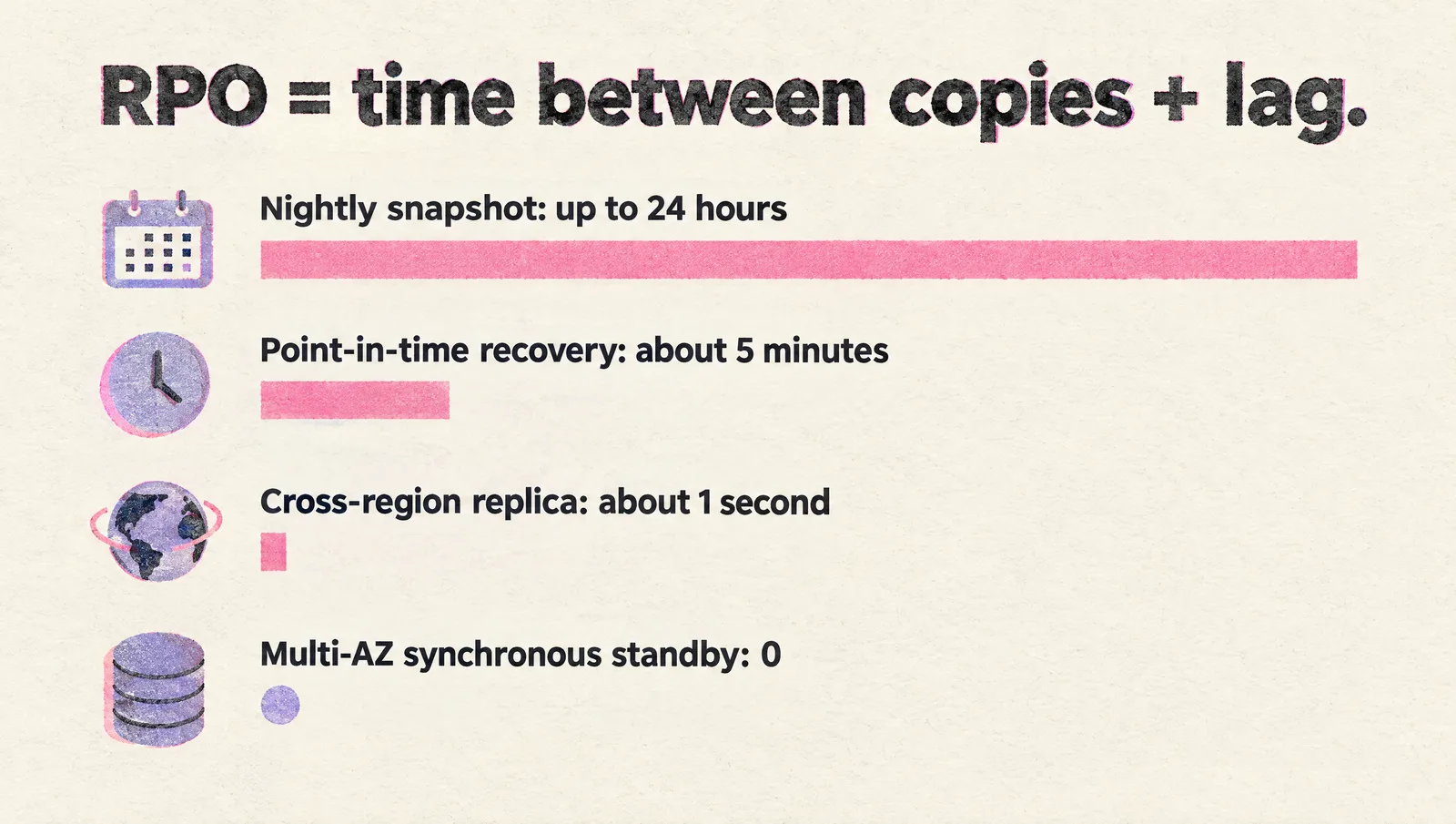
3 things the table hides:
- A replica copies your mistakes at full speed. The copy that saves you from a bad migration is the point-in-time one. You need both kinds for Tier 1
- Retention is part of RPO. RDS keeps automated backups 1 day by default from the CLI, 7 days from the console, 35 at most, and 0 turns them off. A corruption noticed on day 8 with 7 days of retention has no copy to go back to. Retention must outlast your time to notice
- Same account = same blast radius. AWS Backup copies backups to another region and another account. Do that for Tier 1, because a compromised account can delete its own backups
The honest answer to "is your RPO zero": only a synchronous copy gives 0, and only for the failures it covers. For a human error your RPO is the point-in-time granularity, about 5 minutes on RDS. Write that in the questionnaire. Buyers trust the exact number more than the round one.
RTO is a sum of steps you can time
RTO = detect + decide + restore + verify + reconnect.
Each step is a number you can measure. 2 failures on the same database:
The availability zone dies, Multi-AZ is on.
detect: RDS does it, 0 for you →
decide: automatic →
restore: failover, typically 60 to 120 seconds →
verify: your health checks →
reconnect: the database's DNS name now points at the standby, so every open connection must be reopened
Total: about 2 minutes, if the app reconnects on its own. Hours, if it caches the old address and nobody is paged. AWS tells Java shops to cap the JVM's DNS cache at 60 seconds for this reason.
A migration drops the wrong table at 10:42.
detect: when support notices, or when your alerts do →
decide: someone with authority picks the restore time (10:41) and accepts losing everything after it →
restore: a point-in-time restore creates a NEW instance; a large database runs for a long time, and after it reports available it keeps loading blocks from S3 in the background →
verify: is the table back, is the data right →
reconnect: repoint the app at the new endpoint, rotate the secret, restart
Total: hours the first time. Under an hour from the second time on, if someone wrote down what happened the first time.
Detect is the step startups skip. The database can fail over in 2 minutes and nobody knows for 2 hours. That is an alerting problem, and I wrote about it in how to design on-call before you hire an SRE.
Restore is the step that needs infrastructure as code. AWS says it in its disaster recovery whitepaper: without IaC, redeploying in the recovery region gets complex, takes longer, and may exceed your RTO. The whole stack from a repo in 1 command is also the definition of a one-click environment.
Reconnect is the step that needs rehearsal: DNS TTLs, connection pools, secrets, and the hard coded endpoint in the 1 service nobody owns.
The 4 recovery patterns, and what each one costs
AWS's disaster recovery whitepaper lines up 4 strategies for a second region. GCP and Azure describe the same 4 with other names.
| Pattern | What runs in the second region | RTO and RPO (AWS's figure) | What you pay for |
|---|---|---|---|
| Backup and restore | Copies of data and code, nothing running | Hours | Storage |
| Pilot light | Data stores replicating; apps deployed but switched off | Tens of minutes | A second database, always on |
| Warm standby | A scaled down, fully working copy | Minutes | A small second production |
| Multi-site active/active | Full production, serving traffic | Near zero | 2 productions, plus the engineering for writes in 2 regions |
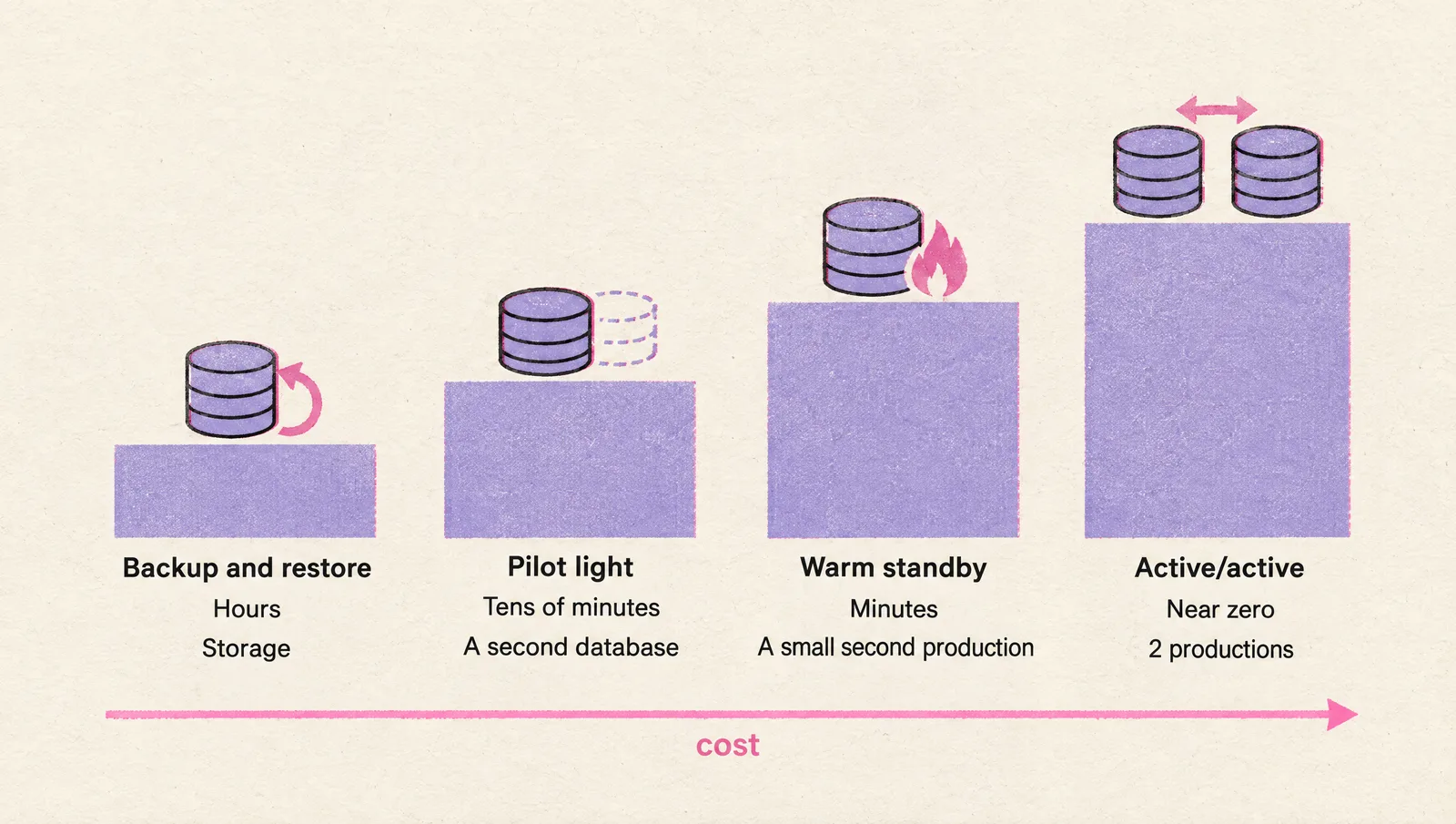
My position: for a startup in 1 region, Multi-AZ plus tested backups (pattern 1, done well) covers every failure you will realistically have. AWS agrees in the same whitepaper: for the loss of 1 data center, a well-architected, highly available workload may only require backup and restore.
Move to pilot light or warm standby for 1 of 3 reasons: a contract says so, a regulator says so, or 1 hour of downtime costs more than the second region (the rule above).
A security questionnaire is passed with a measured RTO, a measured RPO and a plan the auditor can read. Multi-region is for the 3 reasons.
One caveat, straight from AWS: automatic failover between regions deserves caution. A false alarm fails you over for nothing, and recovery time and recovery point are never zero.
What works is a manual decision that presses 1 button, with every step behind the button automated.
The AWS parts of that button: Route 53 health checks (a 30 second interval as standard, 10 seconds as fast, times a failure threshold of consecutive checks) and Application Recovery Controller.
Active/active is where the whiteboard gets exciting and the budget gets quiet. Data corruption still needs backups there, so the RPO for a bad deploy stays above zero at twice the bill. (That part is rarely on the whiteboard.)
Measure the real RTO with a restore drill
There's a famous quote I've just invented: "A backup you never restored is a rumor."
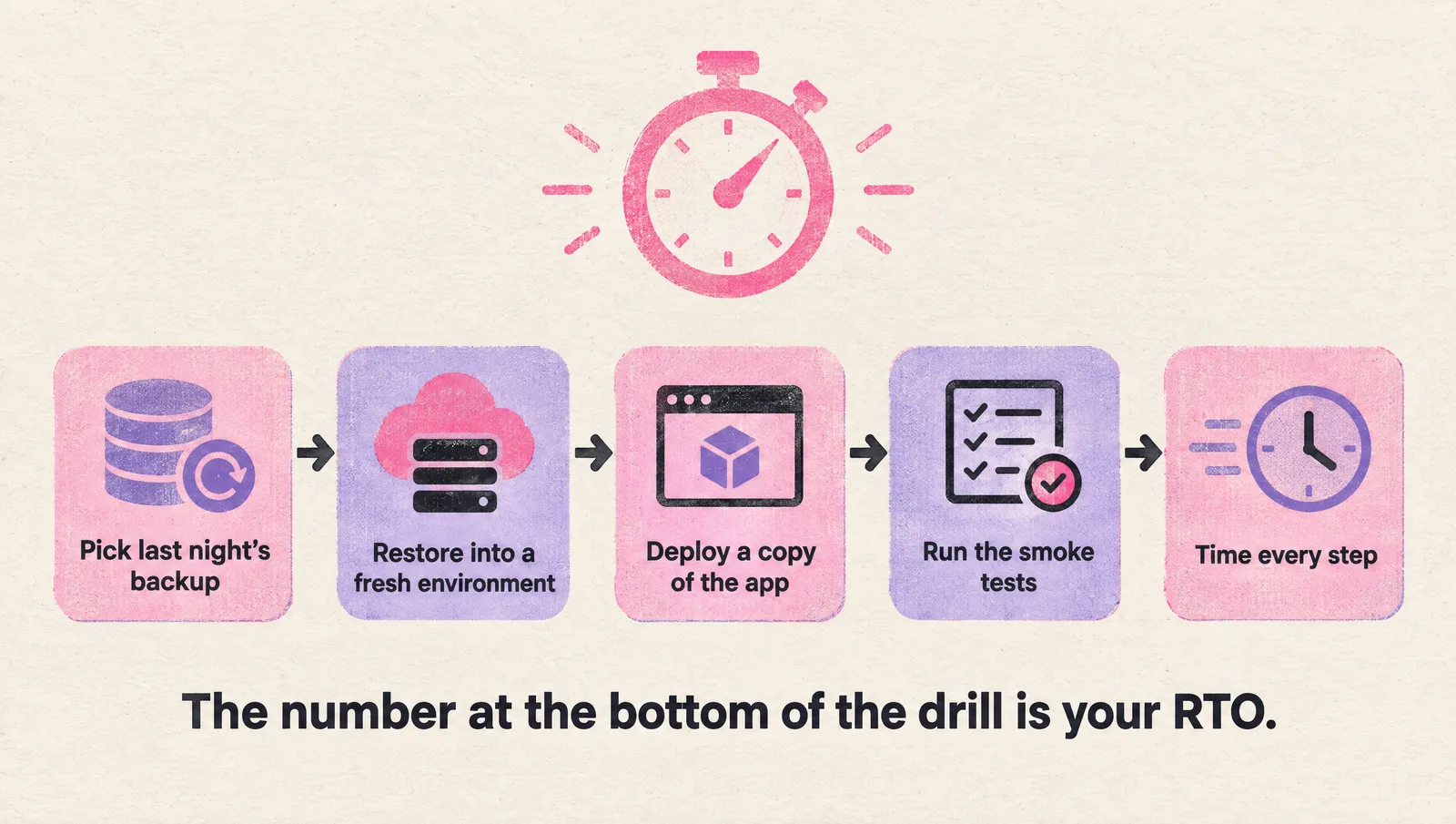
The drill, once a quarter, for Tier 1:
- Pick last night's backup, or a point in time from 1 hour ago
- Restore it into a fresh environment: a new database instance of the same class, from IaC
- Deploy a copy of the app against it, from the same Git commit as production
- Run the smoke tests you run after every deploy
- Time every step and write the numbers next to the plan
On RDS the restore is 1 command:
aws rds restore-db-instance-to-point-in-time \
  --source-db-instance-identifier prod \
  --target-db-instance-identifier drill-2026-11 \
  --use-latest-restorable-time
The number at the bottom of the drill is your RTO. Whatever the document says.
What the first drill finds, at almost every company:
- The IAM role that can restore belongs to someone who left
- The app reads its database endpoint from a secret that was set once, by hand
- The restored instance is "available" and slow for an hour, because it is still loading blocks from S3
- The runbook is in a wiki hosted on the system that is down
- Nobody knows who is allowed to say "restore to 10:41 and lose the rest"
Every one of those is a line in your RTO. The drill is how the lines get shorter.
Automate the restore and the drill becomes cheap. AWS suggests a scheduled job that restores the latest backup, runs checks and deletes the instance. Restore is a control plane operation, so if the control plane is impaired during a real event, a recently restored copy already exists.
Measure RPO in the same drill: the timestamp of the newest row in the restored copy against the time you started. That gap is the recovery point you actually have.
Kubernetes moves the state, and the question
On Kubernetes the cluster is disposable. Treat it that way.
RTO of a stateless cluster = terraform apply + the GitOps sync. If both run from a repo, you can time it today in a sandbox account.
The data belongs outside the cluster: managed databases, object storage, managed caches. Their RTO and RPO come from the tables above.
Persistent volumes are the exception. For them: a VolumeSnapshot schedule, copied to another region for Tier 1. Velero is the usual tool. It writes the cluster objects to object storage, snapshots the volumes through the cloud API, and runs on a cron expression. On restore it skips objects that already exist, so drill the restore into an empty cluster.
Rule: anything whose RPO matters lives in a service with point-in-time recovery, outside the cluster.
Put the numbers where they get used
A recovery target lives in 4 places. Keep them in sync:
- The security questionnaire: the tier table, 1 line per system, with a "last tested" date
- The SOC 2 evidence: the backup configuration, the drill log, and the plan below (most of the availability criteria, see SOC 2 compliance)
- The SLA: the RTO in the contract is the one you measured, with margin
- The on-call runbook: the restore steps, kept outside the system they restore
The disaster recovery plan, on 1 page
The template I use fits on 1 page, under 9 headings:
- Scope: the systems, by tier
- Targets: RTO and RPO per tier, and who agreed to them
- Copies: what is backed up, how often, the retention, which region and which account
- Scenarios covered: instance loss, AZ loss, region loss, deletion or corruption, account compromise
- Runbook per scenario: numbered steps, with the commands
- Roles: who declares the incident, who restores, who talks to customers
- Access: break-glass credentials, and where this document lives (outside the system)
- Test log: date, scenario, measured RTO and RPO, what broke
- Review: quarterly, and after every architecture change
Headings 8 and 9 are what separates a plan from a PDF.
Mistakes I keep seeing
- An RTO of 15 minutes on a database that fails over in 2 and an app that reconnects in 40: the connection pool was never tested against a failover
- "RPO 0" above nightly snapshots: copied from a vendor page
- Backups in the production account: a compromised account deletes them; copy to a second account
- 7 days of retention and a 10 day time to notice: retention has to outlast detection
- A region failover nobody may trigger: the button exists and nobody was given the authority to press it
- Backups that were never restored: see the famous quote
- The runbook in the wiki that is down with everything else: keep a copy where the incident cannot reach
Checklist
Always:
- Tier your systems and write an RTO and RPO per tier, with the owner's name
- Point-in-time recovery on every Tier 1 database, with retention longer than your time to notice
- Multi-AZ on Tier 1 databases, and an app proven to reconnect after a failover
- Tier 1 backups copied to another region and another account
- Versioning on the object storage that holds customer data
- The whole stack in a repo, so restore is a redeploy
- Alerts that reach a person for every Tier 1 failure
- A timed restore drill every quarter, with the numbers in the plan
- A 1 page plan with roles, access and the test log, stored outside the system
- The measured numbers in the questionnaire and the SLA, with margin
FAQ
Should RTO be longer than RPO?
Usually it is, and nothing requires it. They measure different things: RPO is the age of your newest copy, RTO is the time until service returns. A typical SaaS runs RPO 5 minutes and RTO 1 hour. The reverse exists too: a synchronous replica (RPO 0) with a manual failover nobody rehearsed (RTO hours).
How is RPO calculated?
Start from the business: how much data, measured in time, can this system lose? Then check the mechanism: the time between copies plus the lag of the copy. The real RPO is the larger of what the business accepted and what the mechanism delivers, and the drill tells you which one you have.
What is RTO in simple terms?
The longest the service is allowed to be down after a failure. It is the sum of detecting the failure, deciding what to do, restoring, verifying and reconnecting the application. Each part can be timed, so the total can be measured.
What are RTO, RPO and MTPD?
MTPD is the maximum tolerable period of disruption: the point past which the damage to the business becomes unacceptable. RTO is the target you set to stay well inside it, and RPO is the data loss you accept on the way. If your RTO equals your MTPD you have no margin.
What is the difference between RTO and MTTR?
RTO is the target for 1 incident. MTTR (mean time to recovery) is the average you measured across past incidents. For Tier 1 the MTTR should sit below the RTO with room to spare, and the drill log is where you check.
What RTO and RPO should a SaaS startup promise?
The ones you measured, with margin. A workable start for Tier 1 on a managed cloud database is RTO 1 hour and RPO 5 minutes, met by Multi-AZ and point-in-time recovery. Promise 15 minutes only after a drill has shown 15 minutes 3 times.
Can RPO be zero?
Only with synchronous replication, and only for the failures it covers, such as losing an availability zone. For a deletion or a bad migration the replica copies the damage, and your RPO is the granularity of point-in-time recovery, about 5 minutes on RDS.
How often should you test disaster recovery?
Once a quarter for Tier 1, and after every architecture change that touches the data path. Automate the restore and the quarterly drill drops to a review of the timings.
A recap
If you take away 1 thing, let it be this: RPO is how you copy the data, RTO is how you run the system, and both are wishes until a drill measures them.
Tier the systems. Set 2 numbers per tier with the owner. Build RPO with point-in-time recovery and replication. Build RTO with IaC, alerts and a rehearsed runbook. Measure both every quarter. Put the measured numbers in the questionnaire.
You don't NEED a DevOps expert for the first drill. A Friday afternoon and a sandbox account get you the first honest number.
If you would rather do it with people who have run it at 200+ companies, book a free production setup consultation.
P.S. The CTO DevOps Handbook has "architect for high availability" in its Always list. This article is what that line costs, and how to prove it.