

An on-call rotation is a schedule that names one engineer (the primary) to answer production pages for a fixed period, usually one week, with a secondary as backup and a clear escalation path above them. For a small team, the right rotation is weekly primary and secondary, paging only on customer impact, with written handoffs and runbooks.
You do not need a Site Reliability Engineering (SRE) team to run on-call well. You need named owners, a schedule people can actually sustain, alerts that only fire when a human must act, and an escalation policy that gets the right person involved without a debate at 3 a.m. This guide covers each of those for teams of 3 to 15 engineers: rotation types, team-size math, escalation rules, paging hygiene, handoffs, compensation and tooling, plus a schedule template you can copy.
On-call rotation basics: primary, secondary and escalation
Every working rotation has the same three layers, whatever tool you use:
- Primary on-call: receives every page first, acknowledges it, and owns the first response: triage, mitigation, and calling for help.
- Secondary on-call: is paged automatically if the primary does not acknowledge in time, and joins any incident that needs a second pair of hands.
- Escalation contact: usually an engineering lead or CTO, who joins for customer-facing outages, security incidents, and decisions with business risk such as rolling back a migration or putting the product into read-only mode.
A shift is the period one person holds the primary pager. The rotation is the order in which people take shifts. The schedule is the rotation laid out on a calendar with overrides for holidays and sick days. When people search for "on call schedule" they usually want the last one, so there is a template further down.
Rotation types compared
Pick the rotation type from your team size and where your engineers live, not from what a large company does. These are the patterns that work in practice:
| Rotation type | How it works | Good for | Watch out for |
|---|---|---|---|
| Weekly primary only | One person holds the pager for 7 days, then hands over | Teams of 3 to 4 with low page volume | No backup when the primary is unreachable; burnout if pages are frequent |
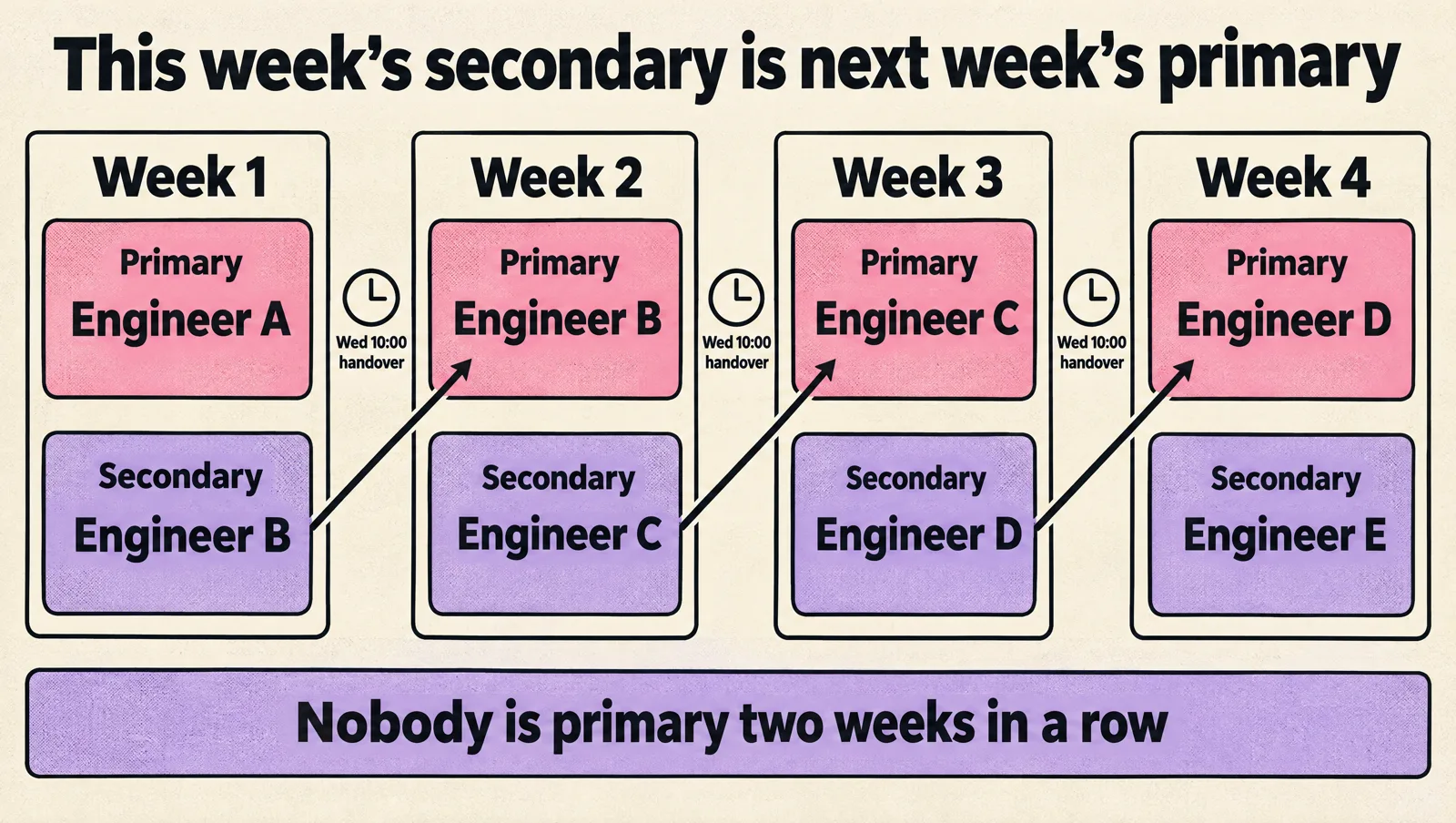
| Weekly primary and secondary | This week's secondary becomes next week's primary | Most teams of 4 to 10 | Each person holds a pager 2 weeks out of every N |
| Business hours plus best effort | Formal paging only during working hours; nights are best effort or limited to SEV1 | Very small teams, B2B products with daytime usage | Must be agreed with leadership and reflected in customer commitments |
| Weekday and weekend split | One person covers Monday to Friday, another covers the weekend | Teams where weekend load is low but non-zero | Weekend shifts feel heavier; rotate them fairly |
| Follow the sun | Two or three regions each cover their own daytime, 8 to 12 hours each | Teams spread across time zones with at least 2 to 3 people per region | Handoff quality between regions becomes the main failure point |
| Service-based rotations | Each team carries its own pager for the services it owns | Organizations with several product teams and clear ownership | Needs a cross-team escalation path for shared infrastructure |
Default recommendation for a startup: weekly primary and secondary, handover on a weekday morning (never Friday evening or Monday 9 a.m.), with paging limited to customer impact. Move to follow the sun only when you genuinely have people awake in another region.
How many engineers you need for a sustainable rotation
Rotation math is simple, and it is the most common thing teams get wrong. With a weekly rotation of N people, each person is primary one week in N. Add a secondary and each person holds a pager 2 weeks in N.
| Engineers in rotation | Primary weeks per year (each) | Pager weeks per year with secondary (each) | Verdict |
|---|---|---|---|
| 2 | 26 | 52 | Not sustainable for 24/7. Use business hours only. |
| 3 | about 17 | about 35 | Fragile. One vacation breaks it. |
| 4 | 13 | 26 | Workable if pages are rare. |
| 6 | about 9 | about 17 | Comfortable for most startups. |
| 8 | 6.5 | 13 | Healthy for 24/7 from one site. |
Google's SRE book gives two reference points that hold up well outside Google: on-call should take no more than 25% of an engineer's time, and a 24/7 rotation from a single site needs at least eight engineers (six per site for a two-site follow-the-sun setup). It also suggests a ceiling of about two incidents per 12-hour shift, because each real incident takes hours once you include the follow-up. See Being On-Call in the Google SRE book.
If you are below those numbers, that is normal for a startup. Compensate by narrowing what pages (customer impact only), shortening the paging window, and widening the rotation: include every engineer who ships to production, not just the "infra person".
Severity levels and paging rules
Paging rules decide whether on-call is tolerable. Agree on severity before the first bad night, then map each level to a response:
| Severity | Example | Response |
|---|---|---|
| SEV1 | Checkout, login or the core API is down for most users; data loss risk; security incident | Page primary immediately, 24/7. Escalate to secondary after 5 minutes without acknowledgement. |
| SEV2 | Partial degradation, one region or a subset of customers affected, a critical background job stopped | Page during the agreed coverage window; otherwise notify the on-call channel. |
| SEV3 | Elevated errors below customer impact thresholds, a flaky job, a degraded internal tool | Ticket for the next working day. Never pages at night. |
| SEV4 | Noisy alert, cleanup, known bug | Backlog. |
The 5 minute acknowledgement for user-facing services and around 30 minutes for less time-critical systems match the response targets in the Google SRE book. Pick numbers your team can meet consistently; a promise of 5 minutes that is missed every second weekend is worse than an honest 15.
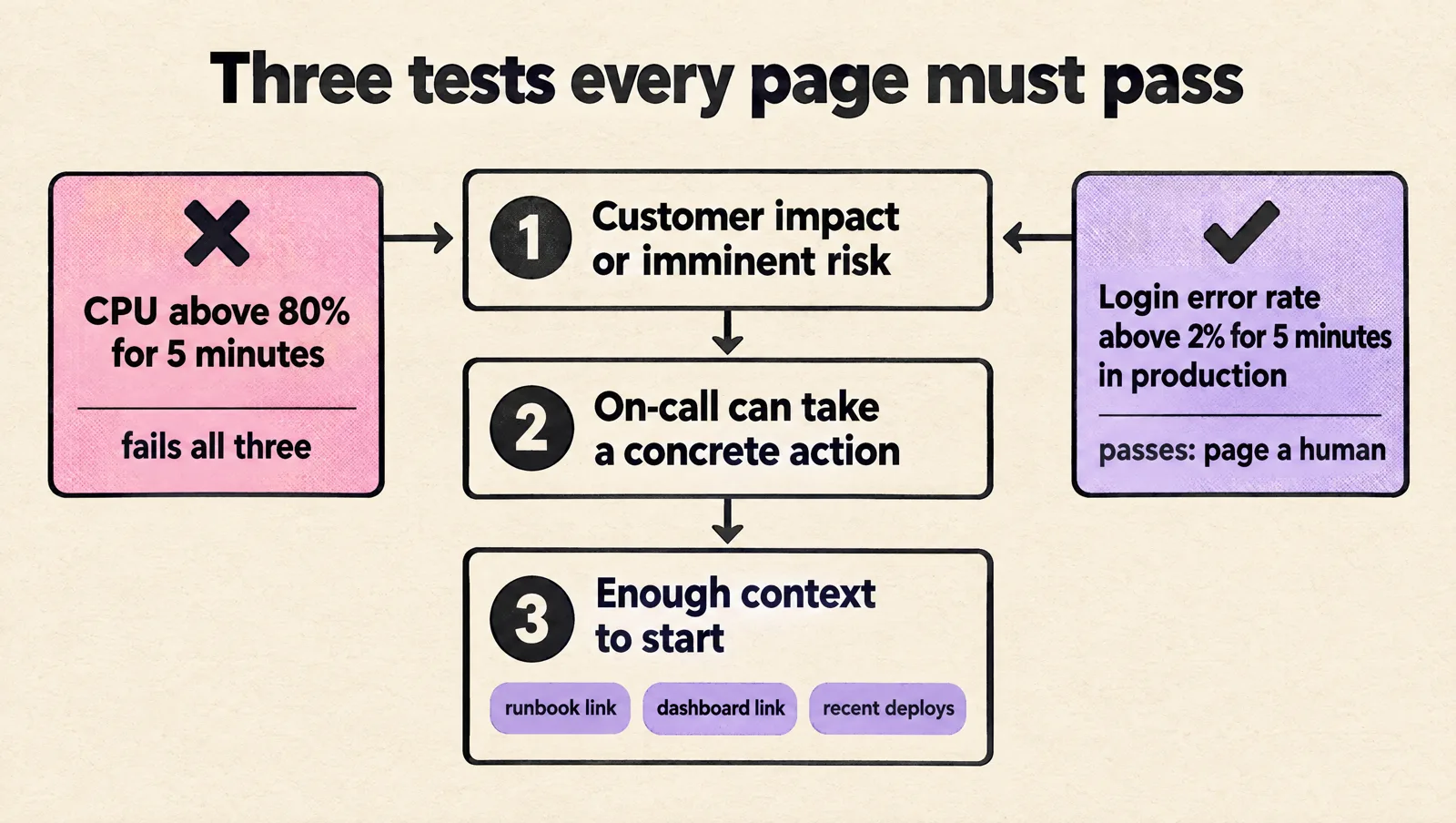
Every page should pass three tests: it reflects customer impact or imminent risk of it, the on-call engineer can take a concrete action, and the alert carries enough context to start (service, environment, severity, dashboard link, runbook link, recent deploys). "CPU above 80% for 5 minutes" usually fails all three. "Login error rate above 2% for 5 minutes in production" passes. If your team already ignores alerts, fix that before building the rotation; our guide to handling alert fatigue covers how.
Escalation policy example
An escalation policy is the ordered list of who gets paged, and when, if nobody acknowledges. Write it down in your paging tool and in the runbook. A good default for a small team:
Escalation policy: production-critical
Level 1: current primary on-call
         page by push + SMS + phone call
         escalate if not acknowledged in 5 minutes
Level 2: current secondary on-call
         escalate if not acknowledged in 10 minutes
Level 3: engineering lead (or CTO)
Repeat:  restart at level 1 up to 2 times

Escalation policy: business-hours
Level 1: current primary on-call, push notification only
         Mon to Fri, 09:00 to 18:00 local time
Outside hours: post to #oncall, create a ticket
Also write down when the primary should escalate by choice, not just by timeout: the incident affects paying customers, the failing component is not clear after 15 minutes, a rollback risks data inconsistency, the fix needs access the primary does not have, or the same alert keeps firing after mitigation. Escalating early is a skill, not a failure.

On-call schedule template
Copy this for a six-person team running weekly primary and secondary, with handover on Wednesday at 10:00. Wednesday handovers keep both people at work for the handoff and avoid starting a shift on a weekend.
| Week starting (Wed 10:00) | Primary | Secondary | Notes |
|---|---|---|---|
| Week 1 | Engineer A | Engineer B | |
| Week 2 | Engineer B | Engineer C | |
| Week 3 | Engineer C | Engineer D | Release freeze, extra care |
| Week 4 | Engineer D | Engineer E | |
| Week 5 | Engineer E | Engineer F | Public holiday Thursday: override to Engineer A |
| Week 6 | Engineer F | Engineer A |
Rules that keep it fair: swaps are allowed if both people agree and the tool is updated, holidays are distributed across the year, nobody is primary two weeks in a row, and new joiners shadow one full shift as an extra secondary before taking primary.
Handoff checklist
A five-minute handoff prevents most "nobody told me" incidents. The outgoing primary posts this in the on-call channel:
- Incidents and pages from the past shift, and anything still open.
- Deploys, migrations or config changes that changed production behavior.
- Known degraded dependencies, temporary alerts, or silenced monitors (with expiry).
- Upcoming risky work: launches, load tests, database maintenance.
- Alerts that fired but were not actionable, so they get fixed instead of ignored.
Runbooks and access for the person holding the pager
The on-call engineer should never need to ask "am I allowed to roll this back?" Write runbooks for the incidents you can predict, starting with the top five by frequency: roll back a bad deploy, restart or scale a stuck worker, handle database connection exhaustion, investigate a spike in API errors, rotate a leaked secret. Each runbook needs symptoms, first checks, safe mitigations, risky actions to avoid, and who to call.
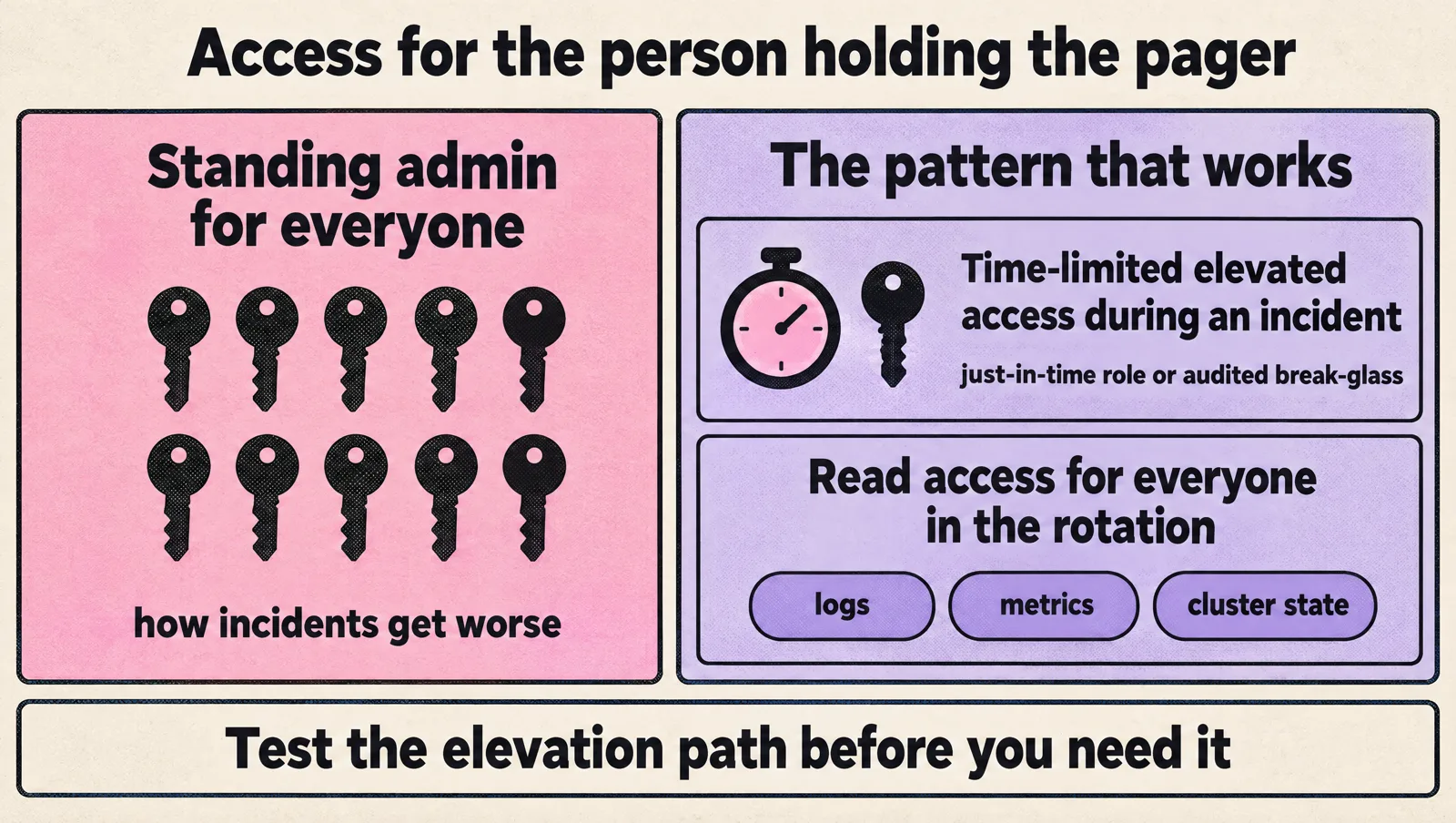
Access is the part teams forget. The primary needs enough access to diagnose and mitigate, but standing admin access for everyone is how incidents get worse. The pattern that works: read access to logs, metrics and cluster state for everyone in the rotation, plus time-limited elevated access (just-in-time roles, or an audited break-glass role) that the on-call engineer can grant themselves during an incident. This also answers a common question: you can remove standing production access from the team without breaking on-call, as long as the elevation path is tested before you need it.
On-call compensation and burnout
On-call is work outside normal hours, and teams that treat it as free eventually lose their most reliable engineers. The common compensation models are:
- Flat stipend per shift: a fixed amount for each week on primary, regardless of pages. Simple and predictable.
- Per-incident or hourly pay: paid for time actually spent responding outside hours. Fairer when load is uneven, more admin.
- Time off in lieu: a late-morning start or a day off after a rough night. Cheap and often the most appreciated.
- Combination: a small stipend plus time off after any night page.
Labor rules on standby time vary by country, so check local requirements before you set a policy. Beyond money, the strongest burnout controls are operational: track pages per shift, review every night page in a weekly on-call review, and give the on-call engineer explicit permission to spend quiet shift time fixing the alerts that woke them up.
On-call tools: what each is good at
The tool matters less than the policy, but the tool should make schedules, overrides and escalations easy to see and change.
| Tool | Strength | Note |
|---|---|---|
| PagerDuty | Mature scheduling, escalation policies and integrations | The reference product; cost grows with team size |
| incident.io | On-call plus incident workflow inside Slack | Strong if incidents already run in Slack |
| Grafana Cloud IRM | On-call and incident response next to Grafana dashboards and alerts | Natural fit if you already use Grafana |
| Rootly, FireHydrant | Incident management with on-call scheduling | Compare their paging reliability and pricing for your size |
| Opsgenie | Long-time PagerDuty alternative | Atlassian ended new sales on June 4, 2025 and shuts it down on April 5, 2027; plan a migration (Atlassian notice) |
Whatever you choose, test it: trigger a test page to each person's phone during onboarding, confirm phone-call escalation works with Do Not Disturb on, and review the schedule for gaps every month.
Common on-call mistakes in small teams
- One hero on permanent call. The person who built the infrastructure answers every page. It feels efficient until they leave or burn out.
- Paging on symptoms nobody can act on. Resource alerts without user impact train people to ignore the pager.
- No secondary. A dead phone battery becomes a full outage.
- Handover on Monday morning. The outgoing person is already in planning meetings and the handoff gets skipped.
- Runbooks that live in someone's head. The first incident handled by a new engineer becomes a guessing game.
- No review of pages. The same noisy alert wakes someone every week and nothing changes.
A 30-day plan to launch on-call before you hire SRE
- Week 1: list your production services and name an owner for each. Agree severity levels and the paging window with leadership.
- Week 2: audit alerts. Delete or downgrade anything that does not pass the three tests. Add the missing customer-impact alerts (error rate, latency, failed critical jobs).
- Week 3: set up the schedule and escalation policy in your tool, write the top five runbooks, and set up just-in-time elevated access.
- Week 4: run a game day: trigger a realistic failure in staging and have the primary handle it end to end. Fix what was confusing, then go live.
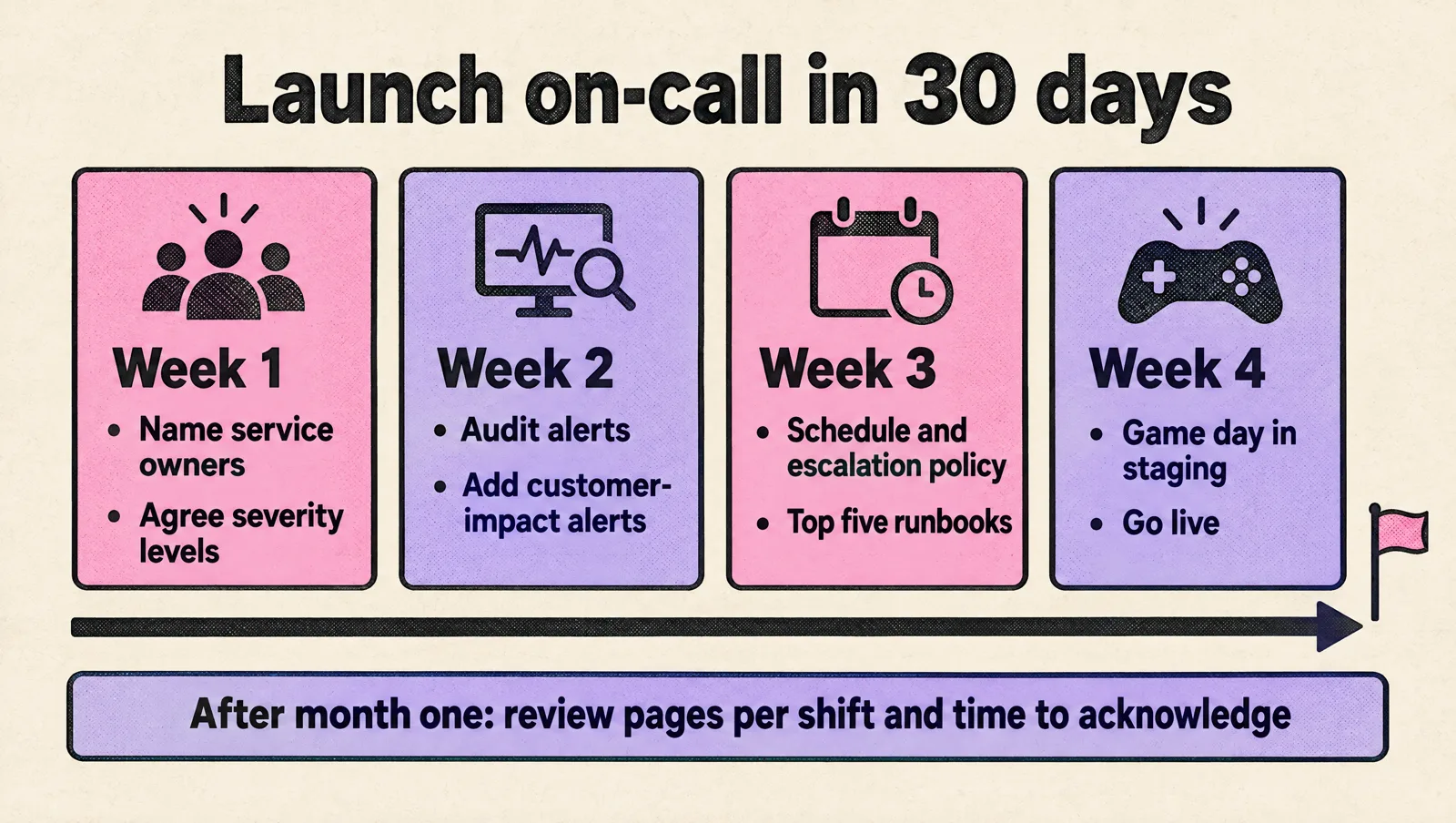
Plan to revisit after the first month: pages per shift, time to acknowledge, and which alerts woke people for nothing. When the rotation itself becomes the bottleneck, that is the signal to formalize the role; our guide on how to build a DevOps team covers that decision.
On-call rotation FAQ
What is an on-call rotation?
An on-call rotation is a repeating schedule that assigns one engineer at a time to respond to production alerts, usually for a week. A secondary backs up the primary, and an escalation policy defines who gets paged if nobody acknowledges.
How do you set up on-call rotations for a small engineering team?
Start with a weekly primary and secondary rotation that includes every engineer who ships to production, page only on customer impact, and hand over midweek with a short written checklist. With fewer than four people, limit formal paging to business hours plus SEV1 at night.
How does an on-call schedule work?
The schedule assigns shifts on a calendar, the paging tool routes alerts to whoever is on shift, and overrides cover holidays and swaps. If the primary does not acknowledge within the agreed time, the escalation policy pages the secondary, then a lead.
How long should an on-call shift be?
One week is the most common and works well for small teams because it limits handovers. Follow-the-sun teams use 8 to 12 hour shifts per region. Avoid shifts longer than a week unless pages are very rare.
Should engineers be paid for on-call?
Most companies compensate on-call through a stipend per shift, pay for time spent on incidents, time off in lieu, or a mix. Unpaid on-call with frequent night pages is one of the fastest ways to lose senior engineers, and local labor rules may require compensation.
Do I need an SRE team to run on-call?
No. Product engineers can run a healthy rotation if ownership, alerting, runbooks and escalation are in place. An SRE function becomes worth it when reliability work consistently competes with product work and the rotation is large enough to need dedicated ownership.
How many people do you need for 24/7 on-call?
Google's SRE guidance puts the minimum at eight engineers for a single-site 24/7 rotation, or six per site for two sites. Smaller teams can still cover 24/7 by keeping night paging to true emergencies and keeping page volume low.
If you need production covered before your team is big enough to carry a pager sustainably, MeteorOps provides SRE on-call support that plugs into your existing rotation and tooling.