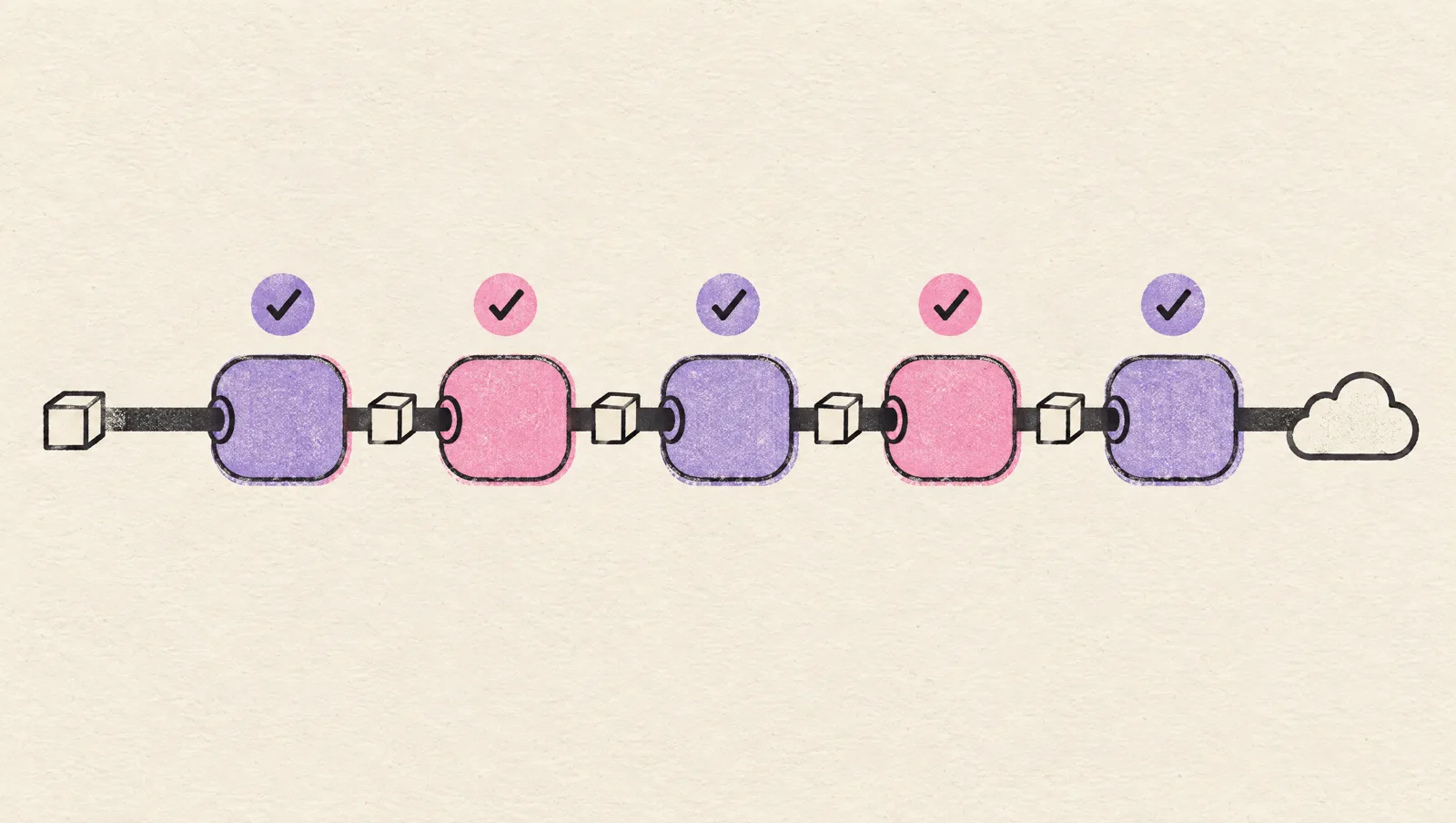

A CI/CD pipeline is the automated path a code change takes from a commit to production: build, test, package, deploy. 5 things to know before you build one:
Bottom line
- CI = everyone merges to main at least daily, and every merge is built and tested. A tool that runs tests on a branch that lives for 3 weeks is a test runner
- CD = the latest build can go to production at any time. Continuous delivery keeps a human click before production. Continuous deployment removes the click
- Build once. The artifact that passed the tests is the artifact that reaches production. A rebuild per environment ships something nobody tested
- 10 minutes. That is the budget from push to a red or green answer. Slower checks move to a later stage
- The pipeline holds the keys to production. Treat its config, its permissions and its third-party steps like production code
The whole thing in 1 line:
commit → build → test → package → deploy to staging → approve → deploy to production → verify
A small pipeline that works, on GitHub Actions (the full version with deploys is below):
name: ci
on:
  pull_request:
  push:
    branches: [main]

permissions:
  contents: read

jobs:
  test:
    runs-on: ubuntu-latest
    timeout-minutes: 10
    steps:
      - uses: actions/checkout@v7
      - uses: actions/setup-node@v7
        with:
          node-version: 24
          cache: 'npm'
      - run: npm ci
      - run: npm test
A pipeline that is slow, flaky, or that nobody dares to touch? Get a free DevOps assessment: a senior engineer reviews your CI/CD, infra, Kubernetes, cloud cost and on-call setup.
Find your situation:
- You are explaining CI/CD to someone: CI, delivery and deployment in 3 lines
- You have no pipeline yet: what to build first
- You want a file to copy: the GitHub Actions example
- Your pipeline takes 30 minutes: the 10 minute budget
- Deploys scare the team: deploy and release are 2 decisions
- You are choosing a tool: the tools table
- Security asked what the pipeline can access: 6 rules for a pipeline that holds your keys
CI is a habit and CD is a capability
People say "we have CI/CD" when they mean "we have a YAML file".
The 3 terms, in the plainest words I have:
Continuous integration = everyone merges to the main branch at least once a day, and every merge is verified by an automated build and tests.
Continuous delivery = the product can be released to production whenever someone decides to.
Continuous deployment = every change that passes the pipeline goes to production automatically.
These are Martin Fowler's definitions, close to word for word. He revised his continuous integration article in January 2024, and "at least daily" is still in the first sentence.
The difference between delivery and deployment is 1 manual approval:
| Continuous delivery | Continuous deployment | |
|---|---|---|
| Deploy to staging | Automatic | Automatic |
| Deploy to production | A person clicks | Automatic |
| What you need first | Tests you trust | Tests you trust, monitoring and a fast way back |
| Fits | Most teams, regulated releases, mobile apps | Web services with strong tests |
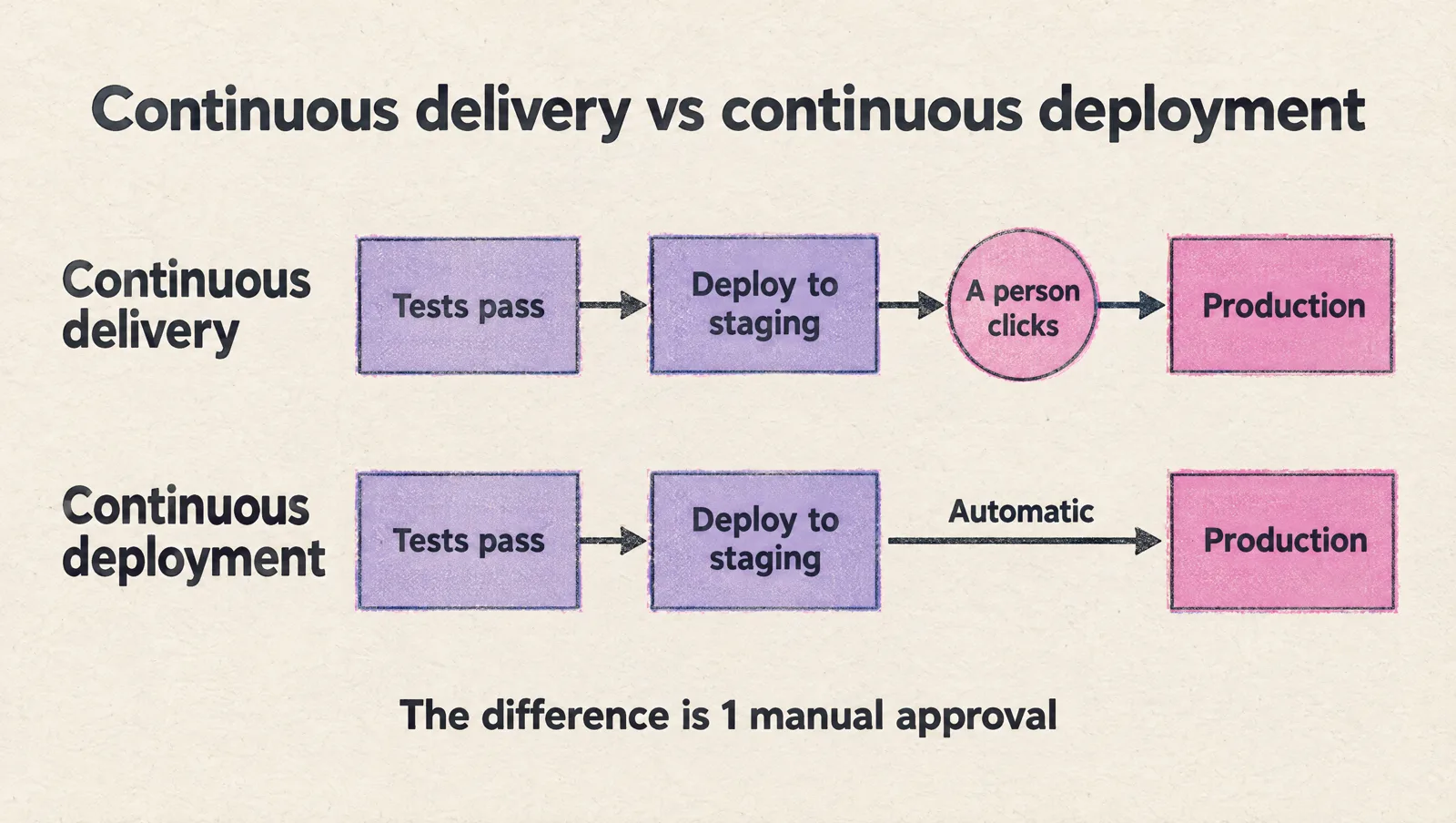
Delivery comes first. You cannot remove the click before the click is boring.
Jez Humble, who co-wrote the book on continuous delivery, has a 3 question test for CI:
- Does every engineer push to trunk daily? (A feature branch does not count.)
- Does every commit trigger the unit tests?
- When the build breaks, is it usually fixed within 10 minutes?
By his own estimate, fewer than 20% of the teams that think they do CI pass it.
That matches what I see. The usual miss is question 1: branches that live for a week, reviewed on Friday, merged in one stressful batch.
Merge daily. 2 days is the hard limit for a branch, and the time it spends waiting for review counts.
The 8 stages of a CI/CD pipeline
Every pipeline is the same idea: a sequence of checks, cheapest first, where each one that passes earns the change more trust.
| Stage | What it does | It stops the change when |
|---|---|---|
| 1. Source | A push or a pull request triggers the run | Nothing yet |
| 2. Build | Installs dependencies, compiles | The code does not build |
| 3. Test | Unit tests, lint, static analysis | A test or a rule fails |
| 4. Package | Produces 1 versioned artifact (a container image, usually) and stores it | The image does not build |
| 5. Deploy to staging | Runs the same deploy script production uses | The deploy fails |
| 6. Acceptance | Smoke tests, end-to-end tests, scans against the running system | The system misbehaves |
| 7. Deploy to production | After an approval, or automatically | A person says no, or the rollout fails |
| 8. Verify | Health checks and metrics after the deploy | Errors rise: roll back |
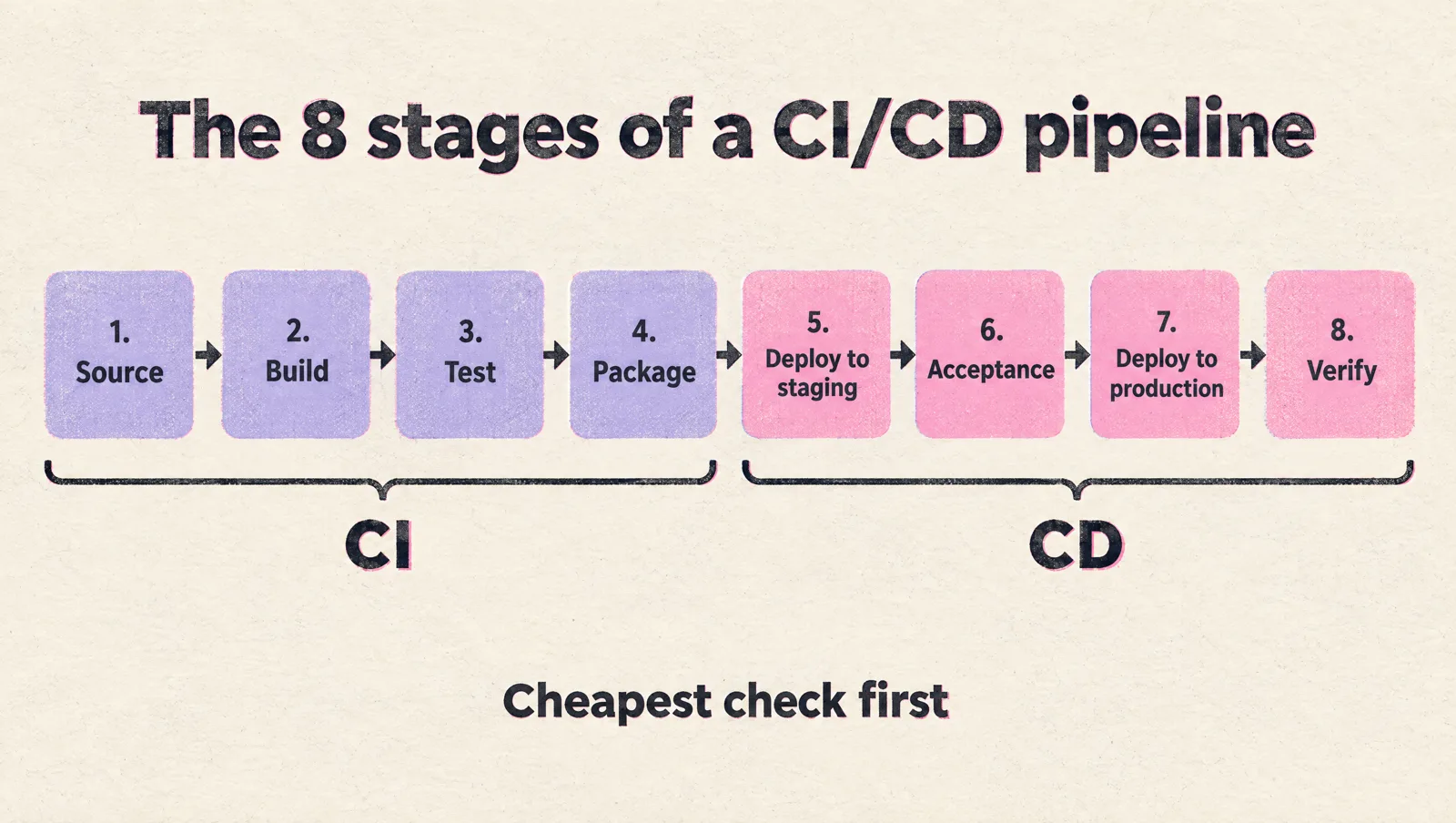
Stages 1 to 4 are CI. Stages 5 to 8 are CD.
The order matters more than the tool. A unit test that fails in 2 minutes costs you 2 minutes. The same bug caught by an end-to-end test costs 40, and caught by a customer it costs a weekend.
So when a late stage catches a bug, add a test for it in an early stage.
A CI/CD pipeline example on GitHub Actions
This is the pipeline I would give a team that deploys a container to AWS. It has 4 jobs: test, build, deploy to staging, deploy to production.
Save it as .github/workflows/pipeline.yml:
name: pipeline
on:
  pull_request:
  push:
    branches: [main]

permissions:
  contents: read

concurrency:
  group: ${{ github.workflow }}-${{ github.head_ref || github.run_id }}
  cancel-in-progress: true

jobs:
  test:
    runs-on: ubuntu-latest
    timeout-minutes: 10
    steps:
      - uses: actions/checkout@v7
      - uses: actions/setup-node@v7
        with:
          node-version: 24
          cache: 'npm'
      - run: npm ci
      - run: npm run lint
      - run: npm test

  build:
    if: github.event_name == 'push'
    needs: test
    runs-on: ubuntu-latest
    timeout-minutes: 15
    permissions:
      contents: read
      packages: write
    outputs:
      digest: ${{ steps.push.outputs.digest }}
    steps:
      - uses: actions/checkout@v7
      - uses: docker/setup-buildx-action@v4
      - uses: docker/login-action@v4
        with:
          registry: ghcr.io
          username: ${{ github.actor }}
          password: ${{ secrets.GITHUB_TOKEN }}
      - id: push
        uses: docker/build-push-action@v7
        with:
          context: .
          push: true
          tags: ghcr.io/${{ github.repository }}:${{ github.sha }}

  deploy-staging:
    needs: build
    runs-on: ubuntu-latest
    timeout-minutes: 15
    environment: staging
    concurrency: deploy-staging
    permissions:
      contents: read
      id-token: write
    steps:
      - uses: actions/checkout@v7
      - uses: aws-actions/configure-aws-credentials@v6
        with:
          role-to-assume: ${{ vars.AWS_ROLE_ARN }}
          aws-region: us-east-1
      - run: ./scripts/deploy.sh "ghcr.io/${{ github.repository }}@${{ needs.build.outputs.digest }}"
      - run: ./scripts/smoke-test.sh

  deploy-production:
    needs: [build, deploy-staging]
    runs-on: ubuntu-latest
    timeout-minutes: 15
    environment: production
    concurrency: deploy-production
    permissions:
      contents: read
      id-token: write
    steps:
      - uses: actions/checkout@v7
      - uses: aws-actions/configure-aws-credentials@v6
        with:
          role-to-assume: ${{ vars.AWS_ROLE_ARN }}
          aws-region: us-east-1
      - run: ./scripts/deploy.sh "ghcr.io/${{ github.repository }}@${{ needs.build.outputs.digest }}"
      - run: ./scripts/smoke-test.sh
The 2 scripts are yours: deploy.sh takes an image and rolls it out (Helm, ECS, whatever you run), smoke-test.sh hits the health endpoint and exits non-zero when it is wrong.
It also needs 2 things outside the file: an OIDC identity provider and 1 role per environment in AWS (the trust policy matches environment:staging or environment:production), and an AWS_ROLE_ARN variable in each GitHub environment.
Your cluster needs permission to pull from ghcr.io. Or push the image to Amazon ECR and skip that.
What each part buys you:
permissions: contents: read: once you name 1 permission, every permission you did not name is set to none. A job that sets its own list replaces this one, so each job repeatscontents: readand adds what it needsconcurrency: a new push to a pull request cancels the run that is now out of date. On main every merge gets its own run. The job level groups let 1 deploy per environment run at a time. When 2 deploys wait for the same environment, the newest one winstimeout-minutes: the default is 360. A hung test should cost you 10 minutes of runner time. The default lets it burn 6 hoursneeds: jobs run in parallel unless you order them. A failed job skips everything that needs it- The image is addressed by digest: staging and production deploy the exact bytes that the build pushed
id-token: write: the job gets an identity token from GitHub through OpenID Connect (OIDC) and trades it at AWS for credentials that expire in 1 hour. No AWS keys are stored in GitHubenvironment: each environment has its own variables, secrets and protection rules.AWS_ROLE_ARNis a different role in staging and in production
3 things to change before you rely on it:
- Pin the actions. I wrote
@v7so you can read it. In your repository pin each action to a full commit SHA (the reason is in the security section) - Lowercase the image name. An image name allows lowercase letters only, and
github.repositorykeeps your capitals. If the organization or the repository has an uppercase letter (Acme/Api), type the name in lowercase in all 3 places - Decide who approves production. Add required reviewers to the
productionenvironment and the last job waits for a click
2 catches. On GitHub Free, environments work on public repositories only. And on Free, Pro and Team, required reviewers work on public repositories only: a private repository needs Enterprise for the approval click.
The workaround I use on a Team plan: move the production job to its own workflow with on: workflow_dispatch and an image digest as input. Somebody still has to press the button.
The same gate in the other 2 big tools:
| Tool | Config file | The manual gate |
|---|---|---|
| GitHub Actions | .github/workflows/*.yml | Required reviewers on an environment |
| GitLab CI/CD | .gitlab-ci.yml | when: manual on the job |
| Jenkins | Jenkinsfile | The input directive on a stage |
Build once and promote the same artifact
The rule comes from the original deployment pipeline pattern: only build packages once.
Why? Because you want to be sure that the thing you deploy is the thing you tested.
The version I see broken most often:
- A
stagingbranch and aproductionbranch, each with its own build - A Docker build per environment with the API URL baked in as a build argument
npm installwithout a lockfile at deploy time
Each of them means production runs a build that no test ever saw.
The fix is 2 lines:
Artifact = code + dependencies, built once, tagged with the commit SHA.
Configuration = everything that differs per environment, injected at deploy or at start time.
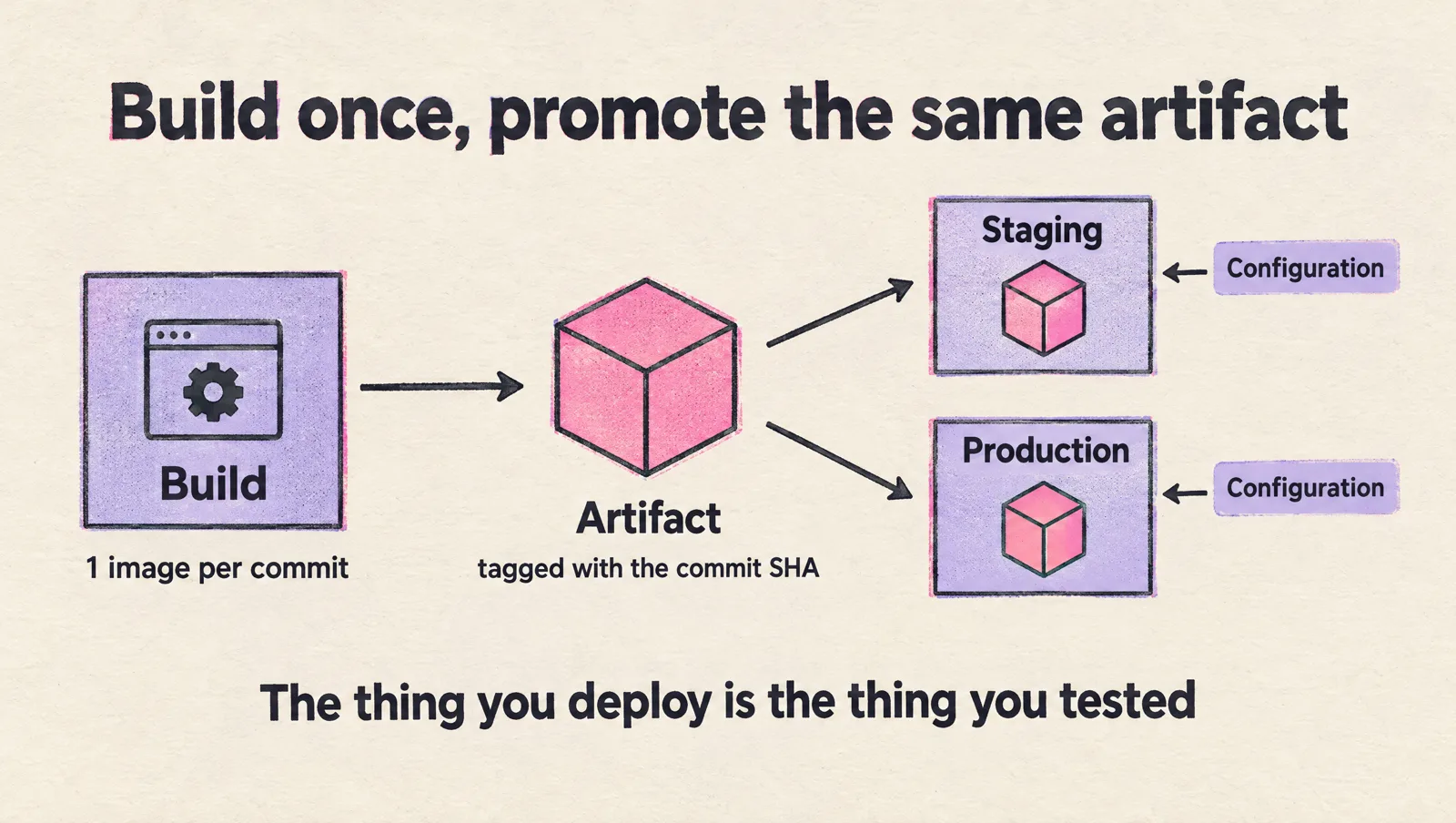
Promotion is then a pointer move. Staging runs digest sha256:ab12… today, production runs the same digest tomorrow.
A rollback becomes a pointer move too: deploy the previous digest. No build, no waiting, no surprises from a dependency that changed overnight.
Keep the first answer under 10 minutes
The "ten minute build" is an old Extreme Programming guideline, and it has aged well.
Past 10 minutes, people stop waiting for the result. They start the next task, the red build lands 25 minutes later, and now 2 changes are tangled.
Slow pipelines also push people to batch. A bigger batch is a bigger deploy, and a bigger deploy is a harder incident.
How to stay inside the budget:
- Split by speed. Unit tests, lint and static analysis in the first stage. Tests that need a real database or a browser in a second stage, after the image is built
- Run in parallel. Jobs are parallel by default on GitHub Actions. 4 jobs of 4 minutes beat 1 job of 16
- Cache dependencies.
cache: 'npm'in the example is 1 line - Cancel stale runs. That is the
concurrencyblock - Delete or fix flaky tests. A test that fails 1 time in 50 teaches the team to press "re-run" without reading
On flaky tests, Google published its own numbers in 2016: about 1.5% of all test runs gave a flaky result, and about 84% of the pass to fail transitions they saw involved a flaky test.
At 1,000 tests and 1.5%, that is 15 false failures on a run.
10 tests that everybody trusts are worth more than 300 that everybody re-runs.
The money side is smaller than people expect. A standard Linux runner on a private repository costs $0.006 per minute since the January 2026 price cut (public repositories run free).
A team with 40 runs a day at 10 minutes each, 22 working days:
40 × 10 × 22 = 8,800 minutes = $52.80 a month, before the included allowance (2,000 minutes on Free, 3,000 on Team).
The expensive part of a slow pipeline is the engineers waiting for it. I wrote a separate guide on how to speed up GitHub Actions.
Deploying and releasing are 2 decisions
Deploy = the new code runs in production.
Release = users get the new behavior.
Teams that fear deploys have usually glued the two together, so every deploy is a launch.
4 tools pull them apart:
- A deployment strategy. Rolling, blue-green or canary decides how much traffic meets the new version and how fast you get back. I compared them in deployment strategies
- Feature flags. Unfinished code ships switched off. A release flag should live a week or two and then get deleted (the flag graveyard is real)
- Expand and contract for the database. Add the new column as nullable. Deploy code that writes both. Copy the old data over. Deploy code that reads and writes only the new column. Drop the old column last. Each step works with the version before it and the version after it
- A rollback you have used. Redeploy the previous digest. Practice it on a quiet Tuesday
The database is where pipelines get stuck. A migration that drops a column in the same deploy as the code change cannot be rolled back, because the old code needs the column.
My rule: a schema change and the code that depends on it never ship in the same deploy.
Infrastructure goes through the same pipeline. For Terraform the usual shape is a plan on every pull request for a human to read, then a fresh plan and apply after the merge. Inside 1 run, save the plan and apply that exact file:
terraform plan -out=tfplan -input=false
terraform apply -input=false tfplan
A saved plan goes stale as soon as another change is applied to the same state, so plan again after the merge.
On Kubernetes the deploy job often shrinks to a commit: the pipeline updates the image digest in a Git repository, and Argo CD or Flux pulls the change into the cluster. That is GitOps. The CI system no longer holds cluster credentials, only write access to 1 Git repository.
The pipeline holds the keys to production
Your CI system can push images, assume cloud roles and deploy. An attacker who controls 1 step can do whatever that job is allowed to do.
In March 2025 this happened to the tj-actions/changed-files action (CVE-2025-30066). The attackers moved its version tags to a malicious commit that printed CI secrets into workflow logs. More than 23,000 repositories used the action.
Every tag from v1 to v45.0.7 pointed at the malicious commit. A workflow that said @v45 ran it on its next run. A workflow pinned to an older commit SHA did not.
A tag can be moved. A commit SHA cannot.
6 rules, in the order I would apply them:
- No long-lived cloud keys in CI. Use OIDC to AWS, Google Cloud or Azure. The credentials are issued per job and expire on their own (1 hour by default on AWS)
- Least permissions per job.
permissions: contents: readat the top, more only where a job needs it - Pin third-party actions to a full commit SHA. Let Dependabot or Renovate open the update pull requests. GitHub's allowed-actions policy can enforce pinning for the whole organization
- Keep untrusted code away from secrets. A
pull_requestrun from a fork gets no secrets and a read-only token.pull_request_targetruns with the base repository's secrets and token, so never check out the fork's code inside it (actions/checkout@v7refuses unless you opt in) - Turn on secret scanning with push protection. It blocks the push that contains the key, before the key reaches the repository
- Protect the production environment. Limit which branches can deploy to it and who approves
On rule 4, GitHub is tightening the default: from December 2, 2026, pull_request_target is blocked by default in public repositories unless a policy allows it. Private repositories are not affected.
When a customer or an auditor asks for proof of where a build came from, the vocabulary is SLSA (Supply-chain Levels for Software Artifacts: levels for build provenance), SBOM (software bill of materials: the list of ingredients, in SPDX or CycloneDX format) and artifact attestations (a signed statement that this workflow built this image).
Start with the 6 rules. They stop the attacks that happen every month.
Pick the CI/CD tool that sits next to your code
My position: the tool is the least interesting decision in this article.
Use the one your Git host ships. GitHub Actions on GitHub, GitLab CI/CD on GitLab. You get pull request checks, permissions and secrets in 1 place, with nothing to host.
| Tool | What it is | Pick it when |
|---|---|---|
| GitHub Actions | CI/CD built into GitHub | Your code is on GitHub |
| GitLab CI/CD | CI/CD built into GitLab | Your code is on GitLab, or you self-host everything |
| Jenkins | Self-hosted automation server, pipelines in a Jenkinsfile | You already run it and it works, or you need full control of the build machines |
| CircleCI | CI/CD as a service (a self-hosted edition exists), config in .circleci/config.yml | You already use it and it is fast for you |
| Azure Pipelines | CI/CD in Azure DevOps | You are a Microsoft shop |
| AWS CodePipeline | AWS's continuous delivery service | Everything must stay inside AWS |
| Argo CD, Flux | GitOps delivery for Kubernetes, pull based | You deploy to Kubernetes. They replace the deploy step and keep your CI |
In JetBrains' 2025 State of CI/CD survey, 41% of respondents used GitHub Actions in their organization, and 32% of organizations ran 2 CI/CD tools at once.
Two tools is usually a migration that stopped halfway. Finish it.
When should you migrate? When the tool costs you people: a Jenkins that needs 1 engineer 2 days a week to stay alive is an expensive free tool.
(If you are on Azure DevOps and wondering, I compared Azure DevOps and GitHub separately.)
What to build first
You don't build 8 stages in week 1. You build a thin pipeline that goes all the way to production, then you thicken it.
The order I use with a team that has nothing:
- 1 command that runs the tests.
make testornpm test, the same on a laptop and in CI. Even with 5 tests - Run it on every pull request and block the merge on red. The first YAML file in this article runs it. A branch rule that requires the
testcheck blocks the merge - Build 1 image on every merge to main, tagged with the commit SHA
- Deploy that image to staging automatically, with a script that lives in the repository
- Deploy to production with the same script, behind 1 click
- Add a smoke test after each deploy, and write down the rollback command
- Now improve: more tests, security scans, preview environments per pull request, canary releases
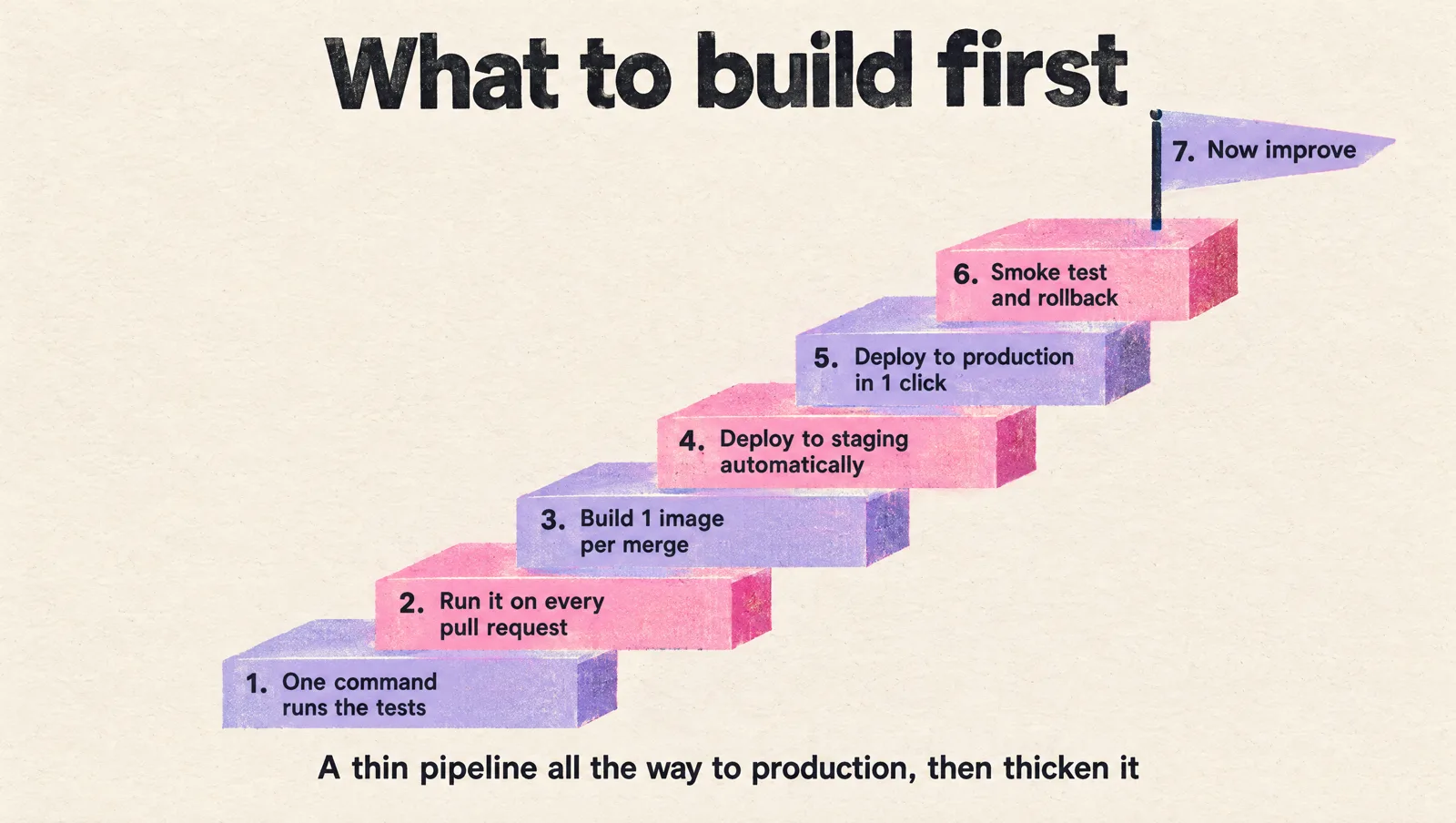
Steps 1 to 6 are a week of work for most web services. Most teams I meet did step 7 first.
They have 3 scanners, a coverage gate at 80%, and a production deploy that is a wiki page with 14 manual steps.
A pipeline that stops at "tests passed" is half a pipeline. The value is in the last mile.
If the deploy itself is the hard part, that is usually an environment problem. The goal I aim for is in One-Click Environment.
Measure the pipeline with 5 numbers
The DORA (DevOps Research and Assessment) research program tracks software delivery with 5 metrics (the famous "four keys" got a fifth in 2024):
| Metric | What it measures |
|---|---|
| Change lead time | Time from a commit to that commit running in production |
| Deployment frequency | How often you deploy |
| Failed deployment recovery time | Time to recover from a deploy that needed immediate intervention |
| Change fail rate | Share of deploys that needed immediate intervention |
| Deployment rework rate | Share of deploys that were unplanned and caused by a production incident |
The first 3 are about throughput and the last 2 about instability.
You don't need a dashboard product for this. A spreadsheet does it, with 1 row per deploy: commit time, deploy time, "needed a fix: yes or no", time recovered, "planned: yes or no".
One warning: measure a single service at a time and never turn a metric into a target. A team told to "deploy 10 times a day" will deploy 10 times a day.
The lever behind all 5 is the same: smaller changes.
That matters more now that AI assistants write a growing share of the code. More code per day through the same pipeline means bigger batches, unless the tests and the feedback loop keep up.
7 mistakes and their fixes
| Mistake | What it costs | Fix |
|---|---|---|
| Long-lived branches | Merge conflicts, big risky deploys | Merge to main daily, hide unfinished work behind a flag |
| A build per environment | Production runs untested bytes | Build once, deploy by digest |
| Flaky tests left in place | Nobody believes a red build | Fix or delete within the week |
| Everything in 1 serial job | A 40 minute wait | Split into parallel jobs, slow tests in a later stage |
| Cloud keys stored as CI secrets | 1 leaked log = 1 leaked account | OIDC and short-lived tokens |
| Actions pinned to a tag | Someone else decides what runs in your pipeline | Pin to a commit SHA |
| Schema change and code change in 1 deploy | No way back | Expand and contract, 1 step per deploy |
The CI/CD pipeline checklist
Always:
- Every pull request runs the tests, and red blocks the merge
- The first answer arrives in under 10 minutes
- Branches merge within a day, 2 days at the most
- 1 artifact per commit, tagged with the SHA, deployed by digest
- The same script deploys staging and production
- Configuration is injected at deploy time
- A smoke test runs after every deploy
- The rollback command is written down and has been used
- No long-lived cloud keys in the CI system
- Third-party actions are pinned to a commit SHA
- Each job has the minimum permissions
- Schema changes ship separately from the code that needs them
Frequently asked questions
What is a CI/CD pipeline in simple terms?
It is the automated sequence that takes a code change from a commit to production: build it, test it, package it, deploy it. Each stage that passes makes the change more trusted, and a stage that fails stops it.
What is the difference between CI and CD?
CI (continuous integration) is merging to the main branch at least daily and verifying each merge with an automated build and tests. CD (continuous delivery) is keeping that build ready to release at any time, with the deploy automated.
What is the difference between continuous delivery and continuous deployment?
One manual approval. With continuous delivery a person decides when a build goes to production. With continuous deployment every change that passes the pipeline goes to production automatically.
What are the stages of a CI/CD pipeline?
Source, build, test, package, deploy to staging, acceptance tests, deploy to production and verify. Small teams merge some of them, and the order (cheapest check first) is what matters.
Which CI/CD tool should I use?
The one built into your Git host: GitHub Actions on GitHub, GitLab CI/CD on GitLab. Add Argo CD or Flux for the deploy step when you run Kubernetes.
How long should a CI/CD pipeline take?
The first stage (build, unit tests, lint) should answer in under 10 minutes. Slower tests run in a later stage, in parallel, so they do not block the first answer.
What is the difference between DevOps and CI/CD?
DevOps is the way of working: the team that builds the software can also ship and run it. A CI/CD pipeline is 1 of the tools that makes that practical.
Do I need Kubernetes for a CI/CD pipeline?
No. A pipeline deploys to whatever you run: a virtual machine, a serverless function, a managed container service. The rules in this article hold for all of them.
A recap
If you take away 1 thing, let it be this:
A pipeline is finished when a small change reaches production in under an hour and nobody is nervous. Everything else is decoration.
You don't NEED a DevOps expert for that. The example file and the 7 steps above get most teams there.
If you would like someone to look at yours anyway (yes, I sell DevOps engineers), the free DevOps assessment is where a senior engineer reviews your CI/CD, infra and deploy setup.
Related guides: deployment strategies, how to speed up GitHub Actions and Kubernetes Deployments.