


Kubernetes Ingress still works on every cluster, but the controller that about half of cloud native environments ran it on (the Kubernetes committees' figure) got its last release in March 2026:
Bottom line
- Ingress = routing rules. An API object that maps a host and a path to a Service, for HTTP and HTTPS only
- A controller does the work. The Kubernetes docs: "Only creating an Ingress resource has no effect"
- The API is frozen, and it stays. No new features, and "no plans to remove Ingress from Kubernetes"
- ingress-nginx is retired. Last release on March 19, 2026, repository archived on March 24, 2026
- New work goes to Gateway API. That is the Kubernetes project's own recommendation
What to do, by where you are today:
| Your situation | What I would do |
|---|---|
| New cluster, nothing exposed yet | Start on Gateway API with your cloud's controller |
| Ingress objects on a maintained controller (AWS, Traefik, F5 NGINX, HAProxy, Cilium) | Keep them. Write new routes as HTTPRoutes when the controller supports both |
| Ingress objects on ingress-nginx | Migrate now. It has had no patches for 8 months |
| AKS with the managed NGINX add-on | Migrate this month. Microsoft's support ends in November 2026 |
| GKE Ingress | Plan the move to GKE Gateway. Google put GKE Ingress in maintenance mode |
The object itself, in its smallest valid form (from the Kubernetes docs):
apiVersion: networking.k8s.io/v1
kind: Ingress
metadata:
  name: minimal-ingress
spec:
  ingressClassName: nginx-example
  rules:
  - http:
      paths:
      - path: /testpath
        pathType: Prefix
        backend:
          service:
            name: test
            port:
              number: 80
And the command from the retirement announcement, to check whether a cluster runs ingress-nginx (run it with cluster administrator permissions):
kubectl get pods --all-namespaces --selector app.kubernetes.io/name=ingress-nginxEvery version, date and quote in this guide comes from the Kubernetes documentation and blog, the Gateway API site, the projects' own repositories and the AWS, Google and Microsoft docs, as read on November 24, 2026.
Still running ingress-nginx in production? In a free assessment, a senior engineer reviews your CI/CD, infra, Kubernetes, cloud cost and on-call setup, the ingress layer included.
Find your situation:
- You are new to Ingress: start at an Ingress is a list of rules
- A path does not match: go to pathType decides which requests match
- You run ingress-nginx: go to the timeline, then the 8 steps
- You are choosing a controller: go to what to run in its place
- An Ingress returns 404 or 503: go to fix an Ingress that does not route
An Ingress is a list of rules, and a controller does the work
A Service of type ClusterIP is only reachable inside the cluster.
An Ingress is the object that says which outside requests reach which Service.
In the docs' words: an Ingress "exposes HTTP and HTTPS routes from outside the cluster to services within the cluster".
The object stores rules. It moves no traffic.
An Ingress controller reads the rules and configures a proxy or a cloud load balancer to follow them.
What happens to one request:
- A user opens shop.example.com/api
- → DNS points to the load balancer in front of the controller
- → The controller compares the host and the path to every Ingress rule it owns
- → The matching rule names a Service and a port
- → The request goes to a Pod behind that Service
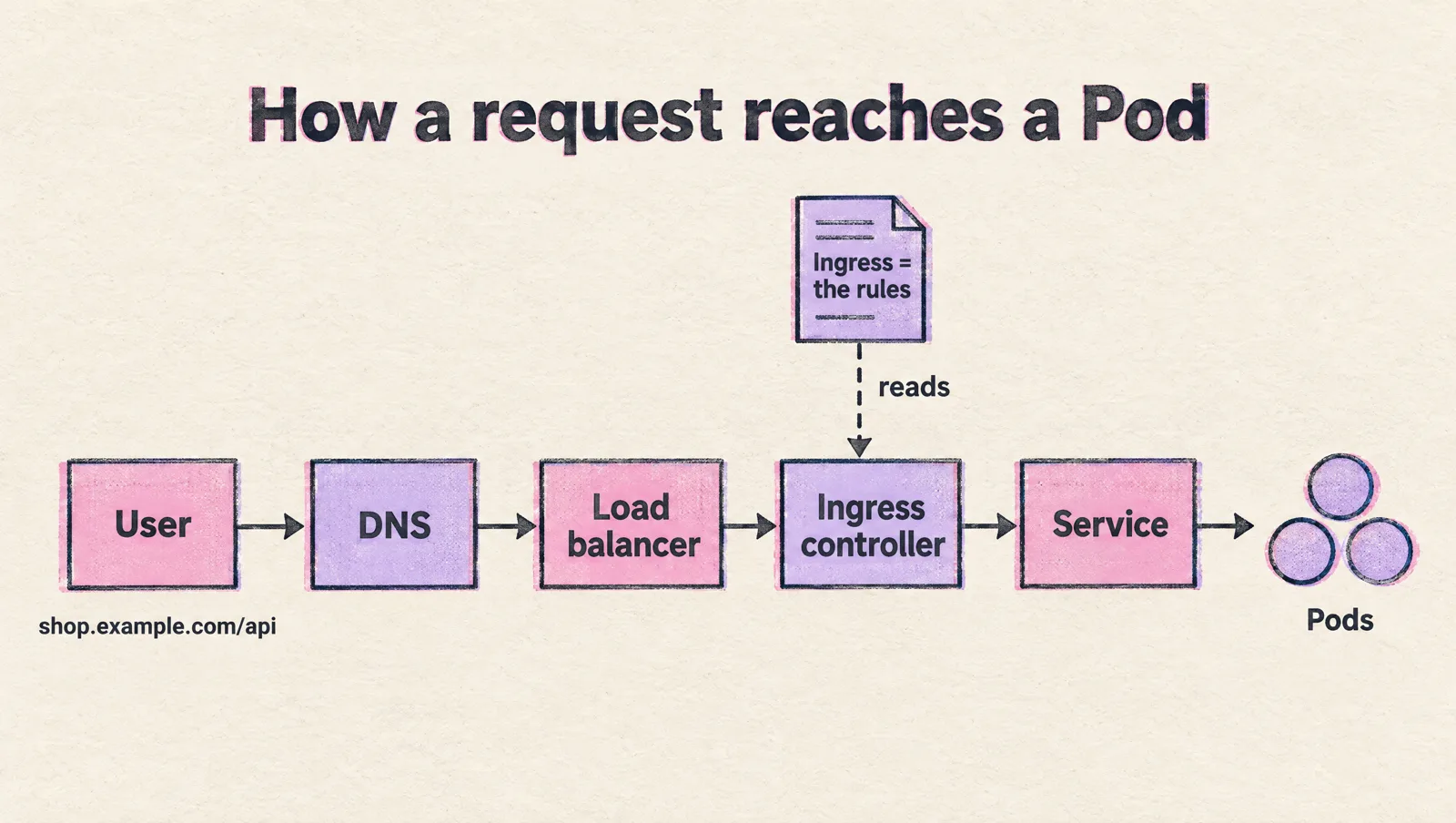
An Ingress with no controller does NOTHING. kubectl accepts it, and then: no error, no event, no address.
Ingress next to the Service types, in the docs' own words:
| Object | What it exposes | Use it for |
|---|---|---|
| Service, ClusterIP | "a cluster-internal IP", the default | Everything that sits behind an Ingress or a Gateway |
| Service, NodePort | "each Node's IP at a static port", 30000 to 32767 by default | The plumbing under a load balancer, rarely more |
| Service, LoadBalancer | 1 Service through "an external load balancer" | TCP or UDP, or a single public Service |
| Ingress | Many Services "behind a single listener", HTTP and HTTPS only | Websites and APIs that share 1 entry point |
The reason Ingress exists is in 1 line of the docs: "An Ingress allows you to keep the number of load balancers down to a minimum."
20 Services with 20 load balancers = 20 bills and 20 DNS records. 20 Services behind 1 Ingress = 1.
Read an Ingress manifest field by field
A realistic Ingress: 1 host, TLS, 2 paths to 2 Services.
apiVersion: networking.k8s.io/v1
kind: Ingress
metadata:
  name: shop
  namespace: shop
spec:
  ingressClassName: public
  tls:
  - hosts:
    - shop.example.com
    secretName: shop-tls
  rules:
  - host: shop.example.com
    http:
      paths:
      - path: /api
        pathType: Prefix
        backend:
          service:
            name: api
            port:
              number: 8080
      - path: /
        pathType: Prefix
        backend:
          service:
            name: web
            port:
number: 80| Field | What it does | The rule to remember |
|---|---|---|
ingressClassName | Names the IngressClass, which names the controller | Always set it |
rules[].host | The hostname to match. Optional | No host = the rule applies to all inbound HTTP traffic |
paths[].path and pathType | The path to match and how to match it | pathType is required. Without it the object fails validation |
backend.service | The Service name and port that gets the request | "Both the host and path must match" before traffic is sent |
tls | Hosts and the Secret that holds the certificate | tls.hosts has to match rules.host |
defaultBackend | Where requests go when no rule matches | Usually set on the controller. Without it, the controller decides |
Everything else you have seen on an Ingress (rewrites, rate limits, CORS, canary weights, timeouts) is an annotation.
Annotations belong to the controller. Change the controller and they stop meaning anything.
Annotation = a feature you rent from 1 controller.
The docs admit the gap: "Ideally, all Ingress controllers should fit the reference specification. In reality, the various Ingress controllers operate slightly differently."
pathType decides which requests match
There are 3 path types, and the difference between them is where most routing bugs live.
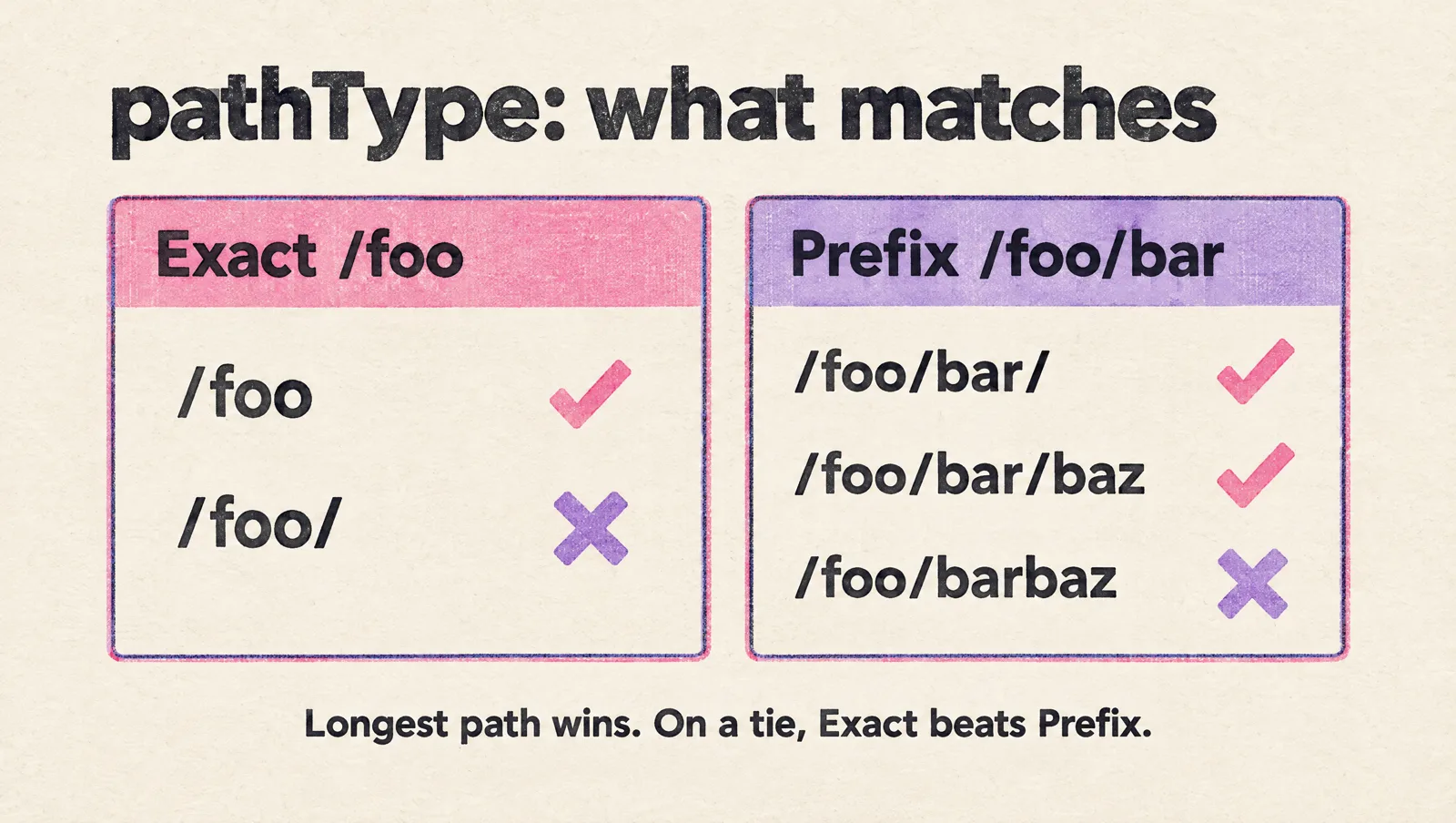
- Exact: "Matches the URL path exactly and with case sensitivity"
- Prefix: matches "a URL path prefix split by /", one path element at a time
- ImplementationSpecific: "matching is up to the IngressClass". Each controller picks its own behavior
Rows from the official examples table:
| pathType | Path in the rule | Request path | Match |
|---|---|---|---|
| Exact | /foo | /foo/ | No |
| Exact | /foo/ | /foo | No |
| Prefix | /foo | /foo, /foo/ | Yes |
| Prefix | /aaa/bbb | /aaa/bbb/ | Yes, matches trailing slash |
| Prefix | /aaa/bbb | /aaa/bbbxyz | No, does not match string prefix |
| Prefix | /aaa | /ccc | No, uses default backend |
| Mixed | /foo (Prefix), /foo (Exact) | /foo | Yes, prefers Exact |
3 rules cover the table:
- Exact cares about the trailing slash. Prefix ignores it
- Prefix matches whole elements.
/foo/barmatches/foo/bar/bazand does not match/foo/barbaz - The longest matching path wins. On a tie, Exact beats Prefix
Hosts have 1 rule of their own: a wildcard covers exactly 1 DNS label.
*.foo.com matches bar.foo.com. It does not match baz.bar.foo.com, and it does not match foo.com.
My default: Prefix for applications, Exact for single endpoints such as a health check or a webhook, and ImplementationSpecific never.
Why never? Because it is the 1 value that changes meaning on the day you change controllers. Cilium, for example, documents it as a regex.
IngressClass picks the controller
A cluster can run several Ingress controllers. IngressClass tells each one which Ingresses are its own.
apiVersion: networking.k8s.io/v1
kind: IngressClass
metadata:
  name: public
  annotations:
    ingressclass.kubernetes.io/is-default-class: "true"
spec:
  controller: example.com/ingress-controller
The controller string comes from your controller's docs. On EKS Auto Mode, for example, it is eks.amazonaws.com/alb.
List what a cluster has:
kubectl get ingressclass
kubectl get ingress --all-namespaces
4 facts that save an afternoon:
- The default class: the
ingressclass.kubernetes.io/is-default-classannotation set totrueassigns that class to new Ingresses that name none - 2 defaults: with more than 1 default class, the admission controller blocks every new Ingress that has no
ingressClassName - The old annotation:
kubernetes.io/ingress.classis deprecated since v1.18 and "was never formally defined". The AWS docs still show it askubernetes.io/ingress.class: alb, and many charts still ship it - The scope: IngressClass is cluster-scoped. One name, one meaning, in every namespace
Migration uses this directly: 2 controllers, 2 classes.
Copy each Ingress under a new name with the new class, test it on the new controller's IP, switch DNS, then delete the old copy.
Do not edit ingressClassName on the live object: the old controller drops the host the moment you do.
TLS on an Ingress is port 443 and 1 Secret
The TLS part of the API is short, and so is its list of limits.
- 1 port: "The Ingress resource only supports a single TLS port, 443"
- Termination at the edge: the API "assumes TLS termination at the ingress point (traffic to the Service and its Pods is in plaintext)"
- The Secret: "must contain keys named tls.crt and tls.key"
- The namespace:
secretNameis a bare name with no namespace field, so the Secret sits in the namespace of the Ingress - Several hosts: multiplexed on the same port by Server Name Indication (SNI), "provided the Ingress controller supports SNI"
- No TLS on the catch-all rule: "hosts in the tls section need to explicitly match the host in the rules section"
Create the Secret from a certificate and a key:
kubectl create secret tls shop-tls --cert=tls.crt --key=tls.key --namespace shopIn practice cert-manager creates and renews that Secret for you.
On a cloud load balancer the certificate usually lives in the cloud (AWS Certificate Manager on an ALB) and the Secret is not used.
cert-manager (v1.21.3 today) watches Ingresses through annotations. Its Gateway support is still marked beta, since version 1.15.
Redirects from HTTP to HTTPS, TLS versions, ciphers, mutual TLS, passthrough: all annotations, all different per controller.
The docs say so in 1 line: "There is a gap between TLS features supported by various ingress controllers."
The Ingress API is frozen, not deprecated
These 2 words get mixed up in every thread about Ingress, so here is the official text.
From the Ingress page of the Kubernetes docs:
- "The Kubernetes project recommends using Gateway instead of Ingress. The Ingress API has been frozen."
- "The Ingress API is no longer being developed, and will have no further changes or updates made to it."
- "The Kubernetes project has no plans to remove Ingress from Kubernetes."
From the Gateway API FAQ, under "Will Gateway API replace the Ingress API?":
- "No. The Ingress API is GA since Kubernetes 1.19. There are no plans to deprecate this API and we expect most Ingress controllers to support it indefinitely."
Frozen = it will never do more than it does today.
Deprecated = officially marked for removal, with a warning every time you use it. Ingress carries no such mark.
(Frozen is one of the nicer things that can happen to an API you depend on.)
So your Ingress manifests are safe. The question is only what runs them.
One old version did go away: networking.k8s.io/v1beta1 Ingress has not been served since Kubernetes v1.22.
A tutorial that shows serviceName: and servicePort: under backend is written for that removed version. Its manifest fails on every supported cluster.
ingress-nginx is retired: the timeline
ingress-nginx was the community controller, the one most tutorials install.
The number the Kubernetes Steering and Security Response Committees cite: "about 50% of cloud native environments currently rely on this tool" (internal Datadog research, January 2026).
| Date | What happened |
|---|---|
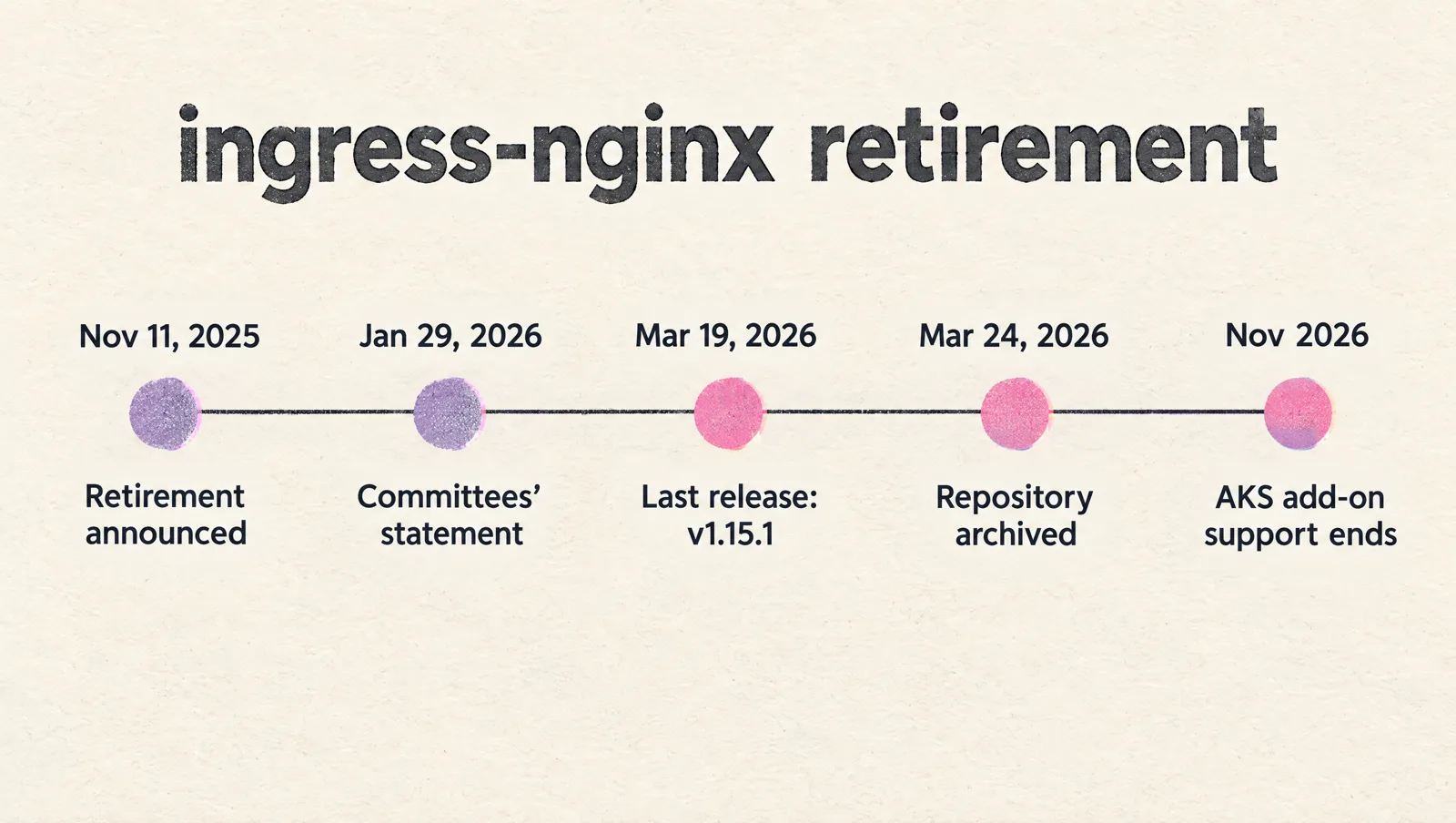
| March 24, 2025 | CVE-2025-1974 disclosed, rated 9.8 CVSS. Fixed in v1.12.1 and v1.11.5 |
| November 11, 2025 | Retirement announced. "Best-effort maintenance will continue until March 2026" |
| January 29, 2026 | Statement from the Steering and Security Response Committees: staying "leaves you and your users vulnerable to attack" |
| February 27, 2026 | The Kubernetes blog lists 5 surprising ingress-nginx behaviors to know before migrating |
| March 19, 2026 | Last releases: controller v1.15.1, v1.14.5 and v1.13.9 |
| March 20, 2026 | ingress2gateway 1.0, the conversion tool, is released |
| March 24, 2026 | The repository is archived and read-only |
| June 30, 2026 | InGate, the planned successor, is archived too |
| November 2026 | Microsoft ends support for the AKS managed NGINX add-on |
What "retired" means
- No fixes: "no further releases, no bugfixes, and no updates to resolve any security vulnerabilities that may be discovered"
- Nothing breaks: "Existing deployments of Ingress NGINX will continue to function and installation artifacts will remain available"
- No comeback: "it is no longer reasonable or even possible to continue maintaining the tool even if resources did materialize"
The second point is the dangerous one.
The committees wrote it themselves: "Existing deployments will continue to work, so unless you proactively check, you may not know you are affected until you are compromised."
Why it matters for this controller in particular
CVE-2025-1974 is the example of what an ingress-nginx bug looks like.
- "anything on the Pod network has a good chance of taking over your Kubernetes cluster, with no credentials or administrative access required"
- "By default, ingress-nginx has access to all Secrets cluster-wide"
That one shipped with its patch on the day it was disclosed, because maintainers existed.
The next one has nobody to patch it.
There is a second clock. The last release, v1.15.1, lists Kubernetes 1.31 to 1.35 as its supported versions. Kubernetes is at v1.37, with v1.38 in beta.
ingress-nginx and NGINX Ingress Controller are 2 projects
The names are a trap, and the Kubernetes blog spells it out: "Ingress-NGINX and NGINX Ingress are two separate Ingress controllers."
| ingress-nginx | NGINX Ingress Controller | |
|---|---|---|
| Repository | kubernetes/ingress-nginx | nginx/kubernetes-ingress |
| Maintained by | The Kubernetes community | F5 |
| Status | Retired, archived | Maintained, v5.8.1 in November 2026 |
| Annotation prefix | nginx.ingress.kubernetes.io/ | nginx.org/ |
"Both use NGINX as the dataplane, but are otherwise unrelated."
So moving from one to the other is a migration, with its own guide from F5, and the annotations do not carry over as they are.
What to run in place of ingress-nginx
The official recommendation has 2 branches: "begin migration to Gateway API or another Ingress controller immediately."
And 1 warning: "None of the available alternatives are direct drop-in replacements."
On a managed cloud, start with the cloud's controller
| Cloud | Ingress today | Gateway API today |
|---|---|---|
| AWS EKS | AWS Load Balancer Controller creates an Application Load Balancer for an Ingress (one each, unless you group them with IngressGroups). EKS Auto Mode has it built in | The same controller creates an ALB for a Gateway from v2.14.0. Current release v3.6.3 |
| Google GKE | "GKE Ingress is in maintenance mode" | "We recommend that you use GKE Gateway API." Both GKE Gateway controllers are generally available |
| Azure AKS | The application routing add-on is managed ingress-nginx, supported "through November 2026" for critical security patches only | The add-on's Gateway API mode (built on Istio), or Application Gateway for Containers |
If you run AKS with the managed NGINX add-on, the date in that table is this month.
Microsoft's wording: "you must migrate to the application routing Gateway API implementation, or another supported implementation, by November 2026."
(Picking the cluster itself? See how to choose Kubernetes hosting for production and ECS vs EKS.)
In-cluster controllers that are maintained
Versions are the latest releases on November 24, 2026.
| Controller | Ingress | Gateway API | Worth knowing |
|---|---|---|---|
| Traefik v3.8.0 | Yes | Yes, Standard v1.7.0 | Has a provider that reads "many of the ingress-nginx annotations" on existing Ingresses |
| F5 NGINX Ingress Controller v5.8.1 | Yes | No (see NGINX Gateway Fabric) | Same proxy, different annotations. F5 publishes a migration guide |
| HAProxy Kubernetes Ingress Controller v3.4.1 | Yes | No (see HAProxy Unified Gateway) | Its docs: version 3.4 and newer "don't support Gateway API" |
| Kong Ingress Controller v3.5.15 | Yes | Yes | "All new development of Kong products on Kubernetes will land in the Kong Operator" |
| Cilium 1.20.5 | Yes | Yes | No separate controller to install when Cilium is already your network plugin: you switch it on in Cilium (needs kube-proxy replacement) |
| Contour v1.33.8 | Yes | Yes | Envoy underneath. No minor release since v1.33.0 in September 2025, patch releases only |
| Istio 1.32.0 | Yes | Yes | Can run "purely as Gateway API controller with no other service mesh features" (Kubernetes blog) |
| Envoy Gateway v1.10.0 | No | Yes | Gateway API only, by design |
| NGINX Gateway Fabric v2.9.1 | No | Yes | F5's Gateway API controller, with NGINX as the data plane |
| kgateway v2.5.2 | No | Yes | A Gateway API control plane for Envoy |
How I would pick
- You are on EKS, GKE or AKS and the cloud load balancer does what you need: use the cloud's controller. One component fewer to patch
- You need to be off ingress-nginx this week: a controller that keeps your Ingress objects (Traefik's ingress-nginx provider, or F5 NGINX with its migration guide). Test every annotation, because "many" is the vendor's word
- You have a month: go to Gateway API directly, with the controller your platform already runs (Cilium, Istio) or a Gateway-only one (Envoy Gateway, NGINX Gateway Fabric)
- You run multi-tenant clusters: Gateway API, no debate. ingress-nginx's own FAQ said "Do not use in multi-tenant Kubernetes production installations"
Option 2 buys time. Option 3 is where everybody ends up.
Gateway API is Ingress split into 3 objects
Gateway API is "the successor to the Ingress API", in the words of both kubernetes.io and its own site.
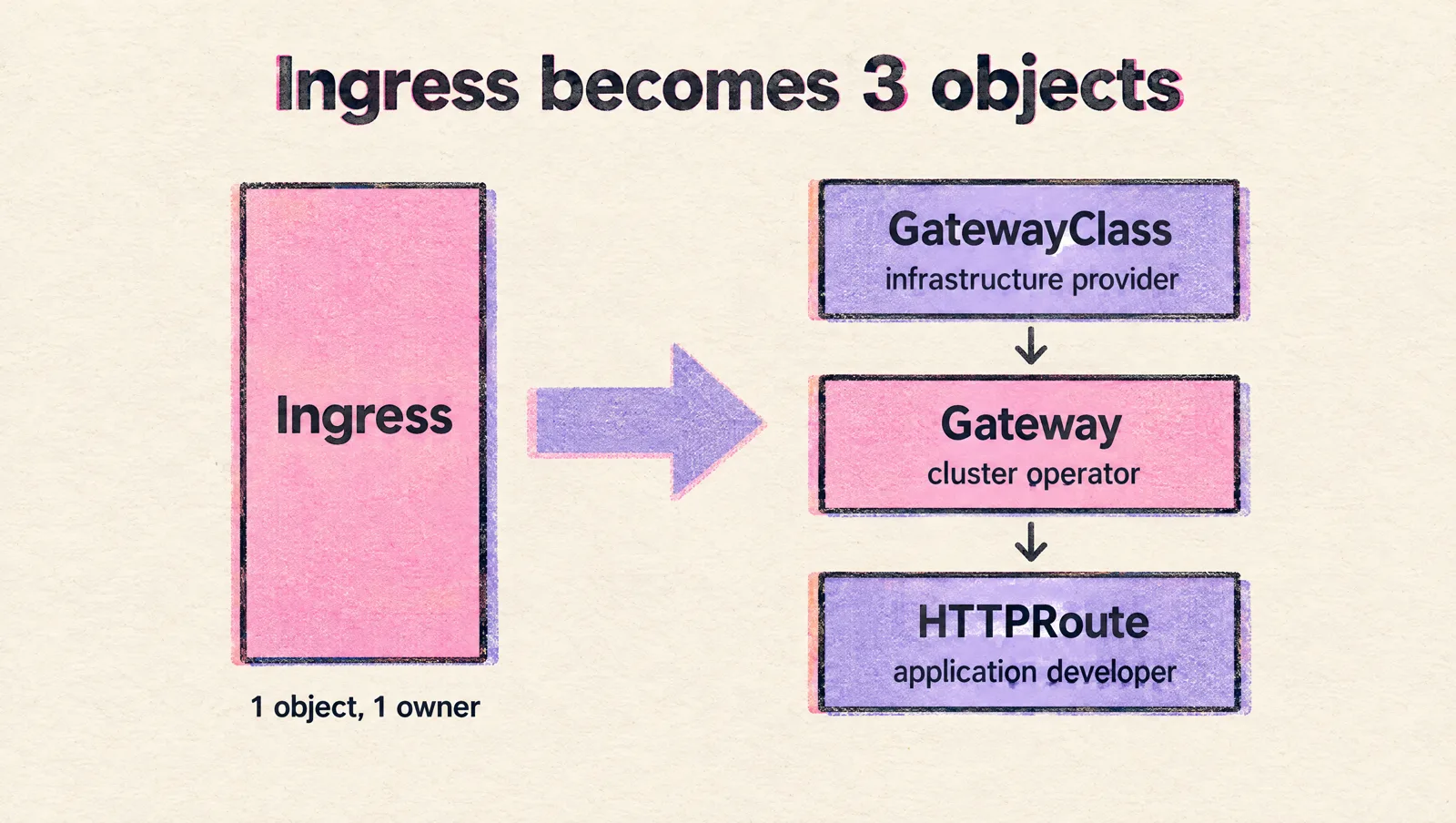
The idea: the one Ingress object becomes 3, and each has an owner.
| Object | What it holds | Who owns it |
|---|---|---|
| GatewayClass | Which controller, with which settings | The infrastructure provider |
| Gateway | Listeners: ports, protocols, hostnames, certificates | The cluster operator |
| HTTPRoute | Hosts, paths, headers, weights, backends | The application developer |
The HTTPS side of the shop Ingress from above, as a Gateway and an HTTPRoute:
apiVersion: gateway.networking.k8s.io/v1
kind: Gateway
metadata:
  name: public
  namespace: infra
spec:
  gatewayClassName: example
  listeners:
  - name: https
    protocol: HTTPS
    port: 443
    hostname: shop.example.com
    tls:
      mode: Terminate
      certificateRefs:
      - name: shop-tls
    allowedRoutes:
      namespaces:
        from: All
---
apiVersion: gateway.networking.k8s.io/v1
kind: HTTPRoute
metadata:
  name: shop
  namespace: shop
spec:
  parentRefs:
  - name: public
    namespace: infra
  hostnames:
  - shop.example.com
  rules:
  - matches:
    - path:
        type: PathPrefix
        value: /api
    backendRefs:
    - name: api
      port: 8080
  - matches:
    - path:
        type: PathPrefix
        value: /
    backendRefs:
    - name: web
      port: 80
2 things moved.
The certificate now sits with the Gateway, in the platform team's namespace. The application team never touches it.
So the shop-tls Secret has to exist in infra now, or be shared with a ReferenceGrant.
And the entry point is explicit. An Ingress has "two implicit entry points", HTTP and HTTPS. A Gateway lists its listeners.
This Gateway listens on 443 only. Port 80 is a second listener you add yourself, and the redirect to HTTPS is an HTTPRoute with a RequestRedirect filter.
from: All is the shortest form. In production use from: Selector with a namespace label, so that only the namespaces you choose can attach routes.
What it adds over Ingress
| Need | Ingress | Gateway API |
|---|---|---|
| Route on host and path | In the API | In the API |
| Route on header, query parameter or method | Annotation, if the controller has one | In HTTPRoute |
| Split traffic by weight | Annotation, if the controller has one | In HTTPRoute |
| Redirects, including HTTP to HTTPS | Annotation | In HTTPRoute |
| Retries | Annotation | In HTTPRoute, Standard since v1.7.0 |
| gRPC, TLS passthrough, TCP, UDP | Outside the API | GRPCRoute, TLSRoute, TCPRoute, UDPRoute |
| A route to a Service in another namespace | Outside the API | Allowed with a ReferenceGrant from the owner |
| Separate permissions for platform and app teams | One object for both | Gateway and HTTPRoute, with allowedRoutes |
A canary in Gateway API is 4 extra lines in the route, with no annotation:
    backendRefs:
    - name: web
      port: 80
      weight: 90
    - name: web-v2
      port: 80
      weight: 10
In the API does not mean in your controller. Query parameter and method matching and retries are Extended features: check your controller's conformance report.
(When to use a canary at all is in deployment strategies: 6 types and how to pick one.)
What is stable today
The current release is Gateway API v1.7.0, published on October 29, 2026.
- GatewayClass, Gateway, HTTPRoute: stable, in the Standard channel since v0.5.0
- GRPCRoute: Standard since v1.1.0
- TLSRoute and ListenerSet: Standard since v1.5.0 (February 27, 2026)
- TCPRoute and UDPRoute: Standard since v1.6.0 (June 2026)
- HTTPRoute retries: Standard since v1.7.0
2 things to know before you start:
- Gateway API "does not include the Ingress kind". Existing Ingresses need "a one-time conversion"
- Annotations are gone on purpose: using them as an extension point "is strongly discouraged"
Use the Standard channel. The project recommends it "by default", and a controller's docs tell you which version it supports.
Migrate off ingress-nginx in 8 steps
The steps are the same whether the target is another Ingress controller or Gateway API.
- Find it. Run the command from the top of this guide on every cluster, then
kubectl get ingress --all-namespaces - List the annotations in use. Every
nginx.ingress.kubernetes.io/annotation is a feature the new controller has to provide. Count the "snippets" first: arbitrary NGINX configuration has no equivalent anywhere - Pick the target with the 4 rules above
- Install the new controller next to the old one. The Gateway API guide: "They will each get a different external IP address, allowing you to test and validate your new configuration in isolation without affecting production traffic"
- Convert. For Gateway API, ingress2gateway reads your Ingresses and prints Gateways and HTTPRoutes. For another Ingress controller, copy each Ingress with the new class and the new controller's annotations
- Test against the new IP with the real hostnames (
curl --resolve), path by path, including the paths with a trailing slash - Switch DNS per hostname, with a low TTL, least important hostname first
- Delete the ingress-nginx release when its access log has been quiet for a week. Keeping it "just in case" keeps the risk
What ingress2gateway does
ingress2gateway print --providers=ingress-nginx --all-namespaces > gwapi.yamlWithout --all-namespaces it reads the current namespace only.
- Version: v1.2.0 (July 7, 2026). Version 1.0 came out on March 20, 2026
- Annotations: before 1.0 it translated 3 ingress-nginx annotations. Since 1.0, "over 30 common annotations (CORS, backend TLS, regex matching, path rewrite, etc.)"
- Inputs: apisix, cilium, ingress-nginx, istio, gce, kong, nginx, openapi, traefik
- Honesty: it warns "about untranslatable configuration", and its authors call it "a migration assistant, not a one-shot replacement"
The 5 behaviors that break a "correct" translation
The Kubernetes blog published these in February 2026. Each one is something ingress-nginx did that the Ingress API never promised.
- "Regex matches are prefix-based and case insensitive"
- The
use-regexannotation "applies to all paths of a host across all (Ingress-NGINX) Ingresses" - "Rewrite target implies regex"
- "Requests missing a trailing slash are redirected to the same path with a trailing slash"
- "Ingress-NGINX normalizes URLs"
Their summary is the reason step 6 exists: "a seemingly correct translation can still cause outages if it does not consider Ingress-NGINX's quirks."
Your application may depend on any of the 5 without anybody knowing. Test the paths, do not read the YAML.
Fix an Ingress that does not route
Start with 2 commands:
kubectl get ingress --all-namespaces
kubectl describe ingress shop --namespace shop
The describe output shows the address, the default backend, every rule with the Pod IPs behind its Service, the annotations and the events.
| Symptom | Usual cause | Check |
|---|---|---|
| ADDRESS stays empty | No controller owns the Ingress, or the controller cannot get a load balancer. A minute or two of <pending> is normal, 10 minutes is not | ingressClassName against kubectl get ingressclass, then the events, the controller's Pods and its logs |
| 404 from the controller | No rule matched, so the controller's default backend or built-in 404 answered | The Host header you send, the pathType, the trailing slash |
| 503 | Usually: the Service has no ready Pods behind it. On ingress-nginx, also its rate and connection limits | The backend line in the describe output. A Service with no endpoints shows as api:8080 (<none>). Then the Service selector and the readiness probe |
| Browser warns about the certificate | The Secret is missing, in another namespace, or tls.hosts does not match the host. ingress-nginx then serves a self-signed certificate | kubectl get secret in the namespace of the Ingress |
| A new Ingress is rejected | 2 IngressClasses are marked default and the Ingress names none | kubectl get ingressclass, and set ingressClassName |
| Works on one controller, breaks on the next | An annotation, or ImplementationSpecific | The annotation list from step 2 of the migration |
The 503 row has a Gateway API twin, written into the spec: a route to a Service with no ready endpoints should return 503, and an invalid backend reference returns 500.
(The commands for the next level down, endpoints, logs and events, are in the kubectl cheat sheet. Readiness itself is in the liveness probes guide.)
The Ingress checklist
Always:
- Know which controller serves every Ingress, and that it still gets releases
- Set
ingressClassNameon every Ingress - Have exactly 1 default IngressClass, or none
- Write
pathType: PrefixorExact, neverImplementationSpecific - Give every rule a
host, and match it intls.hosts - Keep the TLS Secret in the namespace of the Ingress, renewed by cert-manager
- Keep a list of the annotations you depend on, per controller
- Write new routes as HTTPRoutes when your controller supports both APIs
- Run 0 retired controllers on a public IP
Kubernetes Ingress FAQ
Is Kubernetes Ingress deprecated?
No. The Ingress API is frozen: it gets no new features, it is still generally available, and the Kubernetes project says it has "no plans to remove Ingress from Kubernetes". What was retired in March 2026 is ingress-nginx, one controller for that API.
What replaces ingress-nginx?
Nothing replaces it one for one. The official recommendation is Gateway API or another Ingress controller: on a managed cloud that is the cloud's own controller, and in the cluster the maintained options include Traefik, F5 NGINX Ingress Controller, HAProxy, Cilium, Istio, Envoy Gateway and NGINX Gateway Fabric.
What is the difference between an Ingress and a LoadBalancer Service?
A LoadBalancer Service exposes 1 Service through 1 external load balancer, on any TCP or UDP port. An Ingress puts many HTTP and HTTPS Services behind 1 entry point and routes by host and path.
What is the difference between Ingress and Gateway API?
Ingress is 1 object with host and path routing, and annotations for everything else. Gateway API splits the job into GatewayClass, Gateway and HTTPRoute, and puts header matching, traffic weights, redirects, retries, gRPC, TCP and UDP into the API itself.
Is NGINX Ingress Controller the same as ingress-nginx?
No. ingress-nginx was the Kubernetes community project and is retired. NGINX Ingress Controller is F5's product, lives in the nginx/kubernetes-ingress repository, uses nginx.org/ annotations and is still released.
Can an Ingress route TCP or UDP traffic?
No. The docs: "An Ingress does not expose arbitrary ports or protocols." Use a Service of type LoadBalancer, or a TCPRoute or UDPRoute in Gateway API, both stable since v1.6.0.
Do I need an Ingress controller on EKS, GKE or AKS?
Yes, but the cloud usually provides it. EKS has the AWS Load Balancer Controller (built into EKS Auto Mode), GKE has GKE Ingress and GKE Gateway, and AKS has the application routing add-on and Application Gateway for Containers.
What is the difference between ingress and egress in Kubernetes?
Ingress is traffic coming into the cluster or into a Pod, egress is traffic leaving it. The Ingress object only covers inbound HTTP and HTTPS. Which Pods may send or receive what is a NetworkPolicy, which has both ingress and egress rules.
A Recap!
If you take away 1 thing from this guide, let it be this:
Your Ingress objects are fine. Check what is running them.
- Ingress = rules. The controller = the thing that can be out of date
- The API is frozen and stays. ingress-nginx is retired and stays retired
pathType,ingressClassNameand the TLS Secret's namespace explain most broken Ingresses- New routes go to Gateway API. Old ones move with ingress2gateway and a second IP
You don't NEED anyone for this. The 8 steps above are the whole job: an afternoon for a cluster with a handful of plain Ingresses, weeks for one with snippets and regex paths.
If you would rather have someone who has done it look at your setup first (yes, I sell DevOps engineers), start with the free assessment.