
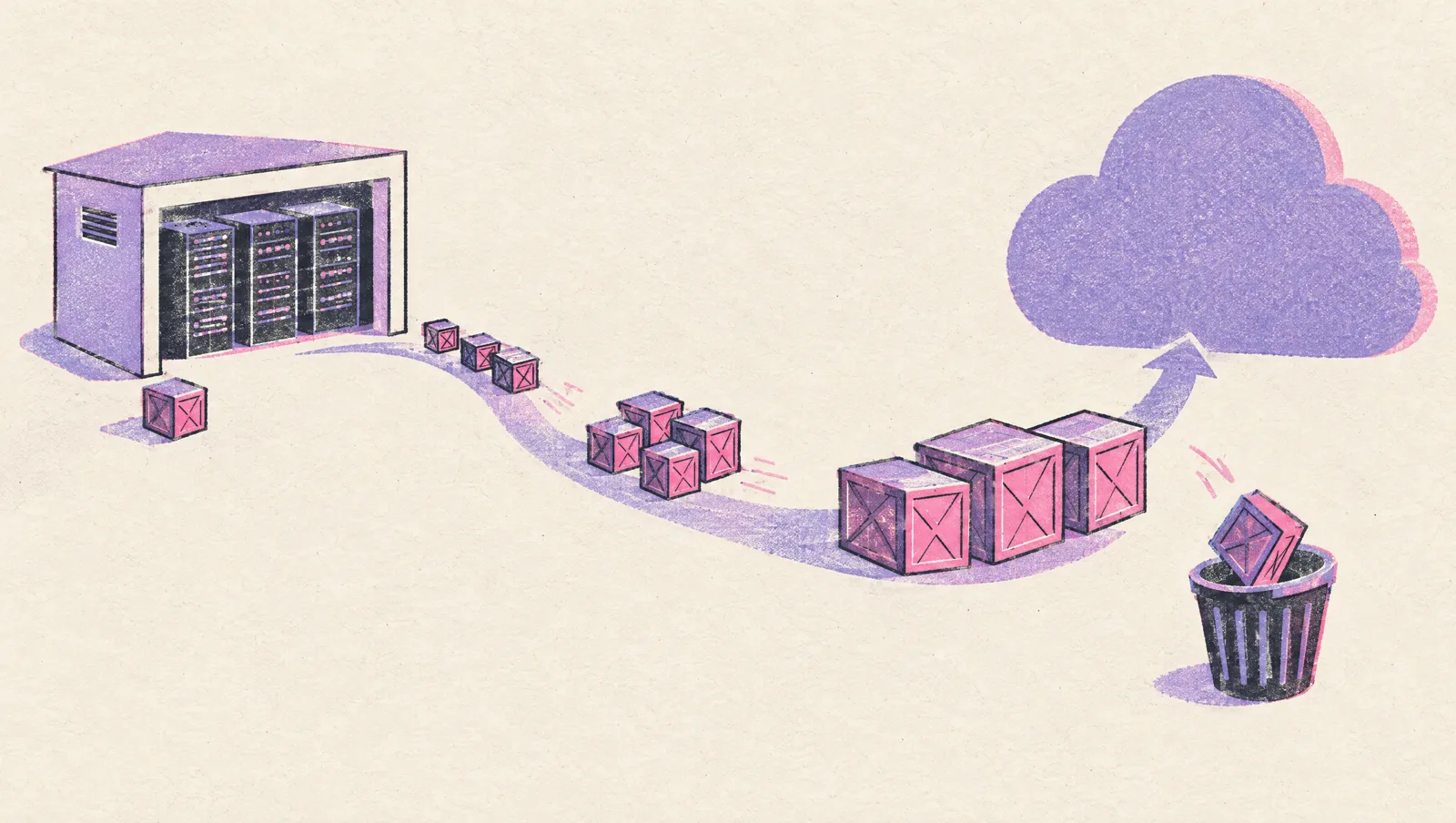

A cloud migration strategy is 4 decisions, and most guides stop after the first one:
Bottom line
- A strategy per workload: which "R" each one gets (retire, retain, rehost, relocate, repurchase, replatform, refactor)
- An order: which workloads move first, and how many at a time
- A cutover and a way back: written per workload, before the move
- An exit: what it costs and how long it takes to leave the cloud you are moving to
The short version of each, with the numbers the cloud vendors publish:
| Decision | My default | The number to remember |
|---|---|---|
| Strategy per workload | Retire what nobody uses, rehost what works, replatform the database | Under 5% average CPU and memory = a candidate to switch off (AWS) |
| Rewrite during the move | No. Move first, change later | Rehost only what stays as it is for 2 years (Microsoft) |
| First workload | Boring, used every day, 0 to 3 dependencies | Fewer than 10 servers in each of the first 5 waves (AWS) |
| Cutover | Freeze, replicate, pause writes, switch DNS, watch | 24 to 48 hours of close watching after the switch (Microsoft) |
| Rollback | Triggers and a time limit written before the cutover | 1 maximum execution time per step, then roll back (Google) |
| Exit | Read the contract end dates before you sign | 2 months of notice for free egress out of AWS |
Every vendor number and quote in this article comes from the AWS, Microsoft and Google Cloud documentation and price lists, Gartner's 2011 press release (archived copy), the European Commission, or the companies' own posts, as read on November 19, 2026.
A cloud migration strategy is one decision per workload
You do not pick 1 strategy for the company.
You pick 1 per workload, and the list of picks is the strategy.
Workload = an application plus everything it needs to run: servers, database, queues, cron jobs, DNS records.
Microsoft says it in 1 line: "Each workload can be Retired, Retained, Rehosted, Replatformed, Refactored, Rearchitected, Rebuilt, or Replaced."
So the first deliverable of a migration is a spreadsheet: 1 row per workload, 1 column for the R, 1 for the owner, 1 for what it depends on.
The rest of this guide fills that spreadsheet in, then puts the rows in order.
The 7 Rs are 5 different lists
"The 7 Rs" sounds like a standard. It is the AWS version of a list that every vendor wrote differently.
| What you do | Gartner, 2011 (5) | AWS, 2016 (6) | AWS today (7) | Microsoft today (8) | Google Cloud today (6) |
|---|---|---|---|---|---|
| Move it as it is | Rehost | Rehost | Rehost | Rehost | Rehost |
| Move a whole platform as it is | Relocate | ||||
| Small changes, same architecture | Refactor (run it on a platform service) | Replatform | Replatform | Replatform | Replatform |
| Change the code | Revise | Refactor / re-architect | Refactor or re-architect | Refactor | Refactor |
| Change the architecture | Rebuild | (same R) | (same R) | Rearchitect | Re-architect |
| Rewrite it | Rebuild | Rebuild | Rebuild | ||
| Buy SaaS (software as a service) | Replace | Repurchase | Repurchase | Replace | Repurchase |
| Switch it off | Retire | Retire | Retire | ||
| Leave it where it is | Retain | Retain | Retain |
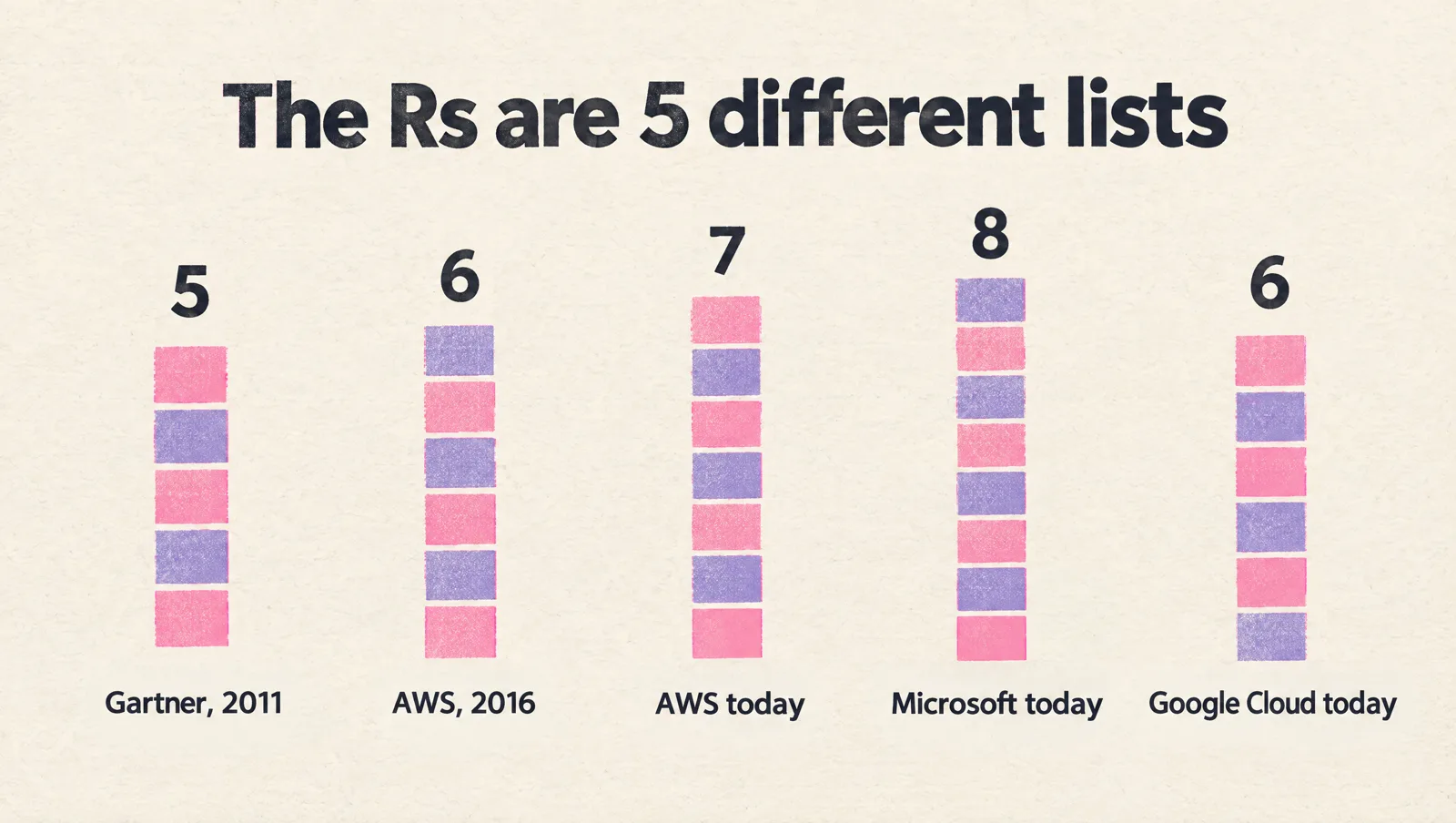
3 things to take from the table:
- "Refactor" has 3 meanings. Gartner in 2011: run the application on a provider's platform service. AWS: "modify its architecture by taking full advantage of cloud-native features". Microsoft: improve "the internal structure of code without adding new features"
- Google has no retire and no retain. Its 6 types only describe workloads that move
- Relocate exists only at AWS. It means moving many servers at once to "a cloud version of the platform", or between accounts and Regions
The rule I use: when somebody in the room says "refactor", ask which one they mean before you estimate anything.
The history is also told wrong on pages that rank for this search today.
One says AWS added Retire in 2016 and Retain in 2017. The AWS post from November 1, 2016 already lists both: "5. Retire" and "6. Retain". The R that came later is Relocate.
Another says the "original four Rs" came from Gartner. Gartner's press release from May 16, 2011 lists 5 options: "rehost", "refactor", "revise", "rebuild" and "replace".
(Even an AWS documentation page credits Gartner with "the 7 Rs" in 2019. Nobody remembers who wrote the list, which tells you how much to worry about the list.)
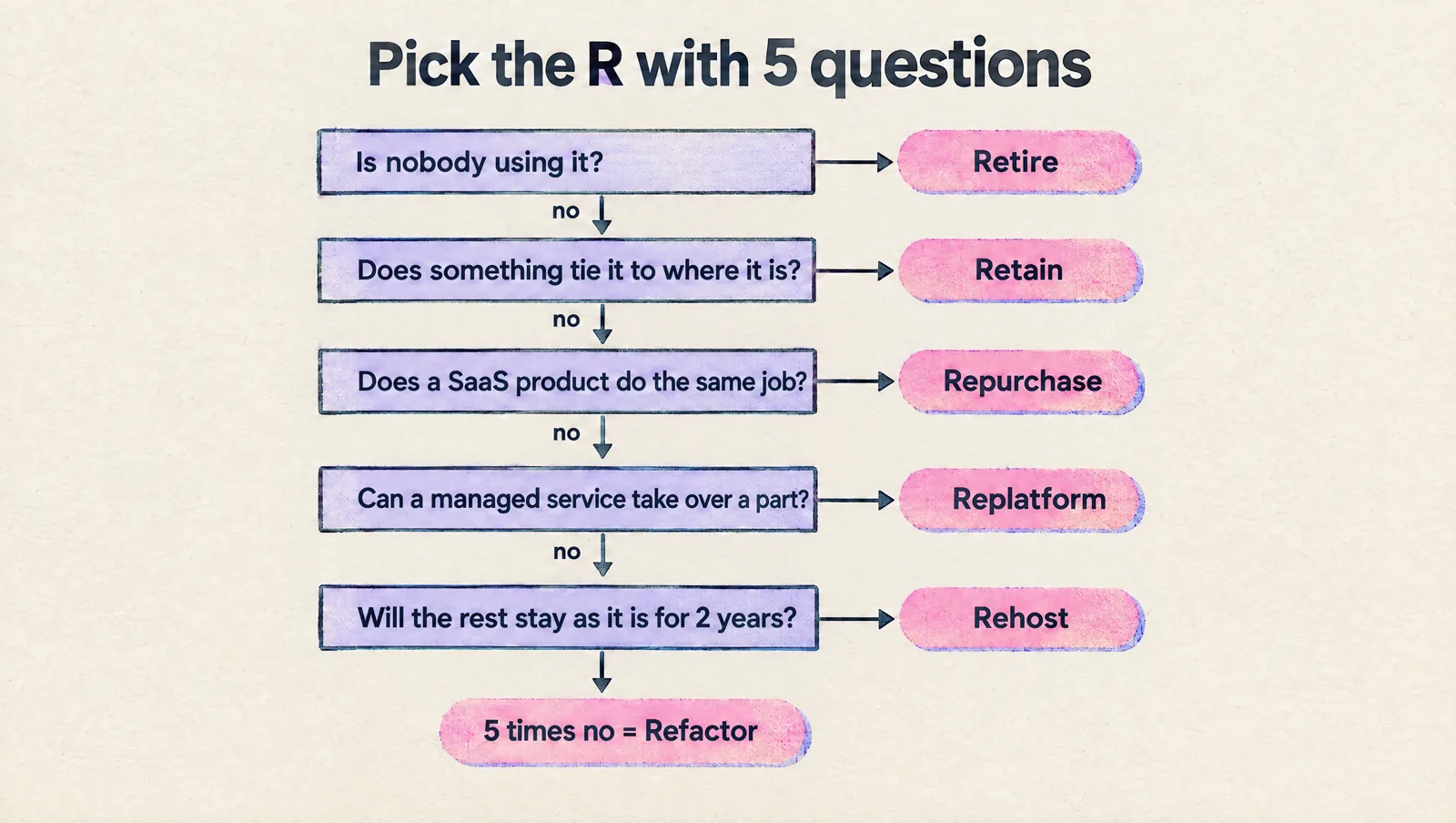
Pick the R for each workload with 5 questions
Ask them in this order. Stop at the first yes, with 1 exception: a yes to question 4 covers only that part, so ask question 5 for the rest.
- Is nobody using it? Retire it
- Does something tie it to where it is? Retain it, and write down the date you look again
- Does a SaaS product do the same job with little customization? Repurchase it
- Can a managed service take over a part of it with no code change? Replatform that part (the database is the usual one)
- Will the rest stay as it is for the next 2 years? Rehost it
5 times no = refactor, and only when the business asks for something the current architecture cannot give.
(Relocate is rehost for a whole platform, such as a VMware estate, moved at once.)
Each question has a vendor test behind it:
| R | What changes | The test | The warning |
|---|---|---|---|
| Retire | Nothing moves. You switch it off | AWS: average CPU and memory below 5% ("zombie"), or 5% to 20% over 90 days ("idle"), or no inbound connection for 90 days | Check for month-end and year-end jobs before you believe 90 days of silence |
| Retain | Nothing, for now | AWS: data residency, a recent upgrade, hardware with no cloud equivalent. A license that does not allow running in a cloud is another reason | Retained workloads keep the old data center bill alive |
| Repurchase | The product. Your data moves into it | Microsoft: a mature SaaS alternative exists and you need little customization | Google: it "might be a lot more expensive" and you control less |
| Rehost | The address | Microsoft: "the workload remains in its current state for at least two years" | Microsoft: "Rehosting doesn't resolve existing performance, reliability, or architectural issues" |
| Relocate | The address of a whole platform | AWS: you run a platform that has a cloud version, and you move many servers at once | Only AWS has this R |
| Replatform | 1 layer under the application | AWS examples: SQL Server to Amazon RDS, or virtual machines into containers "without making any code changes" | Google: "several rounds of testing" |
| Refactor | The architecture | AWS: "strong business demand to scale, accelerate product and feature releases, and to reduce costs" | AWS: "the most complex and costly of the migration strategies" |
A workload you retire is the cheapest migration you will ever run.
Stephen Orban wrote in that 2016 AWS post that "as much as 10% (I've seen 20%) of an enterprise IT portfolio is no longer useful, and can simply be turned off".
So question 1 comes first. Every workload you switch off leaves every later list.
Move first, modernize later (the vendors disagree)
This is the argument inside every migration: lift and shift now and improve later, or improve on the way?
The 3 vendors give 3 answers:
- AWS (in its guide for large migrations): "We recommend that you first migrate to the AWS Cloud and then modernize the workload." Refactor "only when the other migration strategies are not an acceptable option"
- Microsoft: rehost only when the workload needs no modernization for 2 years. "If modernization is likely, consider refactoring or rearchitecting instead to avoid duplicate effort". It adds a condition: only when your team has the skills and the time
- Google: "Successful migrations change the workload to migrate as little as possible during the migration operations"
I side with AWS and Google.
Why? Because a move and a rewrite at the same time is 2 changes in 1 release, and when it breaks you do not know which one did it.
Move = new network, new identity system, new disks, new DNS. That is enough change for 1 cutover.
There are 2 exceptions I accept:
- The database. Moving a self-managed database to a managed one is a replatform with a well-known path, and it removes the part of operations that hurts most
- The broken workload. If it falls over every week in the data center, it will fall over every week in the cloud. Fix it or leave it for the last wave
Microsoft's page makes one honest point for the other side: a migration project is often what gets the funding and the support of the people who decide.
That is true, and "we will modernize after" is the first line cut when the migration ends.
My answer: put the modernization of the 2 or 3 workloads that need it in the same plan, with dates, as the waves after the move.
Netflix shows what the other choice costs in time. Its move began in August 2008 and finished in January 2016, with most systems in the cloud before 2015. Its own explanation: "we chose the cloud-native approach, rebuilding virtually all of our technology". 7 years.
Netflix had a reason. Most companies moving 40 servers do not.
Start with a boring workload that people use
The first workload teaches your team the path: accounts, network, deploy, monitoring, cutover.
So pick it for what it teaches. The 3 vendors overlap on most of it, and they differ on 1 point, how much the workload should be used:
| Vendor | First workloads | What they add |
|---|---|---|
| AWS | 0 to 3 dependencies, ready to rehost as it is, in a development or test environment | Business-critical applications "are typically low priority for the migration" because they carry more risk |
| Microsoft | "internal tools, development environments, or low-usage applications with standalone architectures" | "Add one or two complex workloads to each early wave" to find the hard problems early |
| Not business critical, few dependencies, little refactoring, can afford a cutover window | "You should avoid rarely used workloads". A workload used a few times a year teaches nothing and hides its problems |
AWS and Microsoft point at applications with few users. Google warns about the extreme of that, and its line is the one teams miss.
The safest first candidate is the internal tool nobody opens. It is also useless as a test: nobody notices when it breaks.
First workload = low risk + used every day + looks like the others.
Google adds a people rule that I like: the team that owns the first workload "should be highly motivated". A team that did not want the migration will prove it does not work.
Size the waves with AWS's numbers
A wave = a group of workloads that move in the same window.
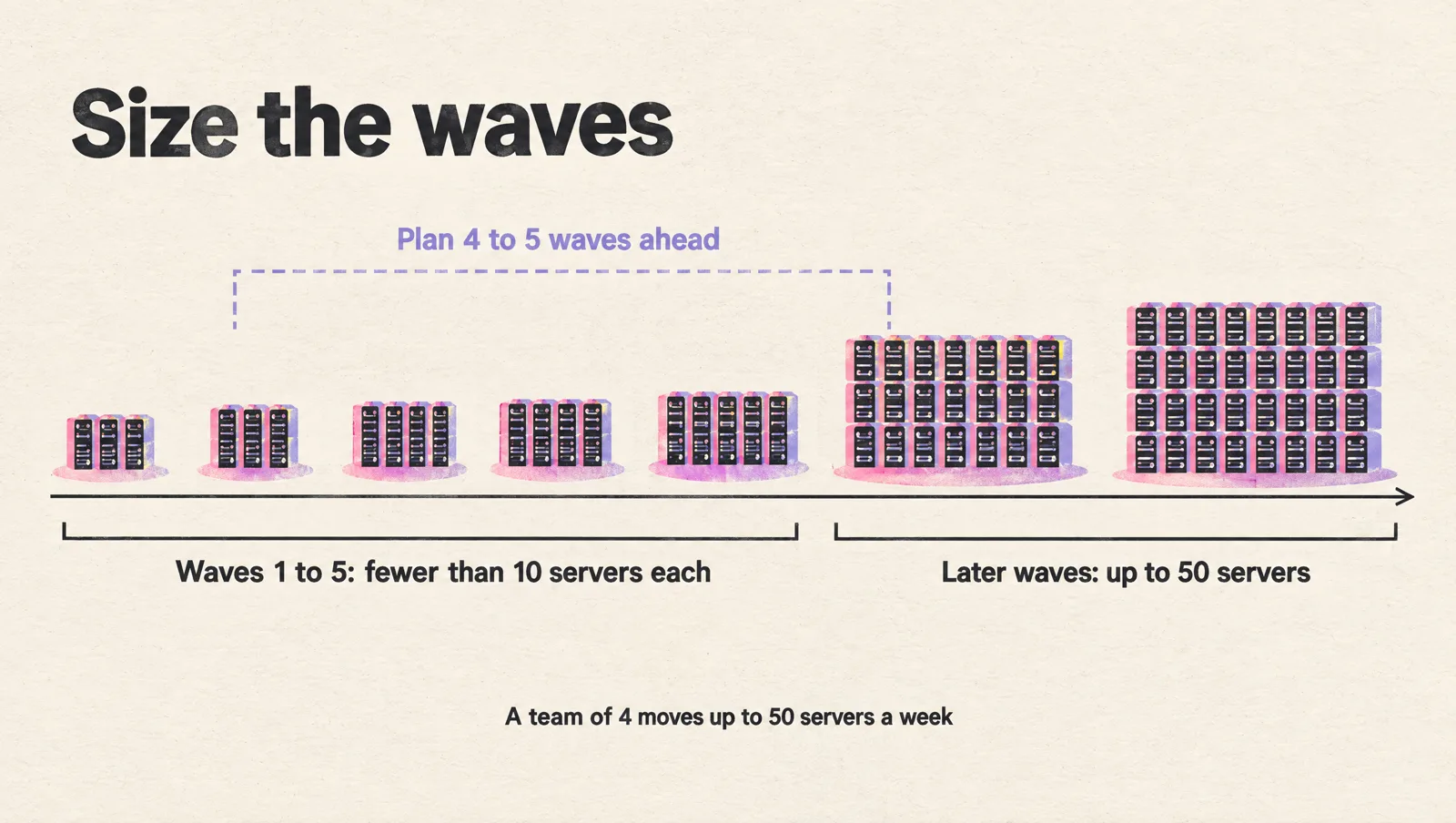
AWS is the only vendor of the 3 that publishes numbers for the size of a wave. They come from its guides for large migrations, and they work as upper limits for small ones:
- Waves 1 to 5: "fewer servers (less than 10), low-complexity applications", in development or test environments
- Later waves: an example cap of 50 servers per wave
- Team capacity: "a migration team of four architects can migrate up to 50 servers in a week for rehost patterns"
- Planning horizon: at least 4 to 5 waves in advance, and never all waves at once
- Order inside the plan: 3 servers before 20, 100 GB before 2 TB, 10 users before 10,000
What goes into the same wave is decided by dependencies:
- "Applications with a shared database must migrate together"
- A dependency that everything shares (AWS uses Active Directory as the example) does not count. Build it in the cloud first, before any application moves
- Microsoft's tie-breaker: "When uncertainty exists about dependency criticality, group the components together"
Plan the calendar with the vendor's durations too, since nobody budgets for them:
- Discovery tooling: 4 to 8 weeks to install, then 4 to 12 weeks of collecting data before its scores mean anything
- Preparation: AWS calls this phase mobilize, builds the landing zone in it, and runs it as 8 sprints of 2 weeks
- Runbooks and automation for a large migration: 1 to 3 months before the first wave at scale
(A landing zone is the base you build once: accounts, network, identity, logging, guardrails. Workloads land in it.)
Write that base as code. And when a migration tool creates resources for you, bring them under code afterwards: Terraform import does that.
With 30 servers you will not need 16 weeks of preparation. You will still need the 3 steps: know what you have, build the base, write the runbook.
Move the data by the downtime you can afford
Servers are the easy part. Data decides how long the cutover takes.
Google's guide asks 4 questions: how much data, how often it changes, whether you can afford a cutover window, and what consistency model you run today.
Google lists 4 approaches. 3 of them cover almost every migration (the fourth, a data-access microservice, is for teams already on microservices):
| Approach | Downtime | How it works | Pick it when |
|---|---|---|---|
| Scheduled maintenance (big bang) | The final sync, or the whole copy if you stop writes first | Copy while live, stop writes, copy what changed, switch. The simpler version: stop writes, copy everything, switch | The workload can afford a window: internal tools, test environments |
| Continuous replication | Short. AWS quotes "cutover windows of minutes" for its server tool | Copy everything once, then replicate changes until the switch | Production databases and servers |
| Dual write ("Y") | None | The application writes and reads in both places during the move | You cannot afford any window, and you can afford changing the application |
Microsoft says a migration with downtime is "simpler and faster because it doesn't require real-time synchronization". Use it wherever a window is acceptable.
The tools for the second approach, with the names they carry today:
- AWS servers: AWS Transform MGN (the service known as AWS Application Migration Service). It does "continuous block-level replication" of the source servers
- AWS databases: AWS Database Migration Service. A full load, a full load plus change data capture (CDC) that keeps replicating changes until the cutover, or CDC only
- Azure: Azure Catalyst, which the documentation describes as "formerly Azure Migrate", and Azure Database Migration Service
- Google Cloud: Migration Center, Migrate to Virtual Machines and Database Migration Service
Then do the transfer arithmetic before you promise a date.
Google's numbers: 1 GB takes 8 seconds on a 1 Gbps line in the ideal case, and 100 TB takes 12 days. On 100 Mbps, 300 TB takes about 9 months.
If the line is too slow, the old answer was a storage device shipped by truck. Check it still exists:
- AWS Snowball: closed to new customers since November 7, 2025. Support ends on December 31, 2026
- Azure Data Box: available in 120 TB and 525 TB (an older 80 TB device is being retired region by region). Microsoft suggests it above 40 TB with limited connectivity. Data Box Heavy is retired
- Google Transfer Appliance: still documented. 300 TB captured "in under 25 days", plus about 10 business days until the data is in Cloud Storage
Script the cutover and the way back
A cutover is a script, written and rehearsed before the night it runs.
Microsoft's migration guide gives the steps for a near-zero downtime cutover. This is the order:
- Freeze changes. Block releases to the source in the CI/CD (continuous integration and delivery) pipeline for the migration window
- Replicate. "Don't proceed to the next step until replication lag is zero" (it stays at zero only once writes are paused, in step 3)
- Pause writes. Read-only mode on the source for the final sync. "If you don't pause write operations, you increase the risk of data loss"
- Validate the data. Row counts are a quick check, and "checksums and hash functions are preferred"
- Switch traffic. "Update DNS records and load balancer configurations"
- Watch. Performance, error rates and user access "for the first 24-48 hours after cutover"
- Keep the source. "Retain the source environment as a fallback option", with the ability to revert DNS
- Announce. "Announce migration success only after thorough validation"
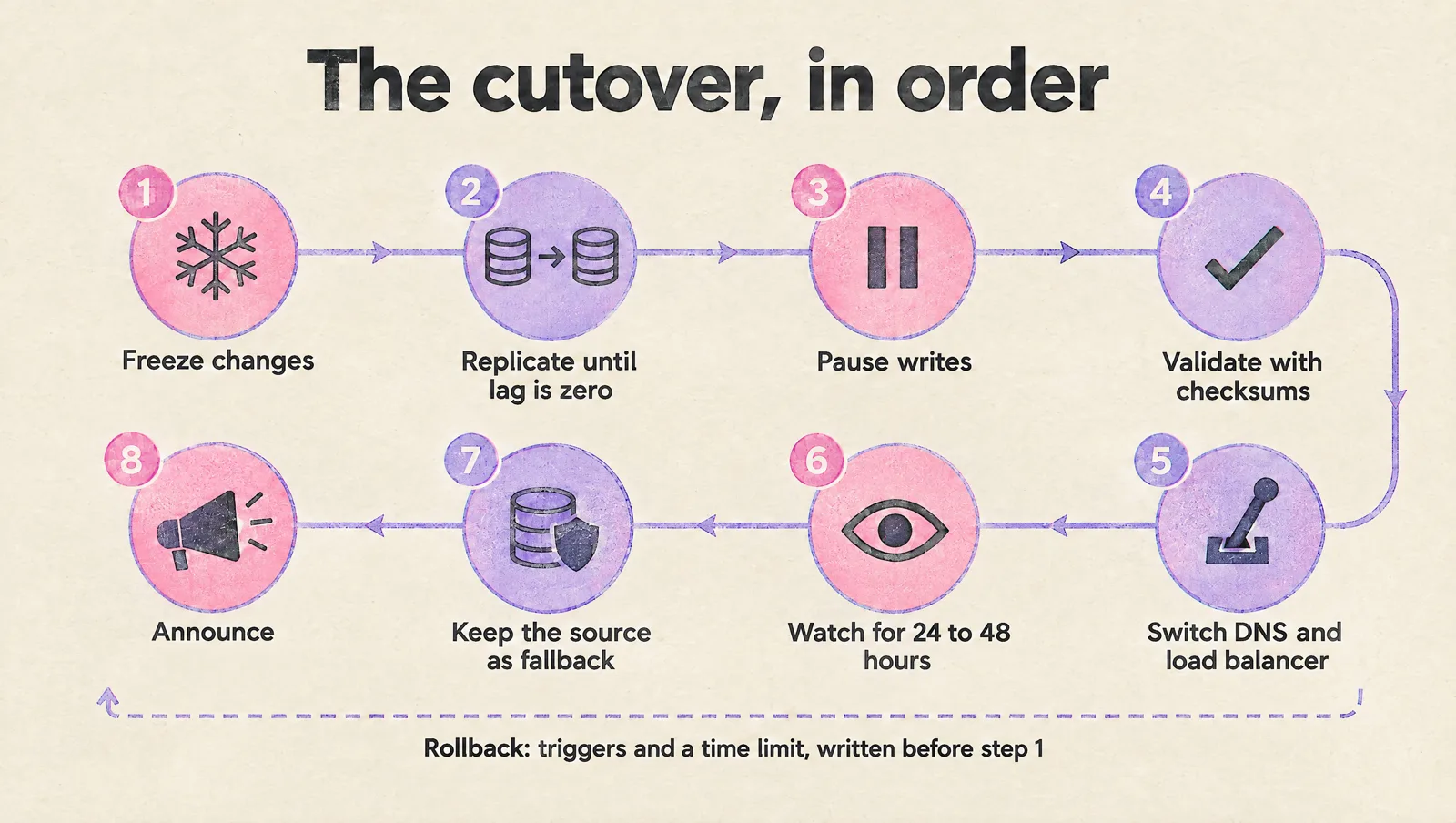
The way back is written before step 1:
- Triggers: Microsoft asks for "specific conditions that trigger a rollback", such as CPU usage, response time or error rate. A number, decided in daylight. If the workload has a service level objective, start from it: SLO vs SLA vs SLI
- A time limit: Google's rule is my favorite line in all 3 guides. "Set a maximum-allowed execution time for each migration step. After this allowed execution time expires, your teams start rolling back the migration step"
- A rehearsal: both tell you to test the rollback before you need it
- The steps with no way back: Google warns that some steps lose data even when rolled back. Mark them in the script
Rollback = a decision you made last week, executed by whoever is on call tonight.
Know where the point of no return is. The first one is the first write that lands only on the new side: from then on, going back means copying data back. Your tool has a second one. In AWS Transform MGN it is the action called "Finalize cutover": it "stops data replication, discards all replicated data" and removes the agent from the source.
About DNS: none of the 3 migration guides gives a number for the TTL (time to live). Google's comes closest: it asks whether you can set the TTL "to its minimum value in seconds before you perform the migration", and whether your clients respect it at all (some applications cache DNS and ignore the TTL).
The closest number is in the Amazon Route 53 best practices, which call 60 or 120 seconds a common choice for records changed during a fast failover. Lower the TTL at least 1 full old TTL before the cutover: resolvers keep the old value until the old TTL runs out.
If the workload has recovery targets, the cutover has to fit inside them. I wrote about setting those in RTO vs RPO.
And if you can send a small share of traffic to the new environment first, do that. The patterns are in deployment strategies.
Decide when the old environment dies
For a while after each cutover you pay for 2 environments.
No vendor publishes what that costs. Google names the risk: "the cost of running two environments indefinitely".
So write the conditions for switching the source off before the first wave:
- No traffic: monitoring shows nothing still reaching the old environment that should reach the new one
- A soak period you chose: Microsoft's example is "all performance benchmarks met for 30 days"
- A named approver: somebody signs the decommission
- Data under retention rules: an inventory of what did not move and has to be kept by law
- Licenses: what you can reuse in the cloud and what you can stop paying for
Then compare the first cloud invoices to what the workload cost before. Microsoft puts it in its checklist: "Compare current costs to premigration baselines."
A migration without a decommission date is a second data center.
Put the exit in the plan on day 1
You are choosing a provider you may leave. Plan it while you have negotiating power, which is before you sign.
What data transfer out costs today
List prices for data transfer out to the internet, first paid tier, read on November 19, 2026:
| Provider | Free each month | First paid tier | Applies to |
|---|---|---|---|
| AWS | 100 GB | $0.09 per GB, up to 10 TB | US East (N. Virginia) |
| Azure | 100 GB | $0.087 per GB, next 10 TB | From North America or Europe |
| Google Cloud, Premium Tier | 1 GiB | $0.12 per GiB, up to 1 TiB | From Iowa to North America |
| Google Cloud, Standard Tier | 200 GiB | $0.085 per GiB, up to 10,240 GiB | From Iowa |
A worked example at AWS list prices, for 100 TB (102,400 GB) leaving US East in 1 month, ignoring the 100 GB free tier:
- First 10,240 GB at $0.09 = $921.60
- Next 40,960 GB at $0.085 = $3,481.60
- Last 51,200 GB at $0.07 = $3,584.00
- Total = $7,987.20
About $8,000 for 100 TB. It is a real cost and a small one next to the engineering time of the move.
Leaving for free has rules and dates
All 3 providers now waive egress charges for customers who leave. Each has conditions:
| Provider | What you must do | Timeline | The catch |
|---|---|---|---|
| AWS | Ask support, and wait for approval before you start | Request "at least two months prior" to the start. 180 days to finish for customers outside the EU | You must move all your data off AWS, or all of it off 1 service. CloudFront and Direct Connect transfer is excluded |
| Google Cloud | Send an Exit Notice before any transfer you want credited | 14 days, then 30 days to start, then 30 days or more to finish | You must end all use of the service you leave. Internet transfers only |
| Azure | Claim a credit for egress above the free 100 GB a month | See the claim steps on the Azure bandwidth pricing page | For moving all your data off Azure, over the internet |
In the European Union the Data Act has applied since September 12, 2025. The European Commission's summary: it "will also entirely remove switching charges, including charges for data egress", from January 12, 2027.
Contracts hold you longer than egress does
37signals moved 7 applications out of AWS in the summer of 2023 and wrote about every step.
3 details from their posts belong in any migration plan:
- The savings came late: "it took until the end of that year for all the long-term contract commitments to end, so 2024 has been the first clean year of savings"
- Their file storage was "locked into a four(!!)-year contract" signed in 2021
- Missing that contract's end date would have had a price: "a cool five thousand dollars a day". And the move needed a calendar: for almost 6 petabytes they planned "at least three weeks" on a 40 Gbit line
Exit date = the end of your longest commitment. The egress price list has little to do with it.
So before you sign a multi-year commitment to get a discount, write its end date next to the row of every workload it covers.
Migration funding exists, ask for it
All 3 vendors pay part of a migration: AWS through the Migration Acceleration Program, Microsoft through the page now titled Frontier Accelerate for Azure, Google through the Rapid Migration and Modernization Program (RaMP).
Google publishes a baseline for general workloads: "20% of the projected Annual Recurring Revenue (ARR), capped at $2M per workload". Microsoft publishes one for databases: delivery funding and Azure credits "at 50% of year-one usage". AWS publishes no amount.
In all 3 cases your number comes from your account manager or a partner. Ask before the first wave.
The cloud migration checklist
Always:
- List every workload with an owner, its dependencies and its R
- Switch off what nobody uses before you plan anything else
- Write the reason and the review date next to every retained workload
- Build the landing zone and the shared services before the first application moves
- Pick a first workload that is low risk, used every day and typical
- Keep the first 5 waves under 10 servers each
- Move applications that share a database in the same wave
- Plan 4 to 5 waves ahead, and replan after each one
- Calculate the data transfer time on your real line
- Write the cutover script and rehearse it
- Write the rollback triggers and the time limit of each step
- Lower DNS TTLs at least 1 full old TTL before the cutover
- Validate data with checksums
- Watch closely for 24 to 48 hours
- Write the conditions for switching the source off, and the date
- Compare the new bill to the old one
- Know the end date of every commitment you sign
FAQ
What are the 7 Rs of cloud migration?
They are AWS's 7 migration strategies: retire, retain, rehost, relocate, repurchase, replatform, and refactor or re-architect. Microsoft lists 8 and Google Cloud lists 6, with different names for some of them.
What are the 6 Rs and the 5 Rs?
The 6 Rs are the AWS list from 2016: rehost, replatform, repurchase, refactor, retire and retain. The 5 Rs are Gartner's options from 2011: rehost, refactor, revise, rebuild and replace.
Which cloud migration strategy is the fastest?
Rehost, for a single workload. Google calls it "the type that requires the least amount of time". AWS calls relocate "the quickest way to migrate" when you move a whole platform at once.
Is lift and shift a bad strategy?
No. It is the right one for a workload that works and will not change soon. It is the wrong one for a workload with problems, since the problems move with it.
How long does a cloud migration take?
No vendor publishes a total. AWS gives 1 to 3 months to prepare a large migration and a pace of up to 50 servers a week for a team of 4 doing rehosts. Netflix took 7 years because it rebuilt everything.
Does a cloud migration need downtime?
Per workload, you choose. A migration with a maintenance window is simpler. Continuous replication brings the window down to minutes, and it costs more preparation.
How much does it cost to move data out of a cloud?
About $0.09 per GB at list price for the first 10 TB a month out of AWS US East, and about $8,000 for 100 TB. All 3 big providers waive it when you leave and follow their process.
A recap
If you take away 1 thing from this guide, let it be this:
A cloud migration strategy is a list of small decisions made BEFORE the move, so that nobody has to make them at 2 AM.
- 1 R per workload, starting with what you can switch off
- Move first, modernize later, except the database
- A first workload that is boring and used every day
- Small waves, planned 4 to 5 ahead
- A cutover script with a way back and a time limit
- A date on which the old environment dies
- The end date of every contract you sign
You don't need a consultant to run this. The vendor guides are free and the checklist above is the short version.
If you would like a senior engineer to go over your plan with you before the first wave (yes, that is what we sell), claim a free assessment.