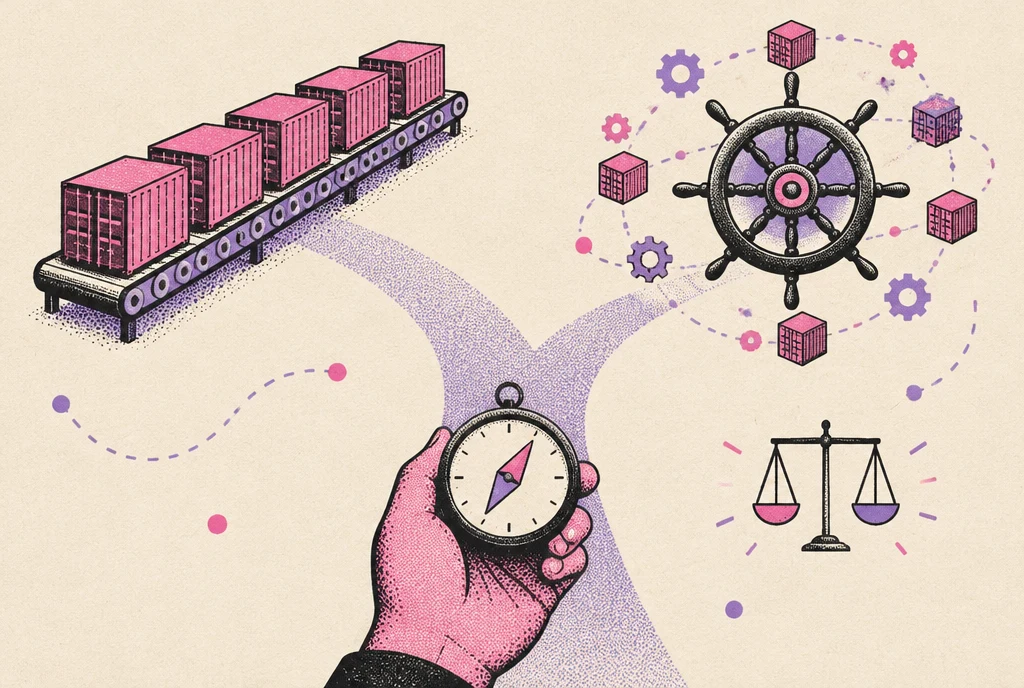

ECS vs EKS in one paragraph: Amazon ECS is AWS's own container orchestrator. It has no control plane fee, no cluster versions to upgrade, and a small set of AWS-native concepts. Amazon EKS is managed Kubernetes. It costs $0.10 per cluster per hour, needs a version upgrade roughly every year, and gives you the whole Kubernetes ecosystem and portability. Most startups with a few services on AWS ship faster on ECS. Teams that need Helm charts, operators, GitOps, multi-cloud or deep scheduling control should pick EKS.
This guide compares the two on the things that decide real projects: cost (with current AWS prices), day-two operations, Fargate on each, the newer EKS Auto Mode and ECS Express Mode, and what a migration in either direction involves.
ECS vs EKS at a glance
| Amazon ECS | Amazon EKS | |
|---|---|---|
| What it is | AWS's proprietary container orchestrator | Upstream Kubernetes with an AWS-managed control plane |
| Control plane price | Free. "There is no additional charge for Amazon ECS orchestration" (ECS pricing) | $0.10 per cluster hour on standard support, $0.60 on extended support (EKS pricing) |
| Upgrades | No cluster version. AWS updates the control plane; you update the ECS agent or Fargate platform version | Kubernetes minor versions get 14 months of standard support, then 12 months of extended support at a higher price |
| Compute options | Fargate, EC2, ECS Managed Instances, ECS Anywhere | Managed node groups, self-managed nodes, Karpenter, EKS Auto Mode, Fargate, Hybrid Nodes |
| Fargate Spot | Supported, up to 70% off Fargate on-demand | Not supported ("Amazon EKS doesn't support Fargate Spot") |
| Learning curve | Task definitions, services, clusters. Days for a developer | Pods, Deployments, Services, Ingress, RBAC, CRDs, Helm. Weeks to be fluent |
| Ecosystem | AWS services and AWS-flavored tooling (Copilot, CDK, Terraform) | The CNCF ecosystem: Helm, Argo CD, Flux, KEDA, operators, service meshes |
| Portability | AWS only (ECS Anywhere extends it to your own servers) | Runs on any cloud or on premises with the same manifests |
| Best fit | Small to mid-size teams, AWS-only, web services and workers | Platform teams, many services, Kubernetes-native tooling, multi-cloud requirements |
How the two models differ
ECS: tasks and services
In ECS you describe a container (or a group of containers that share a lifecycle) in a task definition: image, CPU, memory, ports, environment, secrets and the IAM role it runs with. A service keeps a desired number of those tasks running, registers them with a load balancer and replaces unhealthy ones. A cluster is a logical grouping with capacity behind it, either Fargate or EC2.
That is close to the whole model. Networking is plain VPC networking (each Fargate task gets its own elastic network interface), service discovery is AWS Cloud Map or ECS Service Connect, and permissions are IAM roles per task. If your team already knows AWS, nothing in ECS feels foreign.
EKS: Kubernetes with AWS running the control plane
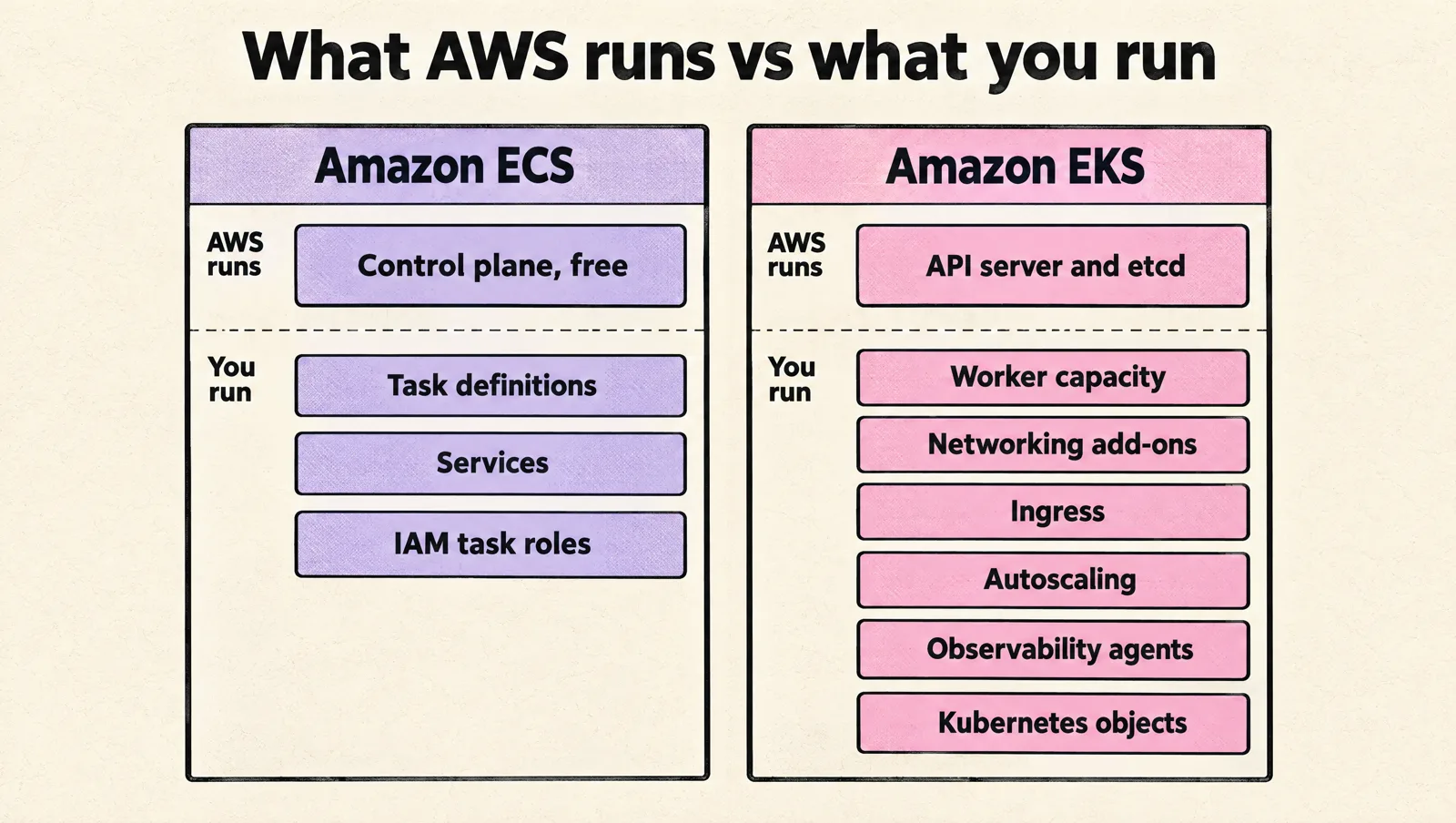
EKS gives you a conformant Kubernetes API. AWS runs and scales the API server and etcd across Availability Zones. You run everything else: worker capacity, networking add-ons, ingress, autoscaling, observability agents, and the Kubernetes objects your apps need.
The payoff is the ecosystem. A Helm chart for almost any open source tool, operators for databases and queues, GitOps with Argo CD or Flux, progressive delivery with Argo Rollouts, event-driven scaling with KEDA, and the same manifests on any cloud. The price is a much bigger surface to understand, secure and upgrade.
What ECS and EKS actually cost
The orchestrator itself is rarely the big number. Compute is. But the control plane fee and the people cost of running Kubernetes are where the two diverge.
Control plane
- ECS: $0.
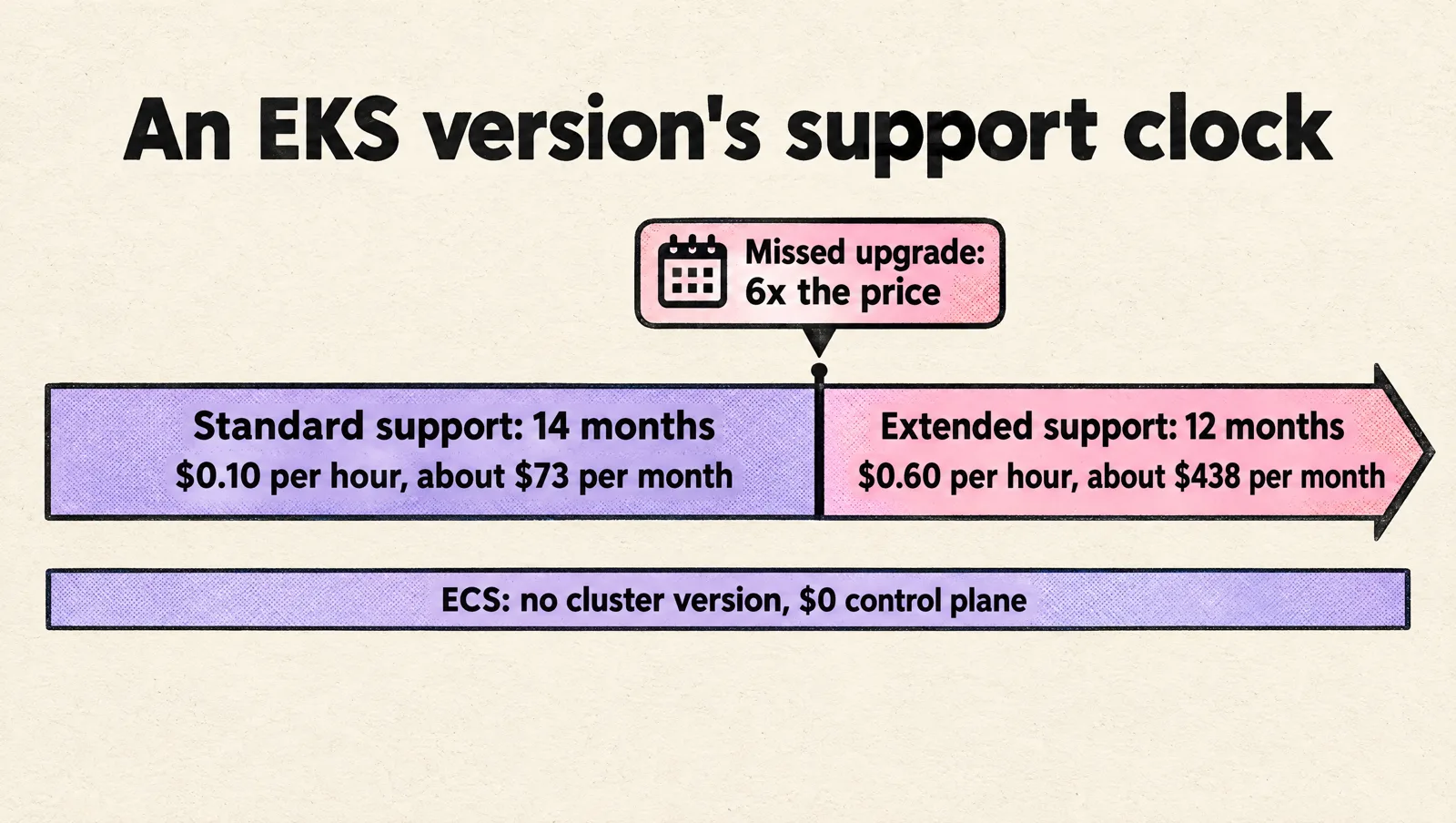
- EKS standard support: $0.10 per hour, about $73 per cluster per month (730 hours).
- EKS extended support: $0.60 per hour, about $438 per cluster per month. You land here when a cluster stays on a Kubernetes version past its 14 months of standard support.
- EKS Provisioned Control Plane: optional larger control plane tiers from $1.65 per hour (XL) up to $13.90 per hour (8XL), on top of the standard fee, for very large clusters.
A typical startup runs three clusters (development, staging, production). On EKS that is about $219 per month before a single container runs. On ECS it is $0.
Compute: Fargate prices
Fargate bills per second (one minute minimum) for the vCPU and memory a task or pod requests. In US East (N. Virginia), per the Fargate pricing page:
| Fargate, us-east-1 | Per vCPU hour | Per GB hour |
|---|---|---|
| Linux, x86 | about $0.04048 | about $0.004445 |
| Linux, Arm (Graviton) | about $0.03238 | about $0.00356 |
Each task gets 20 GB of ephemeral storage included. Compute Savings Plans can cut Fargate costs by up to 52% on a three-year term, and Fargate Spot (ECS only) by up to 70% for interruption-tolerant work.
A worked example
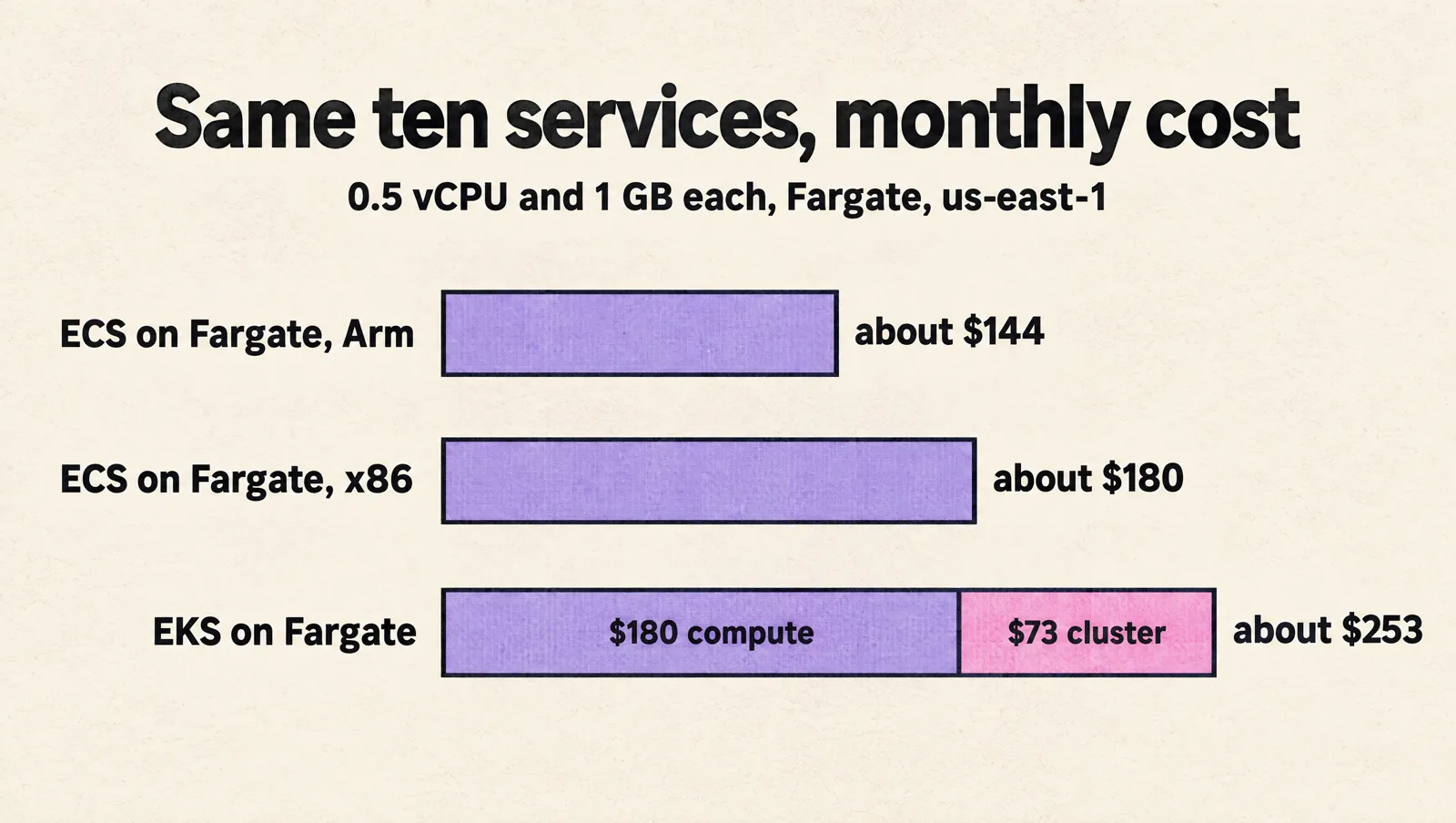
Ten always-on services, each with 0.5 vCPU and 1 GB of memory, on x86 Fargate in us-east-1:
- Per task: (0.5 × $0.04048) + (1 × $0.004445) = about $0.0247 per hour, or about $18.02 per month.
- Ten tasks: about $180 per month of compute, on either orchestrator.
- ECS on Fargate: about $180 per month in total.
- EKS on Fargate: about $180 plus $73 for the cluster, about $253 per month for one cluster.
- Move the same workload to Arm (Graviton) on ECS and compute drops to about $144 per month. EKS on Fargate does not run Arm pods, so on EKS you get Graviton savings only on EC2 or Auto Mode nodes.
Load balancers, NAT gateways, logs and data transfer cost the same on both, and in small environments they often exceed compute. Budget for them separately.
EC2 capacity, Auto Mode and Managed Instances
On EC2 capacity you pay normal instance prices on both services and can use Spot Instances and Savings Plans. Two newer options add a management fee on top of the instance price in exchange for AWS running the nodes:
- EKS Auto Mode charges a per-instance fee. In AWS's own example, four instances costing $1.434 per hour carry an Auto Mode fee of $0.17208 per hour, roughly 12% on top.
- ECS Managed Instances charges a per-instance ECS management fee in the same way, on top of the EC2 price.
The cost nobody puts in the calculator
The real gap is people. An EKS platform needs someone who owns version upgrades, add-on compatibility, node autoscaling, ingress, network policy, RBAC and the observability stack. On a small team that is a meaningful slice of a senior engineer's time every month. ECS removes most of that list. If you do not already have Kubernetes skills in house, that time is usually worth far more than the $73 per cluster.
Fargate on ECS vs Fargate on EKS
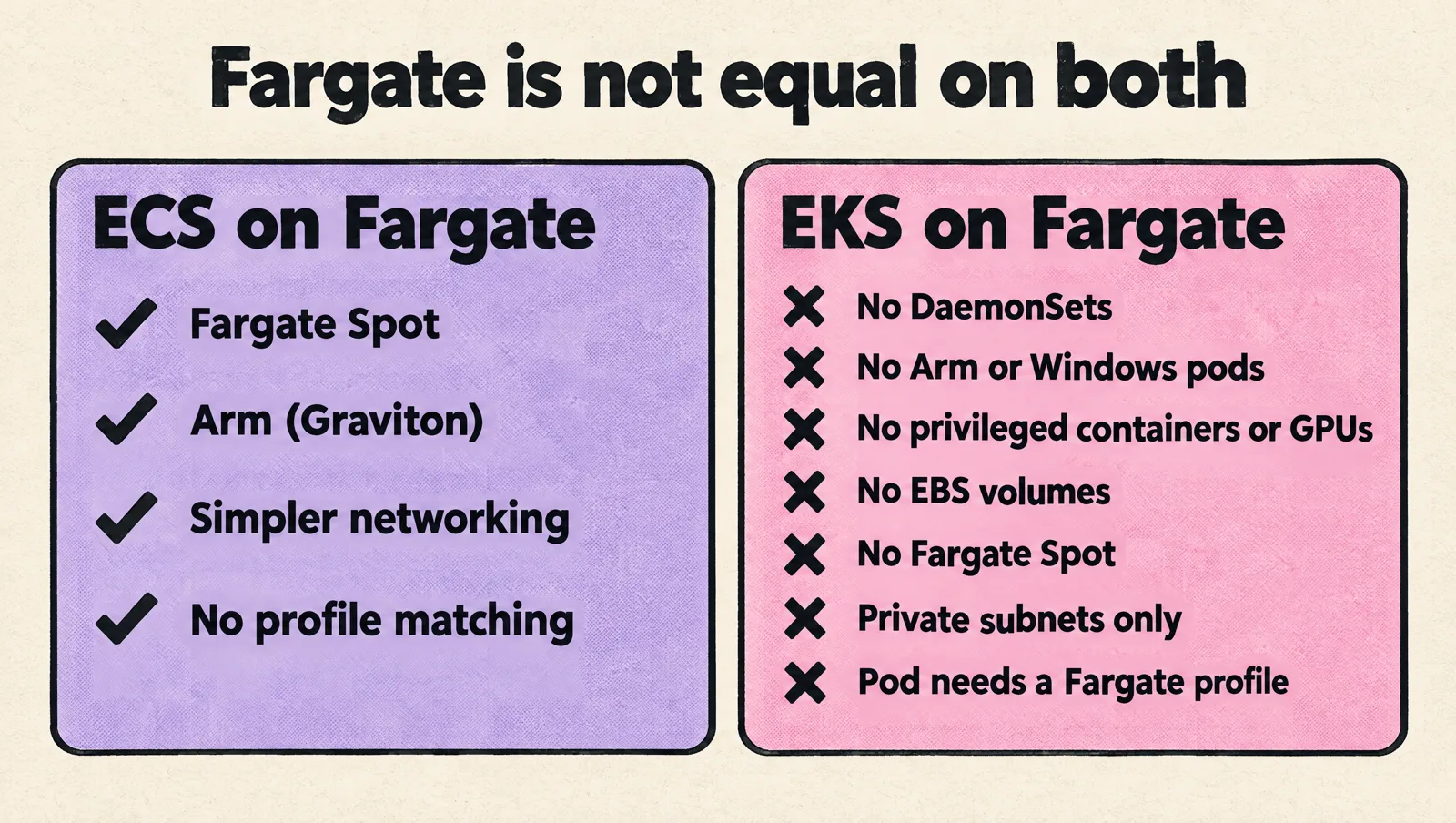
Both run containers on Fargate, but they are not equal. EKS on Fargate has documented limits (EKS Fargate considerations):
- No DaemonSets. Logging and monitoring agents have to run as sidecars.
- No Arm (Graviton) and no Windows pods.
- No privileged containers, no
HostPortorHostNetwork, no GPUs. - No EBS volumes. EFS works with static provisioning only.
- No Fargate Spot.
- Pods run only in private subnets, and load balancers must use IP targets.
- Each pod must match a Fargate profile, or it sits in
Pending.
ECS on Fargate is the more complete Fargate experience: Spot support, simpler networking and no profile matching. If "no servers to manage" is the main goal, ECS on Fargate is the cleaner path. On EKS, most teams now pick Auto Mode or Karpenter-managed EC2 over Fargate.
EKS Auto Mode and ECS Express Mode: the gap got smaller
EKS Auto Mode
EKS Auto Mode moves node management to AWS. It provisions and scales EC2 capacity with Karpenter, runs Bottlerocket-based nodes with read-only root file systems, replaces every node within a 21-day maximum lifetime, patches the OS, and ships pod networking, network policy, cluster DNS, load balancer integration, EBS storage and GPU plugins as core components instead of add-ons you upgrade yourself.
It removes a lot of what made EKS heavy. It does not remove Kubernetes itself: you still own manifests, RBAC, ingress design, application upgrades for API deprecations, and the Kubernetes version cycle.
ECS Express Mode
ECS Express Mode goes the other way and makes ECS even simpler. You provide a container image, a task execution role and an infrastructure role. ECS creates a Fargate service with a URL, an Application Load Balancer with TLS, auto scaling, monitoring and networking. Express services that share a network configuration share a load balancer to cut cost, and there is no extra charge. Everything it creates sits in your account, so you can take over any piece later.
For a startup moving a web app or API off Heroku or a PaaS, Express Mode is now the shortest path to production on AWS.
Day-two operations compared
| Task | ECS | EKS |
|---|---|---|
| Upgrades | No cluster version. Update the ECS agent on EC2 or move to newer Fargate platform versions | A Kubernetes minor upgrade per cluster at least yearly, plus add-ons, plus deprecated APIs in your manifests |
| Deployments | Rolling updates and native blue/green with lifecycle hooks and bake time | Rolling updates; canary and blue/green with Argo Rollouts or Flagger |
| Autoscaling | Service auto scaling on CPU, memory, request count or custom metrics; capacity providers for EC2 | HPA, KEDA, Cluster Autoscaler, Karpenter or Auto Mode |
| Secrets | Secrets Manager and SSM Parameter Store referenced in the task definition | Kubernetes Secrets, External Secrets Operator, Secrets Store CSI driver |
| IAM | Task roles, natively | EKS Pod Identity or IAM roles for service accounts |
| Observability | CloudWatch Container Insights, FireLens for logs | Prometheus, Grafana, OpenTelemetry, or Container Insights |
| GitOps | Possible with Terraform or CDK pipelines; no native controller | Argo CD or Flux reconcile the cluster from Git continuously |
When to choose ECS
- You run on AWS only and expect to stay there.
- You have fewer than roughly 20 to 30 services and no dedicated platform team.
- Your workloads are web services, APIs, workers and scheduled jobs.
- You want Fargate Spot, or the least possible infrastructure to own.
- Nobody on the team knows Kubernetes well, and you would rather spend that learning time on the product.
When to choose EKS
- You depend on Kubernetes-native tools: Helm charts from vendors, operators, Argo CD, KEDA, a service mesh.
- You need multi-cloud or on-premises portability, or customers who require Kubernetes.
- You have many teams and services and want one platform with namespaces, RBAC and policy.
- You need scheduling control: GPU workloads, custom schedulers, DaemonSets, fine-grained node pools.
- You have, or are hiring, engineers who already operate Kubernetes.
If you go with EKS, our guide to EKS vs GKE vs AKS for production covers pricing, support windows and readiness checks in more depth.
A quick decision checklist
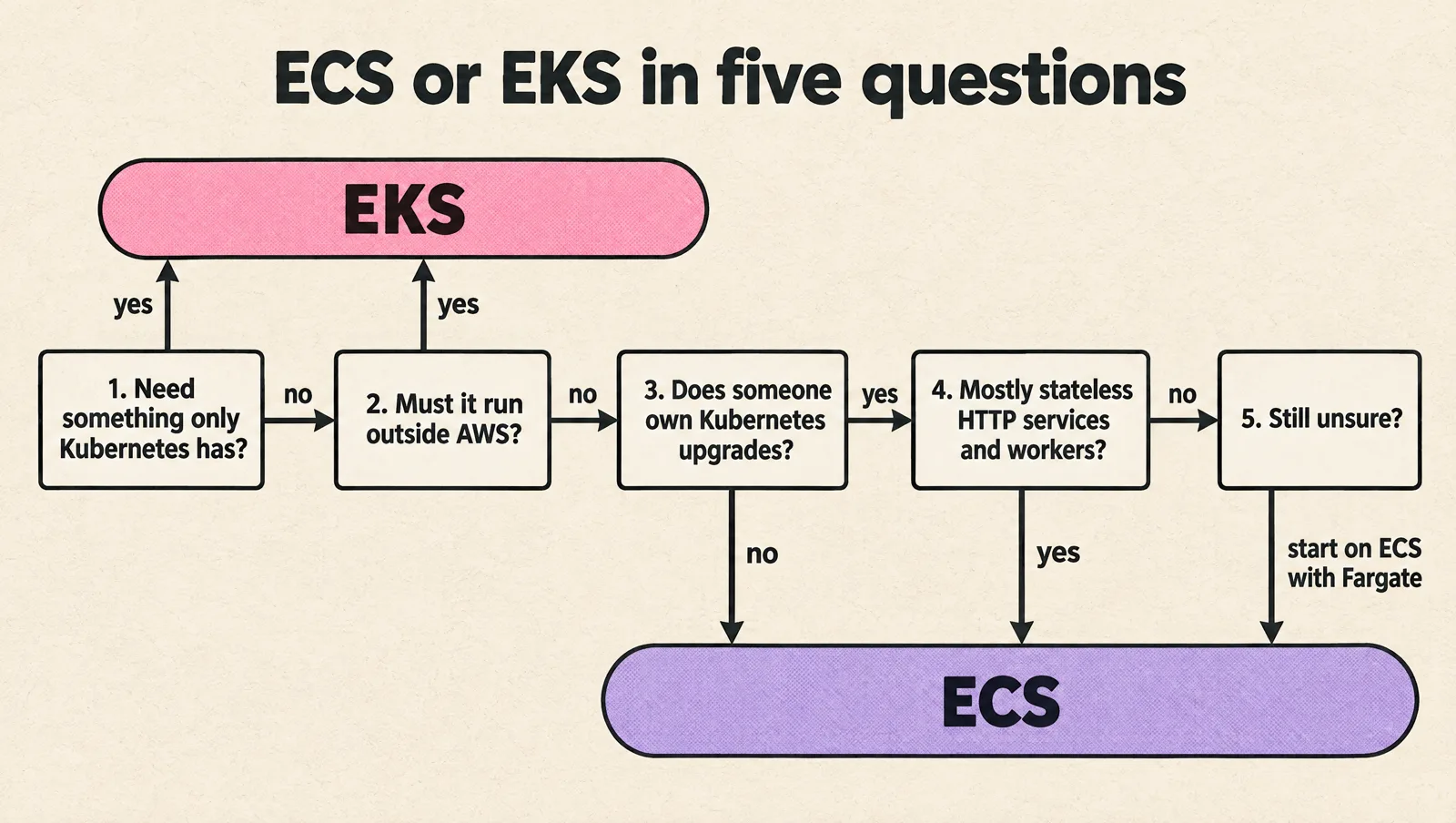
- Do you need anything that only exists in the Kubernetes ecosystem? If yes, EKS.
- Must the same deployment run outside AWS? If yes, EKS.
- Does someone own Kubernetes upgrades and add-ons, at least part time? If no, ECS.
- Is most of your fleet stateless HTTP services and workers? If yes, ECS is enough.
- Still unsure? Start on ECS with Fargate. Containers, images, CI and IAM roles carry over if you move to EKS later.
Migrating between ECS and EKS
ECS to EKS
- Each task definition becomes a Deployment (or StatefulSet, or CronJob), with the same image.
- Task CPU and memory become pod requests and limits. Size them from real metrics, not from Fargate task sizes.
- Task roles become EKS Pod Identity associations or IAM roles for service accounts.
- Secrets Manager references move to External Secrets Operator or the Secrets Store CSI driver.
- ALB target groups move to the AWS Load Balancer Controller (or Auto Mode's built-in load balancing) with Ingress or Gateway API resources.
- Cut over service by service behind the same load balancer or DNS name, with a weighted shift and a rollback path.
EKS to ECS
- Deployments map to services; containers in a pod map to containers in one task definition.
- DaemonSets have no direct equivalent. Agents become sidecars or move to daemon scheduling on EC2 capacity.
- Helm values and operators have to be replaced with Terraform, CDK or managed AWS services.
- Expect most of the work to be in observability and release tooling, not in the containers.
Coming from Heroku rather than Kubernetes? The Heroku to AWS migration plan walks through ECS targets, costs and a cutover runbook.
Common mistakes
- Choosing EKS for the résumé. Kubernetes is a great platform and an expensive hobby. Pick it for a requirement you can name.
- Running EKS on Fargate to "avoid nodes". You lose DaemonSets, EBS and Spot. Auto Mode is usually the better answer.
- Letting EKS versions drift. A cluster that misses its upgrade window moves to extended support at six times the control plane price.
- One cluster per developer. At $73 per month each, ephemeral EKS clusters add up fast. Use namespaces, or ECS services, for preview environments.
- Ignoring NAT and load balancer costs. On small workloads they often cost more than the containers.
FAQ
Is ECS the same as Kubernetes?
No. ECS is AWS's own orchestrator with its own API and concepts (task definitions, services, clusters). It does many of the same jobs as Kubernetes, but it is not compatible with Kubernetes manifests, Helm charts or operators. EKS is the AWS service that runs real Kubernetes.
Is ECS cheaper than EKS?
For the same compute, ECS is cheaper by the EKS control plane fee: $0.10 per cluster hour, about $73 per month per cluster, or $438 per month on extended support. ECS also supports Fargate Spot, which EKS does not. The bigger saving is usually engineering time spent operating Kubernetes.
Is ECS basically Docker?
ECS runs Docker-compatible (OCI) container images, but it is not Docker. Docker builds and runs containers on one machine. ECS schedules containers across many machines or Fargate, keeps them running, connects them to load balancers and gives them IAM roles.
Why use EKS instead of EC2?
EKS still runs on EC2 (or Fargate), but adds orchestration: scheduling, self-healing, rolling deployments, service discovery and autoscaling. Running containers directly on EC2 means building all of that yourself.
Can I use Fargate with both?
Yes. ECS on Fargate is the more complete option: it supports Fargate Spot, Arm (Graviton) and simpler networking. EKS on Fargate does not support DaemonSets, privileged containers, GPUs, Arm, EBS volumes or Fargate Spot.
Is EKS Auto Mode worth the extra fee?
For small platform teams, usually yes. It removes node patching, autoscaler setup and core add-on upgrades for roughly a 12% fee on top of the instances in AWS's example. Large teams with Karpenter already tuned may prefer to run it themselves.
Can I move from ECS to EKS later?
Yes. Your container images, CI pipelines and most IAM design carry over. The work is rewriting task definitions as Kubernetes manifests, setting up ingress, secrets and observability on Kubernetes, and cutting traffic over service by service.
The short answer
Default to ECS on AWS unless you can name the Kubernetes feature, portability requirement or team skill that makes EKS worth its extra cost and operating load. If you can, EKS with Auto Mode is far lighter to run than EKS used to be.
Want a second opinion on your container platform, or help running it? MeteorOps engineers build and operate both Amazon ECS and Amazon EKS platforms for startups, and you can see how we work on our DevOps consulting page.