


For most production teams the best managed Kubernetes service is the one in the cloud you already use: Amazon EKS on AWS, Google Kubernetes Engine (GKE) on Google Cloud, Azure Kubernetes Service (AKS) on Azure. All three charge about $0.10 per cluster hour for a production control plane. The real differences are upgrades, autoscaling, identity and how much node management you hand over.
This guide compares EKS, GKE and AKS on the points that decide day-to-day operations, with prices checked against each provider's official pages in October 2026. It also covers smaller providers, a worked cost example, a readiness checklist for teams adopting Kubernetes for the first time, and the cases where you should not run Kubernetes at all.
What a managed Kubernetes service does and does not do
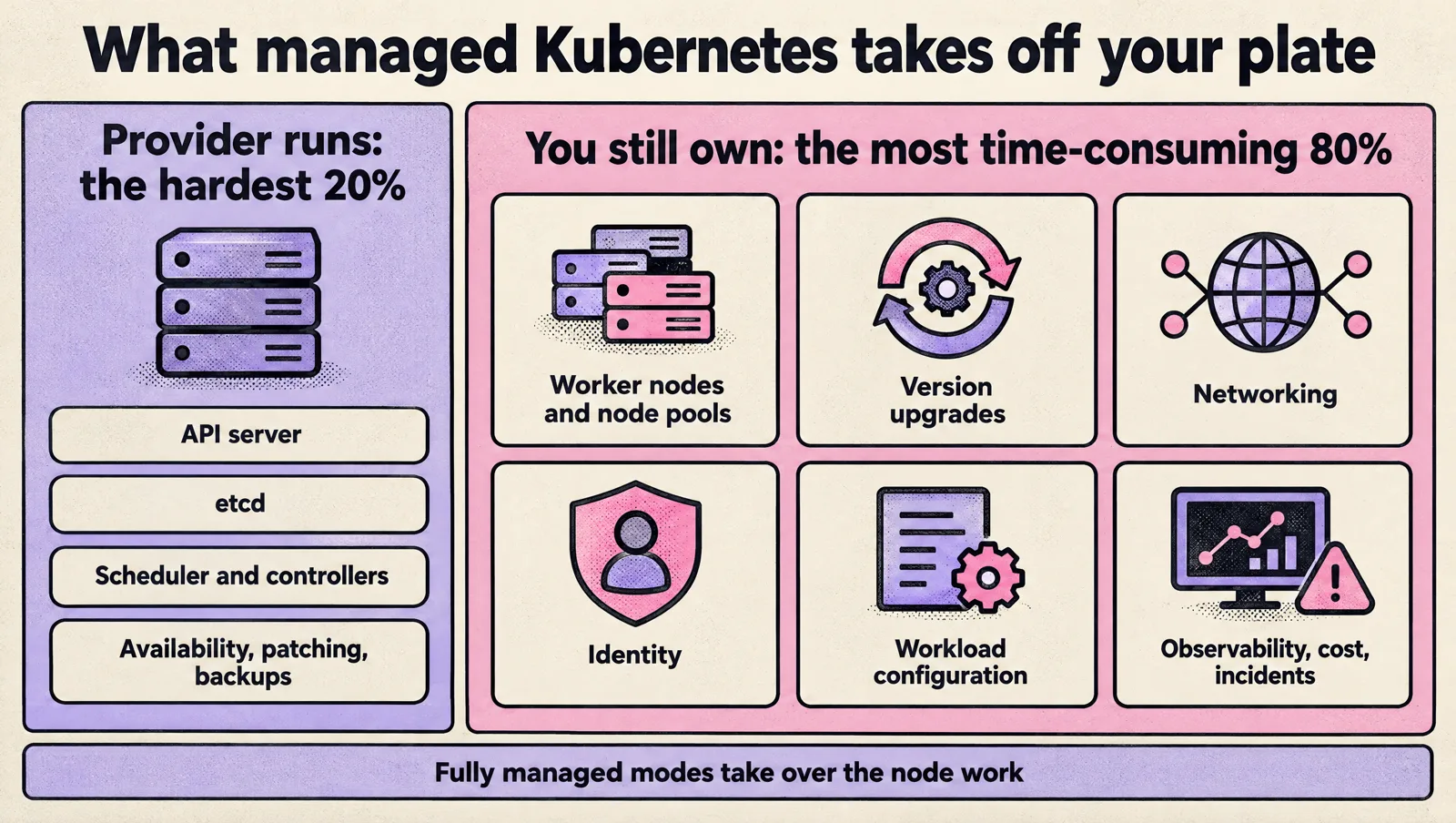
A managed Kubernetes service runs the control plane for you: the API server, etcd, the scheduler and controllers, including their availability, patching and backups. You still own almost everything that makes the cluster production ready:
- Worker nodes or node pools (unless you use a fully managed mode such as GKE Autopilot, EKS Auto Mode or AKS Automatic).
- Kubernetes version upgrades, including add-on compatibility and deprecated APIs.
- Networking: ingress, load balancers, network policies, private endpoints, DNS.
- Identity: who can do what in the cluster, and how pods get cloud credentials.
- Workload configuration: resource requests and limits, probes, disruption budgets.
- Observability, cost control and incident response.
So "managed" removes the hardest 20% of running Kubernetes, not the most time-consuming 80%. Choosing a provider is really choosing how much of that 80% you want automated, and how well it fits the rest of your cloud.
EKS vs GKE vs AKS: head-to-head comparison
| Amazon EKS | Google GKE | Azure AKS | |
|---|---|---|---|
| Control plane fee | $0.10 per cluster hour (standard support) | $0.10 per cluster hour for every cluster, Standard or Autopilot | Free tier: $0 (no SLA). Standard tier: $0.10 per cluster hour |
| Free allowance | None | $74.40 monthly credit per billing account, enough for one zonal or Autopilot cluster | Free tier for dev and test (recommended under 10 nodes) |
| Control plane SLA | 99.95% (99.99% with Provisioned Control Plane) | 99.95% regional and Autopilot, 99.5% zonal | 99.95% with availability zones, 99.9% without (Standard and Premium) |
| Long version support | 14 months standard, then 12 months extended at $0.60 per cluster hour total | Extended release channel, $0.60 per cluster hour total while a version is in extended support | Premium tier with Long Term Support (LTS), 24 months, $0.60 per cluster hour |
| Fully managed mode | EKS Auto Mode: AWS manages nodes, fee per managed EC2 instance | Autopilot: billed per pod resource requests, Google manages nodes | AKS Automatic: preconfigured Standard tier with node autoprovisioning and a pod readiness SLA |
| Node autoscaling | Karpenter (open source, originally from AWS) or Cluster Autoscaler; built into Auto Mode | Cluster autoscaler and node auto-provisioning; built into Autopilot | Cluster autoscaler, or node autoprovisioning built on Karpenter |
| Pod to cloud identity | EKS Pod Identity or IAM Roles for Service Accounts (IRSA) | Workload Identity Federation for GKE | Microsoft Entra Workload ID |
| Best fit | Teams already on AWS, most startup stacks, widest ecosystem | Teams that want the most automation and the smoothest upgrades | Microsoft shops, Entra ID, Azure DevOps and .NET workloads |
Sources: EKS pricing, EKS SLA, GKE pricing, AKS pricing tiers, AKS pricing, AKS node autoprovisioning. Prices are list prices in US regions and change; check before you commit.
Amazon EKS: strengths and trade-offs
EKS is the default for teams on AWS, which is most startups. Its strength is the ecosystem: every tool, Helm chart and Terraform module assumes EKS works, and Karpenter gives fast, cost-aware node provisioning that is hard to beat for mixed workloads and Spot instances.
The trade-off is assembly. A bare EKS cluster needs you to choose and maintain the VPC CNI settings, a load balancer controller, an ingress or Gateway API implementation, Karpenter or Cluster Autoscaler, the EBS CSI driver, and a way to map IAM to Kubernetes access. EKS Auto Mode removes much of that by managing nodes, storage and load balancing for you, for a fee charged on top of each EC2 instance it launches. AWS's own example is a c6a.2xlarge at $0.306 per hour with an Auto Mode fee of $0.03672 per hour, roughly 12% on top of compute.
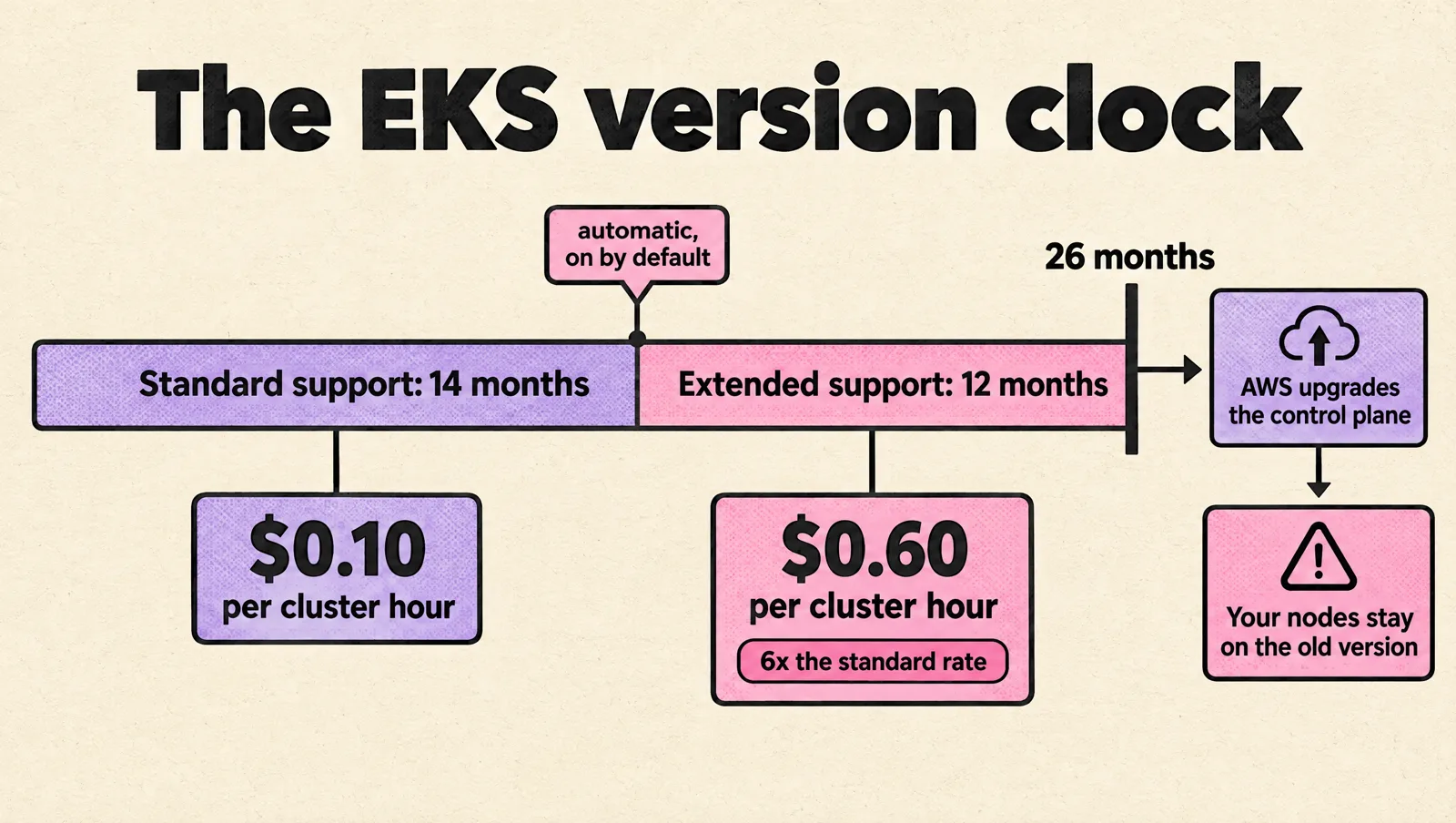
Upgrades are the other cost. Each version gets 14 months of standard support; after that the cluster moves to extended support automatically (it is enabled by default) and the control plane price rises from $0.10 to $0.60 per hour, six times the standard rate. As of October 2026 EKS lists Kubernetes 1.34 to 1.37 in standard support (EKS Kubernetes versions). If your team cannot upgrade at least once or twice a year, budget for extended support or fix the upgrade process; our Kubernetes upgrade tips for startups cover how.
Google GKE: strengths and trade-offs
GKE is the most automated of the three. Release channels handle control plane and node upgrades on a schedule you can shape with maintenance windows and exclusions. Autopilot goes further: Google manages nodes entirely and bills general-purpose workloads on the CPU, memory and ephemeral storage that pods request, so you stop paying for empty node capacity.
The flat $0.10 per cluster hour fee applies to every GKE cluster regardless of mode or size, but the $74.40 monthly free tier credit covers one zonal or Autopilot cluster per billing account, which makes a small production or staging cluster effectively free at the control plane level.
The trade-offs: Autopilot enforces restrictions (no privileged pods by default, limited node access), which breaks some agents and older Helm charts, and pod-request billing punishes inflated requests, so you need accurate sizing. Zonal Standard clusters only carry a 99.5% control plane SLA; production should be regional or Autopilot.
Azure AKS: strengths and trade-offs
AKS is the natural choice when your company runs on Microsoft: Entra ID for identity, Azure DevOps or GitHub for delivery, and .NET or Windows workloads (AKS supports Windows node pools). It is also the only one of the three with a genuinely free control plane tier, useful for development and test clusters.
For production use the Standard tier ($0.10 per cluster hour, with the uptime SLA). Premium adds 24-month Long Term Support at $0.60 per cluster hour. AKS Automatic is Microsoft's recommended production default: it is preconfigured on the Standard tier with node autoprovisioning (built on Karpenter), and adds a pod readiness SLA where 99.9% of qualifying pod readiness operations complete within five minutes. Automatic carries its own pricing: a hosted control plane meter at $0.16 per hour in East US plus per-hour compute meters on top of the virtual machines, so compare it with Standard for your node count.
The trade-offs: networking choices (Azure CNI variants, outbound types) are hard to change after cluster creation, and some features arrive in preview long before general availability, so pin to features marked GA for production.
What managed Kubernetes really costs: a worked example
Control plane fees are small next to compute, but they add up across environments. Monthly control plane cost at 730 hours, list prices:
| Setup | EKS | GKE | AKS |
|---|---|---|---|
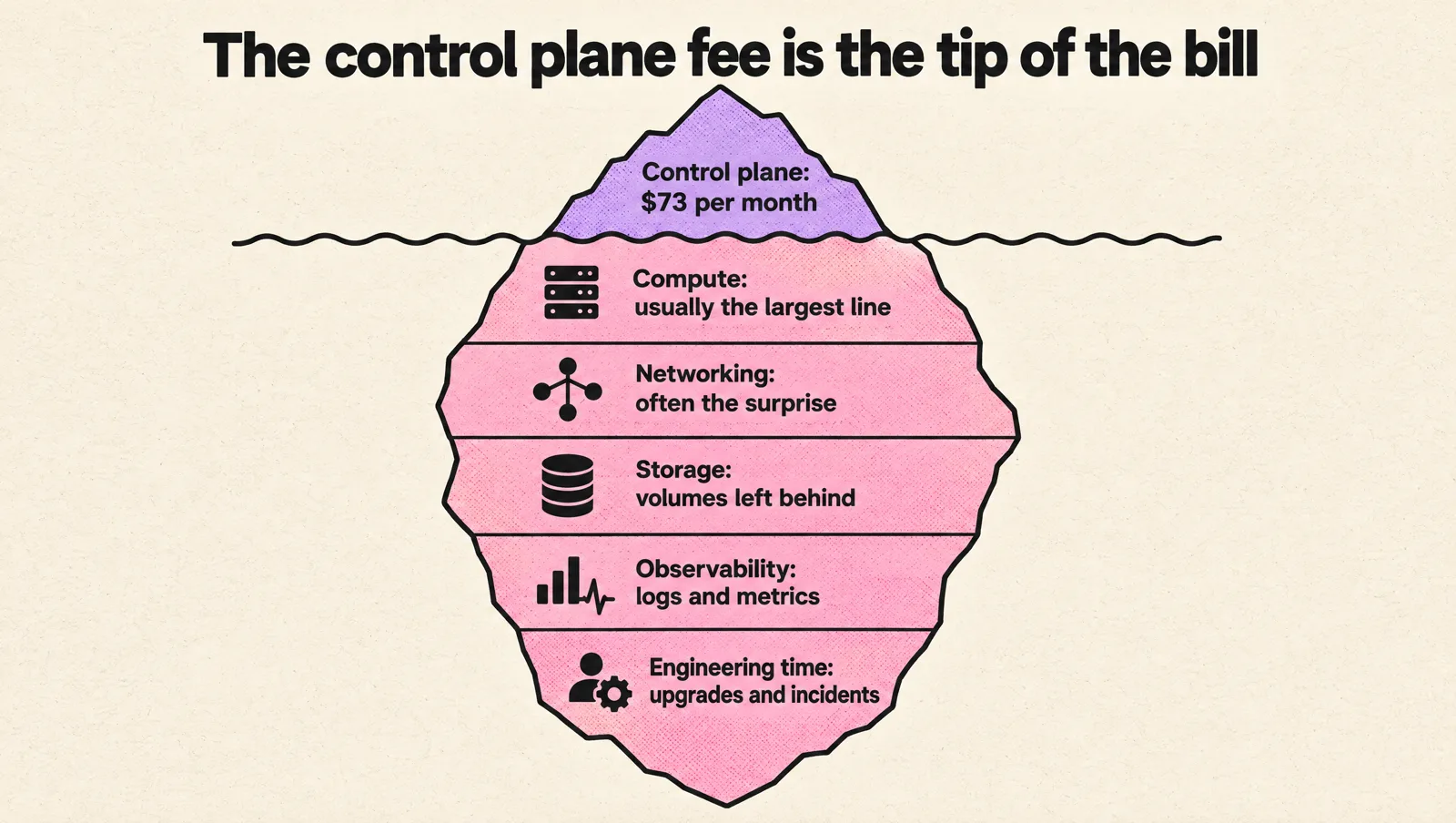
| 1 production cluster | $73 | $73, or about $0 if it is your one zonal or Autopilot cluster covered by the free tier credit | $73 (Standard) |
| Production plus staging plus dev | $219 | $146 to $219 depending on the free tier credit | $146 (Standard for prod and staging, Free tier for dev) |
| 1 cluster on an old version (extended support or LTS) | $438 | $438 | $438 (Premium with LTS) |
What dominates the bill is everything around the control plane:
- Compute: nodes or pod requests, usually the largest line on the bill. Right-sizing requests is the biggest lever; see our guide to Kubernetes requests and limits.
- Networking: load balancers, NAT gateways, cross-zone traffic and egress. Often the surprise line item.
- Storage: persistent volumes, snapshots, and volumes left behind by deleted environments.
- Observability: log volume and metric cardinality can rival compute if unmanaged.
- Engineering time: upgrades, add-on maintenance and incidents. The managed modes (Autopilot, Auto Mode, Automatic) trade a higher unit price for less of this.
For a deeper cost playbook, see how to reduce cloud costs without slowing engineering.
Smaller managed Kubernetes providers
DigitalOcean, Akamai (Linode), OVHcloud, Scaleway, Civo and Vultr all offer managed Kubernetes with simpler pricing and lower entry costs. They are a good fit for small, self-contained products that do not need a big cloud's managed databases, IAM depth or compliance programs.
Before choosing one for production, check five things: private networking between cluster and database, an uptime SLA on the control plane, how version upgrades are handled, autoscaling behavior, and support response times. A smooth first deploy says little about how the provider behaves during an incident.
How to choose: a decision guide
| Your situation | Choose |
|---|---|
| Already on AWS, standard web services and workers | EKS with Karpenter, or EKS Auto Mode if you want less to maintain |
| Small team, want the least operations work possible | GKE Autopilot, or EKS Auto Mode / AKS Automatic in your existing cloud |
| Microsoft identity, .NET or Windows containers, Azure DevOps | AKS (Automatic for new production clusters) |
| Heavy Spot or GPU usage with mixed instance types | EKS with Karpenter, or GKE with compute classes |
| Regulated, slow change windows, upgrades once a year | Whichever cloud you use, with its long-support option budgeted in |
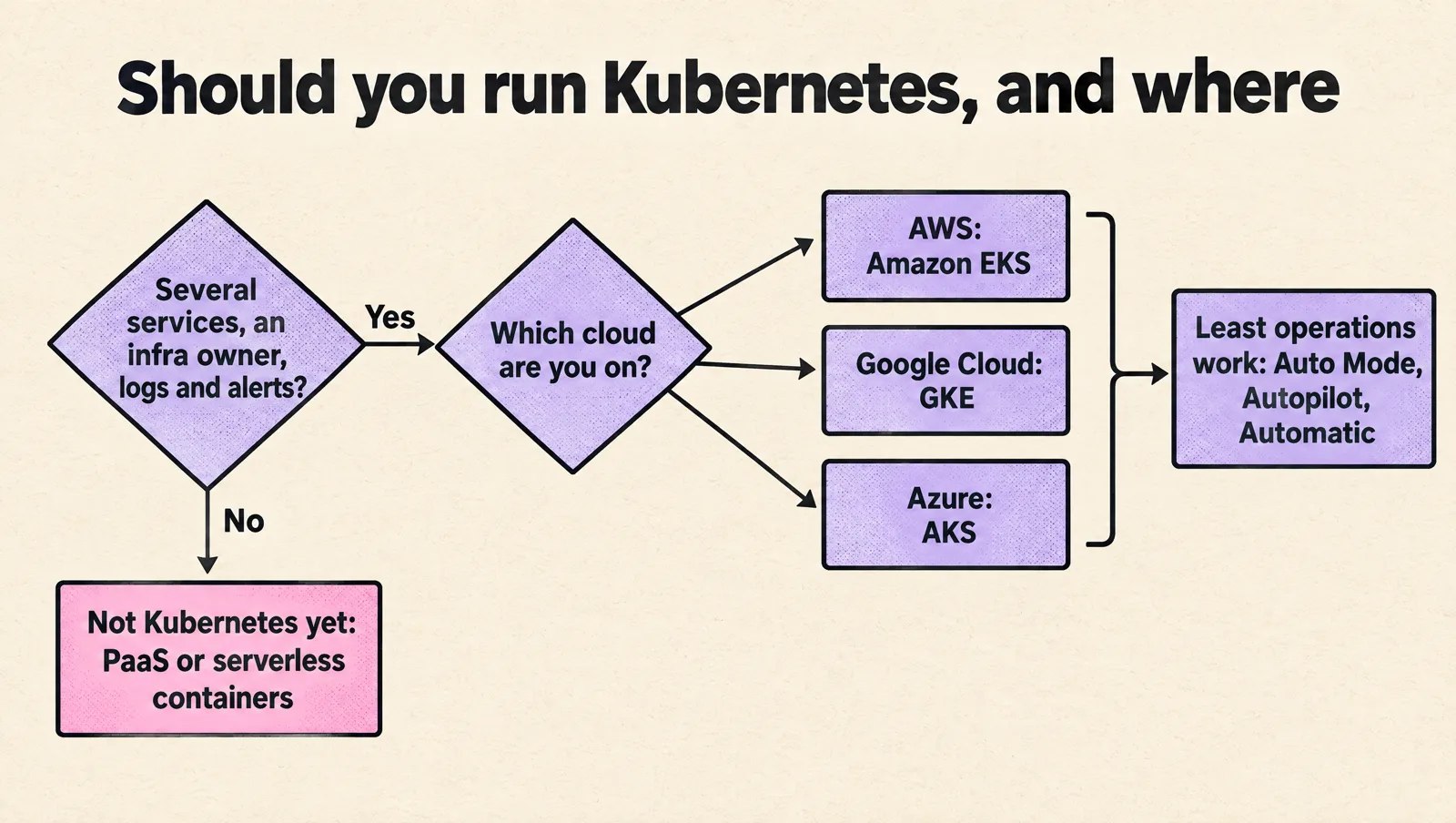
| One or two services, small team, no platform owner | Probably not Kubernetes yet (see below) |
Multi-cloud Kubernetes is rarely worth it for a startup. It doubles networking, identity, deployment and observability work for a resilience benefit most products do not need. Run one cloud well first.
When not to run Kubernetes at all
Managed Kubernetes is the wrong next step when:
- You run one or two web services and a worker queue that a Platform as a Service (PaaS) or a serverless container service (Amazon ECS on Fargate, Google Cloud Run, Azure Container Apps) handles fine.
- Nobody owns infrastructure after launch.
- You do not have basic logs, metrics, alerts and a rollback procedure today.
- The main motivation is "it will be cheaper". Once engineering time is counted, it often is not.
It becomes the right step when you have several services with different scaling and release needs, environments that keep drifting apart, workloads with very different resource profiles, or PaaS limits you can name (networking, cost at scale, compliance). If you are moving from another platform, our Kubernetes migration plan covers sequencing.
Production readiness checklist before the first workload
Most Kubernetes pain at startups comes from missing foundations, not from the provider. Before customer traffic lands:
- Infrastructure as code: cluster, node pools, networking, IAM and core add-ons defined in Terraform or similar. Click-built clusters drift.
- Access control: people and CI mapped to least-privilege roles through cloud identity. Nobody needs cluster-admin by default.
- Pod identity: workloads get cloud credentials through EKS Pod Identity, GKE Workload Identity Federation or Entra Workload ID, never static keys in secrets.
- Resource requests on every workload, plus readiness and liveness probes. See our guide to liveness probes without restart loops.
- Deployment path: CI builds and scans images, deploys go through review or GitOps, and rollback is one command or one revert.
- Observability: logs, metrics, Kubernetes events and customer-impact alerts working before cutover.
- Data outside the cluster: keep databases on managed services until you have proven backup, restore and failover inside Kubernetes.
- Upgrade policy: a written cadence, a non-production cluster to rehearse on, and a calendar reminder before standard support ends.
- Ownership: named owners for upgrades, add-ons, cost review and on-call.
Run a production-like pilot
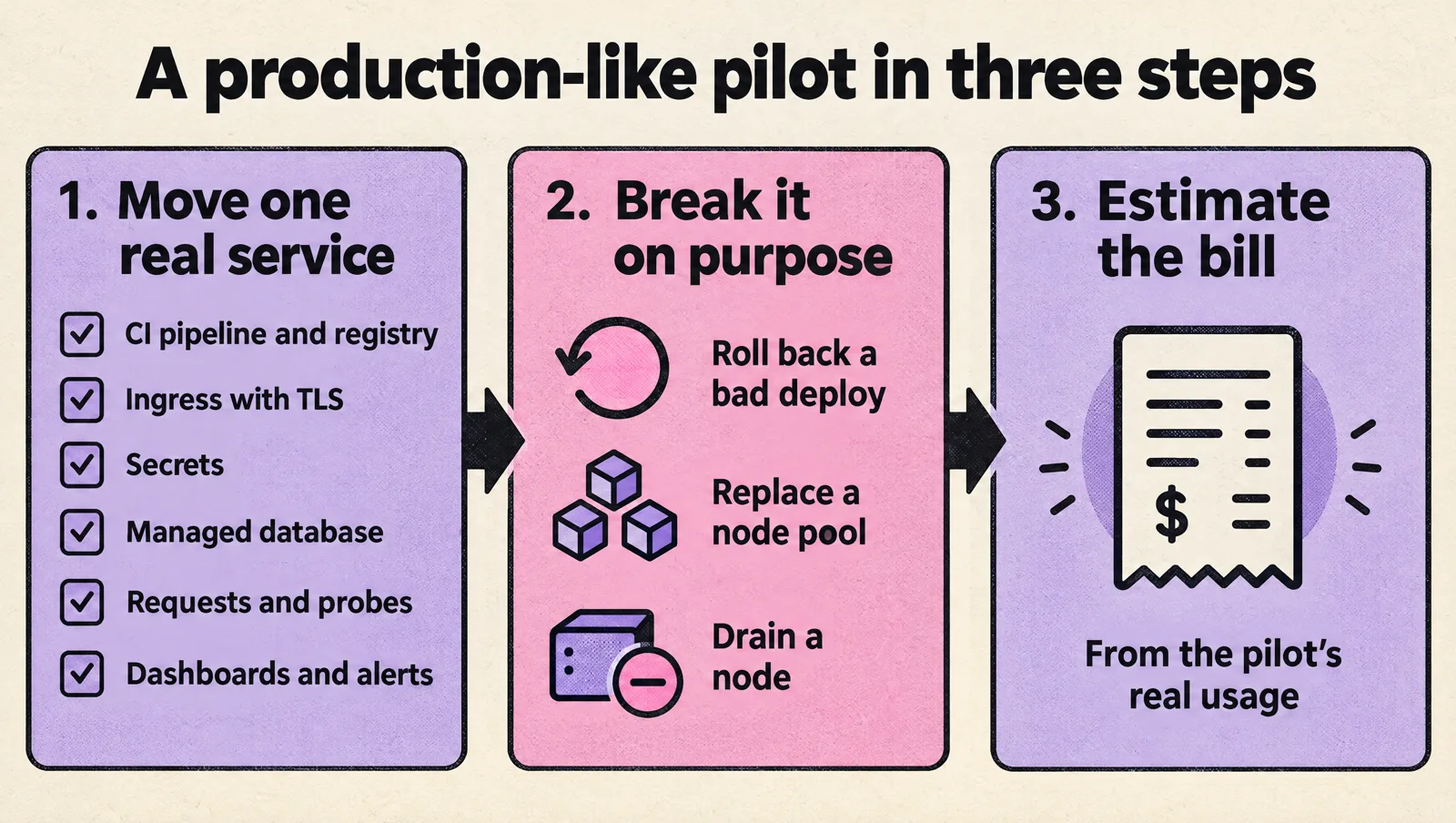
Do not decide on a hello-world deploy. Move one real service through the full path: your CI pipeline and registry, ingress with TLS, secrets, a connection to a managed database, requests and probes, dashboards and alerts. Then break it on purpose: roll back a bad deploy, replace a node pool, and drain a node (our node draining guide shows how to do that safely). Estimate the monthly bill from the pilot's real usage. A provider that makes these steps painful will be painful in production.
Managed Kubernetes FAQ
Which managed Kubernetes service is best for startups?
The one in the cloud you already run on. EKS for AWS, GKE for Google Cloud, AKS for Azure. If you want the least operations work, use the fully managed mode in that cloud: GKE Autopilot, EKS Auto Mode or AKS Automatic.
What separates a good managed Kubernetes provider from a mediocre one?
Predictable upgrades with long enough support windows, a financially backed control plane SLA, solid private networking, native pod-to-cloud identity, good autoscaling, and support that responds during incidents. Price per cluster hour matters far less than these.
What criteria should a growth-stage company use to select a managed Kubernetes vendor?
Fit with your existing cloud and identity provider, upgrade and version support policy, autoscaling options, networking model, cost visibility per team or namespace, compliance coverage, and how much node management you can hand over. Score each option in a pilot, not from marketing pages.
Is EKS more expensive than GKE or AKS?
At the control plane level they are the same for production: $0.10 per cluster hour. GKE's free tier credit and AKS's free tier make small or non-production clusters cheaper. Total cost is driven by compute, networking and how efficiently you size workloads.
What is the AWS equivalent of AKS?
Amazon EKS (Elastic Kubernetes Service). Google's equivalent is GKE. All three are managed Kubernetes services that run the control plane for you.
Is GKE Autopilot cheaper than Standard?
It can be, because you pay for pod requests instead of whole nodes, so idle node capacity disappears. It costs more when requests are inflated or workloads are steady and dense enough to pack nodes efficiently. Size requests accurately before comparing.
What happens if I do not upgrade my EKS cluster?
After 14 months of standard support, the version moves into extended support automatically and the control plane fee rises to $0.60 per cluster hour for up to 12 more months (extended support is on by default). At the end of that 26-month lifecycle AWS upgrades the control plane to the next version automatically, but managed node groups and self-managed nodes stay on the old version, so you still have to upgrade them yourself.
If you want a second opinion on provider choice or a production-ready cluster setup, MeteorOps engineers run EKS, GKE and AKS for startups; see our Kubernetes services.