


Terraform import does 1 thing: it ties a resource that already exists to an address in your Terraform state.
Bottom line
Use an import block. It has been in Terraform since 1.5 (June 2023), it shows up in terraform plan, and it goes through a pull request like any other change.
import {
  to = aws_s3_bucket.assets
  id = "my-company-assets"
}

resource "aws_s3_bucket" "assets" {
  bucket = "my-company-assets"
}
Run terraform plan. The line you want to see:
Plan: 1 to import, 0 to add, 0 to change, 0 to destroy.Then run terraform apply. With that plan line, nothing changes in your cloud account. Terraform records that it now manages the bucket.
Which method to use, by situation:
| Your situation | Use |
|---|---|
| You know the resource and can write its block | An import block |
| You have the ID and no configuration | An import block plus -generate-config-out |
| 10 resources of the same type | 1 import block with for_each |
| You do not know what exists in the account | terraform query (Terraform 1.14 and later) |
| You are pinned below Terraform 1.5 | The terraform import command |
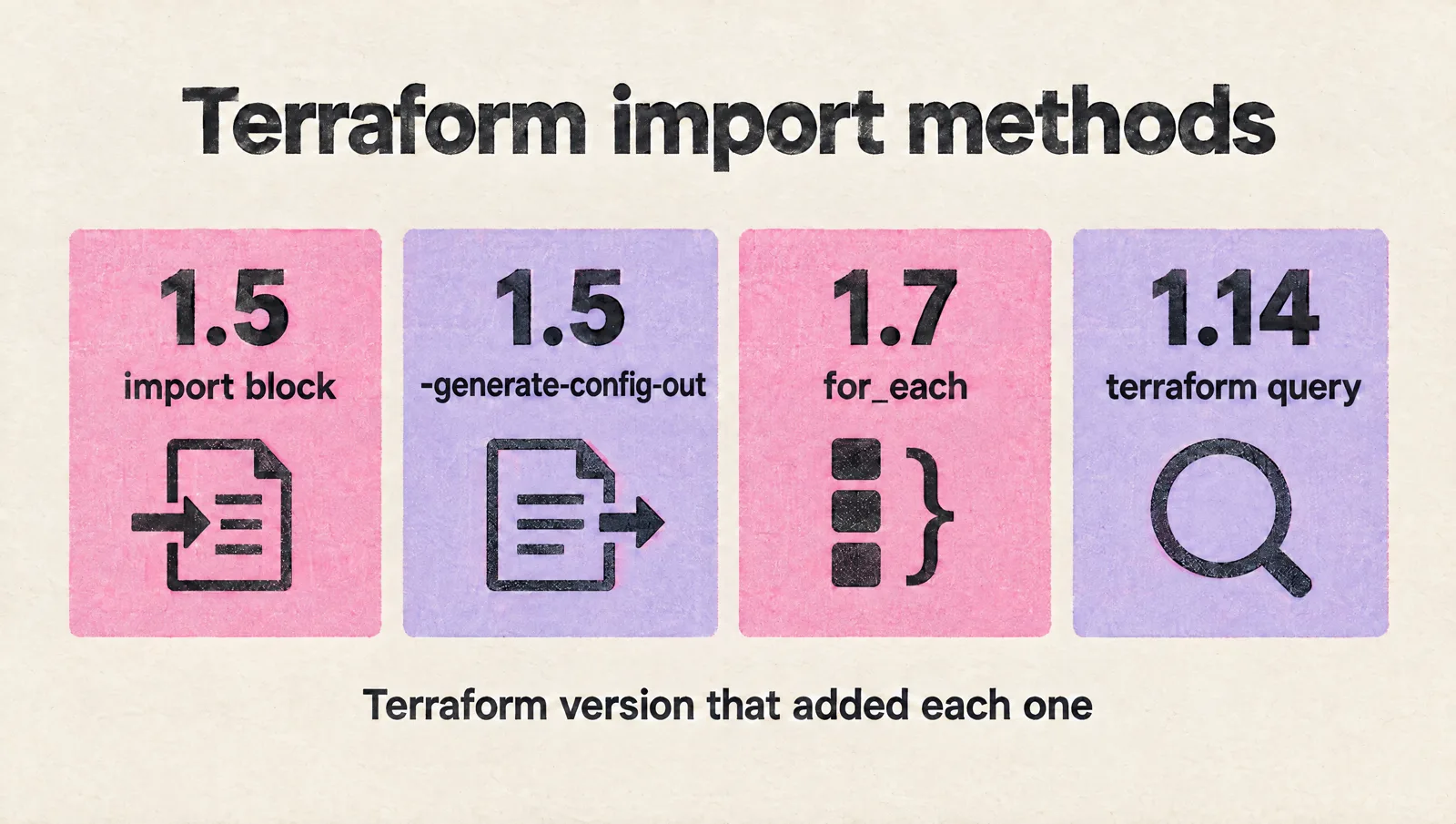
My rule for every import: the plan shows imports and 0 to add, 0 to change, 0 to destroy. Anything else gets fixed in the configuration before anyone applies.
Versions here were checked on November 17, 2026: Terraform 1.17.2, OpenTofu 1.13.9 and the AWS provider 6.73.0. The terminal output in the examples that use random_string is real output from Terraform 1.17.2, so you can reproduce it with no cloud account.
Is half of your infrastructure still outside Terraform? A senior engineer spends an hour on your CI/CD, infra, Kubernetes, cloud cost and on-call setup. You leave with your top 3 risks, quick wins and a rough roadmap. Claim your free assessment.
Find your situation:
- You have 1 resource to bring in today: import with an import block in 5 steps
- You have no configuration for it: generate the resource block
- You need the ID string for a resource type: import ID formats
- The plan after your import wants to replace something: what import leaves out
- Your team shares the state: a safe import workflow for a team
- You imported the wrong thing: undo an import
Import binds an object to an address
Terraform tracks 3 things: the real object in your cloud, the state that maps it to an address, and the configuration that describes it.
A resource created by hand has the first and is missing the other 2.
Import = write the state entry for an object that already exists.
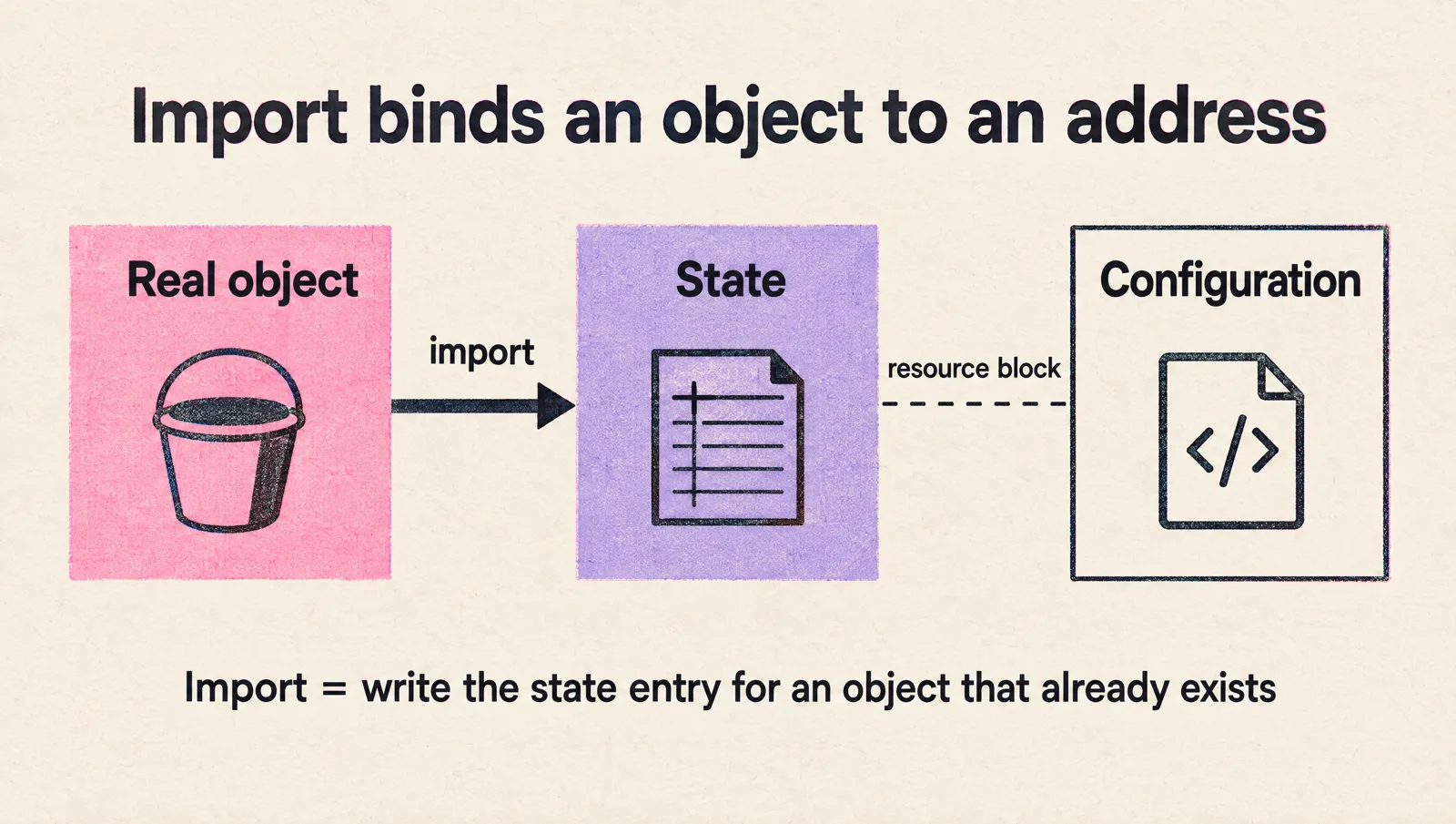
That is all it does. Three consequences follow:
- Import changes nothing in your cloud. The first apply after it can, if your configuration differs from the real object
- You still need a resource block. Terraform's docs: "you must define a resource block for any resource in state to prevent Terraform from destroying it"
- 1 object, 1 address. Terraform expects every remote object to be bound to a single address, and it does not check that for you
Some resource types cannot be imported at all. Each provider documents import at the bottom of the resource's page. If the section is missing, expect an error like this one:
Error: Resource Import Not Implemented

This resource does not support import. Please contact the provider developer
for additional information.
Import with an import block in 5 steps
The same 5 steps work for an S3 bucket, a VPC or a Helm release.
- Write the resource block, with every argument whose real value differs from the provider's default
- Add the import block next to it, or in an
imports.tffile - Run
terraform planand read it - Run
terraform apply - Run
terraform planagain. It has to say "No changes"
Here is a version you can run on your laptop in 2 minutes. The random_string resource needs no credentials and supports import.
terraform {
  required_providers {
    random = {
      source = "hashicorp/random"
    }
  }
}

resource "random_string" "legacy_token" {
  length = 8
}

import {
  to = random_string.legacy_token
  id = "Xk9$mQ2p"
}
The plan, on Terraform 1.17.2:
random_string.legacy_token: Preparing import... [id=Xk9$mQ2p]
random_string.legacy_token: Refreshing state... [id=Xk9$mQ2p]

Terraform will perform the following actions:

  # random_string.legacy_token will be imported
    resource "random_string" "legacy_token" {
        id          = "Xk9$mQ2p"
        length      = 8
        ...
    }

Plan: 1 to import, 0 to add, 0 to change, 0 to destroy.
The apply:
random_string.legacy_token: Importing... [id=Xk9$mQ2p]
random_string.legacy_token: Import complete [id=Xk9$mQ2p]

Apply complete! Resources: 1 imported, 0 added, 0 changed, 0 destroyed.
The second plan:
No changes. Your infrastructure matches the configuration.What about the import block afterwards?
You can delete it or keep it. It does nothing while the address is in state. HashiCorp recommends keeping it "as an historical artifact".
I delete it once the import is merged and applied. A leftover block can surprise you later, and I show how further down.
Three details that save a retry
- The ID can be a variable or an expression (since 1.6), as long as Terraform knows the value at plan time. An ID that depends on a resource created in the same run fails with "Invalid import id argument"
- The provider can be chosen per block, with
provider = aws.east, for a second region or account - Import blocks inside child modules need Terraform 1.16 or later. In the root module, target a module's resource with
to = module.network.aws_vpc.mainon any version from 1.5
Generate the resource block when you have none
Writing 40 arguments of an old load balancer by hand is nobody's idea of a good afternoon.
Terraform can write the first draft. Add only the import block, then run:
terraform plan -generate-config-out=generated.tfThe output:
  # random_string.session_secret will be imported
  # (config will be generated)
  ...

Plan: 1 to import, 0 to add, 0 to change, 0 to destroy.

Warning: Config generation is experimental
...

Terraform has generated configuration and written it to generated.tf. Please
review the configuration and edit it as necessary before adding it to version
control.
And the file it wrote, unedited:
# __generated__ by Terraform
# Please review these resources and move them into your main configuration files.

# __generated__ by Terraform from "p7Wq!zR4tLm2"
resource "random_string" "session_secret" {
  keepers          = null
  length           = 12
  lower            = true
  min_lower        = 0
  min_numeric      = 0
  min_special      = 0
  min_upper        = 0
  numeric          = true
  override_special = null
  special          = true
  upper            = true
}
Look at what it did: 1 argument I care about (length) and 10 defaults and nulls.
Generated configuration = a draft. HashiCorp calls it "Terraform's best guess".
Clean it up before it reaches a pull request:
- Delete the arguments that only restate a default or
null - Replace hard-coded IDs with references to your other resources
- Replace repeated values with variables and locals
- Check every password and key argument by hand
- Move the block into the file and module where it belongs
The limits, as of Terraform 1.17.2:
- Still experimental. The flag has carried that label since 1.5, and the format of the output can change between versions
- It never overwrites. Run it twice with the same path and you get "Error: Target generated file already exists"
- It does not work with
for_eachorcount. Depending on the shape you get "The target resource does not use for_each" or a message that the option "cannot be used with import blocks which use for_each, or resources which use for_each or count" - Some drafts do not validate. On resources with conflicting arguments, Terraform writes both and the plan fails with "Conflicting configuration arguments". Remove one and plan again
Import many resources with for_each
Since Terraform 1.7, 1 import block can bring in a whole set.
locals {
  buckets = {
    staging = "acme-assets-staging"
    uat     = "acme-assets-uat"
    prod    = "acme-assets-prod"
  }
}

import {
  for_each = local.buckets
  to       = aws_s3_bucket.assets[each.key]
  id       = each.value
}

resource "aws_s3_bucket" "assets" {
  for_each = local.buckets
  bucket   = each.value
}
The same shape on the random provider gives this plan:
  # random_string.token["api"] will be imported
  # random_string.token["web"] will be imported
  # random_string.token["worker"] will be imported
  ...

Plan: 3 to import, 0 to add, 0 to change, 0 to destroy.
for_each takes a map, a set of strings or a list. The resource it targets has to be expanded too: with for_each when the keys are strings, or with count when you loop over a list.
One limit to plan around: config generation and for_each do not combine. For 30 resources with no configuration, generate the blocks one by one first, then refactor them into a for_each.
Find what to import with terraform query
Every method above assumes you know the ID. In an account that grew by hand for 4 years, you often do not.
Terraform 1.14 (November 2025) added a search step:
- Write a
listblock in a file ending in.tfquery.hcl - Run
terraform queryto see what exists - Run
terraform query -generate-config-out=generated.tfto getimportandresourceblocks for the results
An example, shortened from HashiCorp's docs:
list "aws_instance" "prod" {
  provider = aws
  limit    = 50
  config {
    region = "us-east-2"
    filter {
      name   = "tag:Name"
      values = ["prod-*", "staging-*"]
    }
  }
}
What to know before you count on it:
- The provider has to support it per resource type. In the AWS provider 6.73.0, 280 of 1,766 resource types can be listed. The common ones are in: instances, buckets, security groups, IAM roles, RDS instances, Lambda functions, EKS clusters, VPCs and subnets
- A list block returns up to 100 results by default. Raise it with
limit - It returns identities only, unless you set
include_resource = trueor generate configuration - OpenTofu 1.13.9 has no
querycommand
A real query needs cloud credentials, so there is no output on this page. The syntax above is HashiCorp's, and it passes terraform validate -query against the AWS provider 6.73.0.
HCP Terraform has the same search in the UI, under "Search & Import". It marks each result as Managed, Unknown or Unmanaged and generates the starter configuration for the ones you select.
The terraform import command still works, with 3 limits
The old way is a command:
terraform import aws_instance.web i-12345678It still ships in Terraform 1.17.2, and you will find it in every runbook written before 2023.
The 3 limits:
- No preview. It writes to the state the moment you press enter. No plan, no approval, no pull request
- One resource per run. The docs: "It cannot simultaneously import an entire collection of resources, such as an AWS VPC"
- No configuration. The resource block has to exist before you run it
Skip the block and you get:
Error: resource address "random_pet.x" does not exist in the configuration.

Before importing this resource, please create its configuration in the root module. For example:

resource "random_pet" "x" {
  # (resource arguments)
}
With the block in place, a successful run looks like this:
random_string.x: Importing from ID "some-id"...
random_string.x: Import prepared!
  Prepared random_string for import
random_string.x: Refreshing state... [id=some-id]

Import successful!
Addresses with an index need quotes in most shells:
terraform import 'aws_instance.baz["example"]' i-abcd1234
terraform import module.foo.aws_instance.bar i-abcd1234
Use the command when you are on a Terraform older than 1.5, or for a 1-off repair of a state at 2 in the morning. For everything else, the block.
Import ID formats for common resources
The ID is a string the provider defines, and every resource type has its own.
When an import fails, check the ID format first. These are the ones from the provider docs:
| Resource | ID format | Example |
|---|---|---|
aws_instance | Instance ID | i-12345678 |
aws_s3_bucket | Bucket name | bucket-name |
aws_vpc | VPC ID | vpc-a01106c2 |
aws_subnet | Subnet ID | subnet-9d4a7b6c |
aws_security_group | Security group ID | sg-903004f8 |
aws_vpc_security_group_ingress_rule | Security group rule ID | sgr-02108b27edd666983 |
aws_iam_role | Role name | developer_name |
aws_iam_role_policy_attachment | Role name / policy ARN | test-role/arn:aws:iam::xxxxxxxxxxxx:policy/test-policy |
aws_route53_record | Zone ID_name_type (plus _set identifier, if the record has one) | Z4KAPRWWNC7JR_dev.example.com_NS |
aws_db_instance | The identifier | mydb-rds-instance |
aws_lambda_function | Function name | example |
aws_eks_cluster | Cluster name | example |
google_compute_instance | Project/zone/name | {{project}}/{{zone}}/{{name}} |
google_storage_bucket | Name, or project/name | {{project_id}}/{{bucket}} |
google_project_iam_member | Project, role and member, separated by spaces | "{{project_id}} roles/viewer user:foo@example.com" |
azurerm_resource_group | Full Azure resource ID | /subscriptions/00000000-0000-0000-0000-000000000000/resourceGroups/group1 |
kubernetes_deployment | Namespace/name | default/terraform-example |
helm_release | Namespace/name | default/example-name |
For any other type: open the resource's page in the Terraform Registry and scroll to "Import" at the bottom.
(If you manage Kubernetes objects this way, there is a separate guide on deploying Kubernetes resources with Terraform.)
identity replaces the glued strings
Formats like test-role/arn:aws:iam::... exist because an ID had to be 1 string.
Terraform 1.12 added identity: named keys in place of 1 glued string.
import {
  to = aws_s3_bucket.example
  identity = {
    bucket = "bucket-name"
  }
}
The rules:
- Use
idoridentityin a block, never both - The provider has to define an identity for the resource type. In the AWS provider 6.73.0, 582 of 1,766 types have one
- For AWS the keys are what you would guess:
bucketfor a bucket,roleandpolicy_arnfor a role policy attachment,zone_id,nameandtypefor a Route 53 record - OpenTofu supports
identitysince 1.12
I still write id for simple resources. I switch to identity when the ID has a separator in it.
What import leaves out
This is where imports go wrong. The import itself works, and then the next plan wants to change or destroy something.
Arguments you did not write
For an argument you leave out of the resource block, Terraform assumes the provider's default.
If the real object has a different value, the next apply "fixes" it.
Sometimes the fix is an update in place. Sometimes it is a replacement. This is a real plan where the configuration says length = 16 and the imported object has 8:
  # random_string.token must be replaced
  # (imported from "Xk9$mQ2p")
  # Warning: this will destroy the imported resource
-/+ resource "random_string" "token" {
      ~ id          = "Xk9$mQ2p" -> (known after apply)
      ~ length      = 8 -> 16 # forces replacement
        ...
    }

Plan: 1 to import, 1 to add, 0 to change, 1 to destroy.
Terraform imports the object and destroys it in the same apply.
Now picture that with a production database in place of a random string.
The fix is in the configuration: make the block match the real object until the plan shows only imports. Where an argument can never match, lifecycle { ignore_changes = [...] } tells Terraform to leave it alone.
Companion resources
One object in the console is often several resources in Terraform.
The S3 bucket is the classic case. Since version 4 of the AWS provider, a bucket's settings are separate resources:
aws_s3_bucket_versioningfor versioningaws_s3_bucket_aclfor the ACLaws_s3_bucket_cors_configurationfor CORS rules- and more, for the policy, encryption, lifecycle rules and logging
Import the bucket alone and Terraform manages the bucket alone. The versioning setting stays unmanaged until you import aws_s3_bucket_versioning too (its ID is also the bucket name, for a bucket in your own account).
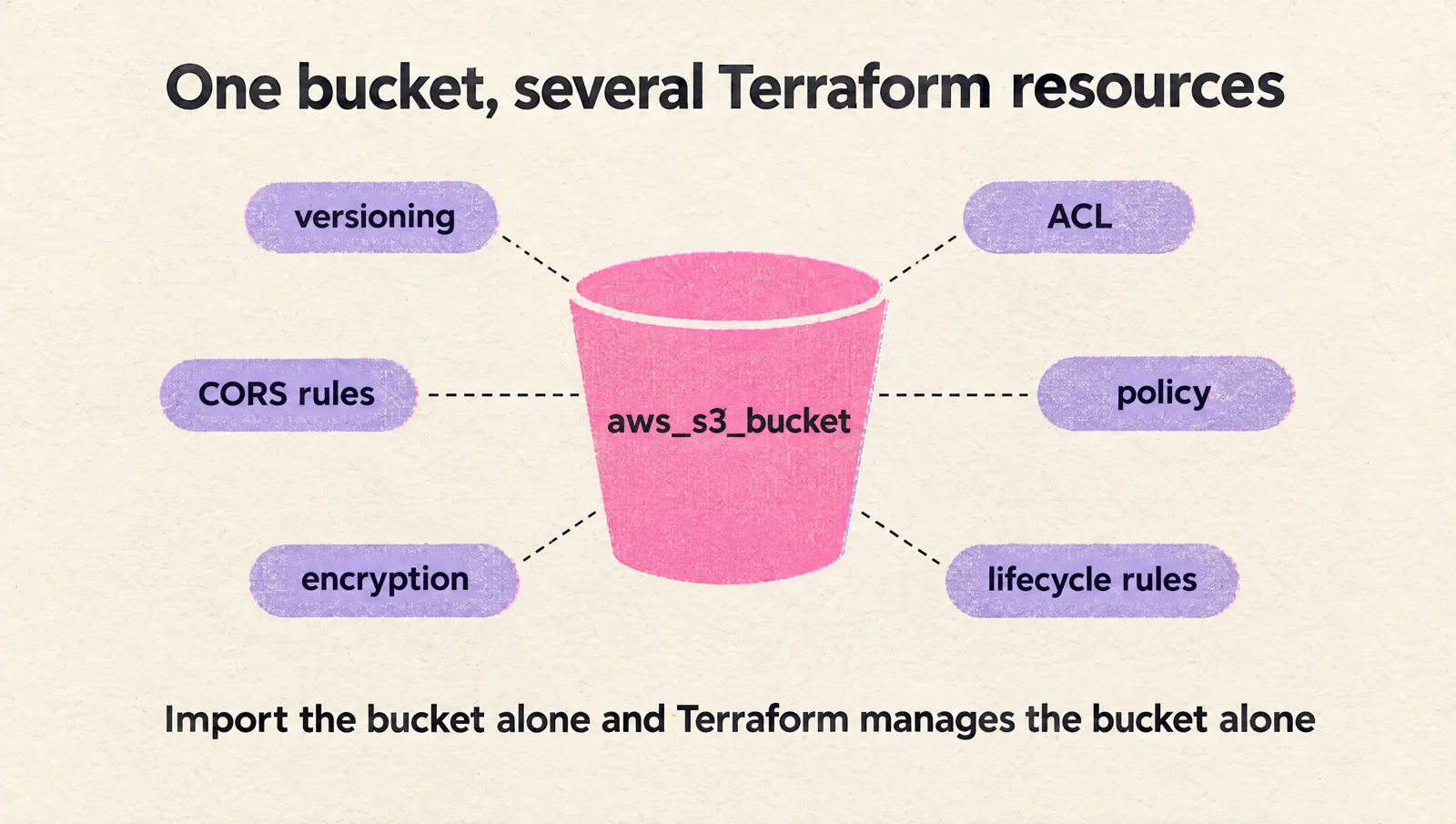
Unmanaged settings are where configuration drift hides.
Security groups have the same trap. Rules can live inline in aws_security_group or as separate rule resources, and the AWS docs warn against mixing the 2: "Doing so may cause rule conflicts, perpetual differences, and result in rules being overwritten."
Pick 1 style before you import. The AWS provider's docs call the separate aws_vpc_security_group_ingress_rule and aws_vpc_security_group_egress_rule resources the current best practice.
Values the API does not return
Some arguments cannot be read back, so import cannot fill them:
- Google disk encryption keys: the provider docs say they "cannot be imported automatically. The API doesn't return this information"
- Google bucket
force_destroy: always imported asfalse - Helm release
repository: not stored by Helm, so it comes back empty
Treat passwords the same way. Check every password and key argument after an import, and keep in mind that what you put in password on aws_db_instance is stored in the state as plain text. (The provider offers a write-only password_wo, which needs Terraform 1.11 or later.)
4 things Terraform will not stop you from doing
You would expect Terraform to catch these. It does not. All 4 were reproduced on Terraform 1.17.2 or the version named.
- Importing the same object twice. The same ID imports into 2 different addresses with no error, by command or by block. Now 2 resource blocks fight over 1 object
- Pointing a new ID at a managed address. An import block with a different ID for an address already in state is ignored. The plan says "No changes" and you think it worked
- Leaving an import block behind. Remove the resource from state later with
terraform state rm, and the forgotten block imports it again on the next plan - A module import block on an old version. Terraform 1.15.8 ignores an import block inside a child module with no warning, and plans to create a new object in its place
The 2 it does catch:
- The command, on an address already in state: "Error: Resource already managed by Terraform"
- 2 import blocks with the same
to: "Error: Duplicate import configuration"
Items 3 and 4 show up in the plan if someone reads it. Items 1 and 2 do not, so run terraform state list before you import and check that the object and the address are both new.
A safe import workflow for a team
An import edits the state, and the state is shared. Here is the order I would run it in.
- Check the backend first. Locking on, and versioning on the state bucket. On the S3 backend locking is opt-in (
use_lockfiledefaults tofalse), and HashiCorp's docs say it is "highly recommended that you enable Bucket Versioning" for state recovery - Take a copy of the state:
terraform state pull > backup.tfstate - Write the import blocks and resource blocks on a branch
- Plan in CI and post the plan on the pull request
- Review 1 line: N to import, 0 to add, 0 to change, 0 to destroy
- Merge and apply through the same pipeline as every other change
- Plan again. "No changes", or the import is not finished
- Delete the import blocks in a follow-up pull request
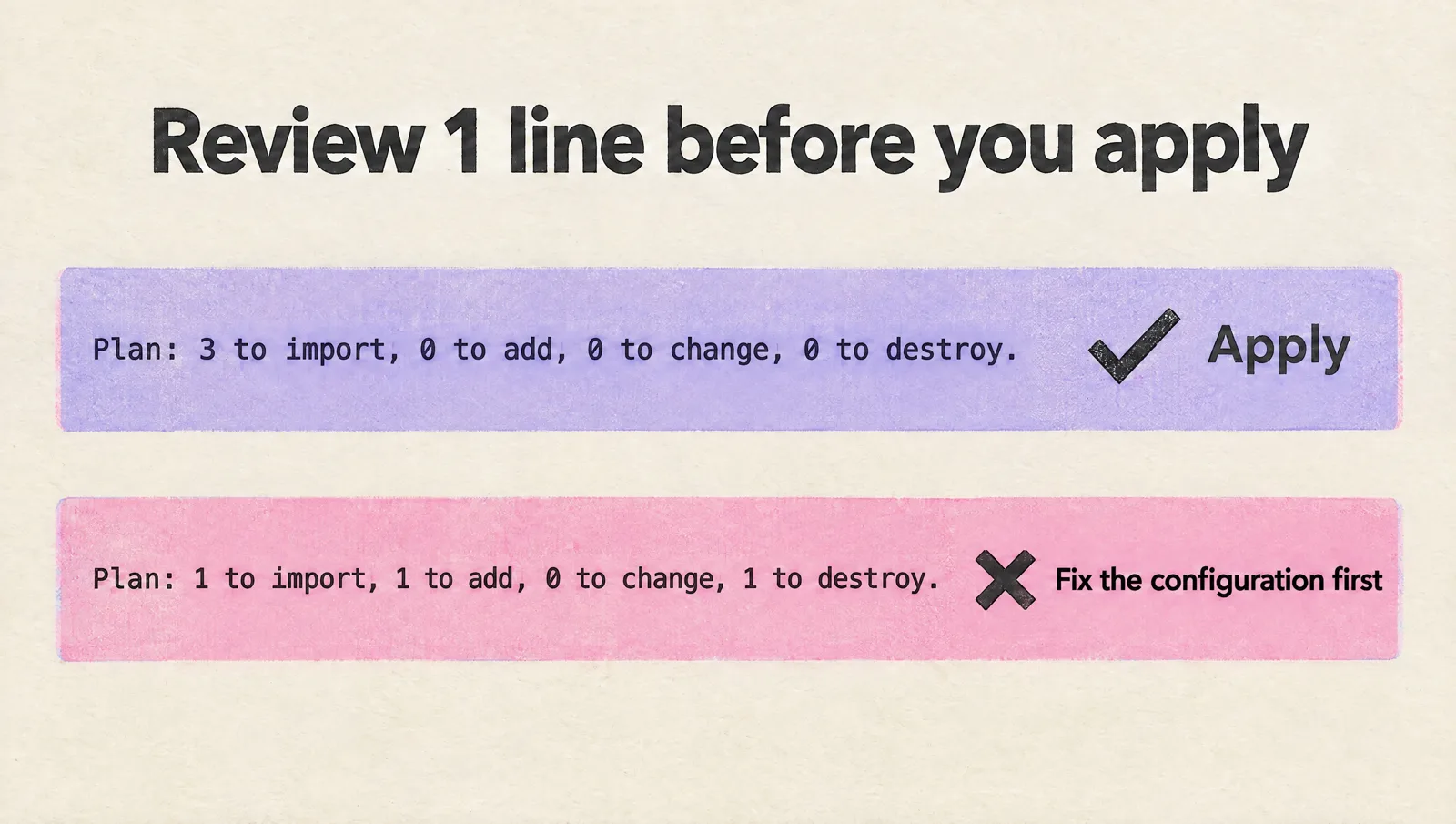
2 rules that keep it boring:
- An import pull request changes nothing. Tags, renames and cleanups go in the next one. If the plan mixes imports with changes, nobody can tell which is which
- Import in small batches. 5 to 20 resources that belong together (a VPC and its subnets) are reviewable. 400 are not
Deciding where the imported resources should live matters as much as the import. That is covered in how to structure Terraform for startup scale.
Undo an import without destroying anything
You imported the wrong object, or into the wrong address. Deleting the resource block alone is the wrong move: Terraform would plan to destroy the real object.
With an import block that has not been applied yet, there is nothing to undo. Delete the block.
After the apply (or after a terraform import command, which writes to the state at once), use a removed block (Terraform 1.7 and later). Delete the import block, and replace the resource block with:
removed {
  from = random_string.token

  lifecycle {
    destroy = false
  }
}
The plan:
 # random_string.token will no longer be managed by Terraform, but will not be destroyed
 # (destroy = false is set in the configuration)
 ...

Plan: 0 to add, 0 to change, 0 to destroy.

Warning: Some objects will no longer be managed by Terraform
The command line version is terraform state rm:
$ terraform state rm -dry-run random_string.forget
Would remove random_string.forget
$ terraform state rm random_string.forget
Removed random_string.forget
Successfully removed 1 resource instance(s).
Delete the resource block and the import block in the same change. Leave the resource block and the next plan creates a second object. Leave the import block and the next plan imports the old one again.
HashiCorp recommends the removed block, for the same reason as with import: you get a preview. One exception: a removed block applies in every workspace that uses the configuration. If you imported into the wrong workspace, run terraform state rm in that workspace.
For a resource that is right but sits at the wrong address, use a moved block. It renames the address and touches nothing else.
Never write a removed block without lifecycle
The same file does opposite things on the 2 tools:
removed block with no lifecycle | Result |
|---|---|
| Terraform 1.17.2 | Plan: 0 to add, 0 to change, 1 to destroy. |
| OpenTofu 1.13.9 | Plan: 0 to add, 0 to change, 0 to destroy, 1 to forget. (with a warning) |
Terraform destroys the object. OpenTofu forgets it.
Always write destroy = false or destroy = true yourself.
OpenTofu imports the same way, with 4 differences
Import blocks, for_each, identity and tofu plan -generate-config-out all work on OpenTofu, and tofu import takes the same arguments as the Terraform command.
The differences on OpenTofu 1.13.9:
| Feature | Terraform 1.17.2 | OpenTofu 1.13.9 |
|---|---|---|
| Import block in a child module | Works (since 1.16) | Error: "Invalid import configuration" |
query command and list blocks | Yes (since 1.14) | No |
removed with no lifecycle | Destroys | Forgets, with a warning |
| Plan summary | to import, add, change, destroy | Adds "to forget" when a resource is forgotten |
A module that ships its own import blocks runs on Terraform 1.16 and later and fails on OpenTofu. Keep import blocks in the root module if you support both.
Moving between the 2 tools is its own project. Our Terraform to OpenTofu migration guide covers it.
Tools that generate Terraform from a live account
Before terraform query, third-party tools filled the gap. Their state in November 2026:
| Tool | Covers | State |
|---|---|---|
| Terraformer | Many providers | Deprecated. The repository was archived on March 16, 2026. Last release: March 2025 |
| aws2tf | AWS | Active. Latest release in July 2026. An aws-samples project |
| Former2 | AWS | Not archived, last commit in July 2026, no releases. Its own badge puts Terraform coverage at 49% |
Azure Export for Terraform (aztfexport) | Azure | Active, from Microsoft. Latest release in November 2026 |
gcloud beta resource-config bulk-export | Google Cloud | Preview. No Windows support |
My order: native import blocks first, terraform query where the provider supports the resource type, and a generator only for a 1-time bulk export that you then review line by line.
Old tutorials still send people to Terraformer. Skip it. Nobody patches it anymore.
Whatever the tool, the test is the same: the generated configuration is done when terraform plan shows no changes.
Import checklist
Always:
- Use an import block, in a pull request
- Back up the state before the apply
- Look up the ID format on the resource's Registry page
- Write every non-default argument in the resource block
- Import the companion resources (bucket settings, security group rules)
- Apply only when the plan says 0 to add, 0 to change, 0 to destroy
- Plan again after the apply and expect "No changes"
- Delete the import blocks once they are applied
- Write
lifecycle { destroy = false }in everyremovedblock
FAQ
Does terraform import change my infrastructure?
No. Import only writes to the Terraform state. The apply that follows can change the resource if your configuration differs from the real object, which is why the plan has to show 0 to change and 0 to destroy first.
Does terraform import generate code?
The terraform import command does not. An import block with terraform plan -generate-config-out=generated.tf writes a draft resource block for you. The feature is still labeled experimental in Terraform 1.17.2, so review the draft.
Can I import multiple resources at once?
Yes, with several import blocks or with 1 import block that uses for_each (Terraform 1.7 and later). The terraform import command handles 1 resource per run.
What is the difference between terraform import and an import block?
The command writes to the state immediately, with no plan. The block is configuration: it shows up in terraform plan, runs in CI and can be reviewed. Use the block on Terraform 1.5 and later.
Should I delete import blocks after applying?
You can do either. HashiCorp recommends keeping them as a record. I delete them, because a leftover block imports the object again if the address ever leaves the state.
How do I undo a terraform import?
Replace the resource block with a removed block that has lifecycle { destroy = false }, or run terraform state rm on the address. Both remove the resource from the state and leave the real object running. Delete the import block and the resource block in the same change.
Does import work the same in OpenTofu?
Mostly. Import blocks, for_each, identity and config generation work on OpenTofu 1.13.9. It has no query command and it rejects import blocks inside child modules.
A Recap!
If you take away 1 thing from this page, let it be this:
An import is done when the plan shows only imports, and done properly when the next plan shows nothing.
- Import block for everything on Terraform 1.5 and later
-generate-config-outfor a first draft, cleaned by handfor_eachfor sets,terraform queryto find what exists- The ID format from the Registry, or
identitywhen the ID is a glued string - Companion resources imported with the main one
- A
removedblock withdestroy = falseto undo
You don't NEED a consultant to import an AWS account into Terraform. The steps above and a patient week will do it.
If you would like a second pair of eyes on the result (yes, I sell those), claim a free assessment and a senior engineer will review your setup with you.
Related guides: how to structure Terraform for startup scale, the Terraform to OpenTofu migration guide and the glossary entry on Terraform state.