


A sound Kubernetes migration strategy moves workloads in phases: inventory and classify services, build a production-ready platform, migrate one low-risk pilot with a tested rollback, then move remaining stateless services in waves while databases usually stay on managed services. Shift traffic gradually, and do not cut over until monitoring, security, ownership and cost controls are in place.
Migrations rarely start as calm modernization programs. Usually the current platform is under strain: manual releases, rollback that depends on one engineer, PaaS limits, unclear cloud costs, or environment drift. A useful plan is not an order to "move everything to Kubernetes". It is a sequence of decisions about what moves, in what order, how traffic shifts, how rollback works, and who owns the platform afterwards.
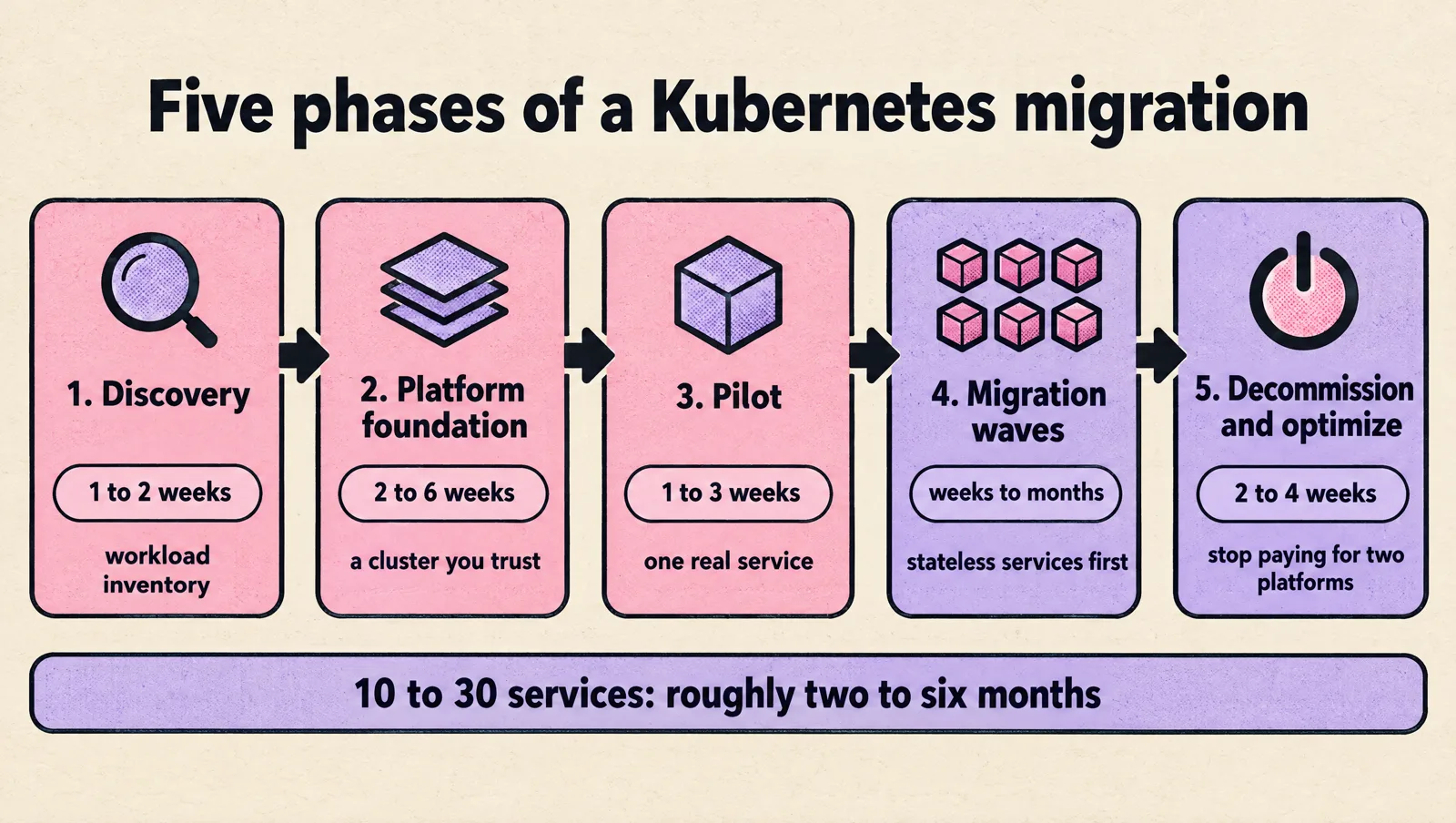
Kubernetes migration phases and timeline
Durations are typical for a startup or scale-up moving 10 to 30 services with a small platform team; they stretch with stateful systems, compliance work and team availability.
| Phase | Goal | Key outputs | Typical duration |
|---|---|---|---|
| 1. Discovery | Know what you are moving | Workload inventory, dependency map, list of what stays where it is | 1 to 2 weeks |
| 2. Platform foundation | A cluster you would trust with production | Clusters as code, CI/CD or GitOps path, ingress, secrets, RBAC, observability baseline | 2 to 6 weeks |
| 3. Pilot | Prove the path end to end | One real service in production on Kubernetes, rollback rehearsed, runbook written | 1 to 3 weeks |
| 4. Migration waves | Move the rest in batches | Stateless services first, workers and jobs next, gradual traffic shifts | Weeks to months |
| 5. Decommission and optimize | Stop paying for two platforms | Old platform shut down, requests and limits right-sized, autoscaling tuned | 2 to 4 weeks |
Migration readiness checklist
Do not move production traffic for a service until you can tick every line:
- The service runs from an immutable container image built in CI, with no host-level configuration.
- Configuration and secrets come from environment, ConfigMaps or a secret manager, not baked into the image.
- Readiness, liveness and startup probes reflect real health, and the app handles SIGTERM gracefully.
- CPU and memory requests are set from measured usage.
- Nothing important is written to local disk.
- Logs, metrics and alerts work in the new environment before traffic moves.
- Network paths to databases, queues and third-party APIs are open and tested.
- Rollback to the old platform is documented and has been rehearsed.
- An owner is on call during the cutover window.
If you are leaving Heroku specifically, our Heroku to AWS migration plan covers the PaaS-specific steps, and choosing a provider is covered in our guide to managed Kubernetes hosting for production.
Start With Workload Decisions Before the Cluster Diagram
Before debating namespaces, node pools, ingress controllers, service meshes, GitOps tooling, or CI/CD architecture, map the workloads you actually intend to move. Keep the inventory lightweight enough for application teams to maintain, but detailed enough to expose migration risk. Use it to separate good first movers from services that need code changes, dependency cleanup, security review, data migration planning, or operational hardening. The same inventory should identify shared systems that can block cutover: identity providers, message queues, DNS, databases, certificate management, image registries, artifact repositories, and observability pipelines. It should also force one uncomfortable but useful decision: some workloads should stay on the current platform for now because moving them would add operational risk without improving reliability, delivery speed, compliance posture, or cost control.
For each workload, capture only the information that changes the migration path, rollout strategy, rollback option, ownership model, or day-two support burden. Avoid building a massive spreadsheet that is obsolete before the first pilot ships. Treat the inventory as a living decision record that helps engineers answer practical questions: can this service run safely in a container, what does it depend on, how does it fail, who approves production changes, what telemetry proves it is healthy, what data must be protected, and what must be true before traffic can move? A team migrating multiple high-scale clusters into infrastructure as code will need different inventory detail than a team moving a small set of stateless APIs, as shown in this high-scale Kubernetes cluster migration. If a field does not change an execution decision, leave it out or put it in a separate application catalog. The migration inventory should guide delivery, not become another system nobody trusts.
- Runtime shape: Classify the workload as a stateless API, background worker, scheduled job, stateful service, long-running stream processor, batch workload, or vendor-managed package. Runtime shape drives decisions about autoscaling, graceful shutdown, persistent storage, disruption budgets, upgrade sequencing, capacity planning, and recovery when a node, zone, or dependency fails. It also prevents a common migration mistake: treating every service like a stateless web app just because it can be packaged into a container image. A queue worker needs idempotent processing and safe retry behavior, a scheduled job may need concurrency controls so it does not run twice after a controller restart, and a service with local session state may need code changes before Kubernetes is the right landing zone. For stateful or latency-sensitive workloads, validate storage behavior, startup time, termination handling, and failover assumptions in a test cluster before declaring the runtime model production-ready.
- Traffic pattern: public traffic, internal traffic, batch usage, bursty demand, or steady load.
- Dependencies: databases, queues, caches, object storage, third-party application programming interfaces (APIs), and internal services.
- Configuration: environment variables, secrets, certificates, feature flags, and runtime-specific settings.
- Operational needs: backups, disaster recovery, monitoring, logging, alerting, and runbooks.
- Release pattern: daily deployment, weekly release, manual promotion, or tightly controlled change window.
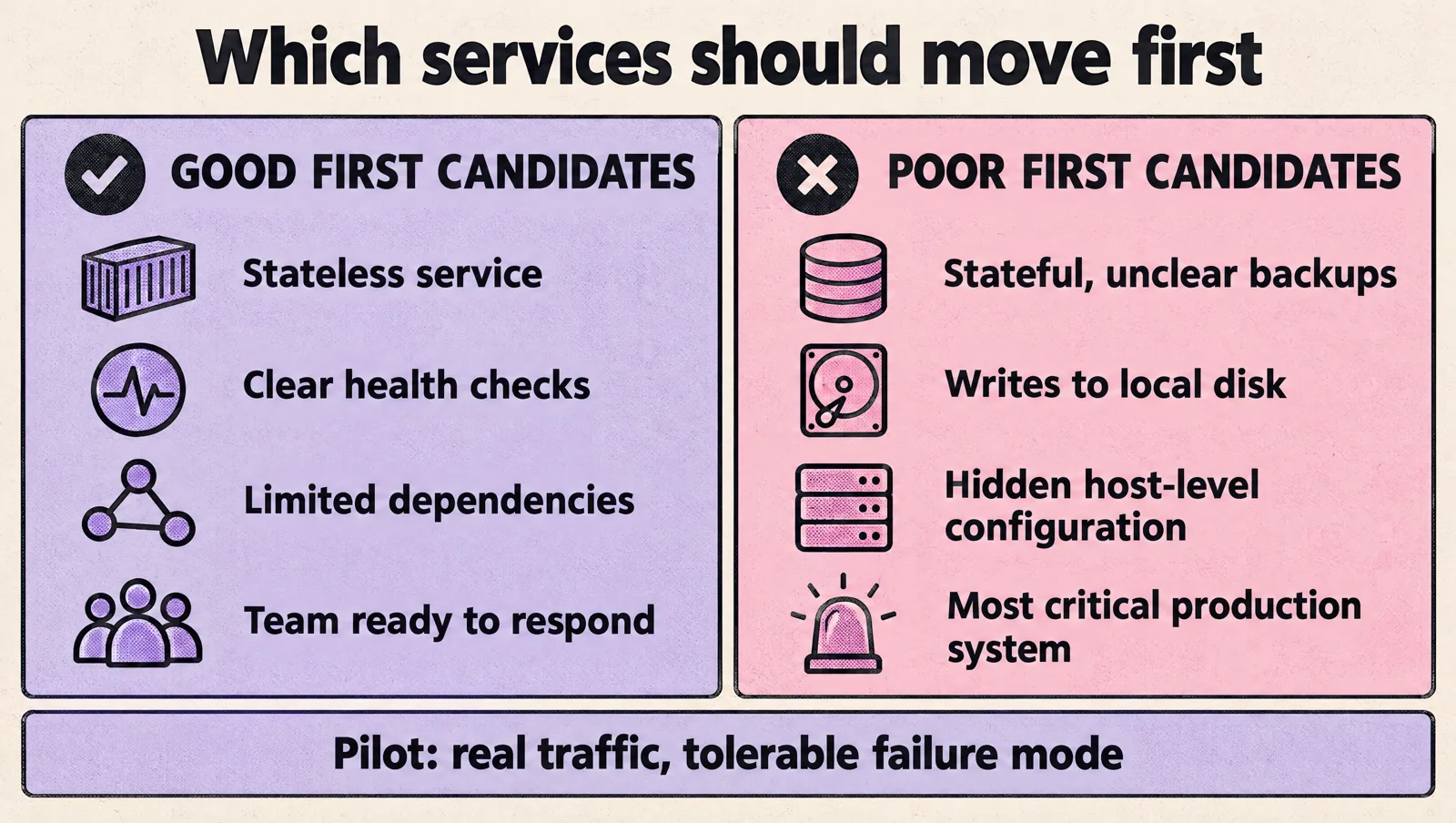
Good first candidates are usually stateless services with clear health checks, limited dependencies, and a team that can respond quickly if something breaks. Poor first candidates often include stateful systems with unclear backup behavior, older applications that write to local disk, and services with hidden dependencies on host-level configuration.
Decide what should move first
Do not choose the most critical production system as the first mover unless the platform team has already proven the cluster, delivery pipeline, observability, and rollback path under realistic conditions. A better pilot is a service with real traffic, real dependencies, and real on-call expectations, but with a failure mode the business can tolerate while the team learns.
Useful selection criteria include:
- Clear rollback path: You can return traffic to the old platform if the migration fails.
- Known dependencies: The team understands what the service talks to and what talks to it.
- Observable behavior: You can see logs, metrics, traces, and health checks before and after the move.
- Contained blast radius: if the migration fails, the impact is limited, visible, and reversible without a broad production incident.
- Team availability: Engineers who know the service can support the migration window.
This is where teams often find that the platform work and the application work are linked. A service may need new readiness probes, better shutdown handling, externalized configuration, or cleaner container images before it can run well in Kubernetes.
If your team already manages infrastructure with code, you can compare approaches such as deploying Kubernetes resources using Terraform against GitOps or native Kubernetes manifests. The right choice depends on your team’s existing workflow, review process, and comfort with state management.
Plan for dependencies and data carefully
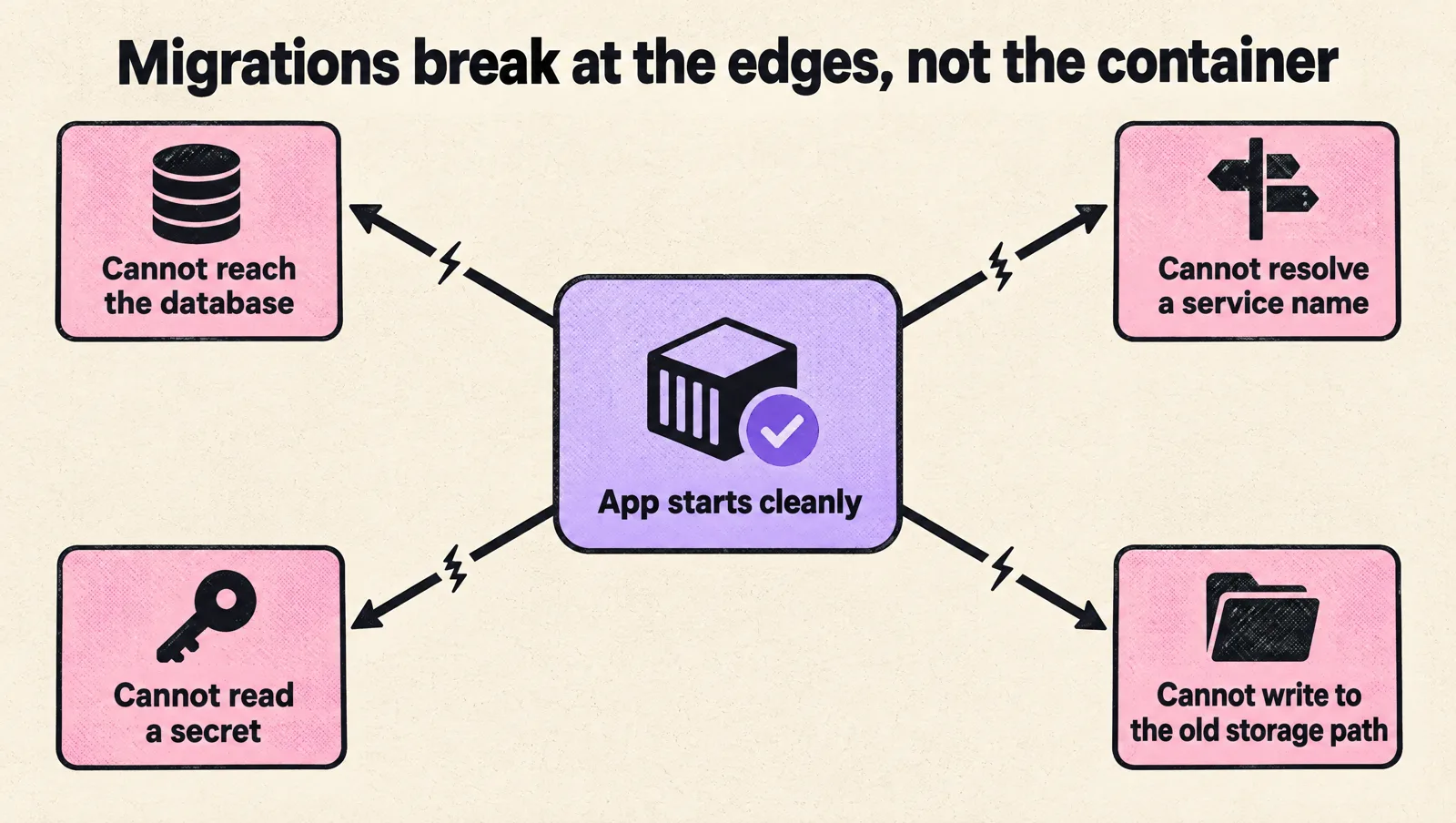
Most migration pain comes from the edges of the application, not the container itself. The app may start cleanly in Kubernetes, then fail because it cannot reach a database, resolve a service name, read a secret, or write to the storage path it used before.
Work through dependency questions early:
- Will databases stay outside the cluster, move later, or run as managed services?
- How will services discover each other during the migration?
- Do firewall rules, security groups, or network policies need to change?
- Where will secrets live, and who can read or rotate them?
- How will background jobs behave if old and new versions run at the same time?
- What happens to in-flight requests during deploys and node termination?
Be cautious with stateful workloads. Kubernetes can run stateful applications, but that does not make every database or message broker a good migration target. If your current database is stable, backed up, and well understood, it may be smarter to keep it where it is while you migrate stateless services first.
Infrastructure provisioning also needs an explicit decision. If the application depends on cloud resources such as object storage, queues, databases, or identity bindings, decide whether those resources stay in Terraform, move behind Kubernetes-style APIs such as Crossplane, or remain managed by a separate platform workflow. The important part is not the tool choice; it is having one source of truth, clear ownership, and a review path for changes that can affect production data or access.
Build the operating model before production cutover
A working cluster is not the same as a working platform. Before production traffic moves, decide who owns the platform, who supports application teams, and how incidents will be handled.
At minimum, define:
- Access model: who can create workloads, read secrets, change ingress, and modify cluster-level resources.
- Deployment path: how code moves through development, staging, and production.
- Observability baseline: what logs, metrics, alerts, and dashboards every service must have.
- Security controls: image scanning, role-based access control (RBAC), network policies, and secret handling.
- Incident process: who responds, where runbooks live, and how changes are paused during active incidents.
- Cost ownership: how teams understand resource requests, limits, autoscaling, and waste.
Many Kubernetes problems are ownership problems with technical symptoms. If every team can change anything, the cluster becomes inconsistent. If only one platform engineer can approve every change, delivery slows down. A practical model gives application teams safe defaults and clear boundaries.
If responsibilities are still unclear, settle them before the cutover. The migration plan should say who owns cluster upgrades, admission policies, incident response, deployment pipelines, application manifests, secrets, and cost reviews. Ambiguous ownership is one of the fastest ways for a technically successful migration to become an operational burden.
Use staged rollout patterns
A big-bang migration creates avoidable risk. A staged rollout gives you time to validate behavior, tune the platform, and teach teams how to operate in Kubernetes without forcing every problem into one release window.
Common rollout patterns include:
- Environment-first migration: move development or staging before production, but only if those environments are similar enough to expose real problems. If staging uses different data volumes, weaker network policies, or simplified dependencies, treat it as a platform rehearsal rather than proof that production is ready.
- Service-by-service migration: move one application at a time. This is usually the safest path for distributed systems.
- Percentage-based traffic shift: send a small amount of production traffic to Kubernetes, then increase it as confidence grows.
- Internal service first: migrate a service used by internal users before moving customer-facing traffic.
- New workloads only: deploy new services to Kubernetes while legacy systems remain in place until they need major change.
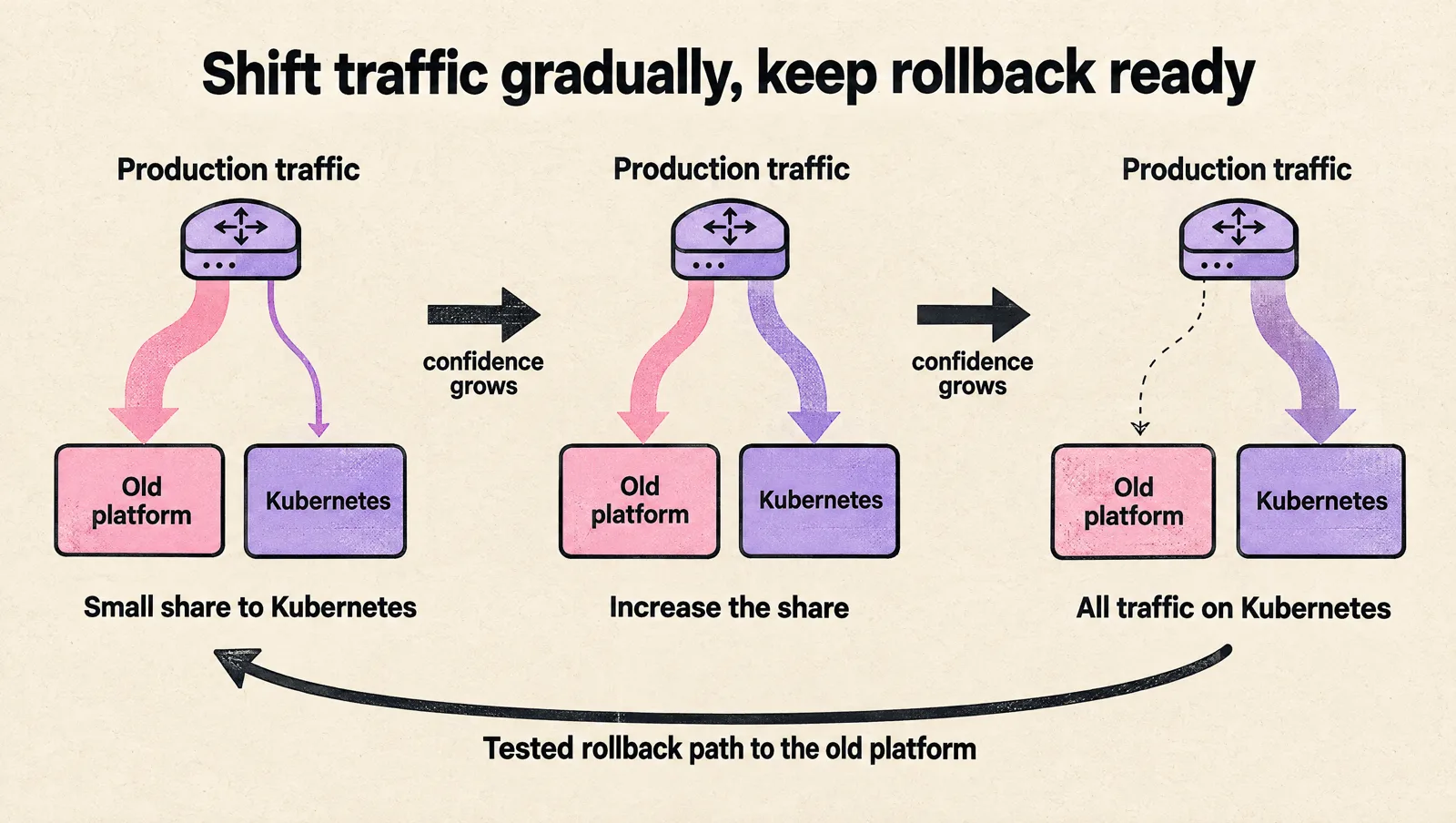
Each pattern has a cost. Running two platforms at once doubles some operational work. Gradual traffic shifting requires routing control, reliable telemetry, and a tested rollback path. Moving only new workloads slows standardization and can leave legacy systems in place longer than expected. Those costs are acceptable when they are deliberate; they become dangerous when the team treats the migration pattern as a shortcut instead of a risk-control mechanism.
For more complex deployments, especially where workloads depend on cloud resources, you may need a full path that covers both application and infrastructure changes. This walkthrough on how to deploy a Kubernetes app with AWS resources using Crossplane gives one example of that combined workflow.
Watch for common migration failure modes
Kubernetes exposes assumptions that were easy to miss on virtual machines or older deployment platforms. Look for these issues before they appear during cutover.
- Weak health checks: an application reports healthy even when it cannot reach a required dependency.
- Bad resource settings: missing requests and limits cause noisy neighbor problems, evictions, or poor scheduling.
- Slow shutdowns: pods receive traffic while they are terminating because the app does not handle signals correctly.
- Local disk assumptions: the app writes files that disappear when the pod restarts or moves to another node.
- Secret sprawl: credentials get copied into manifests, build systems, or team chat because secret management was not planned.
- Unclear rollback: teams know how to deploy to Kubernetes but not how to return traffic to the previous platform.
- Missing cost controls: oversized requests and unused environments make Kubernetes look more expensive than expected.
Specialized workloads need extra care. A platform such as Apache Airflow is not just a web service; it includes schedulers, workers, metadata storage, secrets, queues or executors, and operational expectations around retries and backfills. Before using that kind of system as a migration template, map each dependency, define recovery steps, and confirm that the team understands how scaling, upgrades, and failure handling work on Kubernetes.
FAQ
What is the best Kubernetes migration strategy?
For most teams, an incremental, service-by-service migration: move a low-risk pilot first, then stateless services in waves, with gradual traffic shifting and a rollback path for each. Big-bang migrations concentrate every unknown into one cutover.
How long does a Kubernetes migration take?
For a startup with 10 to 30 services, expect roughly two to six months from discovery to decommissioning the old platform. Platform foundation and the long tail of awkward services take the most time, not the first deployments.
Should databases move into Kubernetes?
Usually not during the migration. Keep databases on a managed service (RDS, Cloud SQL, Azure Database) and connect to them from the cluster. Revisit only if you have a clear reason and the skills to run stateful systems on Kubernetes.
What should we migrate first?
A service with real traffic and real dependencies but a tolerable failure mode: stateless, well understood, with clear health checks and a team available to support it. Avoid starting with the most critical system or the most stateful one.
Is it worth moving to Kubernetes at all?
It is worth it when you run enough services that standard packaging, deployment, scaling and policy pay back the operational cost. A single app or a small team is often better served by a PaaS or a container service such as ECS or Cloud Run.
Takeaway
Plan a Kubernetes migration as an operational change, not a container move. Start with a workload inventory, pick a low-risk first migration, map dependencies, define ownership, and roll out in stages. If you cannot explain how you will monitor, secure, deploy, roll back, and pay for the workload after it moves, the migration plan is not ready yet.