

Azure Pipelines is the CI/CD service in Azure DevOps. A production-ready pipeline is a multi-stage YAML file that builds and tests once, publishes one immutable artifact, and promotes that same artifact through staging and production. Production runs as a deployment job against an environment protected by approvals, and the pipeline reaches Azure through a workload identity federation service connection, so no secrets are stored.
This guide shows that setup end to end. It includes a complete pipeline you can copy, deployment to Azure Kubernetes Service (AKS) and App Service, approvals and checks, service connections without secrets, templates, caching, rollback, a comparison with GitHub Actions, and fixes for the errors teams hit most often. Every YAML key and task input below is checked against Microsoft's current documentation.
How Azure Pipelines YAML is structured
An Azure Pipelines YAML file is a tree: a pipeline has stages, a stage has jobs, and a job has steps. Triggers decide when it runs, and variables and templates keep it readable.
- Triggers:
triggerruns on pushes (CI) andprruns on pull requests. For Azure Repos Git, pull request validation is set with a branch policy instead of theprkeyword. - Stages: logical phases such as Build, Staging and Production. Stages run in sequence by default and can be gated with
dependsOnandcondition. - Jobs: a unit of work that runs on one agent. A normal job uses
job. A deployment usesdeployment, which records history against an environment and supports approvals. - Steps: scripts (
script,bash,pwsh) or tasks such asDocker@2andAzureWebApp@1. - Agents: Microsoft-hosted agents (a clean VM per job, such as
vmImage: ubuntu-latest) or self-hosted agents that you run, which you need for private networks.
The part that confuses most people is that Azure Pipelines has three variable syntaxes, and each one is evaluated at a different time.
| Syntax | Name | Evaluated | Use it for |
|---|---|---|---|
$(myVar) | Macro | At runtime, just before a task runs | Task inputs and scripts. The everyday choice. |
${{ variables.myVar }} | Template expression | At compile time, when the YAML is expanded | Template parameters, conditional insertion, loops over parameters. |
$[ variables.myVar ] | Runtime expression | At runtime, for variables and conditions | Reading output variables from earlier jobs, such as $[ dependencies.Build.outputs['setTag.imageTag'] ]. |
If a value is empty when you expect it to be set, the usual cause is using ${{ }} for something that only exists at runtime, such as an output variable from a previous job.
![Timeline of the three Azure Pipelines variable syntaxes: the template expression ${{ }} is evaluated at compile time when the YAML is expanded, while the runtime expression $[ ] and the macro $( ) are evaluated at runtime, so a runtime value read with ${{ }} is empty.](https://cdn.prod.website-files.com/6203daf47137054c031fa0e6/6ada455579e5bf93c2d30379_6ada44b43427a09c7eeeca85_azure-pipelines-variable-syntax-timing.webp)
A complete multi-stage Azure Pipelines YAML example
The pipeline below builds a Node.js API into a container image and deploys it to AKS. It tests on every pull request, builds and pushes the image only from main, deploys to staging automatically, and deploys the same image tag to production after an approval. Replace the names (sc-product-staging, productacr, and so on) with your own.
# azure-pipelines.yml
trigger:
  branches:
    include:
      - main

pr:
  branches:
    include:
      - main

variables:
  imageRepository: product-api
  acrLoginServer: productacr.azurecr.io
  tag: $(Build.SourceVersion)
  npm_config_cache: $(Pipeline.Workspace)/.npm

stages:
  - stage: Build
    displayName: Build and test
    jobs:
      - job: Build
        pool:
          vmImage: ubuntu-latest
        steps:
          - checkout: self

          - task: Cache@2
            displayName: Cache npm
            inputs:
              key: 'npm | "$(Agent.OS)" | package-lock.json'
              restoreKeys: |
                npm | "$(Agent.OS)"
              path: $(npm_config_cache)

          - script: npm ci
            displayName: Install dependencies

          - script: npm test
            displayName: Run tests

          - task: Docker@2
            displayName: Build and push image
            condition: and(succeeded(), ne(variables['Build.Reason'], 'PullRequest'))
            inputs:
              command: buildAndPush
              containerRegistry: acr-product
              repository: $(imageRepository)
              Dockerfile: Dockerfile
              tags: |
                $(tag)

          - publish: k8s
            artifact: manifests
            displayName: Publish Kubernetes manifests

  - stage: Staging
    displayName: Deploy to staging
    dependsOn: Build
    condition: and(succeeded(), eq(variables['Build.SourceBranch'], 'refs/heads/main'))
    jobs:
      - deployment: DeployStaging
        pool:
          vmImage: ubuntu-latest
        environment: product-staging
        strategy:
          runOnce:
            deploy:
              steps:
                - task: KubernetesManifest@1
                  displayName: Deploy to AKS staging
                  inputs:
                    action: deploy
                    connectionType: azureResourceManager
                    azureSubscriptionConnection: sc-product-staging
                    azureResourceGroup: rg-product-staging
                    kubernetesCluster: aks-product-staging
                    namespace: product
                    manifests: $(Pipeline.Workspace)/manifests/*.yaml
                    containers: $(acrLoginServer)/$(imageRepository):$(tag)
                    rolloutStatusTimeout: '300'

  - stage: Production
    displayName: Deploy to production
    dependsOn: Staging
    condition: succeeded()
    jobs:
      - deployment: DeployProduction
        pool:
          vmImage: ubuntu-latest
        environment: product-production
        strategy:
          runOnce:
            deploy:
              steps:
                - task: KubernetesManifest@1
                  displayName: Deploy to AKS production
                  inputs:
                    action: deploy
                    connectionType: azureResourceManager
                    azureSubscriptionConnection: sc-product-production
                    azureResourceGroup: rg-product-production
                    kubernetesCluster: aks-product-production
                    namespace: product
                    manifests: $(Pipeline.Workspace)/manifests/*.yaml
                    containers: $(acrLoginServer)/$(imageRepository):$(tag)
                    rolloutStatusTimeout: '300'
Why it is built this way:
- Build once, promote the same image. The image is tagged with the commit SHA (
Build.SourceVersion) and both environments deploy that exact tag. You never rebuild for production, so what you tested is what you ship. - Pull requests build and test but never push. The
conditionon the Docker task skips the push whenBuild.ReasonisPullRequest, and the Staging stage only runs forrefs/heads/main. - Deployment jobs download artifacts for you. Microsoft's docs state that the download artifact step is auto-injected only in the
deployhook, so themanifestsartifact lands in$(Pipeline.Workspace)/manifests. A deployment job does not check out the repository unless you addcheckout: self. - Service connection names are literal. Azure DevOps authorizes service connections when the pipeline is compiled, so keep their names as plain strings or compile-time values rather than variables set at runtime.
rolloutStatusTimeoutmakes the deploy honest. The task waits for the rollout to become healthy, so a crash-looping pod fails the stage instead of showing a green run. Readiness probes do the real work here; our guide to configuring Kubernetes probes without restart loops covers that side.

Deploying to Azure App Service with slots instead of AKS
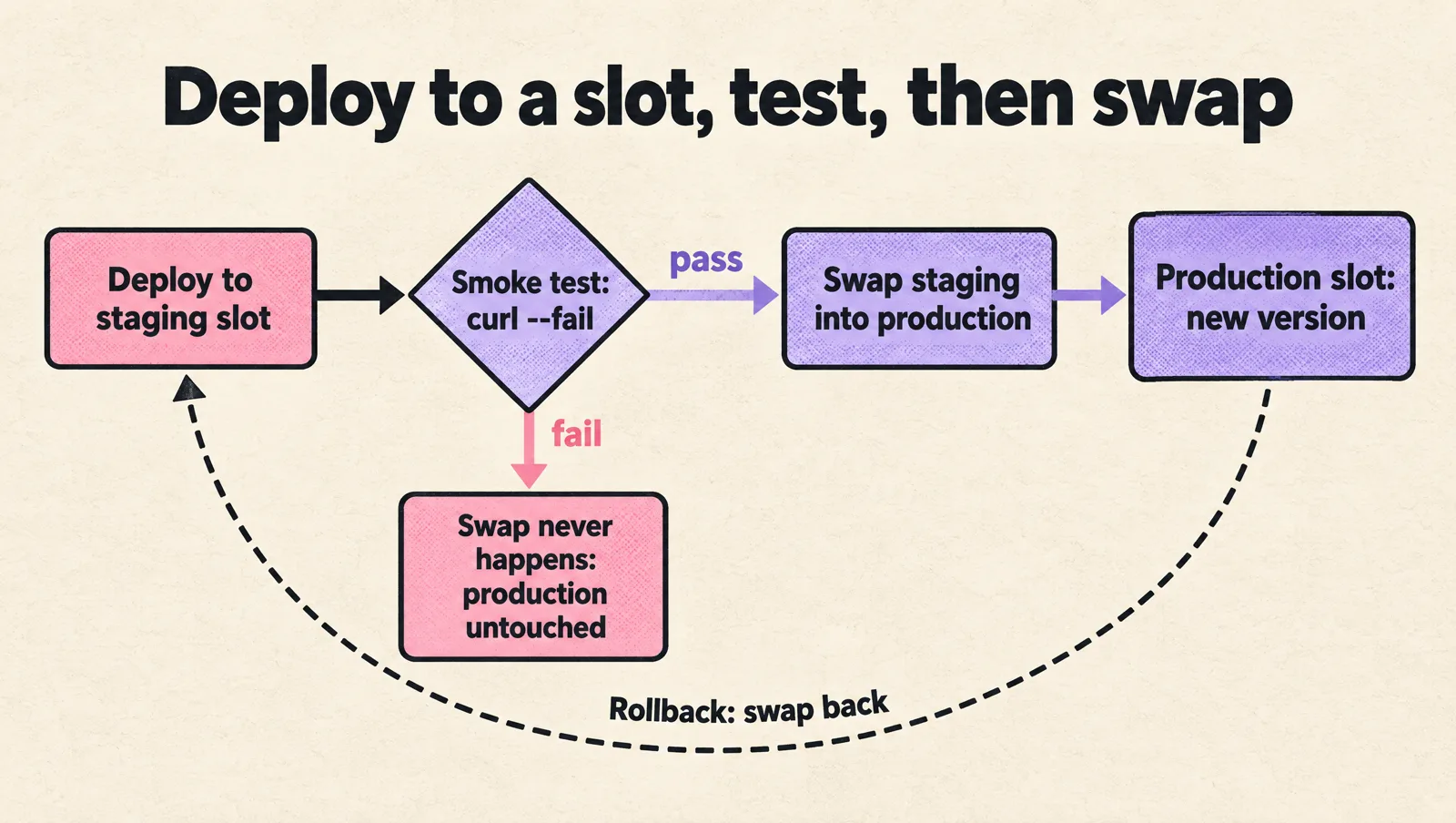
If you run on App Service rather than Kubernetes, swap the deploy steps. The safe pattern is to deploy to a staging slot, warm it up, then swap it into production. Swapping back is your rollback. Deployment slots need a Standard tier App Service plan or higher.
- task: AzureWebApp@1
  displayName: Deploy to staging slot
  inputs:
    azureSubscription: sc-product-production
    appType: webAppLinux
    appName: app-product-prod
    deployToSlotOrASE: true
    resourceGroupName: rg-product-production
    slotName: staging
    package: $(Pipeline.Workspace)/app/*.zip

- task: AzureCLI@2
  displayName: Swap staging into production
  inputs:
    azureSubscription: sc-product-production
    scriptType: bash
    scriptLocation: inlineScript
    inlineScript: |
      az webapp deployment slot swap \
        --resource-group rg-product-production \
        --name app-product-prod \
        --slot staging \
        --target-slot production
Put a smoke test between the two steps, for example a curl --fail against the staging slot's health endpoint. If it fails, the swap never happens and production is untouched.
Environments, approvals and checks
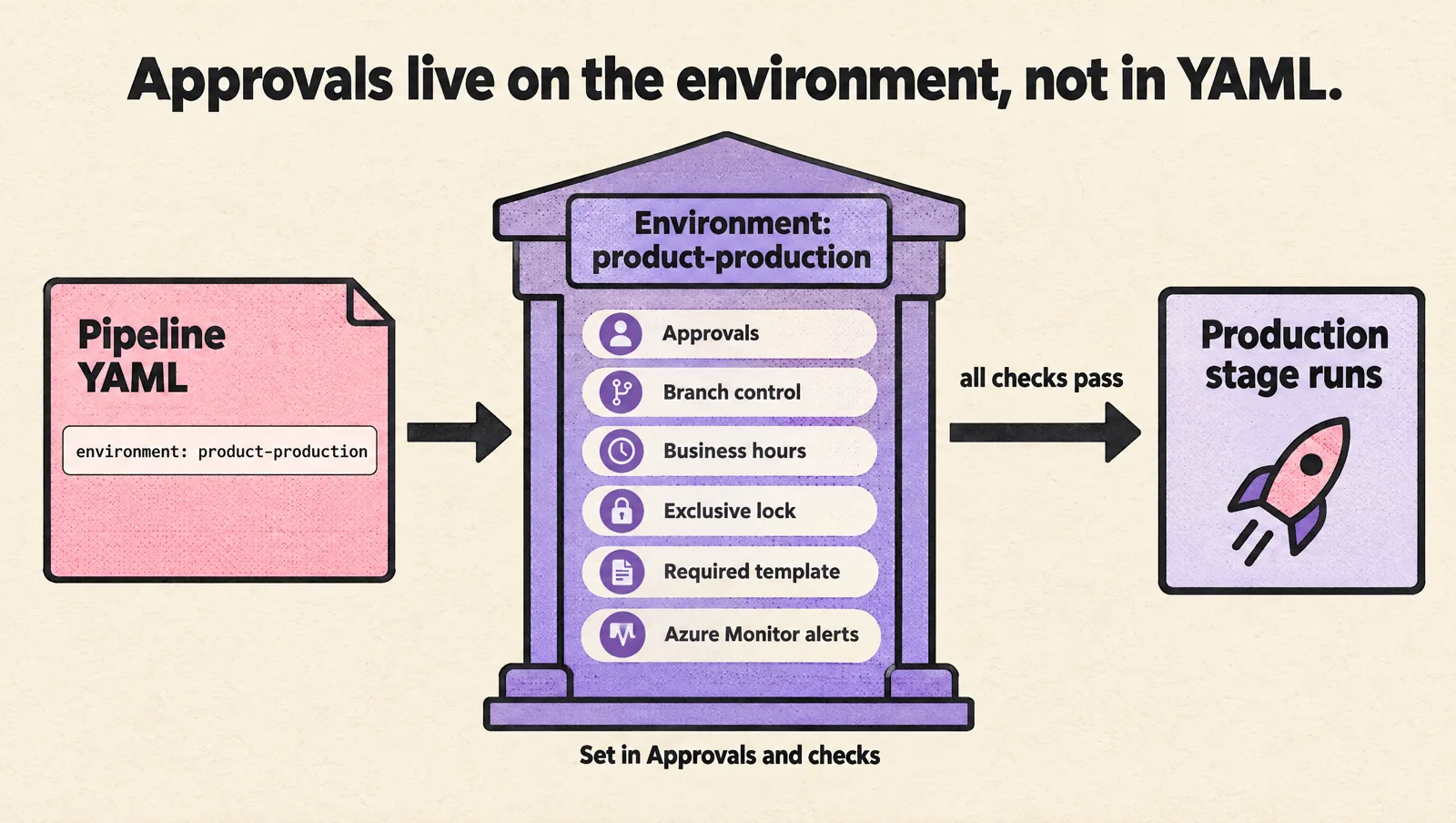
An environment (environment: product-production) is where Azure Pipelines records deployment history and enforces gates. One thing surprises almost everyone: approvals are not written in YAML. You configure them on the environment under Pipelines > Environments > product-production > Approvals and checks, and any pipeline that targets the environment has to pass them.
| Check | What it does | When to use it |
|---|---|---|
| Approvals | Named people or groups must approve before the stage runs. | Production, always. One approver from a release owner group is usually enough for a startup. |
| Branch control | Only runs from allowed branches can deploy. | Stop a feature branch from reaching production by accident. |
| Business hours | Deployments wait until an allowed time window. | Teams without overnight on-call. |
| Exclusive lock | Only one run deploys to the environment at a time. | Prevent two merges racing into production. |
| Required template | The pipeline must extend an approved template. | Once you have shared templates and want every production deploy to go through them. |
| Query Azure Monitor alerts | Blocks the deploy while alerts are firing. | Avoid shipping into an incident. |
Keep staging free of approvals so it deploys on every merge. If every production release needs three people and a meeting, engineers will find a way around the process. One approval plus branch control is the right default for most startups.
Service connections with workload identity federation
A service connection is how a pipeline authenticates to Azure. Microsoft recommends workload identity federation, which uses short-lived tokens instead of a client secret, so there is nothing to rotate or leak. In Microsoft's words, it "eliminates the need for secrets and secret management."
- Go to Project settings > Service connections > New service connection > Azure Resource Manager.
- Choose App registration (automatic) with the Workload identity federation credential. If you can't create app registrations, use the managed identity option instead.
- Set the scope to the subscription and the resource group, for example
rg-product-staging. Create a separate connection per environment. - Leave Grant access permission to all pipelines off. Microsoft advises against it; authorize each pipeline on first use instead.
- Add the same checks to the production service connection that you added to the production environment. Checks on a connection apply to every pipeline that uses it, even one that skips the environment.
Two operational details matter. First, if you still have secret-based connections, Azure DevOps can convert most automatically created ones to workload identity federation with a Convert button, and you can revert within seven days. Second, Azure Pipelines may disable an Azure Resource Manager connection that hasn't been used for 100 days. If a pipeline that worked last quarter suddenly fails to authenticate, check the connection's status first.
Secrets and variable groups
Never put secrets in the YAML file. Use one of these, in order of preference:
- A variable group linked to Azure Key Vault. The secrets live in Key Vault, and the pipeline reads them at runtime with
- group: product-production-secrets. - Secret variables on the pipeline or a variable group. These are fine for a few values, but they are harder to audit than Key Vault.
Secret variables are not automatically turned into environment variables for scripts. You have to map them explicitly, which also keeps them out of steps that don't need them:
- script: ./scripts/run-migrations.sh
  displayName: Run database migrations
  env:
    DATABASE_URL: $(DATABASE_URL)
Pull requests from forks do not get secrets by default. Keep that setting off unless you fully trust every contributor.
Templates: stop copy-pasting pipelines
Once you have more than two or three services, the same build steps get pasted into every repository and drift apart. Templates fix that. Keep them in a separate repository and pin a version.
# templates/node-build.yml (in the shared "pipeline-templates" repository)
parameters:
  - name: nodeVersion
    type: string
    default: '22.x'

steps:
  - task: NodeTool@0
    inputs:
      versionSpec: ${{ parameters.nodeVersion }}
  - script: npm ci
    displayName: Install dependencies
  - script: npm test
    displayName: Run tests
# azure-pipelines.yml in a service repository
resources:
repositories:
- repository: templates
type: git
name: Platform/pipeline-templates
ref: refs/tags/v1
steps:
- template: templates/node-build.yml@templates
parameters:
nodeVersion: '22.x'There are two kinds of templates. An include template (shown above) pastes steps, jobs or stages into your pipeline. An extends template defines the outer structure of the whole pipeline, and Microsoft recommends starting with extends for the most secure pipelines. Combine an extends template with the Required template check on your production environment, and nobody can deploy to production without going through your approved build, scan and deploy steps. Pin templates to a tag (refs/tags/v1) so that a change to the template doesn't break every pipeline at once.
Make pipelines faster with caching
Slow pipelines get bypassed. The quickest win is caching dependency downloads with Cache@2, as in the example above. A few rules from Microsoft's caching docs that save debugging time:
- Cache the package manager's cache directory (for npm,
npm_config_cache), notnode_modules.npm cideletesnode_modulesanyway. - Caches are immutable. A cache saved under a key never changes, so include a lock file in the key and add
restoreKeysas a fallback. - Caches are scoped per pipeline and branch. Pull request runs can read the target branch's cache but can't write to it.
- Caches expire after seven days without use, and you can't clear one. To force a fresh cache, add a literal such as
v2to the key.
Beyond caching: run unit tests and linting in parallel jobs, keep Docker layers ordered from least to most frequently changed, and move slow end-to-end suites to a scheduled run if they block every merge.
Database migrations and rollback
Most failed deploys that can't be rolled back involve a database migration. Two rules keep rollback possible:
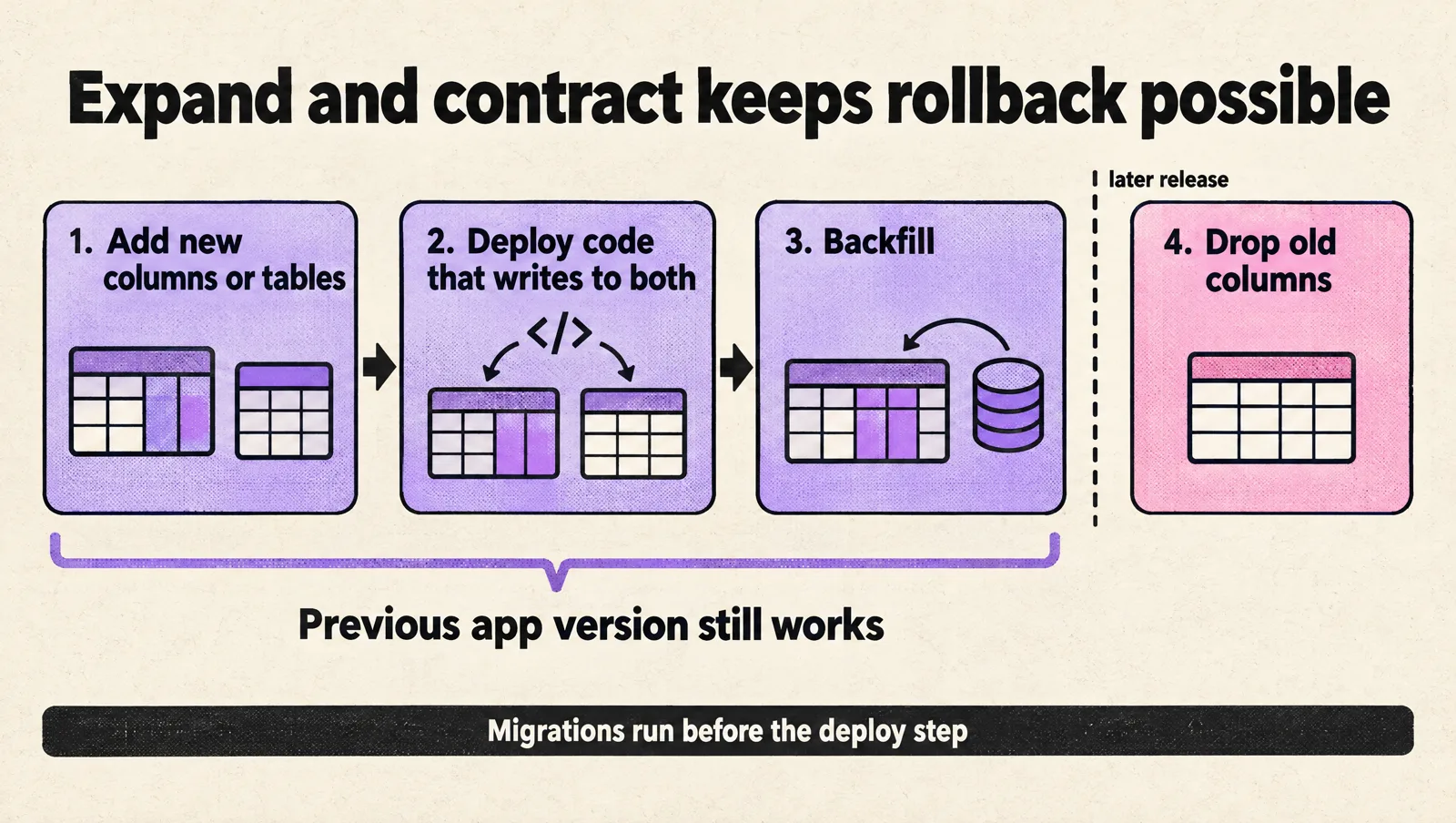
- Make migrations backward compatible. Use expand and contract: add new columns or tables first, deploy code that writes to both, backfill, and only drop old columns in a later release. Then the previous version of the app still works against the new schema.
- Run migrations as their own step before the deploy step, for example in the
preDeployhook of the deployment job, so a failed migration stops the release before new code goes live.
For the application itself, keep three rollback options ready:
- AKS:
kubectl rollout undo deployment/product-api -n productreturns to the previous ReplicaSet in seconds. - App Service: swap the slots back.
- Any target: a small rollback pipeline that takes an image tag as a runtime parameter and deploys it through the same protected environment, so rollbacks are recorded and approved like any other release.
# rollback.yml
parameters:
  - name: imageTag
    displayName: Image tag (commit SHA) to redeploy
    type: string

trigger: none

stages:
  - stage: Rollback
    jobs:
      - deployment: RollbackProduction
        pool:
          vmImage: ubuntu-latest
        environment: product-production
        strategy:
          runOnce:
            deploy:
              steps:
                - checkout: self
                - task: KubernetesManifest@1
                  inputs:
                    action: deploy
                    connectionType: azureResourceManager
                    azureSubscriptionConnection: sc-product-production
                    azureResourceGroup: rg-product-production
                    kubernetesCluster: aks-product-production
                    namespace: product
                    manifests: k8s/*.yaml
                    containers: productacr.azurecr.io/product-api:${{ parameters.imageTag }}
If you want canary or blue-green releases on Kubernetes, with automated analysis instead of a manual check, see our guide to zero-downtime releases with Helm and Argo Rollouts.
A minimal Azure DevOps setup for a startup
You don't need an enterprise release process on day one. You need a path that answers five questions without digging through Slack: what code is running, who can deploy it, where the secrets live, how it was tested, and how to roll it back. This setup covers all five:
- One Azure DevOps project per product, not per service. Separate projects per service create permission sprawl and duplicated pipelines.
- Pipeline YAML in the same repository as the code, reviewed in pull requests like any other change.
- Branch policies on
main: a pull request is required, at least one reviewer, and build validation that runs the pipeline. - One resource group and one service connection per environment (
rg-product-stagingandsc-product-staging,rg-product-productionandsc-product-production), so a staging pipeline can't touch production even by mistake. - Staging deploys automatically and production needs one approval.
- A named owner for the pipeline and the service connections. Pipelines that nobody owns decay quickly.
Write the rollback steps in the repository's README and rehearse them in staging once. If your infrastructure is still created by hand in the portal, put it in code before you scale the pipeline. Our Terraform structure guide covers the layout, and the Azure DevOps setup guide covers the rest of the project configuration.
Azure Pipelines vs GitHub Actions
If your code is already on GitHub, you can use either service. The two have converged on features, so the choice usually comes down to where your code and your team already are.
| Azure Pipelines | GitHub Actions | |
|---|---|---|
| Pipeline definition | azure-pipelines.yml, stages, jobs and steps | .github/workflows/*.yml, jobs and steps |
| Free hosted CI for private repositories | 1 Microsoft-hosted parallel job, 1,800 minutes a month | 2,000 minutes a month on the Free plan |
| Maximum hosted job duration | 60 minutes on the free tier for private repositories, 360 minutes with paid parallel jobs | 6 hours |
| Production gates | Environments with approvals and checks, including business hours, exclusive lock and Azure Monitor alerts | Environments with required reviewers and wait timers (availability on private repositories depends on your plan) |
| Reuse | Include and extends templates, plus the Required template check | Reusable workflows and composite actions |
| Authentication to Azure | Workload identity federation service connections | OpenID Connect with azure/login |
| Best fit | Teams already on Azure Boards and Azure Repos, or that need strong governance on deploys | Teams whose code and reviews already live on GitHub |
If you're comparing whole platforms rather than just CI, our Azure DevOps vs GitLab comparison looks at the wider toolchain.
Common Azure Pipelines errors and how to fix them
| Error or symptom | Cause | Fix |
|---|---|---|
This pipeline needs permission to access a resource before this run can continue | The pipeline isn't authorized to use a service connection, agent pool, environment or repository. | Open the run, select View, then Permit. This authorizes that pipeline only. |
| Jobs sit in the queue and never start on a new organization | New organizations may not get the free Microsoft-hosted parallel job automatically. | Check Organization settings > Parallel jobs. Request the free grant from Microsoft or buy a parallel job. |
| A job is cancelled at exactly 60 minutes | The free tier's maximum job time for private repositories is 60 minutes. | Split the job, cache more, buy a parallel job (360 minutes), or use a self-hosted agent. |
Could not fetch access token for Azure. Verify if the Service Principal used is valid and not expired. | Expired client secret, missing role assignment, or a disabled service connection. | Convert the connection to workload identity federation, check its role on the resource group, and re-enable it if it was disabled after 100 days without use. |
Error: No package found with specified pattern | The deploy job can't find the artifact. | Make sure the build stage publishes it and the path matches $(Pipeline.Workspace)/<artifact name> in deployment jobs. |
Git fetch failed with exit code 128 with TF401019 in the log | The pipeline is checking out a repository in another project while the job authorization scope is limited to the current project. | Disable Limit job authorization scope to current project or grant the build identity access to that repository. |
Run stuck at Job is pending... | Two jobs in a stage share a name, or a job or stage name uses a reserved keyword such as deployment. | Rename the jobs so every name is unique. |
We stopped hearing from agent | The agent ran out of memory or disk, or lost its network connection. | Enable verbose logs to see resource usage per step. Reduce parallelism in the job or use a larger agent. |
| A variable is empty inside a template | A runtime value was read with ${{ }}, which is evaluated at compile time. | Use $(var) or $[ ] for values that only exist at runtime. |
Production readiness checklist
- The pipeline is YAML in the repository, and changes go through pull requests.
mainis protected by a branch policy with build validation.- The artifact or image is built once and tagged with the commit SHA. The same tag is promoted to every environment.
- Production is a deployment job on an environment with an approval and branch control.
- Service connections use workload identity federation, are scoped to one resource group, and are separate per environment.
- Secrets come from Key Vault through a variable group and are mapped to scripts explicitly.
- Migrations are backward compatible and run before the new code goes live.
- Rollback is written down and has been rehearsed in staging.
- The deploy step waits for health (rollout status or a smoke test) before it reports success.
- Somebody owns the pipeline, and failed runs notify a channel people actually read.
Frequently asked questions
Is Azure Pipelines free?
For private projects, Azure Pipelines includes one Microsoft-hosted parallel job with 1,800 minutes a month, and Microsoft says new organizations may need to request that grant. Public projects get more free capacity. Beyond that you buy parallel jobs, or run self-hosted agents.
What are the two types of agents in Azure Pipelines?
Microsoft-hosted agents are fresh VMs that Microsoft manages and discards after each job. Self-hosted agents run on machines you manage. Use self-hosted agents when you need access to a private network (such as a private AKS cluster), custom tooling, or jobs longer than the hosted limits.
Should I use YAML or Classic pipelines?
Use YAML. It is versioned with your code, reviewable in pull requests, and supports templates, environments and the newer features. Classic release pipelines still exist, but new work should go into YAML.
Can I define approvals in the YAML file?
No. Approvals and checks are configured on the environment or on the protected resource, such as a service connection, in the Azure DevOps UI. The YAML references the environment, and every run that targets it must pass its checks.
How do I ship a code change to production in Azure DevOps?
Open a pull request into main. Build validation runs the tests, and after review you merge. The pipeline builds the image once, deploys it to staging, and then waits for the production approval. Once someone approves, the same image goes to production. Hotfixes follow the same path, which is why the path needs to stay fast.
How do I stop a running pipeline?
Open the run and select Cancel. To stop runaway jobs automatically, set timeoutInMinutes on the job, and use the Exclusive lock check so only one run deploys to an environment at a time.
Is Azure Pipelines only for Azure?
No. It can build any language and deploy anywhere the agent can reach, including AWS, Google Cloud and on-premises servers. It does integrate most tightly with Azure through service connections and Azure-specific tasks.
Need a second pair of eyes on your pipeline?
If your releases still depend on one person, shared credentials or a manual production step, fixing that is usually a few days of focused work, not a quarter. MeteorOps engineers build and harden Azure DevOps pipelines for startups. You can book a free production setup consultation to review yours.