


Choose Azure DevOps if you run on Azure, use Microsoft Entra ID, and want strong environment approvals at a low per-seat price ($6 per user after 5 free users). Choose GitLab if you want one product for code, merge requests, CI/CD and security scanning, or you are multi-cloud. GitLab Premium costs $29 per user per month. Both handle YAML pipelines, Kubernetes and Terraform well.
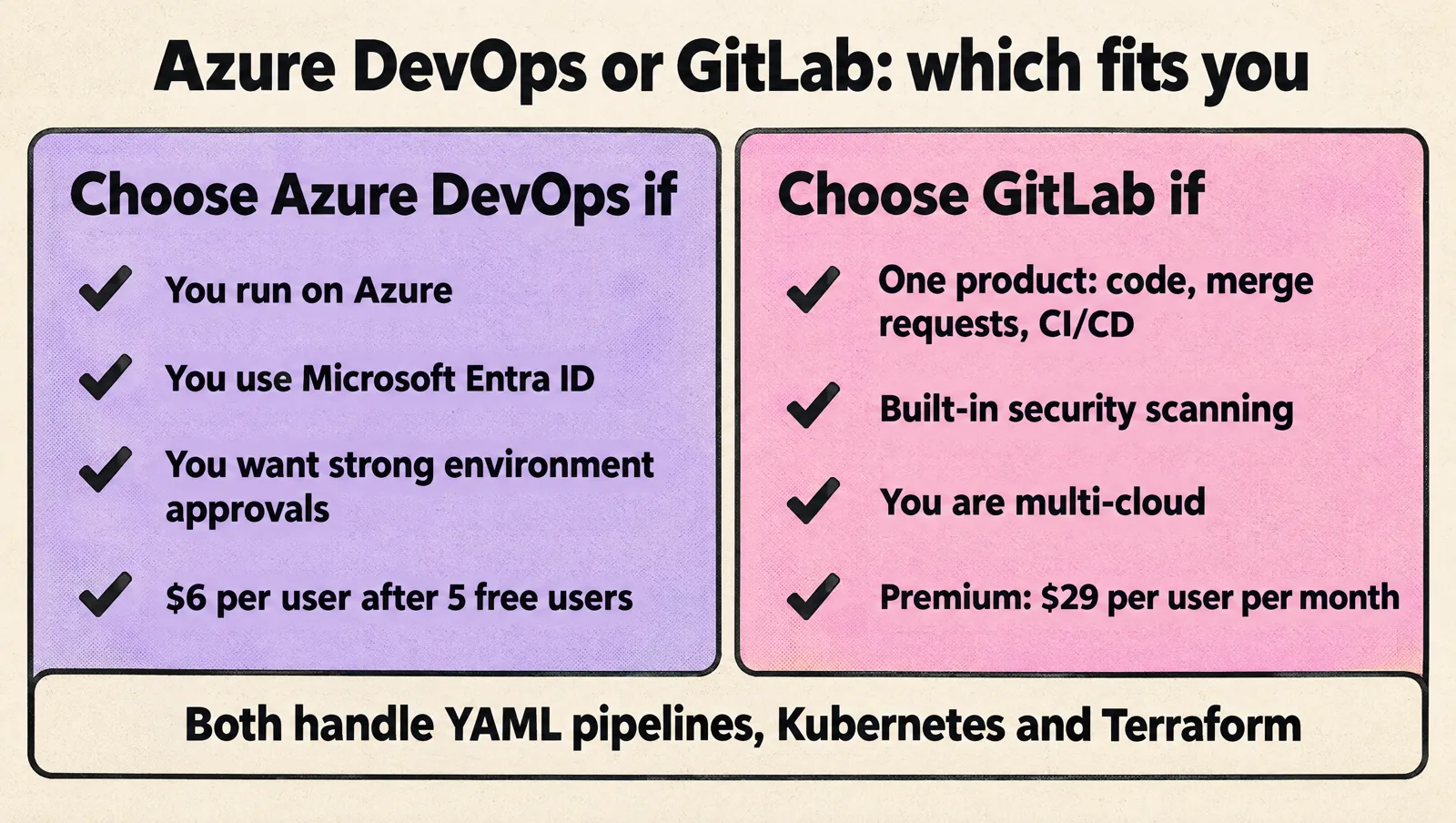
The decision matters more at thirty engineers than at three: runners need to be predictable, permissions understandable, deployments auditable, and pipelines must survive several teams changing services at once. Below are the feature and price comparisons, then the operating questions that should actually decide it.
Azure DevOps vs GitLab: feature comparison
| Azure DevOps | GitLab | |
|---|---|---|
| Product shape | Separate services: Boards, Repos, Pipelines, Test Plans, Artifacts | One application: repos, merge requests, issues, CI/CD, registry, security |
| Pipeline config | azure-pipelines.yml, stages, jobs, templates and template expressions | .gitlab-ci.yml, stages, include, CI/CD components |
| Runners | Microsoft-hosted or self-hosted agents (plus Managed DevOps Pools) | GitLab-hosted or self-managed runners |
| Deployment controls | Environments with approvals, branch control, business hours and other checks | Environments, protected environments, deployment approvals (Premium) |
| Cloud authentication | Service connections with workload identity federation for Azure | OIDC ID tokens to AWS, Azure and GCP |
| Security scanning | Through extensions or GitHub Advanced Security for Azure DevOps (paid add-on) | SAST, dependency and container scanning built in; most advanced features in Ultimate |
| Self-hosting | Azure DevOps Server | GitLab Self-Managed |
| Best fit | Azure and Microsoft-centric teams | Teams wanting one tool, or multi-cloud |
Pricing per seat (October 2026)
| Azure DevOps | GitLab | |
|---|---|---|
| Free tier | First 5 Basic users free; 1 Microsoft-hosted parallel job (1,800 minutes per month) and 1 self-hosted job | Free: up to 5 users per top-level group, 400 compute minutes per month, 10 GiB storage |
| Paid seat | Basic: $6 per user per month; Basic + Test Plans: $52 | Premium: $29 per user per month, billed annually, 10,000 compute minutes; Ultimate: custom pricing |
| More CI capacity | $40 per month per extra Microsoft-hosted parallel job, $15 per self-hosted job | $10 per 1,000 extra compute minutes; self-managed runners use your own compute |
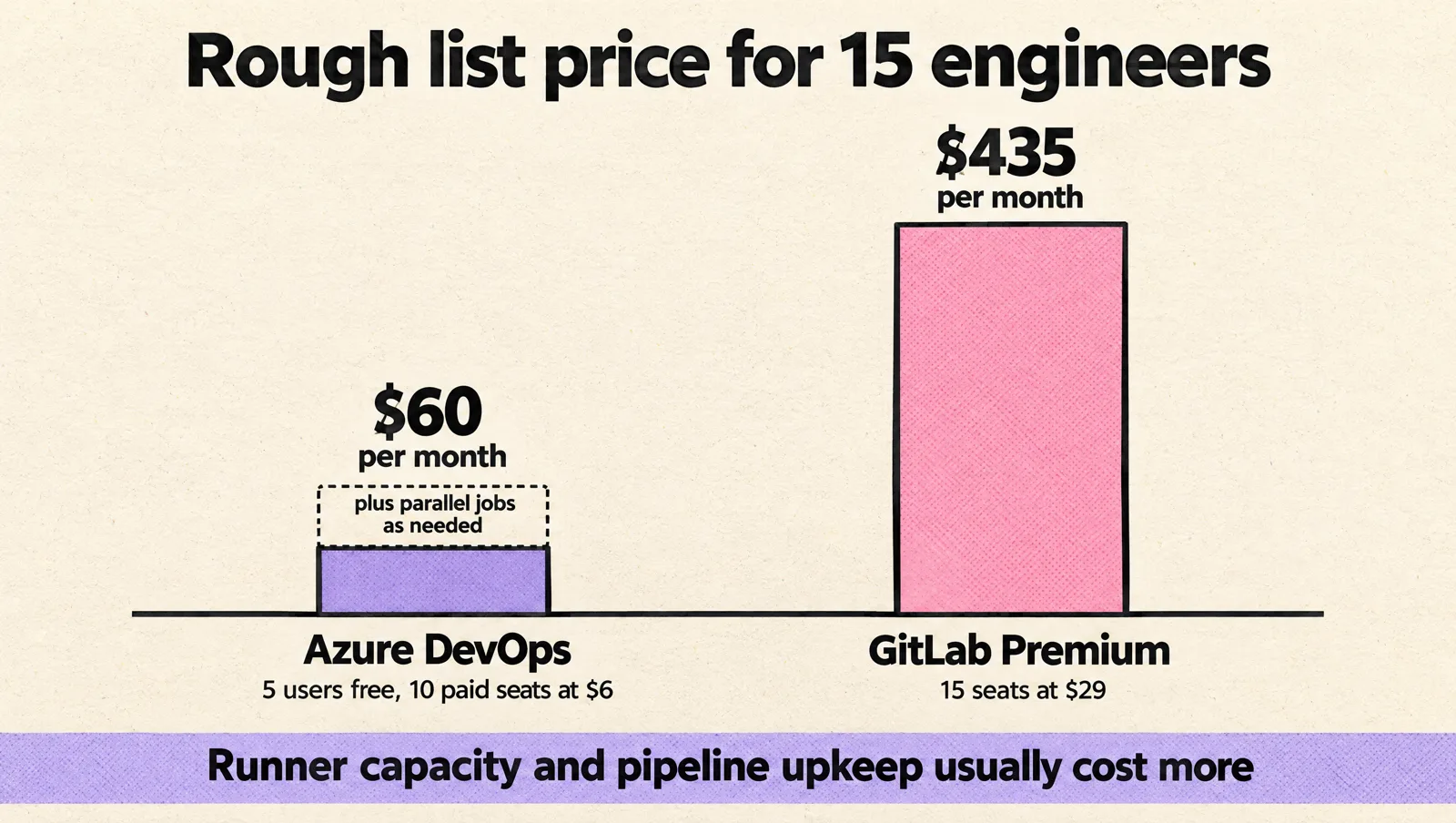
| 15 engineers, rough list price | 10 paid seats = $60 per month, plus parallel jobs as needed | 15 Premium seats = $435 per month |
Sources: Azure DevOps pricing and GitLab pricing. Seat price is rarely the deciding factor; runner capacity and the engineering time to maintain pipelines usually cost more.
Start with the operating model, not the feature list
Feature tables help you spot obvious gaps, but they rarely settle the decision. The better question is operational: which platform fits the way your engineers actually change code, review risk, promote releases, and recover when a deployment goes wrong?
Before comparing Azure DevOps and GitLab, answer these questions:
- Where does your code live today? Moving Git history is easy. Branch protection, review rules, CODEOWNERS, CI/CD variables, secrets, cloud authentication, environment approvals, webhooks and registries are what make a platform migration expensive. If you already ship reliably on one platform, the other has to earn the move with a concrete operational win.
- Who owns pipelines? If every product team owns its own YAML, you need strong templates and guardrails. If a platform team owns CI/CD, you need clear request flows and reusable patterns.
- How often do you deploy? Daily production deployments create different pressure than weekly releases with manual approval windows.
- How do you handle cloud access? Service connections, workload identities, secrets, and approval gates matter more as more engineers touch production.
- What audit trail do you need? Regulated customers, enterprise sales, and internal security reviews can all change the answer.
Azure DevOps often fits naturally when a company already uses Microsoft tooling, Azure cloud services, Microsoft Entra ID (formerly Azure Active Directory), and related enterprise controls. GitLab often fits teams that want source control, merge requests, CI/CD, package handling, and security workflows in one product surface. Those are useful starting points, but they should not replace a review of how your team actually ships software.
Pipeline maintainability and YAML ergonomics
Most CI/CD problems start small. A team adds a build step. Then a test job. Then a deployment job. Then a second environment. Six months later, every service has a slightly different YAML file, nobody knows which variables are still used, and changing a shared deployment step breaks five applications.
Both Azure DevOps and GitLab support YAML-based pipelines. Both can run common CI/CD workflows such as build, test, scan, package, deploy, and rollback tasks. The difference for startups is less about whether YAML exists and more about whether the team can keep it readable and reusable.
What to check in Azure DevOps
- Templates: Azure Pipelines supports reusable YAML templates. This helps if you want a central platform pattern for build and deployment stages.
- Service connections: Azure DevOps has a clear model for connecting pipelines to Azure and other external services, but teams need to manage ownership carefully.
- Project structure: Azure DevOps can work well when you organize products, repositories, pipelines, and permissions with a clear naming and ownership model.
If your startup already runs most workloads on Azure, Azure DevOps may be the lower-friction choice. Still, treat the setup as an operating model decision, not a default. Before you standardize on projects, repos, pipelines, and approvals, review the practical Azure DevOps implementation considerations that will be painful to change once several teams depend on them.
What to check in GitLab
- Included configurations: GitLab CI/CD supports reusable includes and shared pipeline definitions, which can reduce copy-paste across services.
- Repository proximity: CI/CD lives close to merge requests, branches, and project settings, which can make daily developer flow simpler.
- Group-level patterns: GitLab groups can help organize projects, variables, access, and shared CI/CD logic as more teams appear.
GitLab can be appealing when engineers want one place for code review and pipeline behavior. The risk is that teams may still create local variations unless someone sets standards early.
Failure modes to avoid
- Every repository has its own deployment logic.
- Pipeline secrets are copied into project variables without a review process.
- Build jobs and deployment jobs share too much state.
- Production approvals depend on one senior engineer being online.
- YAML templates become so abstract that product engineers cannot debug failed jobs.
Maintainability should be a primary decision factor. A simple pipeline that every engineer understands usually beats a clever setup that only one person can repair.
Runner availability and deployment reliability
Runner availability becomes a real issue when a startup moves from a few engineers to several product teams. At small scale, waiting a few minutes for a runner may be annoying. At larger scale, it blocks releases, slows pull requests, and encourages engineers to bypass tests.
Azure DevOps uses agents to run pipeline jobs. GitLab uses runners. In both cases, you can use managed options or run your own infrastructure. The operational question is the same: who keeps the execution layer healthy?
When comparing runner or agent models, look at:
- Peak load: What happens when five teams merge code on the same afternoon?
- Isolation: Do you need separate runners for production deployments, untrusted branches, or security-sensitive workloads?
- Network access: Can runners reach private Kubernetes clusters, internal package registries, databases, or Terraform backends?
- Cost control: Are long-running test suites consuming shared capacity without limits?
- Ownership: Who upgrades runner images, rotates credentials, and investigates stuck jobs?
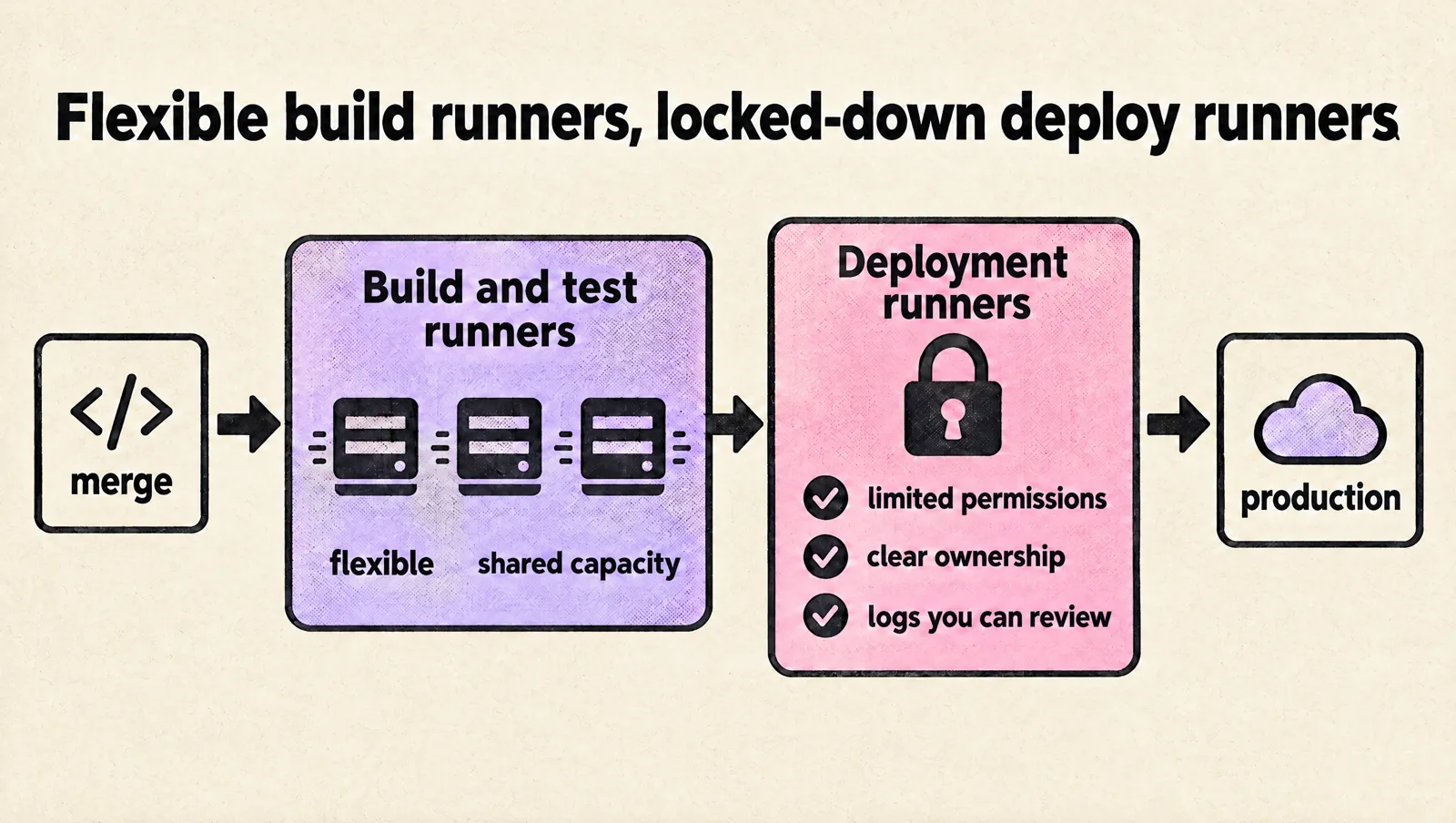
Managed runners or agents reduce operational work, but they may not fit every network or compliance requirement. Self-hosted runners give you more control, but they add maintenance. Startups often underestimate that maintenance until image updates, disk pressure, certificate problems, or cloud permissions break deployments.
A practical model is to keep build and test runners flexible, then treat deployment runners with stricter access rules. Production deployment infrastructure should have limited permissions, clear ownership, and logs that your team can review later.
Kubernetes and Terraform should shape the decision
If your startup deploys to Kubernetes, the CI/CD platform must support more than a basic “run kubectl” step. You need a deployment pattern that engineers can repeat safely across services and environments.
Both Azure DevOps and GitLab can run common Kubernetes deployment tools such as Helm, Kustomize, kubectl, and GitOps controllers. The better fit depends on how your team wants to separate application delivery from cluster operations.
Common Kubernetes patterns
- Pipeline-driven deployments: The CI/CD job builds an image, updates manifests or Helm values, and applies changes to the cluster.
- GitOps deployments: The pipeline updates a Git repository, and a controller inside the cluster applies the desired state.
- Environment promotion: The same artifact moves through development, staging, and production with approvals and controlled configuration changes.
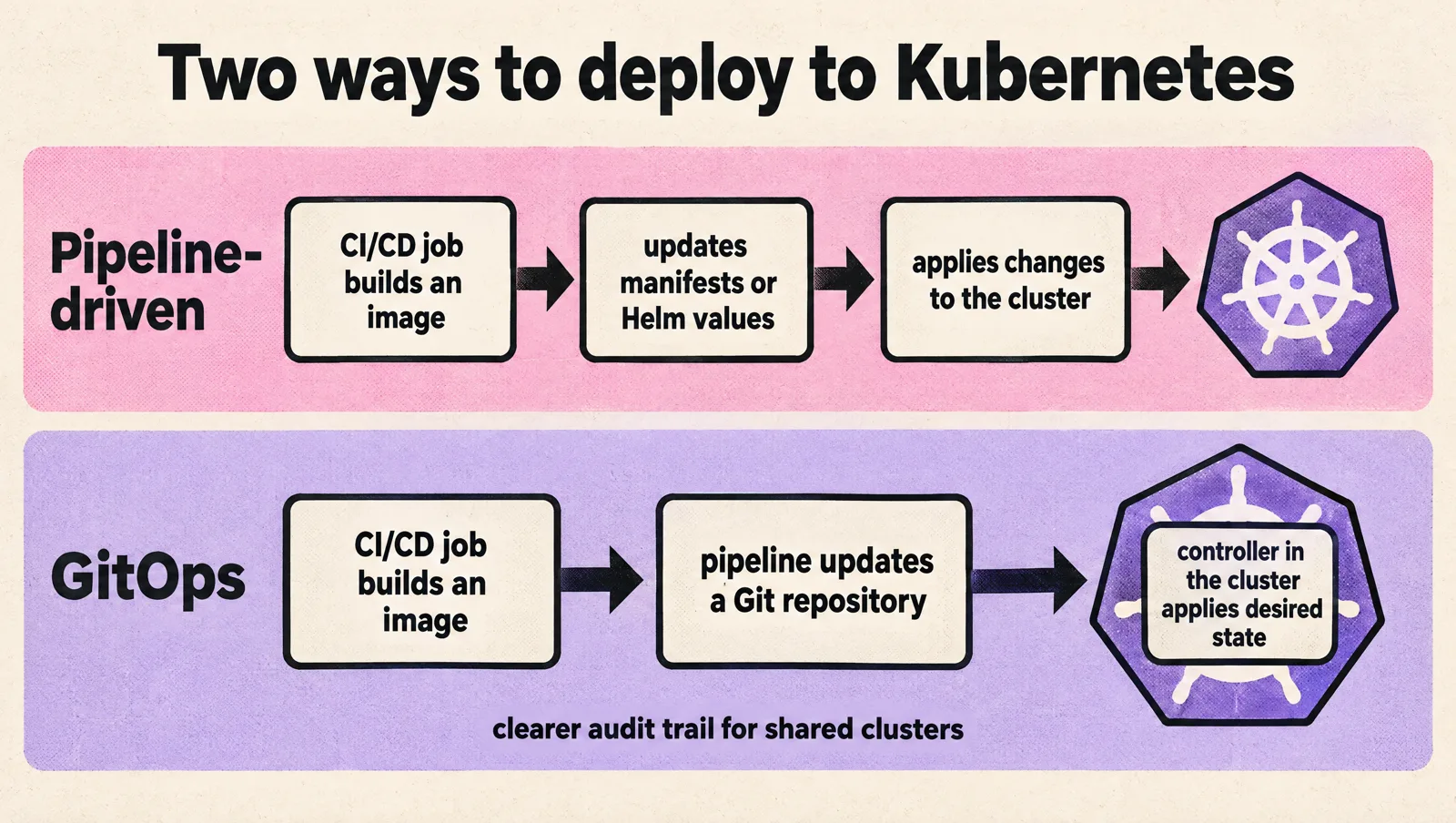
Pipeline-driven deployment can be simple at the start. GitOps can become attractive when several teams deploy to shared clusters and you need a clearer audit trail of what changed. The CI/CD platform should support the pattern your team can operate, not the one that sounds best in a diagram.
Kubernetes also creates lifecycle work outside normal application deployments. Cluster upgrades, ingress changes, policy updates, and node image changes can all affect delivery. If this is part of your roadmap, review your Kubernetes upgrade process before choosing a CI/CD model that assumes clusters stay static.
Terraform compatibility
For infrastructure as code, Terraform compatibility is rarely about whether the platform can run the CLI. Both Azure DevOps and GitLab can execute Terraform commands. The harder questions are about workflow and control:
- Where does Terraform state live?
- Who can run plan and who can run apply?
- Are production applies protected by approvals?
- Can teams see what infrastructure change was connected to which merge request or work item?
- Do you have separate credentials for development, staging, and production?
Startups should avoid mixing application deployment permissions with infrastructure administration permissions. A pipeline that can deploy a service does not always need the ability to change virtual networks, identity policies, or cluster-level resources.
Access control and audit requirements
Access control is easy to under-design when everyone knows each other and production changes happen in a shared chat thread. It gets harder when contractors join, customer compliance questions become real, product teams split ownership, and on-call engineers need enough access to fix incidents without having broad standing permissions everywhere.
Both platforms offer permission models, protected branches, environment controls, approvals, and audit-related features. The important work is mapping those features to your internal rules.
At minimum, define:
- Who can merge to main branches.
- Who can modify pipeline definitions.
- Who can change CI/CD variables and secrets.
- Who can deploy to staging and production.
- Who can approve infrastructure changes.
- Who reviews access on a regular schedule.
This is where many startups create hidden risk. They protect the main branch but leave deployment variables editable by too many people. They require code review but allow a single engineer to change the production pipeline. They lock down the cloud console but give a shared CI/CD token permissions that would never pass review if assigned to a person.
If customers ask for proof of controls, you need more than good intentions. You need logs, clear permissions, and a repeatable review process. A structured DevOps maturity assessment can help identify gaps before a security questionnaire or enterprise procurement review exposes them.
How the choice changes as teams grow
The right CI/CD platform for a five-person startup may still work at fifty engineers, but only if you add structure before the tool becomes a bottleneck.
At a few engineers
At this stage, the team usually optimizes for speed and low ceremony. One or two engineers may understand the full deployment path, and that can be fine for a while. Pipelines are often simple, manual approvals may be informal, and the biggest risk is not tool choice; it is knowledge living in someone’s head instead of in a repeatable release process.
At this stage, your biggest risk is creating habits that do not scale:
- Production deployments from local machines.
- Shared administrator credentials.
- Unreviewed pipeline edits.
- Infrastructure changes mixed into application pull requests without clear ownership.
At multiple product teams, consistency matters more than individual preference
The pressure changes. Teams need consistent templates, clear approval rules, predictable runner capacity, and ownership boundaries. The platform team, if one exists, should provide paved paths rather than approve every small change manually.
At this stage, ask whether Azure DevOps or GitLab better supports your team’s daily habits:
- If your organization already works in Microsoft identity, Azure subscriptions, and Azure-native services, Azure DevOps may reduce friction.
- If your engineers prefer a single product surface for repositories, merge requests, issues, CI/CD, and releases, GitLab may reduce tool switching.
- If you expect strict audit demands, compare permission review, logging, approval, and environment control workflows in detail.
- If you have limited DevOps capacity, choose the platform your team can keep simple and maintain well.
Do not assume you can clean everything up later. CI/CD becomes part of how teams work every day. Poor structure spreads through repositories, onboarding docs, release habits, and incident response.
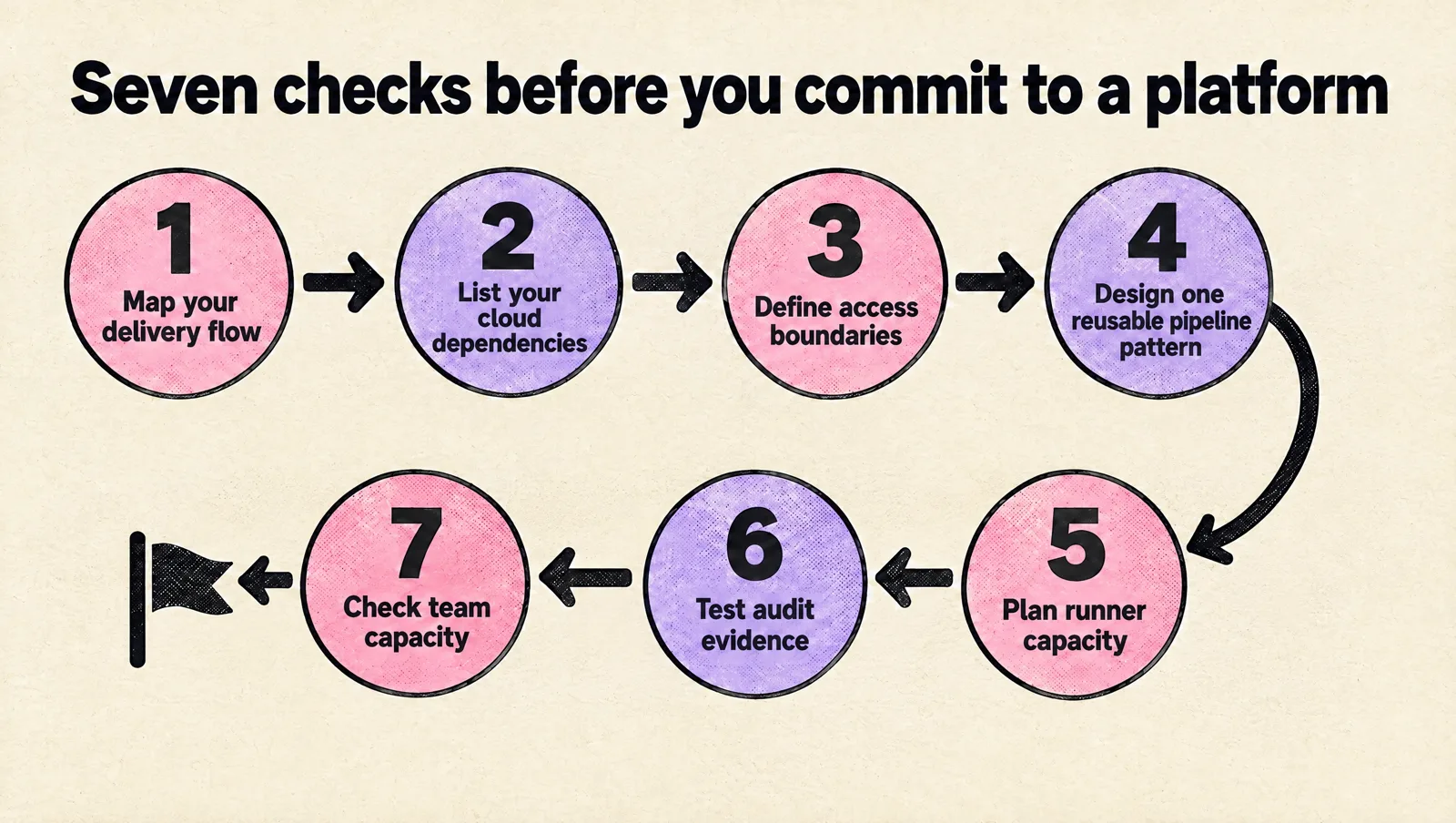
A practical decision checklist
Use this checklist before you commit to either platform or before you expand an existing setup:
- Map your current delivery flow. Include code review, tests, image builds, deployment approvals, rollback, and incident response.
- List your cloud dependencies. Note where you use Azure, other cloud providers, Kubernetes, container registries, secret stores, and Terraform backends.
- Define access boundaries. Separate code ownership, deployment rights, infrastructure rights, and secret management.
- Design one reusable pipeline pattern. Test it with two or three real services before rolling it out broadly.
- Plan runner capacity. Decide which jobs can use shared capacity and which need isolated, controlled runners.
- Test audit evidence. Confirm you can answer who changed what, who approved it, and when it reached production.
- Check team capacity. Be honest about who will maintain templates, runners, credentials, and deployment tooling.
If you are early and need help choosing a path, a short production DevOps setup review can be enough to identify the main risks before they become expensive migrations.
FAQ
Is GitLab better than Azure DevOps?
Neither is better in general. GitLab is stronger as a single integrated product with built-in security scanning. Azure DevOps is cheaper per seat, integrates tightly with Azure and Entra ID, and has mature environment approvals. Pick the one that matches where your code and cloud already are.
Can GitLab CI deploy to Azure?
Yes. GitLab CI can authenticate to Azure with OIDC ID tokens and a federated credential on an Entra ID app registration, so no client secret is stored in GitLab. From there you run the Azure CLI, Terraform, Helm or kubectl as usual.
Can Azure Pipelines build code hosted on GitLab?
Azure Pipelines has native integrations for Azure Repos, GitHub and Bitbucket Cloud. For GitLab you typically mirror the repository or use a generic Git connection, which limits triggers. If your code lives on GitLab, GitLab CI is usually the simpler choice.
Which is cheaper for a startup?
On list price, Azure DevOps: the first 5 users are free and extra users cost $6 per month, against $29 per user per month for GitLab Premium. GitLab Free covers up to 5 users with 400 compute minutes, which small teams outgrow quickly.
How hard is it to migrate from Azure DevOps to GitLab, or back?
Repositories move easily with their history. Pipelines must be rewritten, since the YAML formats differ, and you need to recreate variables, secrets, environments, approvals and cloud authentication. Plan it as a project with an inventory, not a weekend task.
Takeaway
Azure DevOps and GitLab can both support startup CI/CD well. The better choice depends on your cloud footprint, engineering workflow, compliance needs, and DevOps capacity.
Choose Azure DevOps if it fits your existing Azure and Microsoft operating model and your team is ready to manage projects, pipelines, service connections, and permissions cleanly. Choose GitLab if your team benefits from a unified workflow around repositories, merge requests, CI/CD, and group-level patterns.
Whichever platform you choose, keep the first implementation boring and maintainable. Standardize pipeline templates, protect production access, plan runner capacity, separate Terraform permissions, and make audit evidence easy to retrieve. The tool matters, but the operating model will decide whether your CI/CD setup stays healthy as your startup grows.