

ADO is Azure DevOps, Microsoft's software delivery suite: Boards for work tracking, Repos for Git, Pipelines for CI/CD, Test Plans and Artifacts for packages. For a startup, a good ADO setup is one project, branch policies on main, workload identity service connections split by environment, Key Vault for secrets, and one YAML pipeline that promotes the same build to production behind an approval.
ADO gets messy fast under delivery pressure: pipelines created in the UI, broad admin access granted to unblock a release, secrets in plain variables, and production deploys that depend on whoever remembers the clicks. This guide is the lightweight version that ships safely and stays easy to follow, plus the Azure foundations it depends on.
What ADO includes and what it costs
| Service | What it does | Startup tip |
|---|---|---|
| Azure Boards | Backlogs, sprints, work items | Optional. Many teams keep Linear or Jira and use only Repos and Pipelines. |
| Azure Repos | Private Git repositories with pull requests and branch policies | Pipelines also work with GitHub repos if your code already lives there. |
| Azure Pipelines | YAML CI/CD with stages, environments, approvals and checks | The part most startups adopt ADO for. See our Azure Pipelines YAML guide. |
| Azure Test Plans | Manual and exploratory test management | Rarely needed early; it is the expensive add-on. |
| Azure Artifacts | Package feeds (npm, NuGet, Maven, Python) | Useful for shared internal libraries. |
Pricing as of October 2026, from the Azure DevOps pricing page:
- Basic plan: first 5 users free, then $6 per user per month. Basic + Test Plans is $52 per user per month.
- Pipelines: 1 Microsoft-hosted parallel job with 1,800 minutes per month and 1 self-hosted parallel job with unlimited minutes are free. Extra parallel jobs cost $40 per month (Microsoft-hosted) or $15 per month (self-hosted).
- Artifacts: 2 GiB free, then from $2 per GiB.
A five-engineer team running one hosted pipeline at a time pays nothing. The first real cost is usually a second hosted parallel job, once builds start queuing.
Start with the operating model, not the pipeline YAML
Before you create projects, agents, service connections, and environments, define how work should flow from idea to production. Decide who can merge, who can approve production, which checks are mandatory, where secrets live, and what happens when a deployment fails. Most ADO problems come from unclear ownership and inconsistent paths to production, not from missing features.
For a small team, use a simple model:
- Developers own application code and application deployment health. They should be able to see pipeline logs, deployment history, and service metrics.
- Platform or infrastructure owners define shared deployment patterns. This may be one founding engineer at seed stage, or a small platform team later.
- Production changes require review and approval. Approval should be lightweight, but it should exist.
- Infrastructure changes use infrastructure as code. Avoid one-off portal changes that no one can reproduce.
- Rollback is part of the deployment design. Do not wait for the first incident to decide how to revert.
At an early stage, one ADO project is usually enough. Split by service only when you have a real ownership boundary, not because the UI looks cleaner. A common starting point is:
- One project for engineering. Example:
product-platform. - One repository per deployable service if services are owned and released separately.
- One repository for shared infrastructure if Terraform, Bicep, Helm charts, or shared modules need their own lifecycle.
- Shared pipeline templates when the second or third service repeats the same build and deploy steps.
If you are still deciding between Azure DevOps, GitHub Actions, GitLab CI, CircleCI, or another CI/CD platform, pause before you wire your entire release process into one vendor. Compare the things that will be hard to change later: identity model, secret handling, deployment approvals, cloud integrations, runner or agent management, auditability, and how easily developers can understand failed builds. This breakdown of how to choose the right DevOps tools for your team can help you avoid choosing a platform only because one engineer used it at a previous company.
Set up projects, repos, and permissions with least privilege
ADO permissions tend to drift when teams are moving quickly. A developer gets Project Administrator access to fix one release. A contractor keeps broad permissions after the engagement ends. A production service connection can be used by every pipeline in the project. These shortcuts work until they do not.
Start with a few clear groups:
- Project Administrators: very small group, ideally engineering leadership and platform owners.
- Contributors: engineers who can push branches, open pull requests, and view pipeline results.
- Release Approvers: people allowed to approve production deployments.
- Readers: people who need visibility but should not change code or pipelines.
- Service Accounts: identities used by automation, never shared by humans.
Use branch policies on your default branch. For most startups, the following is enough:
- Require at least one reviewer for pull requests.
- Require a successful build validation pipeline.
- Block direct pushes to
main. - Reset approvals when new changes are pushed.
- Require owners for sensitive paths, such as
/infra,/helm, or/pipelines.
Do not give broad admin access because a pipeline is failing. Fix the identity, permission, or service connection that the pipeline actually needs. This takes longer the first time, but it prevents a permissions model where every engineer can accidentally deploy or modify production infrastructure.
Create service connections and secret handling you can defend later
Service connections are one of the most important parts of an ADO setup. They decide what your pipelines can touch in Azure, Kubernetes, container registries, and other systems.
Use separate service connections for non-production and production. For example:
sc-azure-nonprod-deploysc-azure-prod-deploysc-acr-pushfor pushing container imagessc-aks-nonprodandsc-aks-prodif you deploy to Azure Kubernetes Service
Create Azure Resource Manager service connections with workload identity federation (OpenID Connect) rather than a service principal secret. The pipeline gets a short-lived token at run time, so there is no client secret to store, leak or rotate, and it is the default option in the service connection wizard today.
Restrict each service connection to the pipelines that need it. In ADO, avoid enabling access for all pipelines unless you are dealing with a low-risk sandbox. Production service connections should require explicit authorization.
For production service connections, use a clear naming convention, restrict which pipelines can use them, and avoid broad subscription-level access unless the pipeline truly needs it. A practical pattern is to create separate connections for non-production and production, grant production access only to approved release pipelines, and review those permissions whenever a new service or environment is added.

For secrets, avoid plain pipeline variables for anything sensitive. Use one of these patterns instead:
- Azure Key Vault linked variable groups for application secrets used at deploy time.
- Managed identities where supported, so workloads can access cloud resources without long-lived secrets.
- Secret variables only for limited cases, and never as the default secret strategy.
Common mistakes include storing production database passwords in YAML, copying secrets into variable groups without access review, and using the same credentials for non-production and production. These choices usually happen because the first deploy needed to work quickly. Clean them up before more services depend on the pattern.
A simple secret rule works well: developers can deploy without seeing production secrets. They can trigger the deployment, review logs with sensitive values masked, and debug through application telemetry and configuration history.
Build a minimal CI/CD pipeline that promotes the same artifact
A startup pipeline should be boring. Build once, test once, publish an artifact or container image, deploy that same version to non-production, then promote it to production with approval.
Avoid separate production builds. If production uses a different build than staging, you are no longer promoting what you tested. You are hoping the second build behaves the same way.
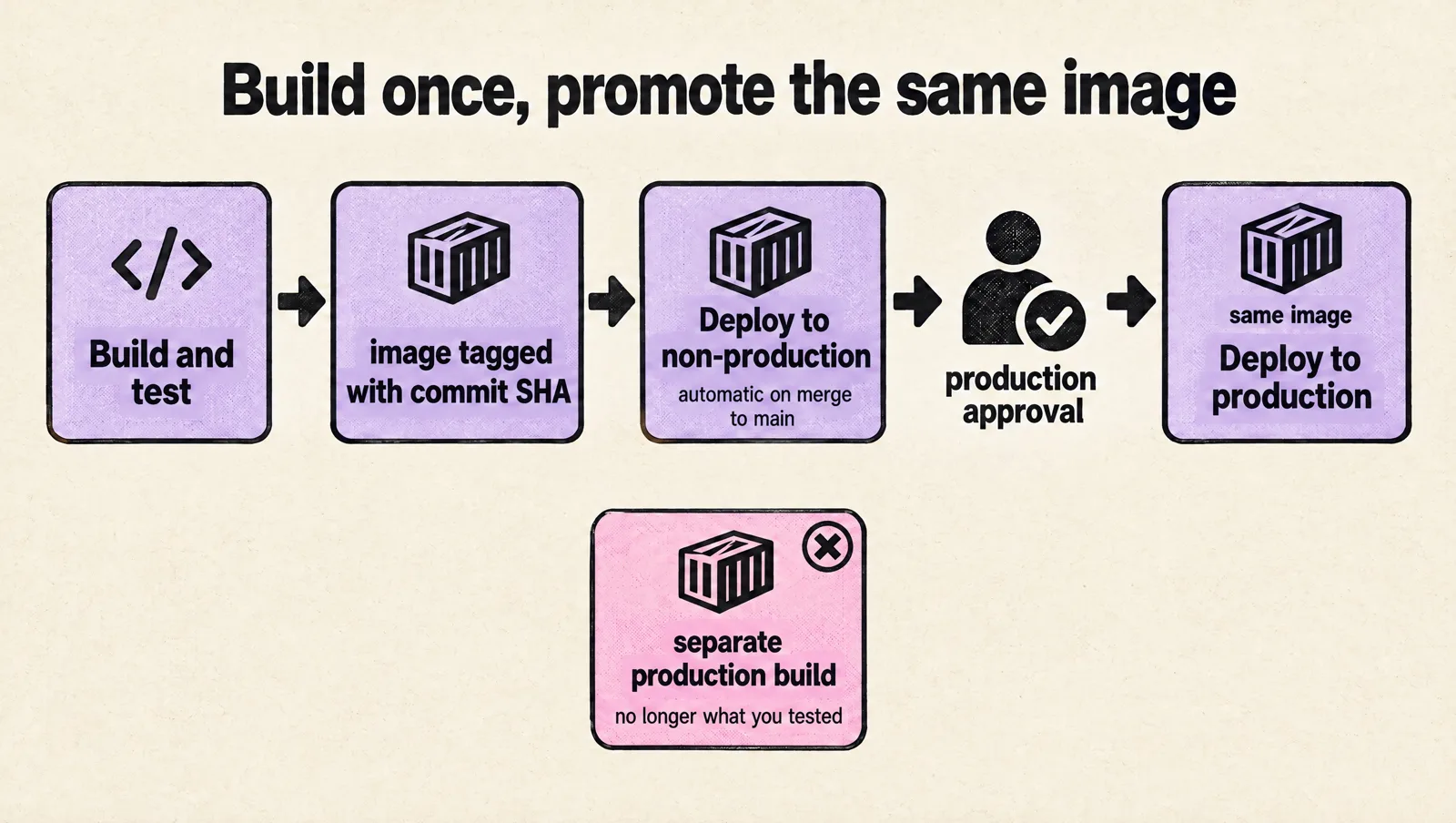
Here is a minimal Azure Pipelines YAML example for a containerized service. It builds on pull requests and main, pushes an image, deploys to a non-production environment, then waits for production approval through an ADO Environment check.
trigger:
  branches:
    include:
      - main

pr:
  branches:
    include:
      - main

variables:
  imageName: my-api
  dockerfilePath: Dockerfile
  containerRegistry: myregistry.azurecr.io

stages:
  - stage: CI
    displayName: Build and test
    jobs:
      - job: build_test
        displayName: Build and test
        pool:
          vmImage: ubuntu-latest
        steps:
          - checkout: self

          - script: |
              npm ci
              npm test
            displayName: Run tests

          - task: Docker@2
            displayName: Build and push image
            inputs:
              command: buildAndPush
              repository: $(imageName)
              dockerfile: $(dockerfilePath)
              containerRegistry: sc-acr-push
              tags: |
                $(Build.SourceVersion)

  - stage: Deploy_NonProd
    displayName: Deploy to non-production
    dependsOn: CI
    condition: and(succeeded(), eq(variables['Build.SourceBranch'], 'refs/heads/main'))
    jobs:
      - deployment: deploy_nonprod
        displayName: Deploy non-production
        environment: nonprod
        strategy:
          runOnce:
            deploy:
              steps:
                - script: |
                    echo "Deploy $(containerRegistry)/$(imageName):$(Build.SourceVersion) to nonprod"
                    # Replace with Helm, kubectl, Azure Web App, or your deploy command
                  displayName: Deploy application

  - stage: Deploy_Prod
    displayName: Deploy to production
    dependsOn: Deploy_NonProd
    condition: succeeded()
    jobs:
      - deployment: deploy_prod
        displayName: Deploy production
        environment: production
        strategy:
          runOnce:
            deploy:
              steps:
                - script: |
                    echo "Deploy $(containerRegistry)/$(imageName):$(Build.SourceVersion) to production"
                    # Replace with the same deployment mechanism used in nonprod
                  displayName: Deploy application
This example is intentionally small. In a real service, you may add linting, security scanning, database migration checks, smoke tests, and deployment templates. Add those when they reduce real risk. Do not create a 900-line pipeline on day one because a larger company had one.
If you deploy to Kubernetes, keep cluster lifecycle work separate from application delivery. Application pipelines should build images, run checks, and deploy workloads. Infrastructure pipelines should handle cluster upgrades, node pool changes, ingress controller updates, and other platform-level changes with their own review path. Mixing these concerns is how a routine application release turns into an accidental platform change. If Kubernetes is part of your stack, these practical tips for Kubernetes upgrades for startups are useful when you start formalizing cluster operations.
Use environments, approvals, and checks without creating release theater
ADO Environments give you deployment history, approvals, and checks. Use them for actual runtime targets, such as nonprod, staging, and production.
For non-production, keep the process fast. A successful merge to main should deploy automatically unless your team has a strong reason to pause. Developers need rapid feedback before production.
For production, add a simple approval check:
- Require one approver from the Release Approvers group.
- Prevent the person who triggered the run from approving when your team size allows it.
- Add business-hour restrictions only if your team can support them without blocking urgent fixes.
- Keep approval comments short and useful, such as the ticket number, risk note, or rollback plan.
Do not treat approvals as a replacement for tests, review, and observability. If every production deploy needs three people in a meeting, your process is too heavy. If anyone can deploy to production from any branch, your process is too loose. The middle ground is a tested build, a visible deployment record, and a production approval by someone accountable.

Also decide what happens when a deployment fails. At minimum, each service should have:
- A rollback command or documented procedure. Example: redeploy the previous container image tag.
- A migration policy. Database changes should be backward compatible when possible.
- A smoke test. Confirm the service starts and responds after deployment.
- A clear owner. The person or team that responds when the deployment breaks.
A rollback plan does not need to be complex. For many services, the first version can be: find the last successful production deployment in ADO, redeploy that image tag, and verify the health endpoint. Write it down in the repository so the person on call is not guessing at 2 a.m.
Make failures easy to trace
A pipeline that fails with no useful signal wastes engineering time. A deployment that succeeds while the service is broken is worse. Your ADO setup should make it easy to answer four questions:
- What commit is running in each environment?
- Who approved the production deployment?
- What changed in configuration or infrastructure?
- Where do logs, metrics, traces, and alerts live?
Use consistent versioning. For container images, tag with the commit SHA, such as $(Build.SourceVersion). You can also add a shorter human-readable tag, but the commit SHA should be enough to map production back to source.
Add deployment annotations where your observability tooling supports them. If an incident starts five minutes after a deployment, the on-call engineer should see the deployment event near the error spike, latency change, or restart count.
Keep logs and metrics linked from the service README or runbook. A practical service README includes:
- Pipeline link
- Non-production and production environment names
- Dashboard links
- Log query examples
- Rollback steps
- Known deployment risks
Alerting also needs restraint. If every failed non-production deployment pages the team, people will ignore alerts. Page on production user impact, failed production deployment requiring action, or capacity issues that need fast response. Send lower-priority signals to Slack, Teams, or the work tracker. If your team already gets too many noisy alerts, this guide on how to handle alert fatigue can help you clean up the signal before adding more checks.
Set up the Azure side before your first production deploy
ADO only deploys into what exists in Azure. A few foundation decisions there save a painful cleanup later.
Subscriptions, resource groups and tags
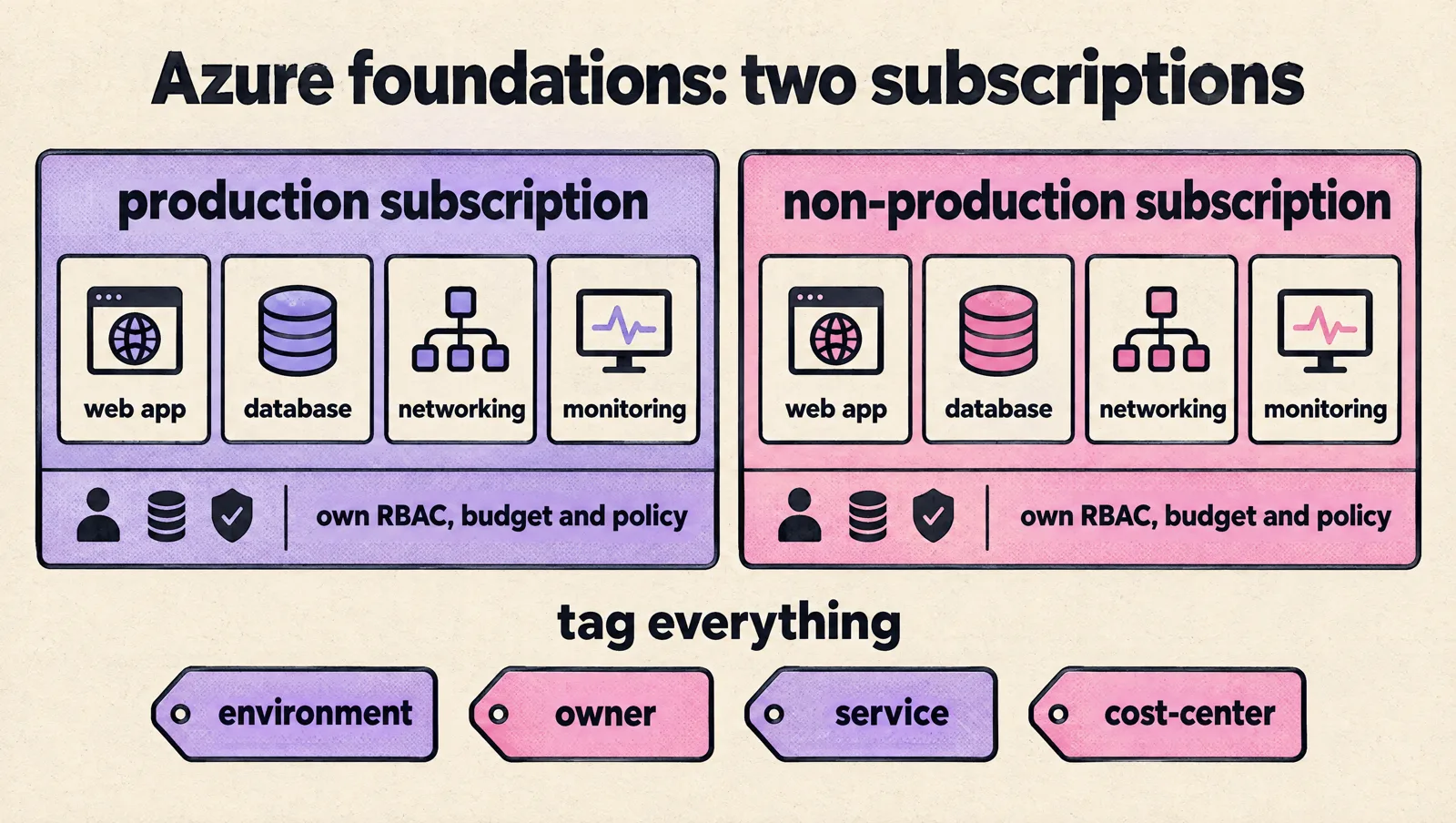
- Use one production subscription and one non-production subscription. Separate subscriptions give you clean RBAC scopes, budgets and policy boundaries; a single shared subscription turns cost allocation and access reviews into archaeology.
- Inside each, create resource groups per service or component (for example web app, database, networking, monitoring) rather than one default group.
- Tag everything with a short, enforced set:
environment,owner,service,cost-center.
Access and budgets
- Keep Owner to two or three people. Grant engineers Contributor or narrower roles through Entra ID groups, scoped to resource groups, never to individuals.
- Prefer managed identities over stored credentials for workloads.
- Create Cost Management budgets with alerts on both subscriptions before spend grows, and review access, budgets and untagged or manually created resources monthly.
- Use the portal for inspection and incidents; make durable changes through Terraform or Bicep in a pipeline.
Pick the simplest compute that fits
| Service | Good fit | Watch out for |
|---|---|---|
| Azure App Service | Web apps and APIs, deployment slots for zero-downtime swaps | Less control over networking and runtime than containers |
| Azure Container Apps | Containerized services and workers without running a cluster | Fewer knobs than Kubernetes for unusual workloads |
| Azure Functions | Event-driven and scheduled jobs | Execution model and cold starts |
| AKS | Many services, platform team capacity, advanced networking | Cluster upgrades, node pools, ingress and policy are now your job |
Do not start with AKS because you might need it later. If you are deciding whether Azure is the right cloud at all, the honest test is not "can Azure run our product?" (it can) but "can our team operate the Azure setup we are about to create?"
Avoid the setup mistakes that slow startups later
Most ADO setups fail in predictable ways. You can avoid many of them with a few early decisions.
- Do not overbuild process too early. A five-person team does not need the same release board as a 500-person company. Start with pull request checks, non-production deploys, production approvals, and rollback documentation.
- Do not give everyone admin access. Use groups, service connections, and scoped permissions. Review access when people change roles or leave.
- Do not store secrets casually. Use Key Vault or an equivalent secret manager. Keep production secrets out of YAML and plain variables.
- Do not mix app and infrastructure ownership without rules. Application engineers can own service deploys. Infrastructure changes should use reviewed infrastructure as code.
- Do not skip rollback planning. Every production service needs a known path back to the last good version.
- Do not create one-off pipelines for every service. Once two services need the same pattern, create a shared template or documented standard.
As the team grows, make platform ownership explicit. At first, this may be a rotating responsibility shared by senior engineers. Later, it may become a named owner for CI/CD, cloud foundations, observability, and incident tooling. Eventually, it may justify a small platform or DevOps function. The right shape depends on team size, incident load, deployment frequency, and how much product engineering time is being lost to infrastructure friction. If you are at that point, this guide on how to build a DevOps team can help you choose a structure without hiring too early or too late.
FAQ
What is ADO software?
ADO stands for Azure DevOps, Microsoft's suite for planning (Boards), source control (Repos), CI/CD (Pipelines), testing (Test Plans) and package management (Artifacts). It runs as a hosted service, Azure DevOps Services, or on your own servers as Azure DevOps Server.
Is Azure DevOps free for startups?
For small teams, mostly yes. The first 5 users on the Basic plan are free, and you get one Microsoft-hosted parallel job with 1,800 minutes a month plus one self-hosted job with unlimited minutes. Costs start with a sixth user ($6 per month) or extra parallel jobs.
Should we use Azure DevOps or GitHub?
If your code is already on GitHub and you deploy to Azure, GitHub Actions is usually simpler. Azure DevOps fits when you want Boards, Repos and Pipelines in one place, need its environment approvals and checks, or your company already standardizes on it. Our Azure DevOps vs GitLab comparison covers the GitLab side.
How should pipelines authenticate to Azure?
Use an Azure Resource Manager service connection with workload identity federation, one per environment, restricted to the pipelines that need it. Avoid service principal secrets and never share a production connection with every pipeline in the project.
Where should secrets live in Azure DevOps?
In Azure Key Vault, linked to a variable group or read at run time, with access granted per environment. Plain pipeline variables and YAML are not secret stores, and engineers should be able to deploy without seeing production secrets.
Takeaway
A solid ADO setup for a startup should be simple, repeatable, and hard to misuse. Developers should merge code, see CI results, deploy to non-production, promote the same artifact to production with approval, and trace failures without hunting through private notes or tribal knowledge.
Start with one clean path for one service. Add branch policies, scoped service connections, secret management, environments, approvals, rollback steps, and basic observability links. Then turn that path into a reusable pattern before every team invents its own.
If your current ADO setup already has brittle pipelines, unclear permissions, shared production credentials, or deployments that depend on one person, fix those risks before the next scaling push. The goal is not to redesign everything at once; it is to remove the failure modes that will hurt most when release volume increases. You can also get a second set of eyes through a DevOps setup for production consultation if you want help pressure-testing the path before more services depend on it.