

A good Terraform project structure keeps reusable modules separate from the root modules that deploy them, gives every environment and major component its own state file, and pins provider and module versions. Start with one directory per environment, split state by blast radius as you grow, and add Terragrunt only when duplication actually hurts.
Most guides stop at "put variables in variables.tf". That is the easy part. The decisions that matter are how you split state, how environments differ without copy-paste drift, how changes are reviewed and applied, and when to change the layout as the team grows. This guide covers all of them with three reference layouts you can copy, sized for teams of roughly 1 to 5, 5 to 20, and 20 to 50 engineers.
Terraform project structure basics: files and modules
Inside any single Terraform directory, follow HashiCorp's Terraform style guide file names. They are boring on purpose: anyone opening the directory knows where to look.
| File | What goes in it |
|---|---|
terraform.tf | The terraform block with required_version and required_providers |
providers.tf | All provider blocks and their configuration |
backend.tf | The backend configuration (where state lives) |
main.tf | Resource and data source blocks (split into topic files such as network.tf or iam.tf when it gets long) |
variables.tf | Variable blocks, in alphabetical order |
outputs.tf | Output blocks, in alphabetical order |
locals.tf | Local values |
.terraform.lock.hcl | Provider dependency lock file; commit it |
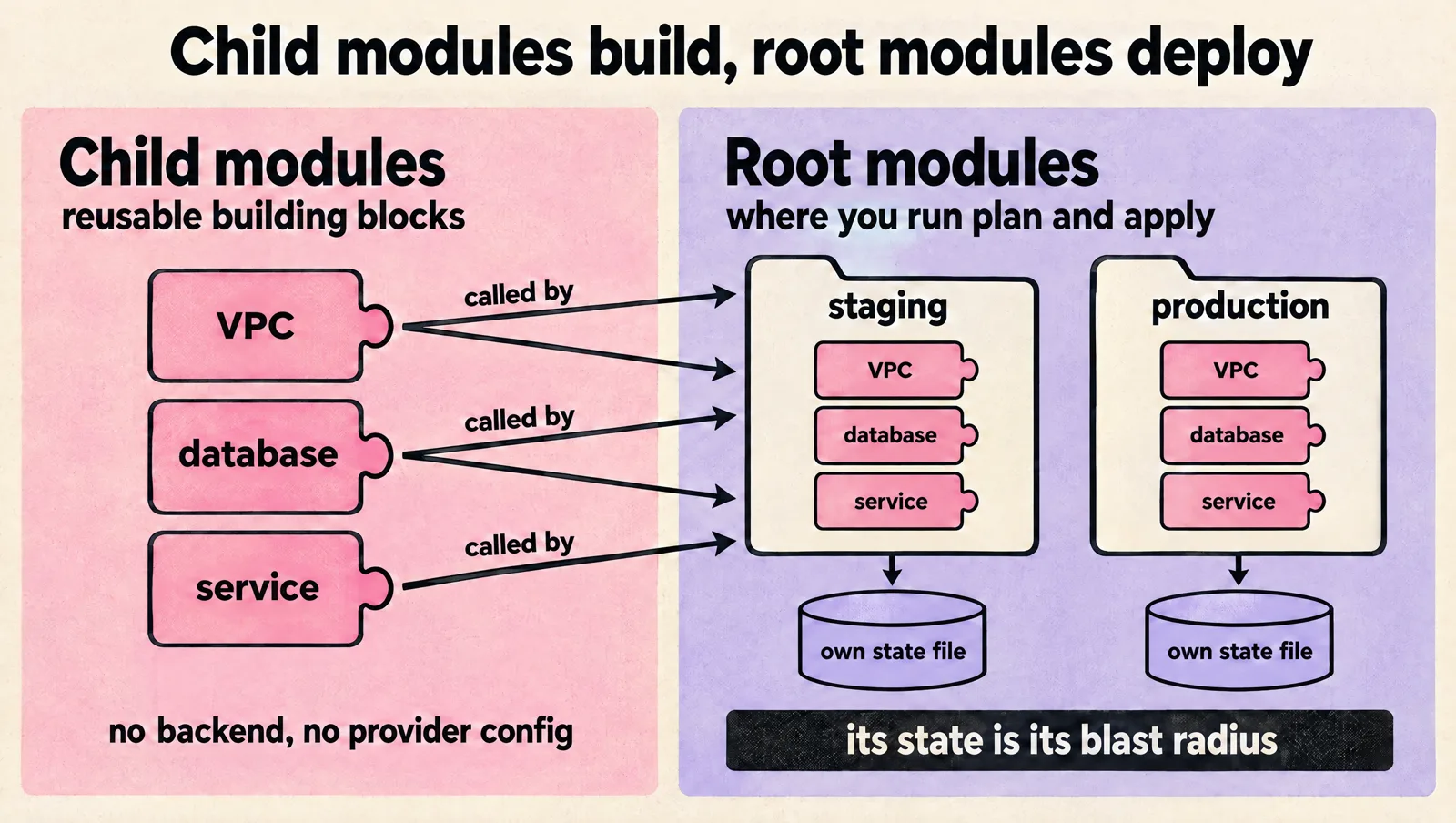
The more important distinction is between two kinds of directories:
- Child modules are reusable building blocks (a VPC, a database, a service). They take variables, create resources and return outputs. They have no backend and no provider configuration of their own.
- Root modules are the directories you actually run
terraform planandapplyin. Each root module has its own backend and therefore its own state file. A root module is a unit of deployment, and its state is its blast radius.
Everything else in this guide follows from that: your directory layout is really a decision about how many root modules you have and what each one owns.
Three Terraform project layouts compared
| Layout | Best for | State split | Main risk |
|---|---|---|---|
| 1. Directory per environment | 1 to 5 engineers, one cloud account per environment | One state per environment | Every plan touches everything in that environment |
| 2. Modules plus live, split by component | 5 to 20 engineers, several services and accounts | One state per environment per component | Copy-paste of backend and provider config across directories |
| 3. Terragrunt hierarchy | 20 to 50 engineers, many accounts and regions | One state per unit, generated backends | An extra tool and more indirection to learn |
Layout 1: one directory per environment
This is the layout HashiCorp recommends when you are not using HCP Terraform workspaces: each environment gets its own directory and state, and shared code lives in local modules.
infra/
  modules/
    network/
      main.tf
      variables.tf
      outputs.tf
    service/
      main.tf
      variables.tf
      outputs.tf
  environments/
    staging/
      backend.tf
      providers.tf
      terraform.tf
      main.tf          # calls ../../modules/network and ../../modules/service
      terraform.tfvars
    production/
      backend.tf
      providers.tf
      terraform.tf
      main.tf
      terraform.tfvars
It is easy to read, easy to review, and each environment can only break itself. The cost shows up as the environment grows: a single production state with a few hundred resources means slow plans, lock contention when two people need to change unrelated things, and a scary diff every time.
Layout 2: modules plus live, split by component
When plans get slow or different people own different parts of the infrastructure, split each environment into components with their own state. The common split is by layer, ordered by how often things change.
infra/
  modules/                 # versioned building blocks
    vpc/
    eks-cluster/
    rds-postgres/
    service/
  live/
    staging/
      network/             # VPC, subnets, NAT, DNS zones
      data/                # databases, caches, buckets
      cluster/             # Kubernetes cluster and add-ons
      services/
        api/
        worker/
    production/
      network/
      data/
      cluster/
      services/
        api/
        worker/
  global/
    iam/                   # org-wide roles, SSO, CI identities
    dns/                   # registrar-level and shared zones
Each leaf directory is a root module with its own backend key, such as production/data/terraform.tfstate. Changing a service no longer locks or plans the network. Losing or corrupting one state file affects one component. Ownership maps cleanly to CODEOWNERS rules on directories.
Layout 3: Terragrunt with an account, region and environment hierarchy
With many accounts and regions, layout 2 turns into dozens of nearly identical backend.tf and providers.tf files. Terragrunt removes that duplication by generating them from a hierarchy of configuration files.
live/
  root.hcl                  # remote state and provider generation, shared by all units
  prod-account/
    account.hcl             # account id, account name
    eu-west-1/
      region.hcl
      production/
        env.hcl
        network/terragrunt.hcl
        data/terragrunt.hcl
        cluster/terragrunt.hcl
  staging-account/
    account.hcl
    eu-west-1/
      region.hcl
      staging/
        env.hcl
        network/terragrunt.hcl
        data/terragrunt.hcl
        cluster/terragrunt.hcl
A unit's terragrunt.hcl points at a versioned module and supplies only its inputs and dependencies. Terragrunt can also run many units in dependency order. We published a ready-to-use example in our Terraform starter boilerplate for GCP using Terragrunt.
Adopt Terragrunt when the duplication is real, not on day one. A team of three with two environments gets more confusion than value from it.
What about workspaces and Terraform Stacks?
Two features often come up as alternatives to directories:
- CLI workspaces (
terraform workspace new staging) keep several states for one configuration in one backend. HashiCorp's workspace documentation says they are not a suitable isolation mechanism when deployments need different credentials and access controls, and are not a tool for system decomposition. Use them for short-lived copies (a feature branch test), not for staging versus production. - HCP Terraform workspaces are a different thing: each is a separate state with its own variables, permissions and runs. If you use HCP Terraform, one workspace per environment and component is the recommended pattern.
- Terraform Stacks in HCP Terraform let you define components once and deploy them to many environments, regions or accounts. HashiCorp announced general availability at HashiConf 2025. Consider them if you are already on HCP Terraform and repeat the same infrastructure across many deployments.
How to split Terraform state by blast radius
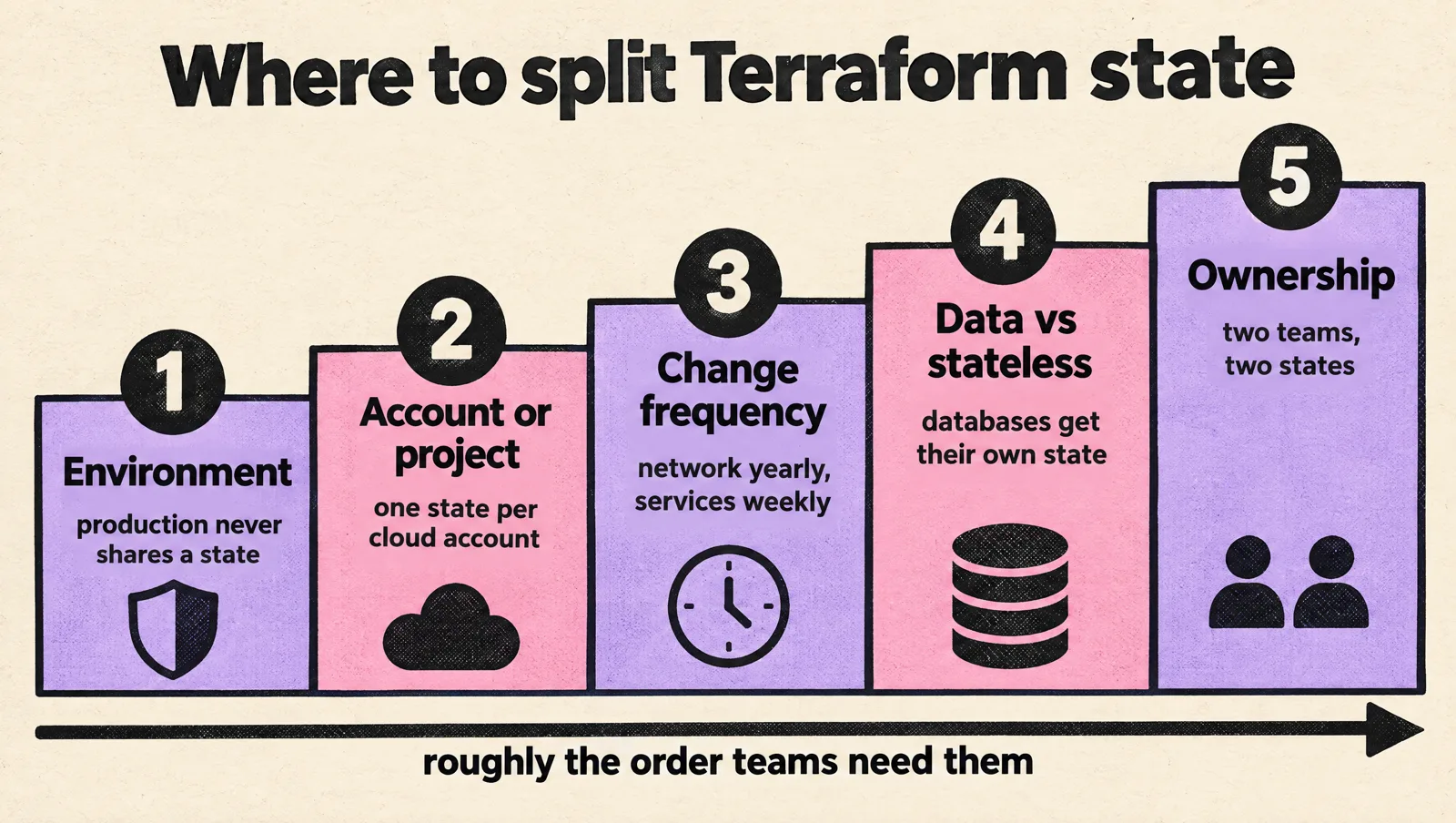
The right number of state files is the smallest number that keeps each one safe to change. These are the boundaries that matter, in roughly the order teams need them:
- Environment. Production and non-production never share a state, and ideally never share a cloud account.
- Account or project. One state per cloud account or GCP project keeps credentials simple.
- Change frequency. Networking changes a few times a year; services change weekly. Do not make a service deploy plan the VPC.
- Data versus stateless resources. Databases and buckets deserve their own state with
prevent_destroyon critical resources, so a refactor in a service directory cannot touch them. - Ownership. If two teams change different resources, give them different states so they do not block each other's locks or reviews.
Signals that a state is too big: plans take more than a couple of minutes, unrelated changes queue on the lock, or reviewers stop reading the plan output. Signals that you split too far: every change needs coordinated applies across five directories, or you spend more time wiring outputs between states than writing resources.
Remote state, locking and backend configuration
Never keep state on a laptop or in Git. Use a remote backend with locking, encryption and versioning turned on.
| Cloud | Backend | Locking |
|---|---|---|
| AWS | s3 with bucket versioning and encryption | S3 lock file with use_lockfile = true (Terraform 1.10 and later); DynamoDB locking is deprecated |
| Google Cloud | gcs with object versioning | Built in |
| Azure | azurerm storage account | Built in, using blob leases |
| Any | HCP Terraform, Spacelift, env0, Scalr | Managed by the platform |
An S3 backend for the layout 2 example looks like this:
terraform {
  backend "s3" {
    bucket       = "acme-terraform-state-prod"
    key          = "production/data/terraform.tfstate"
    region       = "eu-west-1"
    encrypt      = true
    use_lockfile = true
  }
}
The S3 backend documentation notes that locking is opt in and that DynamoDB-based locking is deprecated. If you are migrating, you can set both during the transition and run terraform init -reconfigure.
Keep one state bucket per account (or at least separate production), restrict who can read it (state contains secrets such as generated passwords), and turn on versioning so you can recover from a bad write.
Sharing values between states
Once state is split, components need each other's values: the cluster needs subnet IDs, services need the database endpoint. You have three options:
- Data sources that look up real resources by tag or name (for example
data "aws_vpc"). Loosely coupled and our default. - Published parameters: one component writes outputs to AWS Systems Manager Parameter Store or a similar store, and others read them. Explicit and permission-controlled.
terraform_remote_state: reads another state's outputs directly. Simple, but it requires read access to the whole state file, which can expose secrets.

Module versioning and pinning
Pin everything that can change underneath you:
terraform {
  required_version = ">= 1.10"

  required_providers {
    aws = {
      source  = "hashicorp/aws"
      version = "~> 6.0"
    }
  }
}

module "vpc" {
  source  = "terraform-aws-modules/vpc/aws"
  version = "~> 6.0"
  # ...
}

module "api" {
  source = "git::https://github.com/acme/terraform-modules.git//service?ref=v2.4.1"
  # ...
}- Registry modules take a
versionargument; Git modules use?ref=with a tag. - Commit
.terraform.lock.hclso every run uses the same provider builds. - Version your own modules with tags and a changelog once more than one root module uses them. Upgrade staging first, then production.
- Local modules (
source = "../../modules/vpc") cannot be versioned. That is fine in layout 1, but it means every environment gets every module change at once.
Naming and conventions that keep a codebase readable
- Use snake_case for resource names and do not repeat the resource type (
aws_s3_bucket.assets, notaws_s3_bucket.assets_bucket). - Put environment, service and owner in default tags or labels at the provider level, so every resource is attributable for cost and incidents.
- Give variables types, descriptions and validation; avoid huge untyped
map(any)inputs. - Keep environment differences in
.tfvarsor inputs (instance sizes, replica counts), not in conditional logic scattered through modules. - Run
terraform fmtandterraform validatein CI, plus a linter such as TFLint and a policy scanner such as Checkov or Trivy.
CI/CD for Terraform: plan on pull request, apply on merge
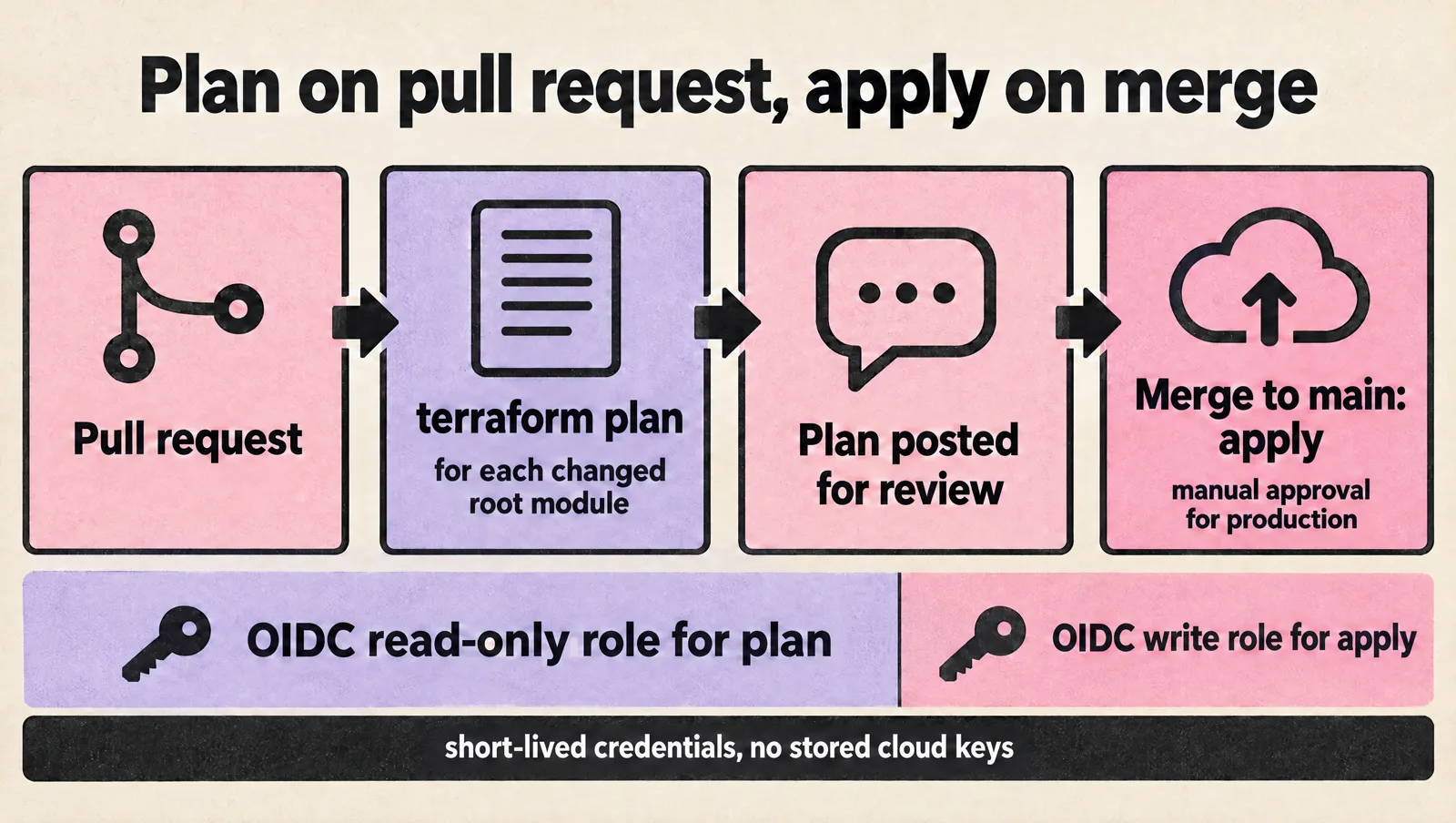
Your structure only works if changes flow through review. The pattern that holds up at every size:
- A pull request triggers
terraform planfor every root module whose files (or whose modules) changed. - The plan output is posted to the pull request for review.
- Merging to
mainapplies the reviewed plan, with a manual approval for production. - CI authenticates with short-lived OpenID Connect (OIDC) credentials, not stored cloud keys. Plan jobs get read-only roles; apply jobs get write roles limited to their account.
A minimal GitHub Actions plan job for one root module:
name: terraform-plan
on:
  pull_request:
    paths:
      - "infra/live/production/data/**"
      - "infra/modules/rds-postgres/**"

permissions:
  id-token: write
  contents: read
  pull-requests: write

jobs:
  plan:
    runs-on: ubuntu-latest
    defaults:
      run:
        working-directory: infra/live/production/data
    steps:
      - uses: actions/checkout@v4
      - uses: aws-actions/configure-aws-credentials@v4
        with:
          role-to-assume: arn:aws:iam::123456789012:role/terraform-plan
          aws-region: eu-west-1
      - uses: hashicorp/setup-terraform@v3
      - run: terraform init -input=false
      - run: terraform plan -input=false -no-color -out=tfplan
Hand-written path filters break down past a few dozen root modules. At that point use a tool built for it: Atlantis or Digger (self-hosted, pull request driven), Terragrunt's run commands, or a managed platform such as HCP Terraform, Spacelift or env0.
Refactoring an existing Terraform codebase safely
Most teams reading this already have a structure they want to change. Terraform has declarative tools for this, so you rarely need to edit state by hand:
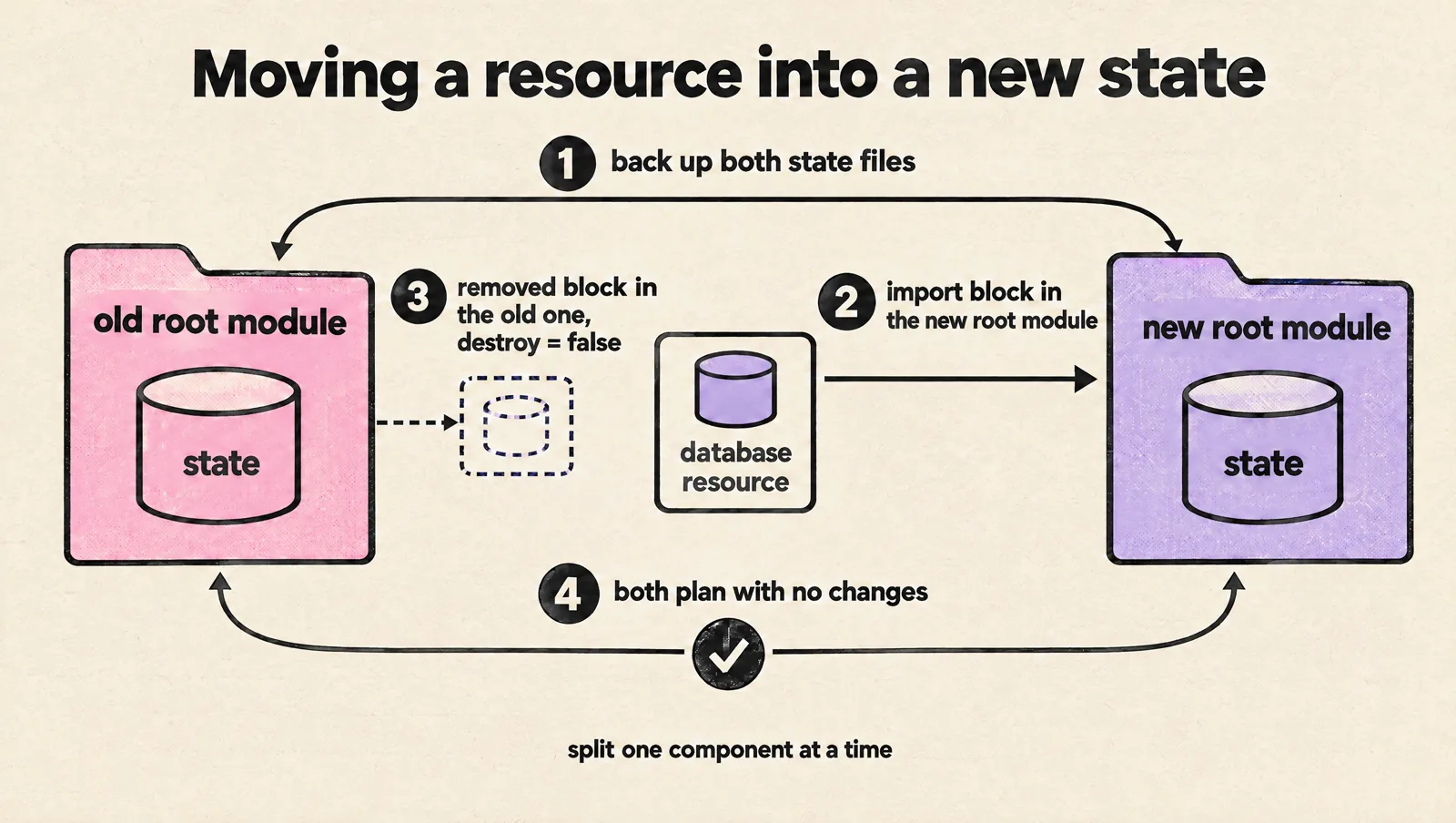
movedblocks rename resources or move them into modules within the same state, and show the move in the plan.importblocks (Terraform 1.5 and later) bring existing resources under management, which is how you move a resource into a new state: import it in the new root module, then remove it from the old one.removedblocks (Terraform 1.7 and later) drop resources from state without destroying them, usinglifecycle { destroy = false }.
Split one component at a time, and confirm that both the old and new root modules plan with no changes before moving on. Back up the state files first; with bucket versioning you also get a rollback path.
Common Terraform structure mistakes
- One giant state for everything. Slow plans, lock queues, and a production database in the same blast radius as a DNS record.
- Copying environments instead of calling modules. Staging and production drift apart within weeks.
- Using CLI workspaces for production isolation. Same backend, same credentials, one wrong
terraform workspace selectaway from an incident. - Unpinned providers and modules. A routine plan suddenly shows changes nobody made.
- Applying from laptops. No review, no audit trail, and state drift when two people apply at once.
- Deeply nested modules. Modules that call modules that call modules make plans unreadable. Keep it to one or two levels.
- Click-ops fixes during incidents that never get imported. Reconcile drift weekly with scheduled plans.
Terraform project structure checklist
- Child modules and root modules live in separate directories (or repositories).
- Production has its own state, credentials and ideally its own cloud account.
- Each state covers one environment and one component with a clear owner.
- Remote backend with locking, encryption and versioning.
- Terraform, provider and module versions pinned; lock file committed.
- Plans run on pull requests; applies happen from CI after review.
- CI uses OIDC roles, read-only for plan.
- Default tags or labels on every resource.
- Scheduled drift detection.
Terraform project structure FAQ
What is the best folder structure for Terraform?
Separate reusable modules from root modules, and give each environment its own root module and state. Small teams can use one directory per environment; growing teams split each environment into components such as network, data, cluster and services. Add Terragrunt when backend and provider configuration is duplicated across many directories.
Should I use a monorepo or multiple repositories for Terraform?
A monorepo is simpler for small teams because modules and environments change together in one pull request. HashiCorp's style guide recommends separate repositories for modules once they are shared widely, because tags and access control work per repository. Many teams keep a modules repository and a live infrastructure repository.
Should I use Terraform workspaces for environments?
Not CLI workspaces. They share one backend and credentials, which HashiCorp's own documentation says is unsuitable when deployments need separate access controls. HCP Terraform workspaces are different and are a good way to separate environments if you use that platform.
How many resources should one Terraform state hold?
There is no fixed number. Split a state when plans become slow, when unrelated changes wait on the same lock, or when critical data resources share a state with frequently changed services. Many healthy states hold tens to a few hundred resources.
When should I use Terragrunt?
Use Terragrunt when you manage many environments, accounts or regions and keep copying the same backend, provider and input configuration. For a small team with two environments, plain Terraform with a directory per environment is easier to understand.
How do I share outputs between Terraform states?
Prefer data sources that look up resources by name or tag, or publish values to a parameter store. The terraform_remote_state data source also works but requires read access to the other state file, which may contain secrets.
Does this structure work with OpenTofu?
Yes. OpenTofu uses the same configuration language, module and backend model, so the layouts, state splitting and CI pattern apply unchanged. Check feature-level differences such as backend options against the OpenTofu documentation.
For the bigger picture of where Terraform fits next to CI/CD, GitOps and observability tools, see our guide to DevOps tools by category. If you want senior engineers to restructure an existing Terraform codebase with your team, book a free DevOps setup consultation.