

DevOps tools are the software a team uses to plan, build, test, ship, run and secure code: source control, CI/CD, infrastructure as code, containers and orchestration, GitOps, observability, secrets management, security scanning and cost tracking. A startup needs one solid tool per category, chosen for low maintenance, not the longest feature list.
Most "best DevOps tools" lists give you 26 logos and no opinion. This guide does the opposite. It groups the tools that matter in 2026 by category, says when each one is the right call and what it will cost you to run, and shows the minimum stack we would set up for a team of 5, 20 and 100 engineers. It ends with a short selection process for the cases where the default answer does not fit.
The minimum DevOps stack by team size
If you only read one section, read this one. The right stack depends far more on how many engineers you have and who will maintain it than on which tool has the best demo.
| Category | About 5 engineers | About 20 engineers | About 100 engineers |
|---|---|---|---|
| Source control | GitHub or GitLab (SaaS) | Same, with branch protection and CODEOWNERS | Same, with SSO, audit logs and org-wide rulesets |
| CI/CD | GitHub Actions or GitLab CI | Same, with reusable workflows and self-hosted runners where cost or network access requires it | Same, or Buildkite for very large build volumes |
| Infrastructure as code | Terraform or OpenTofu, one repo | Terraform or OpenTofu with shared modules and split state | Terraform or OpenTofu plus Terragrunt or a managed runner (HCP Terraform, Spacelift, env0) |
| Runtime | A managed platform (ECS on Fargate, Cloud Run, App Runner) unless you already know Kubernetes | Managed Kubernetes (EKS, GKE, AKS) if you have several services and someone to own it | Managed Kubernetes with a platform team |
| Deployment | CI pipeline deploys directly | Argo CD or Flux (GitOps) | Argo CD or Flux plus Argo Rollouts for canary releases |
| Observability | One hosted product (Datadog, Grafana Cloud or New Relic) plus Sentry for errors | Same, instrumented with OpenTelemetry | OpenTelemetry into a hosted or self-run Prometheus, Loki and Tempo stack, chosen on cost |
| On-call | Alerts to Slack | PagerDuty or incident.io with a real rotation | Same, with service ownership and SLOs |
| Secrets | Cloud secret manager (AWS Secrets Manager, Google Secret Manager) | Same, synced to Kubernetes with External Secrets Operator | Same, or Vault or OpenBao if you need dynamic credentials |
| Security | Dependabot or Renovate, Trivy in CI | Plus policy checks on Terraform (Checkov or Trivy config scanning) | Plus admission policies (Kyverno or OPA Gatekeeper) and a commercial scanner if compliance asks for one |
| Cost | Cloud billing console, budgets and alerts | Plus Infracost on Terraform pull requests | Plus Kubernetes cost allocation (OpenCost or a commercial tool) |
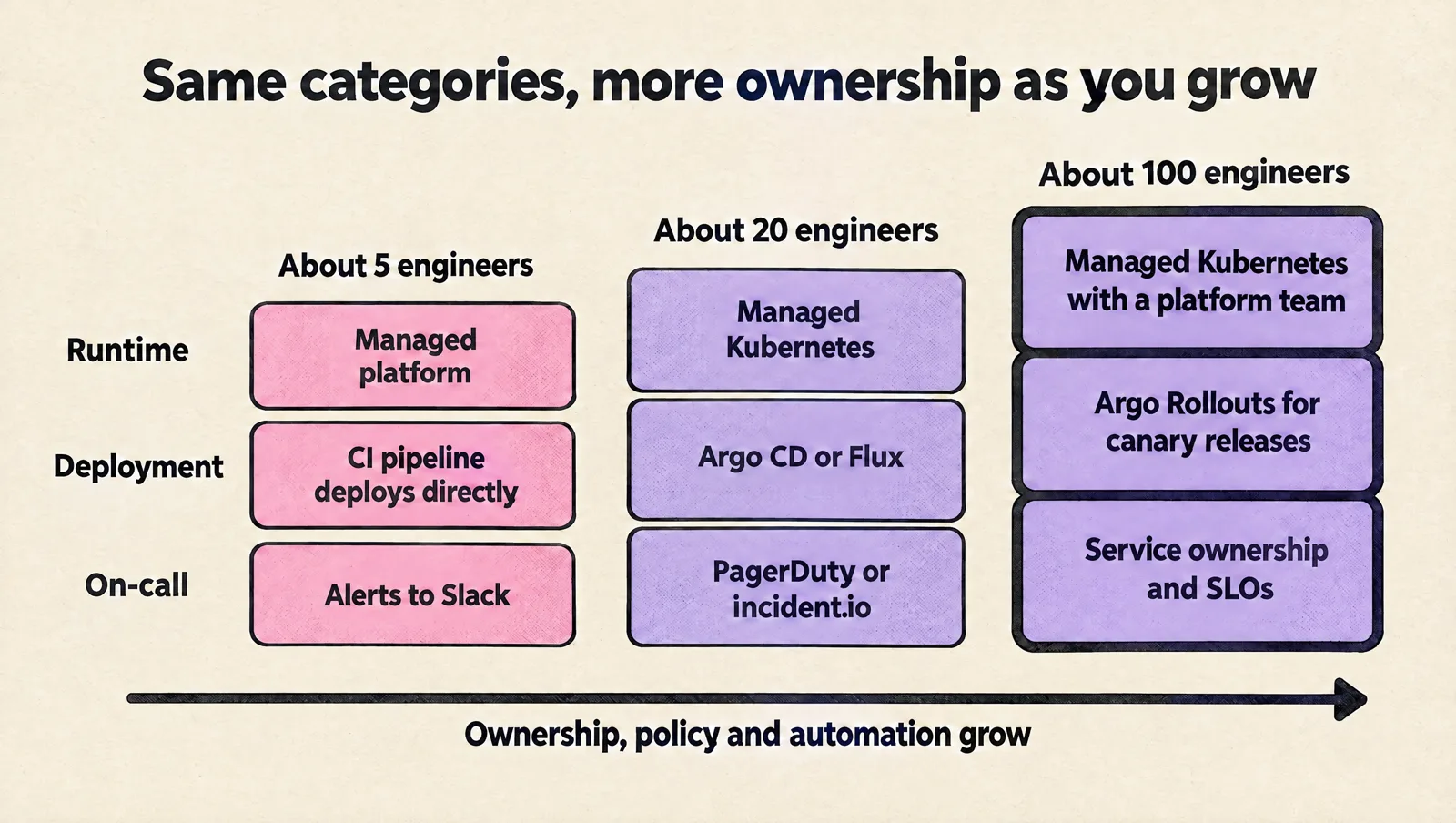
Two patterns are worth noticing. First, the 5-engineer column is mostly managed services: at that size every self-hosted tool is a part-time job nobody has time for. Second, the categories barely change as you grow; what changes is how much ownership, policy and automation sits around each tool.
DevOps tools by category
Each category below lists the tools we see most often in startup and scale-up environments, with a one-line verdict. "Watch out for" is the operational cost that the vendor page does not mention.
Source control and code review
| Tool | Use it when | Watch out for |
|---|---|---|
| GitHub | The default for most startups; the largest ecosystem of integrations and Actions | Advanced security features and SSO sit on higher tiers |
| GitLab | You want source control, CI/CD, registry and issue tracking in one product | Self-managed GitLab is a real service to patch and back up |
| Bitbucket | You are deep in Jira and Atlassian tooling | Smaller CI and integration ecosystem than GitHub |
| Azure Repos | You already run Azure DevOps for planning and pipelines | Fewer third-party integrations; most new tooling targets GitHub first |
Pick the one your CI/CD will live closest to. Splitting source control and CI across vendors adds tokens, webhooks and permissions to maintain for little benefit.
CI/CD tools
| Tool | Use it when | Watch out for |
|---|---|---|
| GitHub Actions | Your code is on GitHub; fastest path from zero to a working pipeline | Minutes on GitHub-hosted runners add up for heavy builds; third-party actions are a supply chain risk, so pin them to a commit SHA |
| GitLab CI | Your code is on GitLab; strong built-in environments and review apps | Runner fleet management if you self-host runners |
| Buildkite | Large monorepos and high build volume where you want your own compute with a hosted control plane | You run and scale the agents yourself |
| CircleCI | Mature pipelines and good caching for container builds | Credit-based pricing needs watching as usage grows |
| Azure Pipelines | Azure-centric teams already on Azure DevOps | YAML and classic pipelines coexist; standardize on YAML |
| Jenkins | Existing investment you cannot move yet, or unusual on-premises requirements | Plugin upgrades, controller maintenance and security patching are an ongoing cost; rarely the right choice for a new startup |
For reference, GitHub's Free plan includes 2,000 Actions minutes a month for private repositories and 3,000 on Team, per GitHub's billing documentation. Public repositories on standard runners are free.
Infrastructure as code (IaC)
| Tool | Use it when | Watch out for |
|---|---|---|
| Terraform | The default for multi-cloud and SaaS providers; the biggest provider and module ecosystem | Licensed under the Business Source License since August 2023; fine for almost every startup, but check if you build a competing product |
| OpenTofu | You want the same workflow under an open source license (MPL 2.0), governed by the Linux Foundation | Mostly compatible with Terraform, but newer features diverge between the two over time |
| Pulumi | Your team strongly prefers TypeScript, Python or Go over HCL | General-purpose code makes it easier to write clever, hard-to-review infrastructure |
| AWS CDK or CloudFormation | AWS-only shops that want first-party support | No coverage for non-AWS services such as DNS providers, monitoring or GitHub settings |
| Terragrunt | Many environments and accounts with the same modules; keeps backend and provider config DRY | One more layer to learn; adopt it when duplication hurts, not on day one |
| Crossplane | You want Kubernetes-style APIs for cloud resources and already run GitOps | Debugging happens through Kubernetes controllers, which is a different skill set |
HashiCorp moved Terraform to the Business Source License in August 2023, the community fork OpenTofu followed under the Linux Foundation, and IBM completed its acquisition of HashiCorp in February 2025. For most startups the practical difference today is small: pick one, pin versions, and do not mix them in the same state. If you are structuring a new Terraform codebase, our guide to Terraform project structure covers layouts, state and CI.
Containers and orchestration
| Tool | Use it when | Watch out for |
|---|---|---|
| Docker (or any OCI build tool) | Always; containers are the packaging standard | Large images and root users; use multi-stage builds and slim base images |
| Managed serverless containers (Cloud Run, ECS on Fargate, App Runner) | A handful of stateless services and no one who wants to run a cluster | Less control over networking, sidecars and scheduling |
| Managed Kubernetes (EKS, GKE, AKS) | Many services, background workers, custom scheduling, or a platform you will grow into | Upgrades every few months, add-ons, networking and access control all need an owner |
| Helm | Packaging and installing third-party software on Kubernetes | Templating your own apps in Helm can get hard to read; keep charts simple |
| Kustomize | Overlaying environment differences on plain manifests | Less suited to distributing software to others |
| Karpenter or Cluster Autoscaler | Node autoscaling on Kubernetes | Misconfigured requests lead to surprise bills; see our guide to Kubernetes autoscaling without cost surprises |
Kubernetes is the tool startups adopt too early most often. It is the right platform once you have enough services and enough people that a shared platform saves time. Before that, a managed container service gets you to production with a fraction of the maintenance.
GitOps and progressive delivery
| Tool | Use it when | Watch out for |
|---|---|---|
| Argo CD | You want a UI, multi-cluster views and an approachable GitOps model | RBAC and SSO setup; the UI tempts people into manual syncs |
| Flux | You prefer a lightweight, CLI-driven, controller-based approach | No built-in UI; visibility comes from other tools |
| Argo Rollouts | Canary and blue-green releases with automated analysis on Kubernetes | Requires good metrics to make promotion decisions meaningful |
| Flagger | Progressive delivery on top of Flux or a service mesh | Tighter coupling to mesh or ingress choices |
Both Argo CD and Flux are graduated Cloud Native Computing Foundation (CNCF) projects, so either is a safe long-term choice. We walk through a full canary setup in zero-downtime releases with Helm and Argo Rollouts.
Observability and monitoring tools
| Tool | Use it when | Watch out for |
|---|---|---|
| OpenTelemetry | Always, as the instrumentation layer; it keeps you free to change backends | Collector configuration and sampling need deliberate tuning |
| Prometheus and Grafana | Metrics and dashboards, especially on Kubernetes | Long-term storage and high cardinality need extra components (Mimir or Thanos) or a hosted service |
| Loki and Tempo | Logs and traces in the same Grafana ecosystem at lower cost than indexing everything | Query patterns differ from full-text log search |
| Datadog | One product for metrics, logs, traces and APM with little setup | Costs scale with hosts, containers, custom metrics and log volume; set budgets early |
| Grafana Cloud or New Relic | Hosted alternatives with generous entry tiers | Same need to control ingestion volume |
| Sentry | Application errors and release health from day one | Noise if you do not group and assign issues |
| PagerDuty or incident.io | On-call schedules, escalation and incident workflow | A tool does not fix noisy alerts; tune alerts first |
Do not leave observability for later. The cheapest time to add metrics, logs and traces is when a service is created, and the most expensive time is during your first serious outage.
Secrets management
| Tool | Use it when | Watch out for |
|---|---|---|
| AWS Secrets Manager, Google Secret Manager, Azure Key Vault | The default; native IAM, audit logs and rotation hooks | Per-secret and per-call pricing; organize names by service and environment |
| External Secrets Operator | Syncing cloud secrets into Kubernetes Secrets | Synced values still live in the cluster; enable etcd encryption and tight RBAC |
| SOPS or Sealed Secrets | Encrypted secrets stored in Git for GitOps workflows | Key management and rotation become your job |
| HashiCorp Vault or OpenBao | Dynamic, short-lived credentials (databases, cloud) and advanced policy | A critical service to run, unseal, back up and upgrade; overkill for most teams under 20 engineers |
Security scanning and policy
| Tool | Use it when | Watch out for |
|---|---|---|
| Dependabot or Renovate | Always; automated dependency update pull requests | Group updates or the noise gets ignored |
| Trivy | Scanning images, file systems and IaC in CI with one open source tool | Fail builds only on fixable high and critical findings, or teams will bypass it |
| Checkov | Policy checks on Terraform and Kubernetes manifests | Tune the baseline before enforcing |
| Kyverno or OPA Gatekeeper | Enforcing rules at Kubernetes admission time (no privileged pods, required labels, resource requests) | Start in audit mode; enforcement surprises break deploys |
| Snyk, Wiz and similar platforms | Compliance requires a commercial scanner, or you need cloud posture management | Price and alert volume; make sure findings route to owners |
Cost management
| Tool | Use it when | Watch out for |
|---|---|---|
| Cloud billing consoles, budgets and anomaly alerts | Always, from the first month | Without tags or labels you cannot tell which team spends what |
| Infracost | Showing the cost impact of Terraform changes in pull requests | Usage-based costs (traffic, requests) need estimates |
| OpenCost or commercial Kubernetes cost tools | Allocating cluster spend to namespaces, teams and services | Accurate only when resource requests are realistic |
Cost tooling only helps if someone acts on it. Pair it with a monthly review and clear owners per service.
Developer portals and configuration management
| Tool | Use it when | Watch out for |
|---|---|---|
| Backstage | Dozens of services and teams that need a catalog, ownership data and templates | A product to build and maintain; usually needs dedicated engineers |
| Port and other hosted portals | You want a catalog and self-service actions without running Backstage | Value depends on keeping catalog data accurate |
| Ansible | Configuring virtual machines, network devices or one-off fleet tasks | Not a substitute for images and immutable infrastructure |
| Puppet, Chef, Salt | Existing large fleets of long-lived servers | Rarely worth adopting fresh in a cloud-native startup |
What to skip until you need it
Many tools are excellent and still wrong for your stage. Add them when you see the signal, not because a conference talk made them sound essential.
| Tool or practice | Add it when you see this signal |
|---|---|
| Kubernetes | More than a handful of services, background workers with custom scaling, or repeated limits on your managed platform |
| Service mesh (Istio, Linkerd) | You need mutual TLS between services or traffic policies that ingress and network policies cannot handle |
| Vault or OpenBao | You need dynamic database or cloud credentials, or a compliance requirement that your cloud secret manager cannot meet |
| Developer portal | Engineers regularly cannot find service owners, runbooks or templates |
| Self-hosted observability | Your hosted observability bill is a top-five line item and you have people to run the replacement |
| Terragrunt or a Terraform automation platform | You copy backend and provider configuration across many environments and accounts |
How to choose DevOps tools for your team
The stack above is a strong default. When your situation is different (regulated industry, on-premises requirements, an unusual language ecosystem), use this process instead of comparing feature lists.
1. Start from the workflow and the failure you are fixing
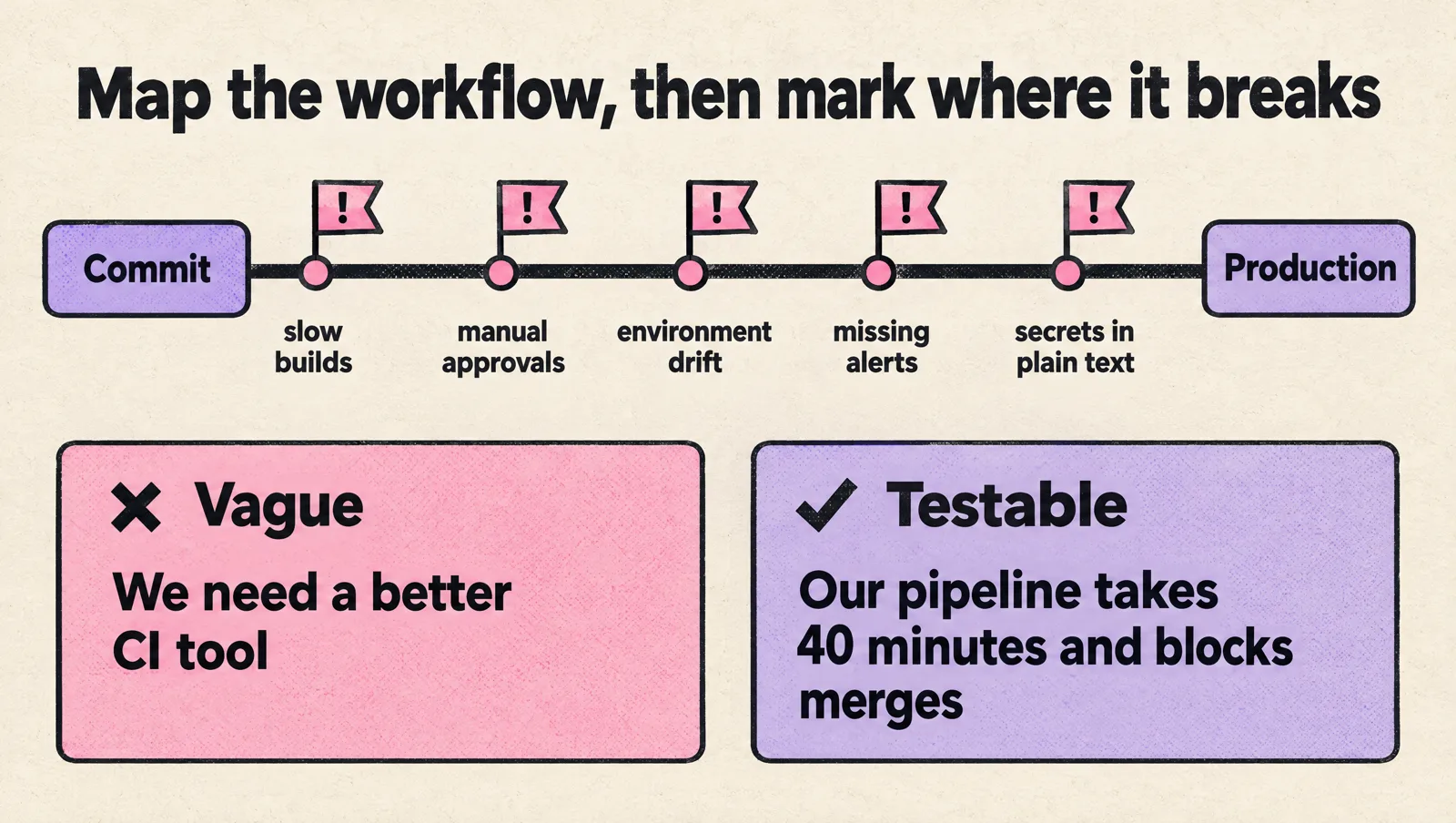
Write down how code moves from a commit to production today, step by step, and mark where it breaks: slow builds, manual approvals, environment drift, missing alerts, secrets in plain text. A tool is only worth adding if it removes one of those failures. "We need a better CI tool" is vague; "our pipeline takes 40 minutes and blocks merges" is something you can evaluate a tool against.
2. Name the owner before you pick the tool
Every tool needs someone who upgrades it, fixes it at 2 a.m. and answers questions about it. If no one will own a self-hosted tool, choose the managed version or do not adopt it. Ownership is the constraint most teams discover too late.
3. Score the shortlist on criteria that matter
| Criterion | Question to answer |
|---|---|
| Maintenance cost | How many engineer hours a month will upgrades, scaling and troubleshooting take? |
| Integration | Does it work natively with our source control, cloud, identity provider and chat? |
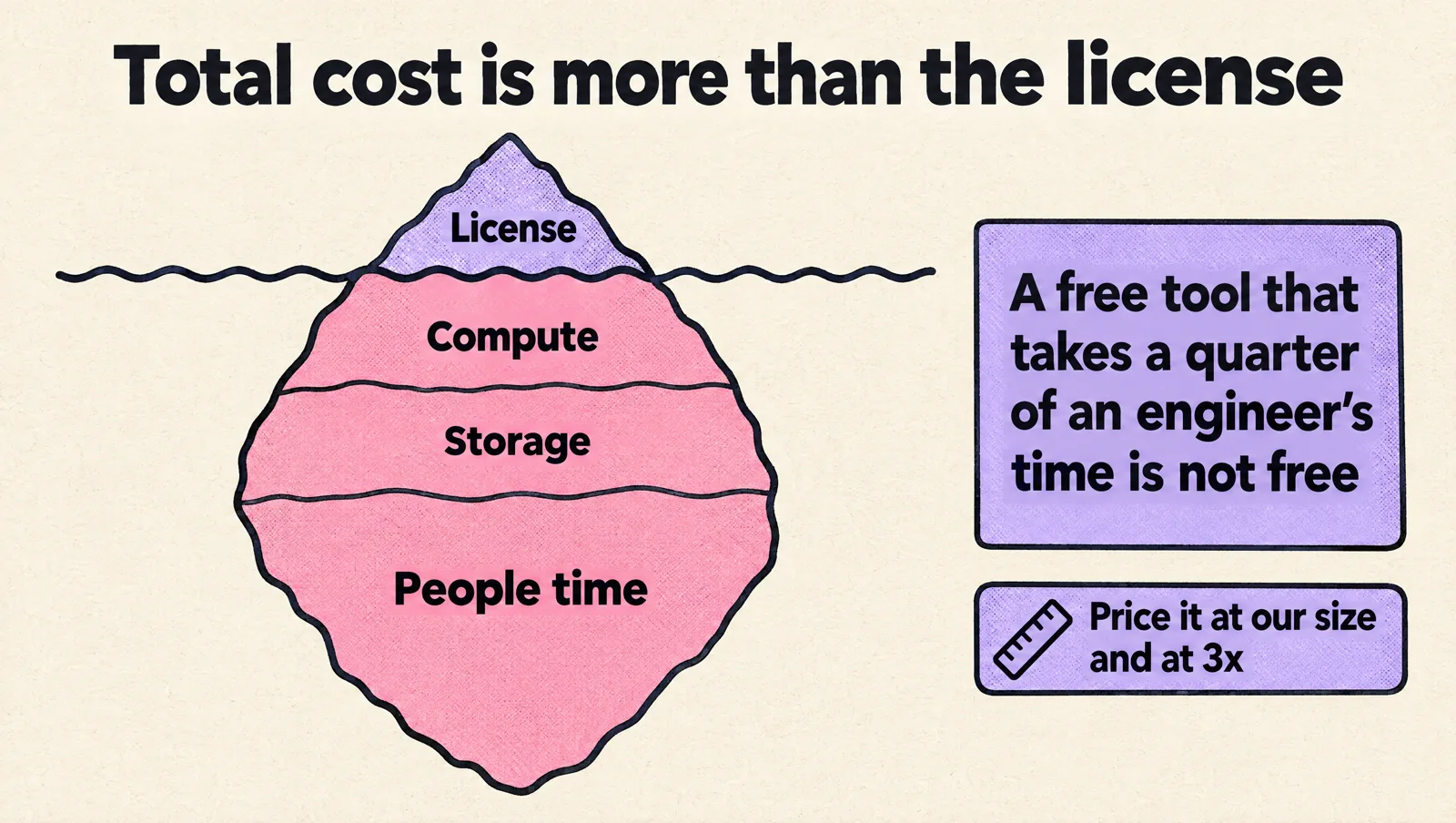
| Total cost | License plus compute plus storage plus people time, at our size and at 3x our size |
| Lock-in and licensing | Can we export data and configuration? Does the license change anything for our business? |
| Security and compliance | SSO, audit logs, least-privilege access, data residency |
| Developer experience | Will engineers use it without a training program? Is the feedback fast? |
4. Run a proof of concept on real work
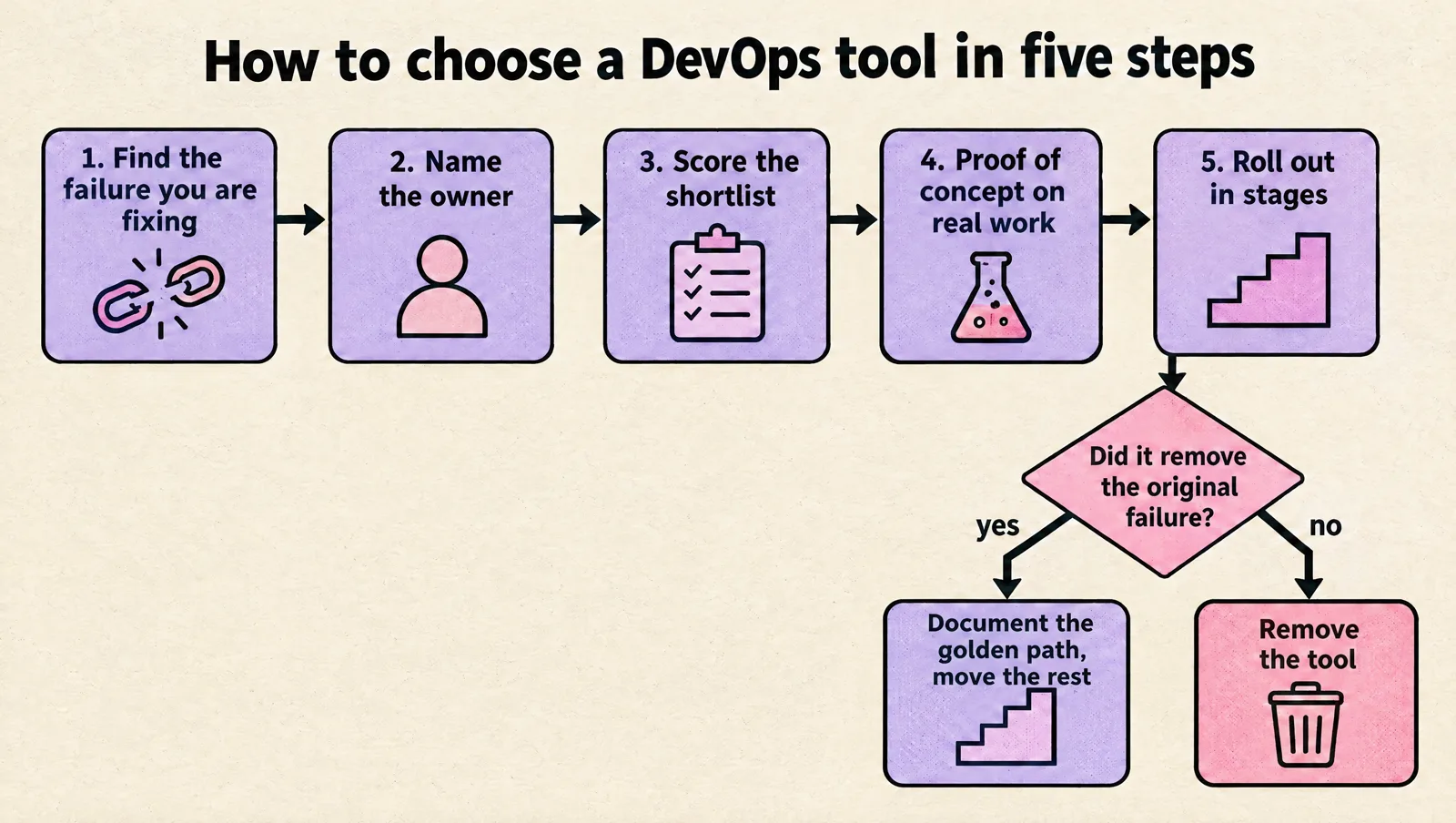
Give the top one or two options a week or two on a real service, not a hello-world demo. Measure the thing you set out to fix: build time, deploy steps removed, time to find the cause of a test incident. Ask the engineers who used it, not only the person who championed it.
5. Roll out in stages and review after real usage
Migrate one service or team first, document the golden path, then move the rest. Set a review date a few months out and ask whether the tool removed the original failure. Removing a tool that did not deliver is a success, not an embarrassment.
If you are unsure how much DevOps capacity you need to run the stack you are choosing, our guide to calculating your company's required DevOps capacity helps size it.
Common mistakes when choosing DevOps tools
- Adopting Kubernetes by default. It is a platform, not a deployment tool. Without an owner it becomes the main source of incidents.
- One tool per team. Three CI systems and two monitoring products double the integration and onboarding work. Standardize per category.
- Treating observability as a later phase. Without metrics and traces, every incident becomes guesswork, and retrofitting instrumentation is slow.
- Choosing on license price alone. A free, self-hosted tool that takes a quarter of an engineer's time is not free.
- Keeping Jenkins by inertia. If maintaining the controller and plugins is someone's recurring job, a hosted CI service usually pays for itself.
- Unpinned dependencies in pipelines. Third-party CI actions, Helm charts and Terraform modules should be pinned to versions or commit SHAs.
- Buying a platform before agreeing on the workflow. A developer portal on top of an inconsistent deployment process just makes the inconsistency easier to find.
Two reference stacks
An AWS startup with about 15 engineers
- GitHub with branch protection and CODEOWNERS; GitHub Actions with OpenID Connect (OIDC) roles into AWS instead of long-lived keys.
- Terraform or OpenTofu with remote state in S3, split by environment and component.
- EKS with Karpenter, Argo CD for deployments, External Secrets Operator reading from AWS Secrets Manager.
- OpenTelemetry into a hosted observability product, Sentry for errors, PagerDuty for on-call.
- Renovate, Trivy in CI, Checkov on Terraform, Infracost comments on pull requests.
A GCP startup with about 6 engineers
- GitHub and GitHub Actions with Workload Identity Federation into Google Cloud.
- Terraform or OpenTofu; see our GCP Terraform and Terragrunt boilerplate for a ready layout.
- Cloud Run for services, Cloud SQL for databases, Google Secret Manager for secrets.
- Cloud Monitoring and Logging, or a hosted Grafana stack, plus Sentry.
- Dependabot and Trivy in CI.
DevOps tools FAQ
What tools are used for DevOps?
DevOps teams use tools in about ten categories: source control (GitHub, GitLab), CI/CD (GitHub Actions, GitLab CI), infrastructure as code (Terraform, OpenTofu), containers and orchestration (Docker, Kubernetes), GitOps (Argo CD, Flux), observability (OpenTelemetry, Prometheus, Grafana, Datadog), secrets management, security scanning, on-call and cost management. Most teams need one tool per category.
What are the top CI/CD tools?
The most common choices are GitHub Actions, GitLab CI, CircleCI, Buildkite, Azure Pipelines and Jenkins. For a new team, the best option is usually the CI that is built into your source control platform, because it removes an integration to maintain.
Is AWS a DevOps tool?
AWS is a cloud provider, not a single DevOps tool, but it offers DevOps services such as CodePipeline, CodeBuild, CloudFormation and CDK. Many teams run their workloads on AWS while using cross-platform tools like GitHub Actions and Terraform for delivery.
Should we use Terraform or OpenTofu?
Both work for almost every startup. Terraform has the larger commercial ecosystem and HashiCorp's managed services; OpenTofu is open source under MPL 2.0 and governed by the Linux Foundation. Pick one, pin the version, and avoid switching back and forth on the same state.
Does a startup need Kubernetes?
Not at first. A managed container platform such as Cloud Run or ECS on Fargate is usually enough for a few services. Kubernetes starts to pay off when you run many services and workers and have someone to own upgrades, networking and access control.
Is an all-in-one DevOps platform better than best-of-breed tools?
An all-in-one platform such as GitLab reduces integration work and suits small teams well. Best-of-breed tools give more depth per category but cost more to integrate. Most startups end up with a hybrid: one platform for code and CI, plus specialized observability and security tools.
How do enterprises choose DevOps tools differently?
Large organizations weigh SSO, audit logging, data residency, support contracts and migration cost more heavily, and they standardize to keep hundreds of teams on one golden path. The process is the same: start from the workflow, name an owner, score a shortlist and prove it on real work.
How many DevOps tools is too many?
If two tools solve the same problem, or a tool has no clear owner, you have too many. A healthy stack has one primary tool per category and documented exceptions.
If you would rather have senior engineers set up this stack with your team, book a free DevOps setup consultation.