


Kubernetes taints and tolerations control which pods may run on which nodes. A taint on a node (kubectl taint nodes NODE key=value:NoSchedule) repels every pod that lacks a matching toleration. A toleration only permits scheduling there; it does not attract the pod. To pin workloads to a node pool, combine the taint with node affinity.
The risk is that one missing toleration, one broad taint, or one mismatched selector strands workloads in Pending. This guide covers the three effects, the exact error message you will see, safe rollout, and the built-in taints Kubernetes adds on its own.
Taint effects compared
| Effect | New pods without a toleration | Running pods without a toleration | Typical use |
|---|---|---|---|
PreferNoSchedule | Avoided, but allowed if nothing else fits | Stay | Soft separation of noisy workloads |
NoSchedule | Never scheduled | Stay | Dedicated node pools (GPU, batch, platform) |
NoExecute | Never scheduled | Evicted, immediately or after tolerationSeconds | Maintenance, node failure handling |
Fix "0/3 nodes are available: 3 node(s) had untolerated taint"
This is the scheduler event you get when every node carries a taint the pod does not tolerate. On current Kubernetes versions it looks like this in kubectl describe pod:
Warning FailedScheduling default-scheduler 0/3 nodes are available: 3 node(s) had untolerated taint {dedicated: batch}. preemption: 0/3 nodes are available: 3 Preemption is not helpful for scheduling.The braces name the taint key and value. Fix it in this order:
- See which taints exist:
kubectl get nodes -o custom-columns=NAME:.metadata.name,TAINTS:.spec.taints - If the pod should run there, add a toleration whose
key,valueandeffectmatch exactly. - If the taint should not be there, remove it with a trailing minus:
kubectl taint nodes NODE dedicated=batch:NoSchedule- - If the taint is
node-role.kubernetes.io/control-plane, the only nodes left are control plane nodes, which means your worker nodes are missing, cordoned or full. Fix capacity rather than tolerating the control plane taint. - If the taint is
node.kubernetes.io/not-readyornode.kubernetes.io/unreachable, the node itself is unhealthy. Checkkubectl describe node.

When the message mixes reasons, such as 1 node(s) had untolerated taint, 2 Insufficient memory, each count is a different node. Fixing the toleration alone will not help if the remaining nodes are out of memory.
Understand what taints and tolerations actually do
A taint lives on a node. A toleration lives on a pod. The scheduler checks both when deciding whether a pod can run on a node.
A taint has three important parts:
- key: the taint name, such as
dedicatedorworkload - value: the taint value, such as
batchorgpu - effect: what Kubernetes does when a pod does not tolerate the taint
Kubernetes supports these taint effects:
NoSchedule: new pods that do not tolerate the taint will not be scheduled onto the node. Existing pods stay where they are.PreferNoSchedule: Kubernetes tries to avoid placing non-tolerating pods on the node, but it may still schedule them there if needed.NoExecute: new pods that do not tolerate the taint will not be scheduled onto the node, and existing pods that do not tolerate it can be evicted.
That last detail matters. NoExecute can move running workloads, so treat it as an eviction control, not just a scheduling control.
Here is a basic taint on a node:
kubectl taint nodes worker-1 dedicated=batch:NoScheduleHere is the matching toleration on a pod template:
apiVersion: apps/v1
kind: Deployment
metadata:
  name: batch-worker
spec:
  replicas: 3
  selector:
    matchLabels:
      app: batch-worker
  template:
    metadata:
      labels:
        app: batch-worker
    spec:
      tolerations:
        - key: "dedicated"
          operator: "Equal"
          value: "batch"
          effect: "NoSchedule"
      containers:
        - name: worker
          image: example.com/batch-worker:1.0.0
          resources:
            requests:
              cpu: "500m"
              memory: "512Mi"
This pod can now run on nodes tainted with dedicated=batch:NoSchedule. It can also run on untainted nodes unless you add a placement rule. That is one of the most common surprises.
Use labels and affinity to avoid accidental placement
A toleration is permission. It is not a preference and it is not a requirement. If you want a workload to run on a specific node pool, add a node label and a matching selector or affinity rule.
For example, label the nodes that should run batch workloads:
kubectl label nodes worker-1 workload=batch
kubectl label nodes worker-2 workload=batch
Then taint those nodes:
kubectl taint nodes worker-1 dedicated=batch:NoSchedule
kubectl taint nodes worker-2 dedicated=batch:NoSchedule
Now add both the toleration and node affinity to the workload:
apiVersion: apps/v1
kind: Deployment
metadata:
  name: batch-worker
spec:
  replicas: 3
  selector:
    matchLabels:
      app: batch-worker
  template:
    metadata:
      labels:
        app: batch-worker
    spec:
      tolerations:
        - key: "dedicated"
          operator: "Equal"
          value: "batch"
          effect: "NoSchedule"
      affinity:
        nodeAffinity:
          requiredDuringSchedulingIgnoredDuringExecution:
            nodeSelectorTerms:
              - matchExpressions:
                  - key: workload
                    operator: In
                    values:
                      - batch
      containers:
        - name: worker
          image: example.com/batch-worker:1.0.0
          resources:
            requests:
              cpu: "500m"
              memory: "512Mi"
This creates a cleaner scheduling contract:
- The taint keeps unrelated workloads away from the batch nodes.
- The toleration allows the batch workload to use those nodes.
- The node affinity tells Kubernetes that the batch workload must run there.
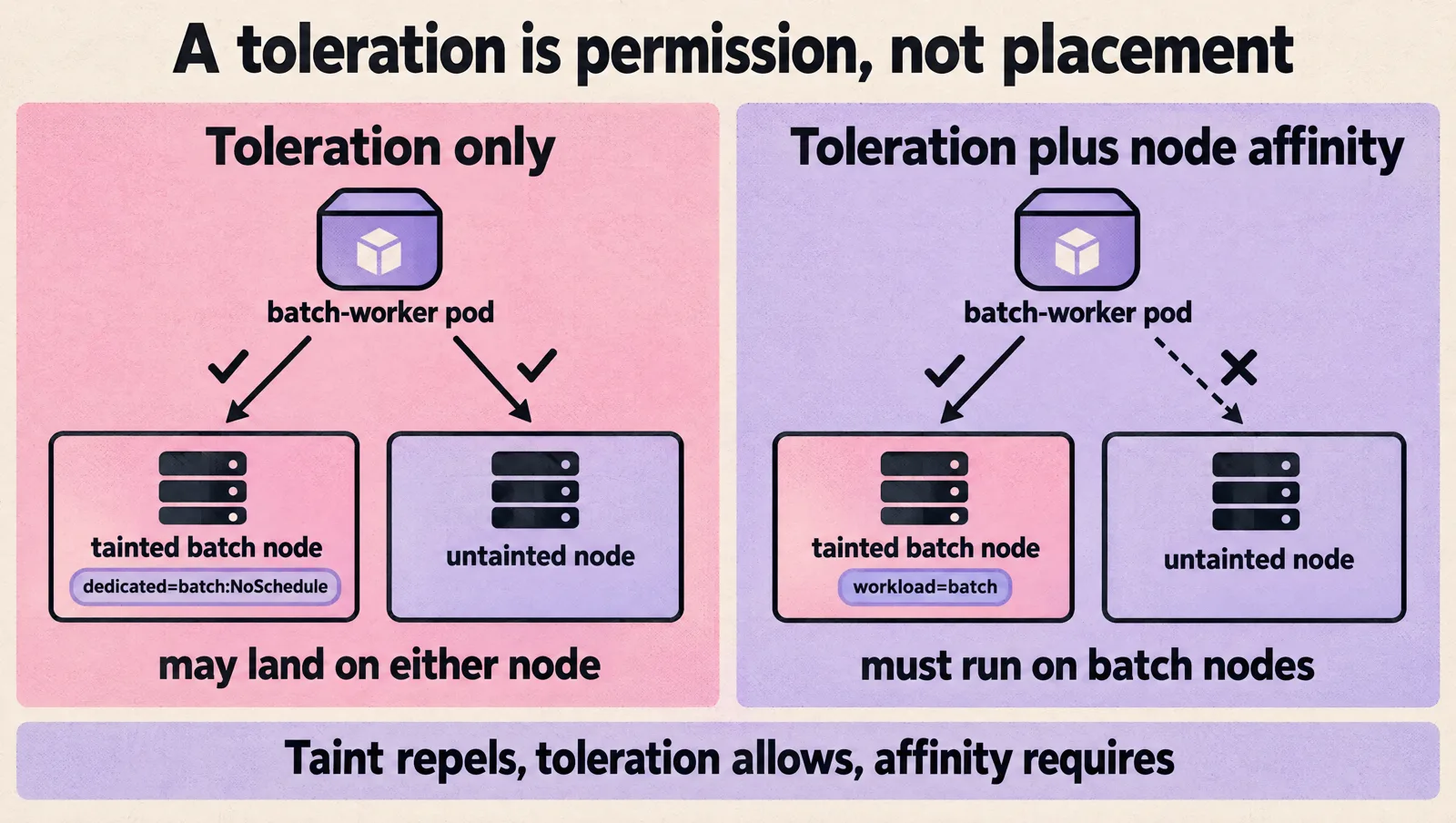
If you manage Kubernetes manifests with infrastructure as code, keep taints, labels, and workload tolerations in the same review path. That reduces drift between node configuration and workload scheduling rules. For example, if you already deploy Kubernetes resources using Terraform, treat scheduling rules as part of the workload contract rather than a one-off cluster change.
Roll out taints safely in small steps
Do not taint a full node pool first. Start with visibility, then test on one node or one small node group.
- List current taints and labels. Know what is already in place before adding more rules.
- Find workloads already running on candidate nodes. A
NoExecutetaint can evict them. ANoScheduletaint will not, but future rescheduling may fail. - Add tolerations to target workloads first. Roll out pod specs before you taint nodes.
- Add labels and affinity where you need required placement. Do not rely on tolerations alone.
- Taint one node or a small pool. Watch scheduler events and pending pods.
- Expand only after you verify the desired workloads land correctly.

Useful inspection commands:
kubectl get nodes -o custom-columns=NAME:.metadata.name,TAINTS:.spec.taints

kubectl describe node worker-1

kubectl get pods -A --field-selector=status.phase=Pending

kubectl describe pod -n default batch-worker-abc123
When a pod is stranded, kubectl describe pod usually tells you why. Look at the Events section for scheduler messages such as:
had untolerated taintdidn't match Pod's node affinity/selectorInsufficient cpuInsufficient memory
Those messages point to different fixes. If the pod has an untolerated taint error, add or correct the toleration. If it has a node affinity mismatch, check labels and selectors. If it has insufficient resources, the toleration is not the problem.
To remove a taint, append a trailing minus sign:
kubectl taint nodes worker-1 dedicated=batch:NoSchedule-To apply a taint across labeled nodes:
kubectl taint nodes -l workload=batch dedicated=batch:NoScheduleBe careful with bulk commands. Confirm the label selector first:
kubectl get nodes -l workload=batchChoose the right taint effect for the job
The taint effect should match the operational outcome you want.
Use PreferNoSchedule when you want a soft boundary
PreferNoSchedule is useful when separation is helpful but not mandatory. For example, you may prefer to keep bursty background jobs off general-purpose nodes, but still allow Kubernetes to use spare capacity during pressure.
kubectl taint nodes worker-1 workload=batch:PreferNoScheduleThis is a safer starting point when you are learning how workloads behave. It gives the scheduler room to place pods if the cluster has limited options.
Use NoSchedule for hard admission control
NoSchedule is the common choice for dedicated node pools. Use it when unrelated pods should not land on a node class, such as nodes reserved for specific workload types.
kubectl taint nodes worker-1 dedicated=batch:NoScheduleThis will not evict existing pods. That makes it safer than NoExecute for most first rollouts.
Use NoExecute only when eviction is intended
NoExecute affects running pods. Pods without a matching toleration can be evicted from the node.
kubectl taint nodes worker-1 maintenance=true:NoExecuteYou can allow a pod to remain temporarily with tolerationSeconds:
apiVersion: v1
kind: Pod
metadata:
  name: temporary-worker
spec:
  tolerations:
    - key: "maintenance"
      operator: "Equal"
      value: "true"
      effect: "NoExecute"
      tolerationSeconds: 300
  containers:
    - name: worker
      image: example.com/worker:1.0.0
In this example, the pod can stay on the tainted node for up to 300 seconds before eviction. Use this carefully with stateful workloads, long-running jobs, and anything that needs graceful shutdown time.

Watch for failure modes that strand pods
Most taint and toleration incidents come from small mismatches. These are the ones to check first.
- The toleration key or value does not match.
dedicated=batchanddedicated=jobsare different. Kubernetes will not infer intent. - The effect is missing or wrong. A toleration for
NoScheduledoes not automatically tolerateNoExecute. - The toleration is too broad.
operator: Existscan tolerate every taint with that key. That may let workloads run on nodes they should avoid. - The pod tolerates the taint but has no placement rule. It may still run on untainted nodes unless you add node affinity or a node selector.
- The pod has required node affinity that matches no nodes. A correct toleration will not help if no node has the expected label.
- The target nodes lack resources. The scheduler still checks CPU, memory, pod count, volume constraints, and other requirements.
- DaemonSets are missing tolerations. Node agents, log collectors, and monitoring pods often need tolerations so they can run on every intended node.
- Autoscaling is not configured for tainted pools. If pending pods require a tainted node pool, confirm your autoscaler can provision nodes with the matching taints and labels.
- Control plane or platform taints are ignored by broad tolerations. Avoid blanket tolerations unless you have a clear reason.
Here is an example of a broad toleration that you should avoid unless you really mean it:
tolerations:
  - operator: "Exists"
That tolerates all taints. It can defeat node isolation and place pods on nodes intended for other purposes.
A safer version names the exact taint:
tolerations:
  - key: "dedicated"
    operator: "Equal"
    value: "batch"
    effect: "NoSchedule"
For platform workloads such as schedulers, controllers, log agents, and monitoring agents, document why each toleration exists. If your team owns both application delivery and cluster operations, make that ownership explicit. A clear responsibility model matters as much as the YAML. If that ownership is still forming, this guide on how to build a DevOps team gives a useful way to think about operational boundaries.
Built-in taints Kubernetes adds for you
The node controller and kubelet add taints automatically. Knowing them explains many surprise evictions and Pending pods.
| Taint | Effect | When it appears |
|---|---|---|
node.kubernetes.io/not-ready | NoExecute | Node condition Ready is False |
node.kubernetes.io/unreachable | NoExecute | The control plane cannot reach the node |
node.kubernetes.io/memory-pressure, disk-pressure, pid-pressure | NoSchedule | The kubelet reports resource pressure |
node.kubernetes.io/unschedulable | NoSchedule | The node is cordoned |
node-role.kubernetes.io/control-plane | NoSchedule | Control plane nodes in kubeadm-style clusters |
Kubernetes automatically adds tolerations for not-ready and unreachable with tolerationSeconds: 300 to every pod, which is why pods on a failed node are evicted after about five minutes. DaemonSet pods get tolerations without a time limit, so they are not evicted.
Use a repeatable checklist before merging changes
Before you merge a change that adds or modifies taints and tolerations, run through this checklist.
- State the intent. Are you isolating workloads, reserving capacity, protecting nodes, or preparing maintenance?
- Pick the weakest effective taint. Start with
PreferNoScheduleif soft separation is enough. UseNoSchedulefor hard admission control. UseNoExecuteonly when eviction is expected. - Add exact tolerations. Prefer explicit
key,value, andeffect. - Add placement rules when needed. Use node affinity or node selectors so tolerated pods land where you expect.
- Check DaemonSets. Confirm node-level agents still run on tainted nodes.
- Check PodDisruptionBudgets. PodDisruptionBudgets, or PDBs, do not control initial scheduling, but they affect voluntary evictions and maintenance workflows.
- Check resource requests. A pod with valid tolerations can still stay pending if nodes lack requested CPU or memory.
- Apply in a small scope first. Use one node, one node pool, or one environment before a wider rollout.
- Read scheduler events. Do not guess. Use pod events to confirm the exact scheduling blocker.
- Document the contract. Record which workloads may tolerate which taints and why.
If your cluster resources are managed through Kubernetes-native control planes, keep the scheduling contract near the resource definitions. For example, teams that deploy AWS resources using Crossplane on Kubernetes often benefit from keeping workload, infrastructure, and operational rules reviewable through the same Git workflow. The same principle applies if you are running more complex workloads such as Apache Airflow on AWS Elastic Kubernetes Service, where schedulers, workers, and supporting services may have different placement needs.
FAQ
What is the difference between a taint and a toleration?
A taint is set on a node and repels pods. A toleration is set on a pod and lets it ignore a matching taint. Taints keep the wrong pods off a node; tolerations let the right pods on.
Does a toleration force a pod onto the tainted node?
No. A toleration only allows scheduling there. The pod can still land on untainted nodes. Add node affinity or a nodeSelector for the node pool's label if the pod must run there.
How do I remove a taint from a node?
Repeat the taint with a trailing minus sign, for example kubectl taint nodes worker-1 dedicated=batch:NoSchedule-. To remove every taint with a key regardless of value and effect, use kubectl taint nodes worker-1 dedicated-.
How do I make a pod tolerate every taint?
Use a toleration with operator: Exists and no key. It matches all taints, which is right for some node agents and almost never right for applications, because it lets the pod run on control plane and dedicated nodes.
What does tolerationSeconds do?
For NoExecute taints only, it sets how long a running pod may stay on the node after the taint appears before it is evicted. Without it, a matching toleration lets the pod stay indefinitely. See the Kubernetes docs on taints and tolerations.
Taints and tolerations work best when they are precise and boring. Use taints to repel the wrong pods, use tolerations to admit the right pods, and use labels plus affinity to control placement. Roll out one node pool at a time, inspect scheduler events, and avoid broad tolerations unless you can explain exactly why they are safe.