

DevOps as a Service (DaaS) means an outside team of DevOps engineers builds and runs your delivery and cloud operations for a recurring fee: CI/CD pipelines, infrastructure as code, Kubernetes or other runtimes, monitoring, security baselines and cost control. You get a team's skills for less than a team's payroll. In exchange, you have to manage the ownership, access and exit terms carefully.
It beats hiring when your DevOps workload is real but not big enough for two or three full-time specialists. It also fits when you need senior skills faster than you can recruit them, or when one engineer is currently the only person who understands production. It loses to hiring when infrastructure is your product, when the work is constant and deep enough to keep a team busy, or when nobody inside the company can own decisions about the platform.
This guide is for founders, CTOs and engineering leaders deciding how to cover DevOps. It covers what DaaS actually includes, the delivery models providers sell under that name, how pricing works and how to compare it with the true cost of hiring, a decision checklist, contract safeguards, and how to run the first 90 days.
What DevOps as a Service actually includes
"DevOps as a Service" gets used for three different things, which is why the search results feel contradictory:
- A managed engineering service. A provider's engineers work on your cloud accounts, repositories and pipelines on an ongoing basis. This is what most buyers mean, and what this guide is about.
- A hosted toolchain. GitHub, GitLab, Azure DevOps or AWS developer tools sold as SaaS. Useful, but that is buying tools, not getting DevOps done.
- A platform product. An internal developer platform or "platform as a service" that hides infrastructure behind a portal. It reduces DevOps work for product teams, but someone still has to run it.
A serious DaaS engagement usually covers these workstreams. Most companies need four or five of them, not all eight:
| Workstream | What the provider does | What you should get to keep |
|---|---|---|
| Cloud foundation | Account structure, networking, identity and access, landing zone, environments | Infrastructure as code in your repositories, an access model diagram |
| Infrastructure as code | Terraform or OpenTofu modules, state management, review workflow | Modules your engineers can read and change through pull requests |
| CI/CD | Build, test and deploy pipelines, environment promotion, rollback | Pipeline definitions in your repositories, a documented release process |
| Runtime | Kubernetes, ECS, Cloud Run or VM operations, upgrades, autoscaling | Upgrade runbooks, a version and support calendar |
| Observability | Metrics, logs, traces, dashboards, alert rules | Alerts that page the right owner, dashboards per service |
| Reliability and on-call | Incident response, postmortems, backup and restore testing | Runbooks, tested restore procedures, an escalation policy |
| Security and compliance | Secrets management, least privilege, vulnerability scanning, audit evidence | Evidence that maps to your SOC 2 or ISO 27001 controls |
| Cost control | Tagging, rightsizing, commitments, budgets and alerts | A cost report your finance team can read, owners per cost line |
Look at the last column. It is the real test of a DaaS provider. The fee buys work, but the value you keep is the code, documentation and operating habits that stay when the engagement ends.
The four ways to get DevOps covered
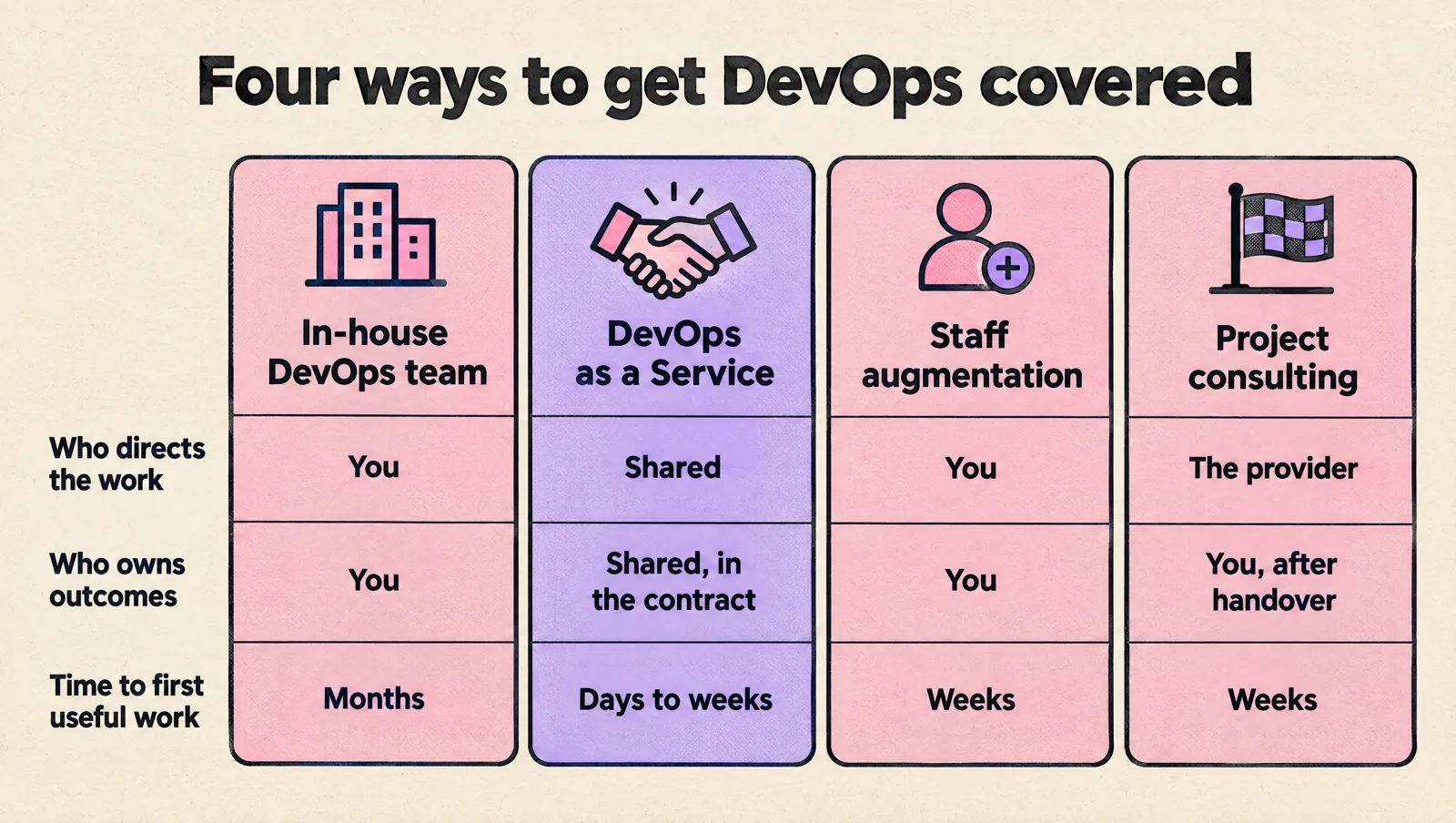
DaaS is one of four models. The difference that matters most is who owns the outcome and who directs the work day to day.
| In-house DevOps team | DevOps as a Service | Staff augmentation | Project consulting | |
|---|---|---|---|---|
| Who directs the work | You | Shared: you set priorities, the provider plans and executes | You | The provider, against a defined goal |
| Who owns production outcomes | You | Shared, defined in the contract | You | You, after handover |
| Typical commitment | Permanent headcount | Monthly, ongoing | Monthly per engineer | Fixed scope and timeline |
| Time to first useful work | Months (hiring plus ramp-up) | Days to weeks | Weeks | Weeks |
| Breadth of skills | Whatever you hired | A bench of specialists behind your main engineer | One person's skills | Whatever the project needs |
| Main risk | Slow hiring, single points of failure | Knowledge staying with the provider | You still need to manage and review the work | Handover to nobody |
| Best for | Large, constant platform work | Startups and scale-ups without a full DevOps team | A known backlog and a capacity gap | A migration or a one-off build |
Many companies combine them: DaaS to stabilize and build the foundation, then one internal hire who takes over day-to-day ownership while the provider stays on for depth and coverage. If the staff augmentation column looks closer to what you need, read how to choose a staff augmentation company. For a project with a clear end, read how to choose a DevOps consulting service.
When DevOps as a Service beats hiring
DaaS is usually the better choice when most of these are true:
- The workload is real but uneven. Some months bring a migration, a compliance audit or a Kubernetes upgrade. Other months are mostly maintenance. A full-time hire is either overloaded or underused.
- You need breadth one person cannot have. Networking, Kubernetes internals, Terraform design, database operations, security and cost optimization rarely sit in one head.
- Production depends on one person. If your only infrastructure engineer goes on holiday and deploys stop, you have a bus factor of one. A provider gives you coverage and a second pair of eyes.
- Hiring is slow or risky. Senior DevOps engineers are hard to assess if nobody on your team is senior in DevOps. A bad hire with production access is expensive to undo.
- You are early. Teams of roughly 5 to 40 engineers usually do not need a dedicated platform team yet, but they do need production-grade foundations.
When hiring wins
- Infrastructure is part of what you sell (a data platform, a developer tool, a hosting product).
- The work is constant and deep enough to keep two or more specialists busy all year.
- Regulation or customer contracts prevent outside parties from accessing production.
- You are building a platform team that will serve many product teams, and you want it to grow with the company.
Even then, a provider often helps for the first months: setting up the foundations, helping you interview candidates and handing over to the new team. If you are unsure how much DevOps work you actually have, estimate your required DevOps capacity before deciding. The guide to building a DevOps team covers the hiring path.
How much DevOps as a Service costs
Providers rarely publish prices, and the ones that do are not comparable, because "a plan" can mean ten hours or a full-time engineer. What you can compare is the pricing model and what it includes.
| Pricing model | How it works | Good for | Watch for |
|---|---|---|---|
| Monthly hours plan | A fixed block of engineering hours per month, often with tiers | Ongoing work with uneven demand | Unused-hour expiry, response times outside the plan |
| Dedicated engineer | One or more named engineers at a monthly rate | Steady workload, deep context | Whether a senior backs up the engineer, cover during leave |
| Managed service with service levels | A fee per environment or service, with uptime and response commitments | Operations you never want to think about | What counts as "in scope", penalties that are only credits |
| Fixed-price project plus retainer | A defined build, then a smaller monthly plan to run it | Foundations, migrations | Change requests, who fixes defects after go-live |
| Pay per hour | Billed monthly for hours worked | Advisory work, small or unpredictable needs | Availability when you need someone urgently |
Compare it with the real cost of hiring
The fair comparison is not a provider's monthly fee against a salary. It is against the full cost of covering the same work in-house:
- Loaded salary. The US Bureau of Labor Statistics puts the median software developer wage at $135,980 (May 2025). Experienced DevOps and platform engineers are often above that median. Wages are about 70% of total employer compensation cost in US private industry (BLS, June 2026), so a $136,000 salary is roughly $194,000 in total cost before recruiting, equipment and tooling.
- Recruiting and ramp-up. Recruiter fees, interview time from your senior engineers, and the months before a new hire is fully productive.
- Coverage. One engineer is not on-call coverage. Real coverage for production needs at least two people who can respond, or an escalation path to someone outside.
- Breadth gaps. The specialist work your hire cannot do still needs a consultant, so add a buffer for it.
- Cost of mistakes. Outages, security incidents and cloud waste from missing experience are real costs, even if they never appear in a budget line.

Put a one-year number on each line, then ask providers to quote the same scope. If the provider costs more but removes the coverage gap and the breadth gap, it can still be the cheaper option. If you have constant work for two engineers, hiring usually wins on cost within a year or two. To see how MeteorOps structures engagements, see the plans and pricing page.
Decision checklist: DaaS, hire, or both
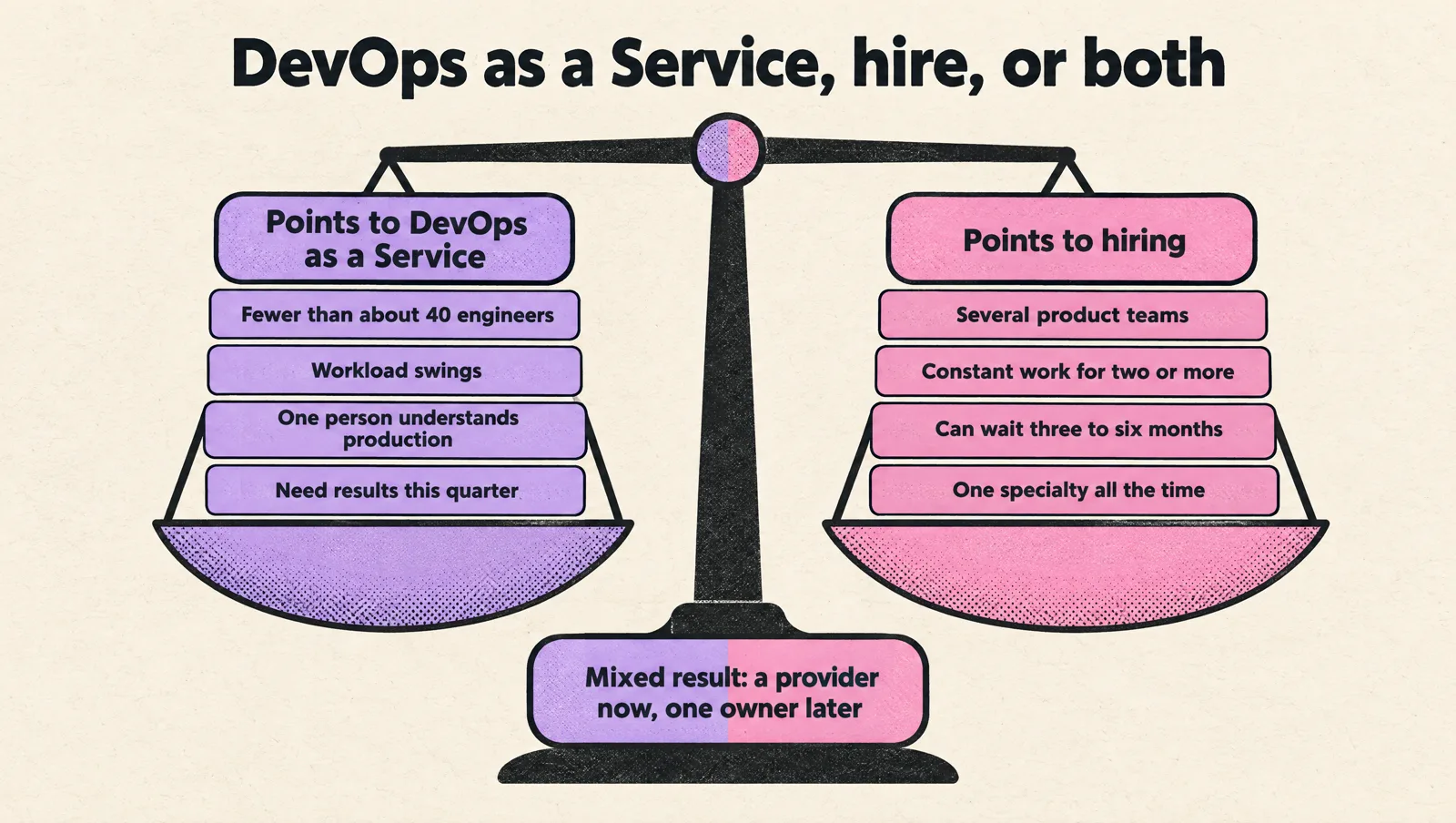
Answer these honestly. Each "yes" in the left group points toward DevOps as a Service, and each "yes" in the right group points toward hiring.
| Points to DevOps as a Service | Points to hiring |
|---|---|
| Fewer than about 40 engineers, no platform team yet | Several product teams that need a shared platform |
| Workload swings with launches, audits and migrations | Constant workload for two or more specialists |
| Only one person understands production today | You already have DevOps people who need reinforcement |
| You need results this quarter | You can wait three to six months for a hire to ramp up |
| You need several specialties occasionally | You need one specialty all the time |
| Nobody internal can assess DevOps candidates | A senior engineer can run the hiring process |
A mixed result is common and usually means "both": a provider now, and a plan to hire one owner who works alongside them.
What good DevOps as a Service looks like in practice
These are the signals that a provider runs DaaS as engineering, not as a ticket desk:
- Everything lands in your repositories. Terraform, pipeline files, Helm charts and runbooks live in your Git organization and go through your pull request reviews.
- Access is personal and least privilege. Each engineer has their own identity through your identity provider or AWS IAM Identity Center. Nobody shares root credentials or long-lived access keys.
- A named lead engineer, with seniors behind them. You know who works on your systems, and design reviews involve someone more senior than the person doing the work.
- Visible work. A shared backlog, short written updates, and decisions recorded where your team can find them.
- Measured outcomes. Progress is tracked with delivery metrics such as the five DORA metrics (change lead time, deployment frequency, failed deployment recovery time, change fail rate and deployment rework rate), plus cloud cost and incident trends. Hours logged and tickets closed do not count as outcomes.
- Your team gets more capable. Your developers can deploy, read dashboards and handle common incidents without asking the provider.
Contract safeguards before you sign
DaaS contracts fail at the edges: who owns what, how fast someone responds, and how you leave. Check these clauses:
| Clause | What to look for |
|---|---|
| Intellectual property | All code, configuration and documentation created for you belongs to you, with no license fees to keep using it |
| Access and credentials | Your identity provider, individual accounts, removal on exit, no provider-owned accounts in your production path |
| Scope and response times | What is included, what is extra, and response times for production incidents in writing |
| Named people | Who your lead engineer is, notice before they change, and how a replacement gets onboarded |
| Security and confidentiality | Handling of secrets and customer data, background checks, and support for your audits |
| Exit and handover | A handover period, final documentation, access removal and a reasonable notice period |
| Commitment | Minimum term, how to scale hours up or down, and what happens to unused hours |
A provider that resists the exit clause is telling you how the relationship will end. A good one plans for its own replacement from the first week.
The first 90 days of a DevOps as a Service engagement
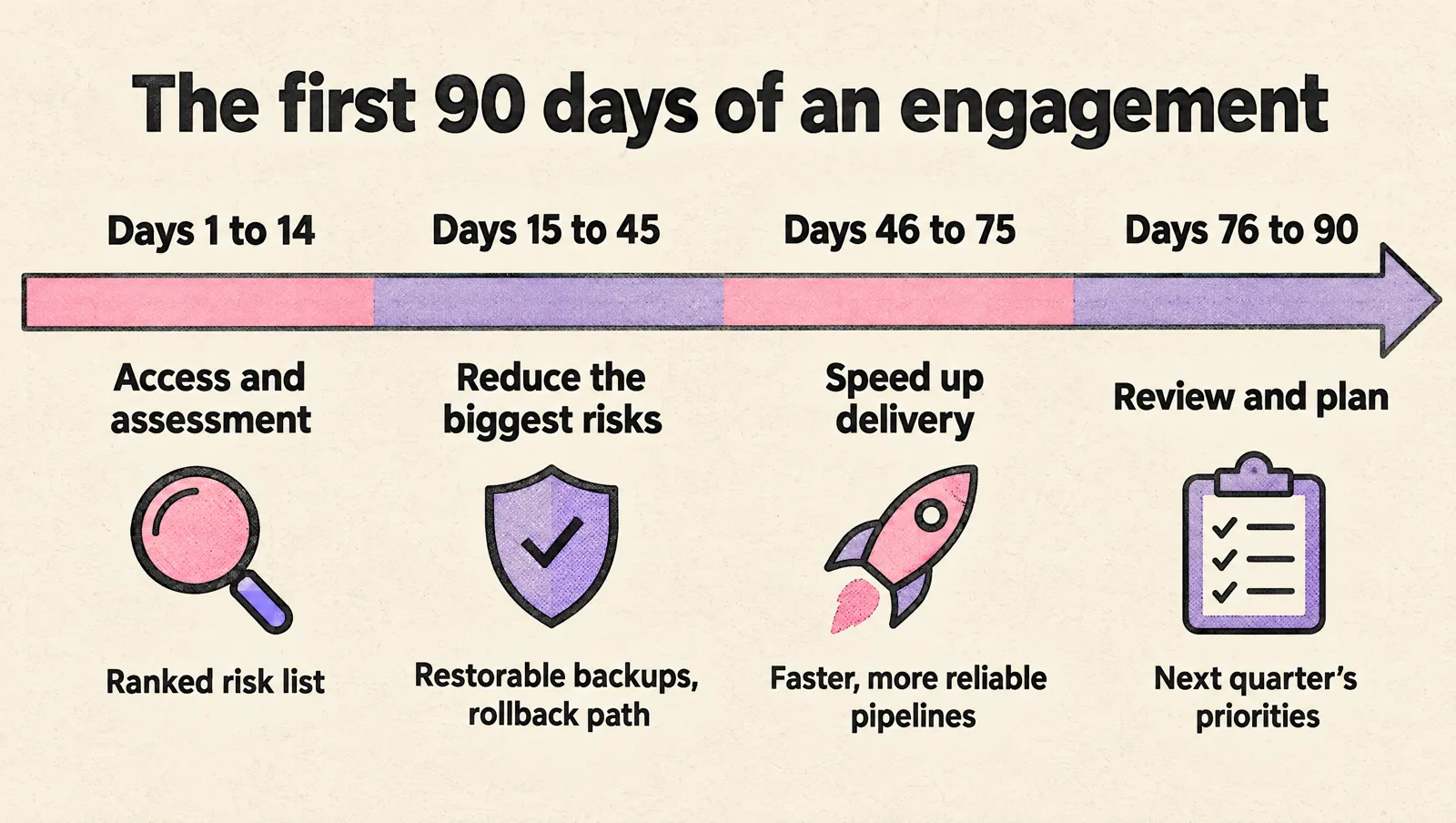
- Days 1 to 14: access and assessment. Set up individual access, review cloud accounts, repositories, pipelines, monitoring, incident history and the cloud bill. The output should be a written list of risks ranked by impact, not a new architecture.
- Days 15 to 45: reduce the biggest risks. Typical first fixes: backups that are actually restorable, removing shared admin access, moving unmanaged production resources into infrastructure as code, alerts on customer-facing symptoms, and a rollback path for deployments.
- Days 46 to 75: speed up delivery. Faster, more reliable pipelines, preview or staging environments that match production, and fewer manual release steps.
- Days 76 to 90: review and plan. Compare the delivery metrics, incident count and cloud spend against day 1. Agree on the next quarter's priorities and adjust the plan size up or down.
If the first two weeks produce a sales proposal for a large rebuild instead of a ranked risk list, slow down. A DevOps maturity assessment is a cheap way to get a baseline before you commit to anything larger.
Common mistakes with DevOps as a Service
- Outsourcing ownership along with the work. Someone inside the company still has to make product and risk decisions about production.
- Treating the provider as a ticket queue. If every change waits for a ticket to be picked up, delivery slows down. Ask for self-service paths for your developers.
- Letting infrastructure live in the provider's accounts. Cloud accounts, domains, repositories and secrets stores should be yours from the start.
- Buying tools before defining problems. New platforms do not fix unclear ownership or missing runbooks.
- No exit plan. If you could not switch providers in a month, you are locked in, whatever the contract says.
FAQ
What is DevOps as a Service?
DevOps as a Service is an outsourced model where an external team builds and operates your delivery pipelines, cloud infrastructure, monitoring and related practices for an ongoing fee. Unlike buying DevOps tools, you are buying engineers' time and expertise, delivered inside your own accounts and repositories.
Is DevOps as a Service the same as managed DevOps services?
Mostly, yes. "Managed DevOps services" usually puts more emphasis on running existing systems against service levels, while "DevOps as a Service" also covers building new foundations. In practice, check the scope and response terms rather than the label.
How much does DevOps as a Service cost?
It depends on the pricing model (hours plan, dedicated engineer, managed service or project) and the scope. Compare quotes against the full one-year cost of hiring: loaded salary, recruiting, ramp-up, on-call coverage and the specialist help a single hire would still need.
Is DevOps as a Service worth it for a small team?
For teams without a dedicated DevOps engineer, it usually is, because one hire cannot cover all the specialties or provide on-call coverage alone. It is less attractive if your workload is small enough for a few hours of advice a month, or large and constant enough for two full-time hires.
Can a DevOps as a Service provider work alongside our in-house engineers?
Yes, and that is often the best setup. The provider brings depth and coverage, while your engineers keep product context and ownership. Make sure work goes through the same repositories, reviews and backlog.
What are the risks of DevOps as a Service?
The main risks are knowledge staying with the provider, broad access to production, and lock-in through provider-owned accounts or tools. Clear IP ownership, individual least-privilege access, documentation in your repositories and a written exit plan reduce all three.
How fast can a DevOps as a Service team start?
A good provider can start within days of signing, once access is granted. Expect a short assessment first. Visible improvements usually come within the first month, and bigger changes such as migrations take longer.
The short version
DevOps as a Service gives a startup senior DevOps coverage without building a team: foundations, pipelines, monitoring, security and cost control, delivered in your own accounts. Choose it when the work is real but uneven, when you need breadth and coverage, or when production depends on one person. Hire when infrastructure is your product or the work is constant. Either way, keep ownership, access and the exit plan on your side.
If you want senior engineers to take on your DevOps work this way, see how MeteorOps DevOps outsourcing works.