

AWS DevOps consulting means hiring experienced engineers to design, fix or run how your software gets built, deployed and operated on Amazon Web Services (AWS). That covers your account structure, infrastructure as code, containers (Amazon EKS or ECS), CI/CD, monitoring, security and cost. In the first 90 days, a good consultant should hand you a ranked list of risks, fix the most dangerous ones, and leave everything in code and documentation your team owns.
The hard part is not finding someone who knows AWS. It is finding someone who fixes the right problems in the right order and does not leave you dependent on them. This guide is for CTOs and engineering leads at startups and scale-ups running on AWS. It covers what a typical scope includes, how engagements are structured, what AWS partner tiers do and do not tell you, the questions to ask, a week-by-week 90-day plan, and the red flags that mean you should walk away.
When you need an AWS DevOps consultant
These are the situations where outside help usually pays for itself:
- The AWS account grew without a plan. Everything sits in one account, people share admin access, and nobody is sure which resources are still in use.
- Deployments are slow or scary. Releases depend on manual steps, one engineer, or a pipeline nobody wants to touch.
- A deadline needs production-grade infrastructure. A launch, an enterprise customer's security review, or a SOC 2 audit.
- The bill is growing faster than usage. Nobody owns cost, nothing is tagged, and commitments (Savings Plans or Reserved Instances) were never planned.
- You are choosing between EKS, ECS and serverless and the decision will be expensive to reverse.
- You are migrating from Heroku, another cloud or data centers. Our Heroku to AWS migration guide covers that path in detail.
If you have a full platform team that only needs extra hands, you probably want staff augmentation instead. If the problem is "we do not know what is wrong", start with an assessment, not an implementation project.
What an AWS DevOps consulting engagement typically covers
Most AWS engagements are built from the same workstreams. A good consultant will tell you which ones matter for you now and which can wait.
| Workstream | Typical AWS building blocks | What "done" looks like |
|---|---|---|
| Account structure and landing zone | AWS Organizations, AWS Control Tower, service control policies, separate accounts for production, staging, security and logging | Workloads separated by account, guardrails applied, new accounts created from a template |
| Identity and access | AWS IAM Identity Center connected to your identity provider, permission sets, IAM roles for workloads | No shared users, no long-lived access keys for people, access removed when someone leaves |
| Infrastructure as code | Terraform or OpenTofu (sometimes CloudFormation or CDK), remote state, plan on every pull request | Production can be recreated from code, and changes are reviewed before they are applied |
| Compute and containers | Amazon EKS, Amazon ECS on Fargate or EC2, Lambda | A runtime that fits your team's size, with documented upgrade and scaling behavior |
| CI/CD | GitHub Actions or GitLab CI with OIDC federation to AWS, Amazon ECR, deployment strategies | Automated deploys with rollback, no static AWS keys stored in CI |
| Observability | Amazon CloudWatch, Prometheus and Grafana, OpenTelemetry, alerting | Alerts on what customers feel, routed to the owning team |
| Security and compliance | AWS CloudTrail, GuardDuty, Security Hub, AWS Config, KMS, Secrets Manager | Audit evidence collected automatically, findings triaged by severity |
| Data and backups | Amazon RDS or Aurora, AWS Backup, snapshots, point-in-time recovery | A restore that was actually tested, with a known recovery time |
| Cost | Cost allocation tags, AWS Budgets, Cost Explorer, Compute Optimizer, Savings Plans | Cost per environment and service, owners per cost line, a commitment plan |
AWS Control Tower is worth knowing by name. It orchestrates AWS Organizations, AWS Service Catalog and IAM Identity Center to build a multi-account landing zone, and applies preventive, detective and proactive controls to keep accounts from drifting (AWS documentation). Not every startup needs it on day one, but a consultant should explain why you do or do not.
EKS, ECS or serverless: the decision a consultant should help you make
This is where AWS consulting most often goes wrong in both directions: Kubernetes introduced too early, or a team stuck on a platform it has outgrown. A good consultant compares the options against your team, not against their favorite tools.
| Amazon ECS (Fargate) | Amazon EKS | AWS Lambda | |
|---|---|---|---|
| Operational effort | Low | Medium to high: upgrades, add-ons, networking | Lowest for event-driven work |
| Fits best | A handful of services, a small team, AWS-only | Many services, platform needs, portability, a large ecosystem of tools | Spiky, event-driven or short tasks |
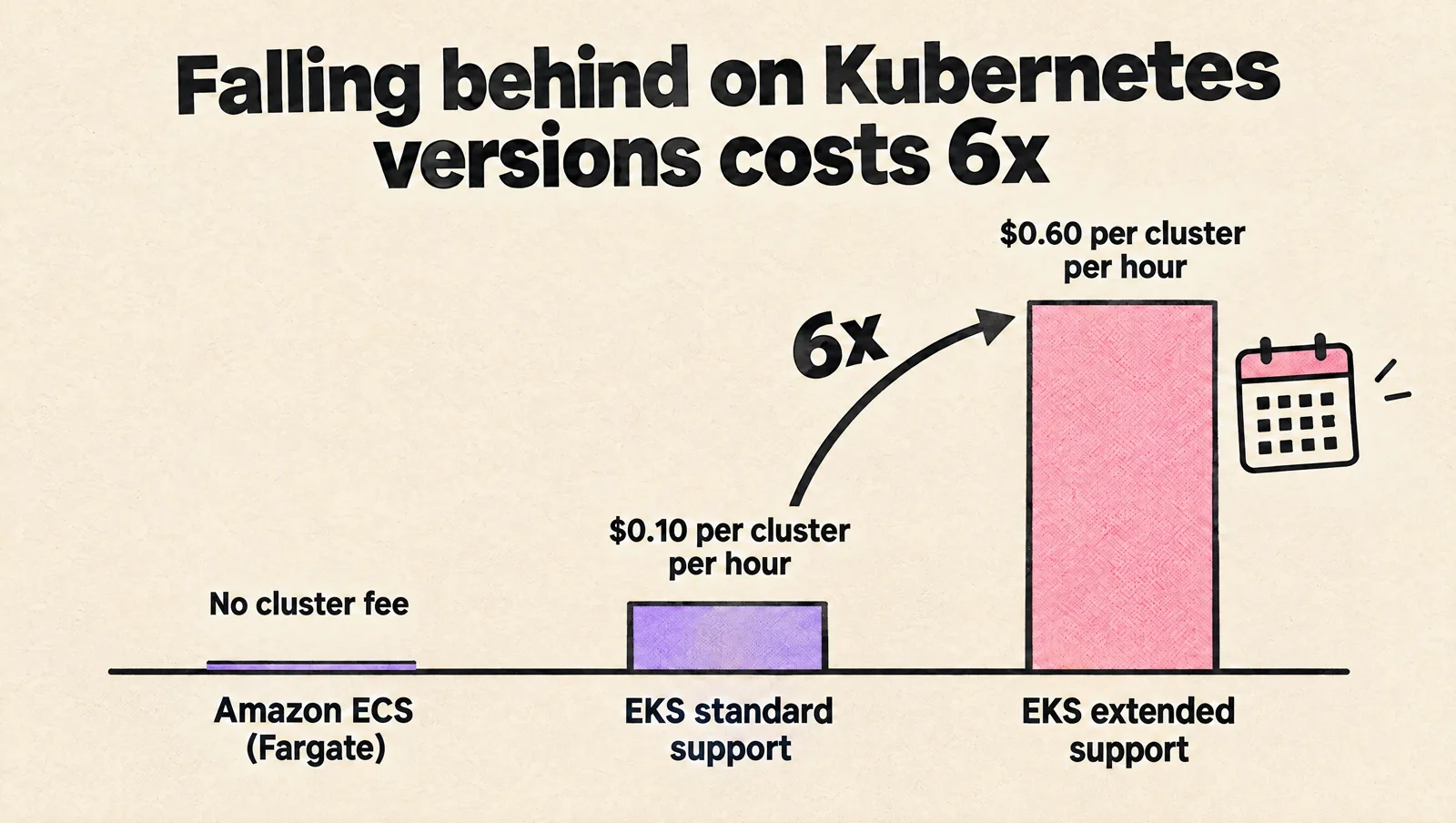
| Control plane cost | No cluster fee | $0.10 per cluster per hour on standard support, $0.60 on extended support (AWS pricing) | Pay per request and duration |
| Upgrade pressure | Minimal | Regular Kubernetes version upgrades, or extended support fees | Runtime deprecations |
| Hiring signal | Easy to learn | Needs real Kubernetes skills on the team or from a partner | Easy to start, harder to observe at scale |
The EKS extended support price is a useful example of what a consultant should catch. A cluster that falls behind on Kubernetes versions costs six times more for its control plane. If you do run EKS, see how MeteorOps works with Amazon EKS.
Engagement models and what they are good for
| Model | How it works | Good for | Watch for |
|---|---|---|---|
| Assessment | A short, fixed review of accounts, pipelines, security and cost, ending in a ranked report | Knowing where to start, budgeting a bigger project | Reports that are really sales proposals |
| Fixed-scope project | A defined outcome, such as a landing zone, an EKS migration or a CI/CD rebuild | Clear goals with a clear end | Change requests, and handover to nobody |
| Ongoing hours plan | A monthly block of senior hours for continuous improvement and support | Startups without a DevOps team | Unused-hour rules, response times for incidents |
| Embedded engineer | A consultant works inside your team, under your priorities | A known backlog and a capacity gap | Whether someone senior reviews their work |
| Managed operations | The partner runs agreed systems against service levels | Operations you never want to touch | Scope boundaries, lock-in through partner-owned tools |
Many good engagements combine an assessment, a short project for the riskiest gaps, and a smaller ongoing plan. If you want the general framework for choosing between consulting models, read how to choose a DevOps consulting service.
What AWS partner tiers tell you (and what they do not)
Many AWS consultancies advertise their AWS Partner Network tier. The services path has three tiers, and the requirements are mostly about scale (AWS Partner services tiers):
| Tier | Main requirements |
|---|---|
| Select | 2 technical certified individuals, 3 launched customer opportunities |
| Advanced | 6 technical certified individuals (at least 3 Professional or Specialty), 20 launched opportunities, a partner business plan |
| Premier | 25 technical certified individuals (at least 10 Professional or Specialty), 50 launched opportunities, 3 Competency, MSP or Well-Architected validations, and sustained performance |
A higher tier tells you the firm is large and active with AWS. It does not tell you that the engineer assigned to you is senior, or that they have run production systems like yours. AWS Competencies and Specializations (DevOps, Migration and others) are a stronger signal for a specific area, because they require customer references in that area. Partners can also unlock AWS programs, such as the Migration Acceleration Program, which provides tooling, partner expertise and funding to offset migration costs for qualifying projects. Ask whether your project qualifies, but do not let funding drive the architecture.

Whatever the badge, interview the engineers who will actually do the work.
Questions to ask an AWS DevOps consultant
- "What would you look at first in our account, and what would you leave alone?" Good answer: identity and access, backups, production change paths and cost visibility first, with no rebuild until they have seen the system. Red flag: a target architecture before they have seen your account.
- "Who exactly will work on our systems?" Good answer: named engineers you can interview, plus a senior who reviews designs. Red flag: "we will assign the best available resource".
- "How will you access our AWS accounts?" Good answer: individual identities through IAM Identity Center or your identity provider, least privilege, and access removed at the end. Red flag: asking for root credentials or an IAM user with admin rights.
- "Where will the code live?" Good answer: in your Git organization, through your pull requests. Red flag: their private modules or a platform you can only use while you pay them.
- "How do you decide between ECS and EKS?" Good answer: they ask about your team, number of services and growth before answering. Red flag: the same answer for every client.
- "What will we measure at day 30 and day 90?" Good answer: delivery metrics, incident and restore metrics, and cost per environment. Red flag: hours logged and tickets closed.
- "What happens when the engagement ends?" Good answer: a handover plan, runbooks and a notice period. Red flag: no clear exit, or an ongoing dependency on their tooling.
A 90-day AWS DevOps consulting plan
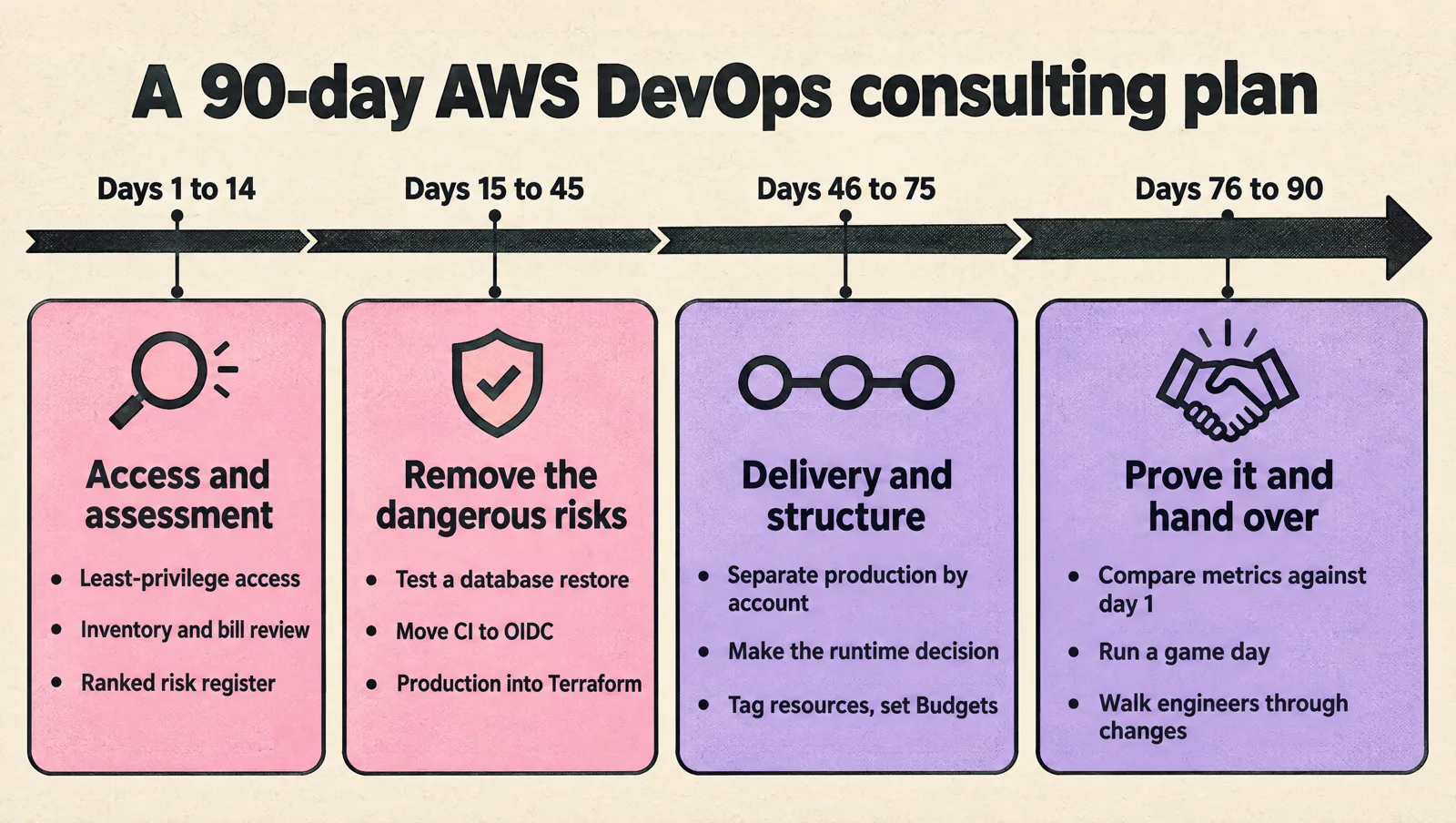
Days 1 to 14: access and assessment
- Set up individual, least-privilege access. Turn on or verify CloudTrail in every account.
- Inventory accounts, VPCs, workloads, databases, pipelines and on-call arrangements.
- Review the last 3 to 6 months of incidents and the last few months of the bill.
- Deliver a written risk register ranked by impact and effort. No major changes yet.
Days 15 to 45: remove the dangerous risks
- Test a database restore and write down how long it took.
- Remove shared admin users and long-lived access keys. Move CI to OIDC federation.
- Bring unmanaged production resources into Terraform, starting with networking, IAM and databases.
- Add alerts on customer-facing symptoms (error rates, latency, failed jobs), not only CPU.
- Add a tested rollback path for deployments.
Days 46 to 75: delivery and structure
- Separate production from everything else, by account if you have not already.
- Speed up pipelines and remove manual release steps.
- Make the runtime decision (ECS, EKS or serverless) where it is still open, with a written rationale.
- Tag resources for cost allocation and set AWS Budgets alerts per environment.
Days 76 to 90: prove it and hand over
- Compare delivery metrics, incidents and spend against day 1.
- Run a game day: break something in staging and recover using only the runbooks.
- Walk your engineers through every change. Agree the next quarter's backlog and who owns it.
Example: removing AWS keys from CI with OIDC
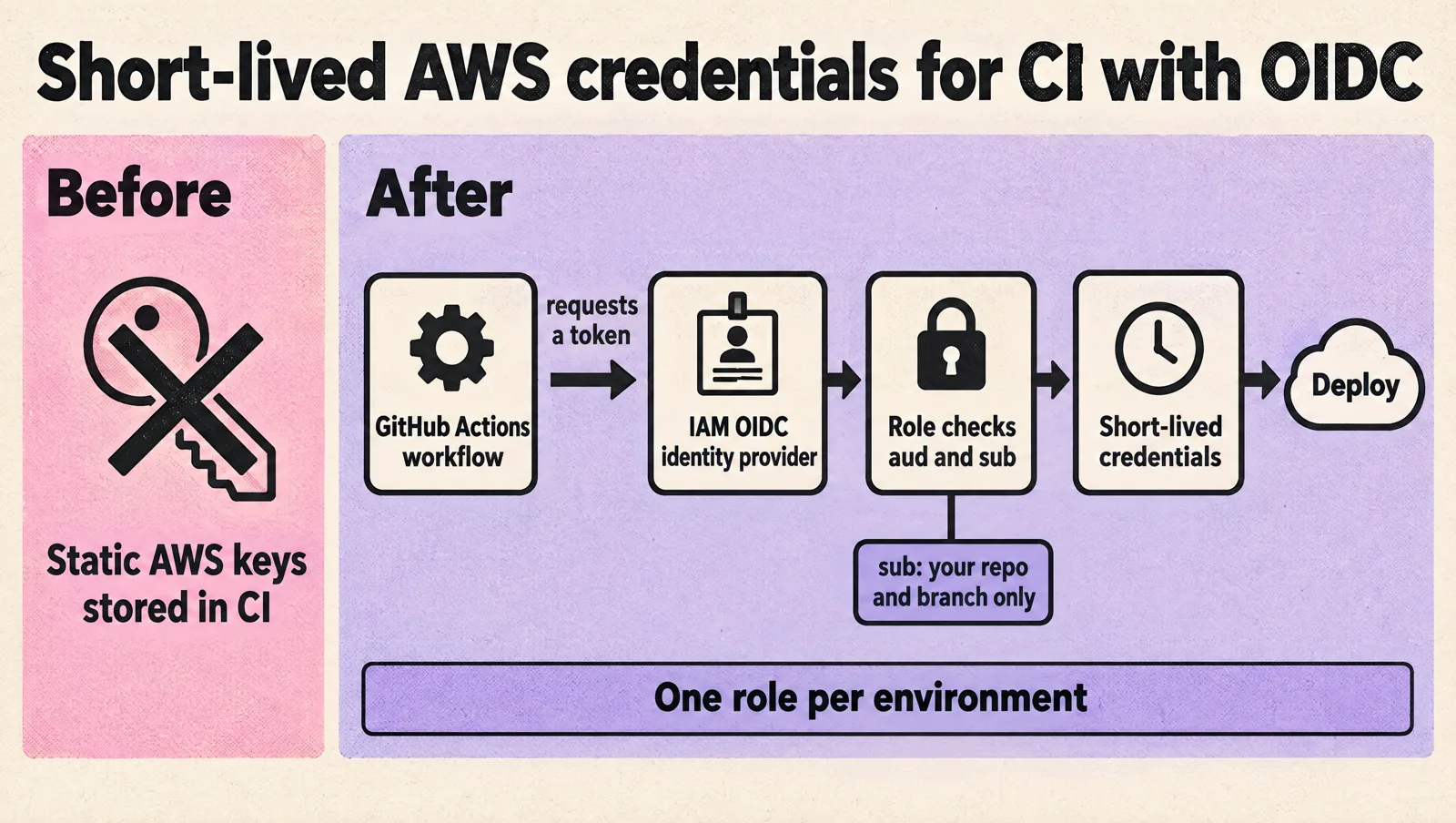
One of the first fixes in most AWS engagements is replacing static access keys in CI with short-lived credentials. With GitHub Actions, you add GitHub as an OIDC identity provider in IAM and create a role that only your repository and branch can assume. AWS requires the sub condition to be set, so other repositories cannot assume the role (AWS IAM documentation).
{
  "Version": "2012-10-17",
  "Statement": [
    {
      "Effect": "Allow",
      "Principal": {
        "Federated": "arn:aws:iam::123456789012:oidc-provider/token.actions.githubusercontent.com"
      },
      "Action": "sts:AssumeRoleWithWebIdentity",
      "Condition": {
        "StringEquals": {
          "token.actions.githubusercontent.com:aud": "sts.amazonaws.com",
          "token.actions.githubusercontent.com:sub": "repo:your-org/your-repo:ref:refs/heads/main"
        }
      }
    }
  ]
}
The workflow then requests a token and assumes the role. No AWS secrets are stored in GitHub:
permissions:
  id-token: write
  contents: read

jobs:
  deploy:
    runs-on: ubuntu-latest
    steps:
      - uses: aws-actions/configure-aws-credentials@v6
        with:
          role-to-assume: arn:aws:iam::123456789012:role/github-deploy
          aws-region: us-east-1
      - run: aws sts get-caller-identity
Give the deploy role only the permissions the pipeline needs, and use a separate role per environment, so a staging pipeline cannot change production.
Red flags in AWS DevOps consulting
- Rebuild before review. Proposing a new architecture before reading your account and incident history.
- Kubernetes by default. EKS for a team with three services and no one to run it.
- Console changes in production. Clicking resources into existence that never make it into code.
- Broad, shared access. Admin rights "to move faster", or shared credentials.
- Cost cuts without reliability analysis. Removing redundancy, shrinking databases or cutting log retention without explaining the risk.
- No exit plan. Partner-owned accounts, modules or tools you cannot keep.
How to measure whether the engagement worked
- Delivery: the five DORA metrics (change lead time, deployment frequency, failed deployment recovery time, change fail rate and deployment rework rate) for your main services.
- Resilience: a tested restore time for each critical database, and the number of incidents caused by changes.
- Security: the number of people with standing admin access, long-lived keys remaining, and open high-severity findings.
- Infrastructure as code: the share of production resources managed in code.
- Cost: spend per environment, the share of spend that is tagged, and commitment coverage. Our guide on reducing cloud costs without slowing engineering covers the cost side in depth.
FAQ
What does an AWS DevOps consultant do?
An AWS DevOps consultant designs and improves how your software is built, deployed and operated on AWS: account structure, access, infrastructure as code, containers, CI/CD, monitoring, security and cost. The best ones also leave your team able to run what they built.
How much does AWS DevOps consulting cost?
It depends on the model: a fixed assessment, a fixed-scope project, an ongoing hours plan or an embedded engineer. Compare quotes on the same scope and on senior time included, and remember that AWS programs can sometimes offset part of a migration's cost.
Do I need an AWS Premier Tier partner?
Not necessarily. Premier Tier reflects a partner's size and volume of AWS business. For a startup, the seniority of the engineers who will work on your systems and their experience with setups like yours matter more. A relevant AWS Competency is a better signal for a specific area.
Should a startup use EKS or ECS?
Most small teams with a handful of services are better served by ECS on Fargate, which has no cluster fee and little to operate. EKS makes sense when you run many services, need Kubernetes tooling or portability, and have Kubernetes skills on the team or from a partner.
How long does an AWS DevOps engagement take?
An assessment usually takes one to two weeks. Fixing the most dangerous gaps and getting delivery on a solid footing typically takes about a quarter. Large migrations take longer and should be planned in phases.
Can an AWS DevOps consultant help with SOC 2?
Yes. Much of SOC 2 evidence comes from AWS configuration: access control, logging with CloudTrail, encryption, backups and change management. A consultant can set these up so evidence is collected continuously rather than gathered by hand before each audit.
What is the difference between AWS DevOps consulting and AWS managed services?
Consulting designs and improves your setup, and your team usually owns it afterward. Managed services means a partner operates agreed systems for you against service levels on an ongoing basis. Many startups use consulting first, then decide how much ongoing support they need.
The short version
Good AWS DevOps consulting starts with an assessment, fixes access, backups, change paths and visibility before anything fancy, makes the runtime decision based on your team, and measures delivery, resilience and cost. Everything should end up in your accounts, your repositories and your runbooks.
If you want senior AWS engineers to run this kind of engagement with your team, see MeteorOps DevOps consulting.