
A five-person startup should start with error tracking, structured logs, the four golden signals (latency, traffic, errors, saturation) for each user-facing service, uptime checks, and three or four symptom-based alerts, all on one managed platform. Add distributed tracing with OpenTelemetry once requests cross several services. Self-hosting becomes worth it only when the bill outgrows a platform engineer's time.
A startup observability stack should answer three questions quickly: what is broken, who is affected, and what changed recently. It does not mean buying the biggest platform or instrumenting every function on day one. It means collecting enough signals to debug production, often Kubernetes, serverless jobs, managed databases and queues, without tribal knowledge or emergency SSH sessions.
What to run at 5, 20 and 100 engineers
| Stage | Signals to have | Typical tooling | Who owns it |
|---|---|---|---|
| About 5 engineers, one or two services | Error tracking, structured logs, golden-signal dashboards, uptime checks, 3 to 5 alerts routed to one channel or pager | One managed platform on a free or entry tier (Grafana Cloud, Datadog, or your cloud's native monitoring) plus an error tracker such as Sentry | Whoever is on call, with one engineer setting conventions |
| About 20 engineers, several services and workers | Add OpenTelemetry tracing at service boundaries, deploy markers, queue and database dashboards, an on-call rotation, alert runbooks | Same platform on a paid tier, OpenTelemetry Collector in the cluster, log retention and sampling rules | A named owner for standards, usually in a platform or DevOps role |
| About 100 engineers, many teams | SLOs per service, per-team dashboards and alert routing, cost allocation, trace sampling strategy | Either a commercial platform under negotiated pricing or a self-hosted stack (Prometheus or Mimir, Loki, Tempo, Grafana) run by a platform team | A platform team that treats observability as an internal product |
What it costs: Grafana Cloud vs Datadog vs self-hosted
List prices from the vendors' pricing pages as of October 2026. Real bills depend on hosts, active series, log volume and retention, so use these to compare shapes, not as quotes.
| Grafana Cloud | Datadog | Self-hosted LGTM (Loki, Grafana, Tempo, Mimir or Prometheus) | |
|---|---|---|---|
| Free tier | 10k metric series, 50 GB logs, 50 GB traces, 14-day retention, 3 users | Infrastructure only: up to 5 hosts, 1-day metric retention | Software is free |
| Paid entry | Pro: $19 per month platform fee, same included usage, then pay as you go | Infrastructure Pro: $15 per host per month billed annually ($18 on-demand) | Compute and storage for the stack, often a few hundred dollars a month at startup scale |
| Metrics | From $6.50 per 1k active series | Included per host; custom metrics billed separately | Storage and memory grow with series count |
| Logs | From about $0.55 per GB (process, write and retain combined) | $0.10 per GB ingested, plus $1.70 per million events indexed for 15 days | Object storage, cheap to keep |
| Traces / APM | Same per-GB pricing as logs | APM from $31 per host per month billed annually | Object storage |
| Hidden cost | High-cardinality labels inflate series | Per-host and indexing costs grow with every node and noisy log line | Engineer time: upgrades, scaling, on-call for the monitoring itself |
Sources: Grafana Cloud pricing and Datadog pricing.
Start with the failures you need to diagnose
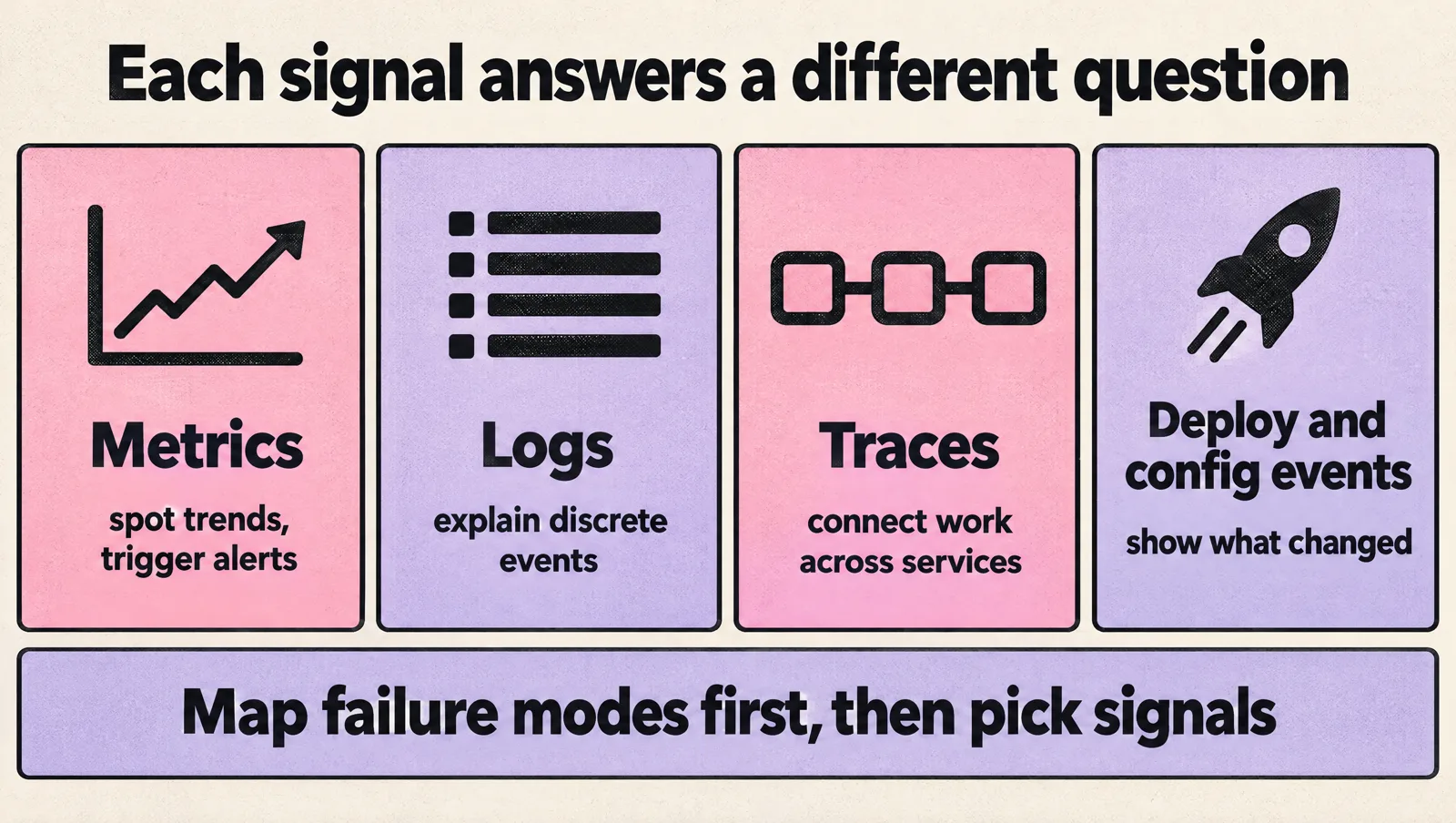
Tool selection gets messy when teams begin with vendor feature matrices. Start with the incidents you expect to handle instead. A payments API returning intermittent 500s, a background worker falling behind its queue, a database connection pool saturating after a traffic spike, or a canary release increasing latency in one region all need different signals. Metrics are best for spotting trends and triggering alerts, logs explain discrete events, traces connect work across services, and deploy or configuration events show what changed. Mapping those failure modes first helps you decide where deep instrumentation is worth it and where a simple log line, counter, or managed cloud metric is enough.
For most startups, the first observability goals should be practical, boring, and tied to production outcomes. Prioritize the checks that shorten incidents and protect user experience before you chase perfect coverage:
- Find customer-impacting issues fast. The team should know when users are seeing elevated error rates, slow requests, failed jobs, or broken workflows. Alerts should include enough context to point to a likely service, dependency, tenant, region, or recent deploy instead of merely announcing that “something is down.”
- Connect symptoms to recent changes. Deployments, configuration changes, feature flags, and infrastructure updates should be visible during incident review.
- Debug without direct server access. Engineers should not need to SSH into machines or manually inspect containers to understand production behavior.
- Support on-call without constant noise. Alerts should point to real action, not every small fluctuation.
- Keep costs predictable. Observability data can grow quickly, especially logs and high-cardinality metrics.
This keeps the stack tied to operational needs instead of tool sprawl. If you are still deciding how your engineering ownership model should work, it can help to define responsibilities early. A clear team model, like the one outlined in how to build a DevOps team, makes observability easier to operate because someone owns the standards, not just the dashboard links.
Build around the four core signal types
A useful observability stack usually combines logs, metrics, traces, and alerts. Each signal answers a different kind of question. Treating one as a replacement for all the others usually creates blind spots.
Logs
Logs explain what happened inside an application or service. They are useful for debugging specific failures, understanding request context, and reviewing edge cases after an incident.
Good startup logging practices include:
- Use structured logs, such as JSON, instead of free-form text when possible.
- Include request IDs, user or tenant identifiers where appropriate, service name, environment, and error details.
- Avoid logging secrets, tokens, payment data, or unnecessary personal data.
- Set retention based on debugging needs and cost, not default settings.
The common failure mode is logging everything. That feels safe until costs rise or engineers cannot find the few lines that matter. Start with application errors, key business workflows, background jobs, authentication events, and integration failures.
Metrics
Metrics show trends and current health. They are best for questions like: error rate increased, memory usage is climbing, queue depth is growing, or request latency changed after deployment.
Most startups should track a small set of service-level metrics first:
- Request rate
- Error rate
- Latency, especially p95 or p99 where available
- CPU and memory usage
- Database connection usage
- Queue depth and job failure rate
Be careful with high-cardinality labels, such as user ID, request path with raw IDs, or tenant ID on every metric. They can make queries expensive and dashboards hard to use. Use detailed labels where they help diagnosis, but do not attach every possible field to every metric.
Tracing
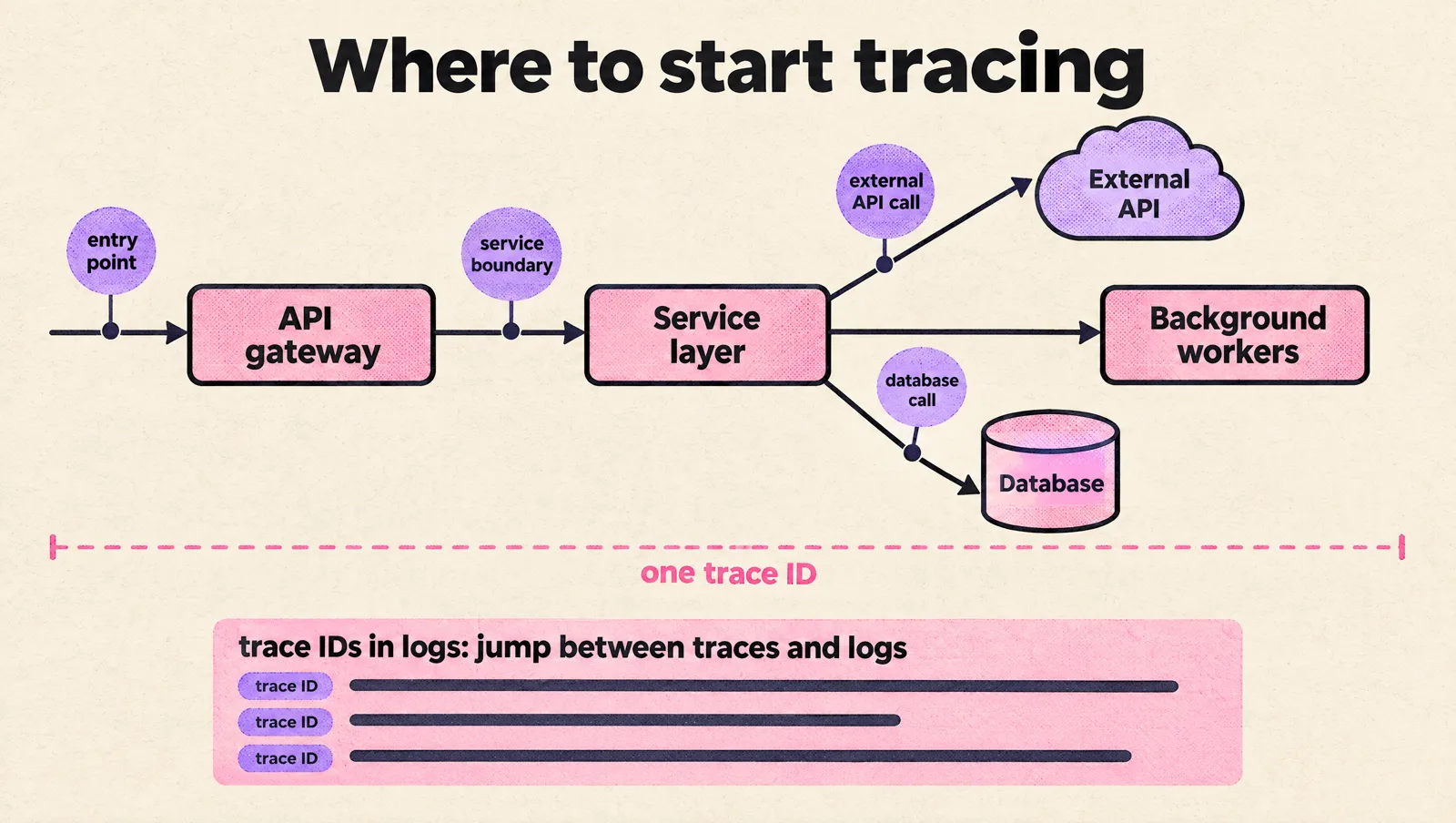
Distributed tracing helps you follow a request across services, queues, databases, and external APIs. It becomes important when one user action touches several components and no single log line explains the delay.
Tracing is especially useful when:
- A monolith is being split into services.
- Requests pass through an API gateway, service layer, and background workers.
- External providers affect latency or reliability.
- Engineers cannot tell which service owns a failure.
You do not need to trace every internal detail at first. Start with entry points, service boundaries, database calls, and external API calls. Make sure trace IDs appear in logs, so engineers can move between traces and log events during debugging.
Alerts
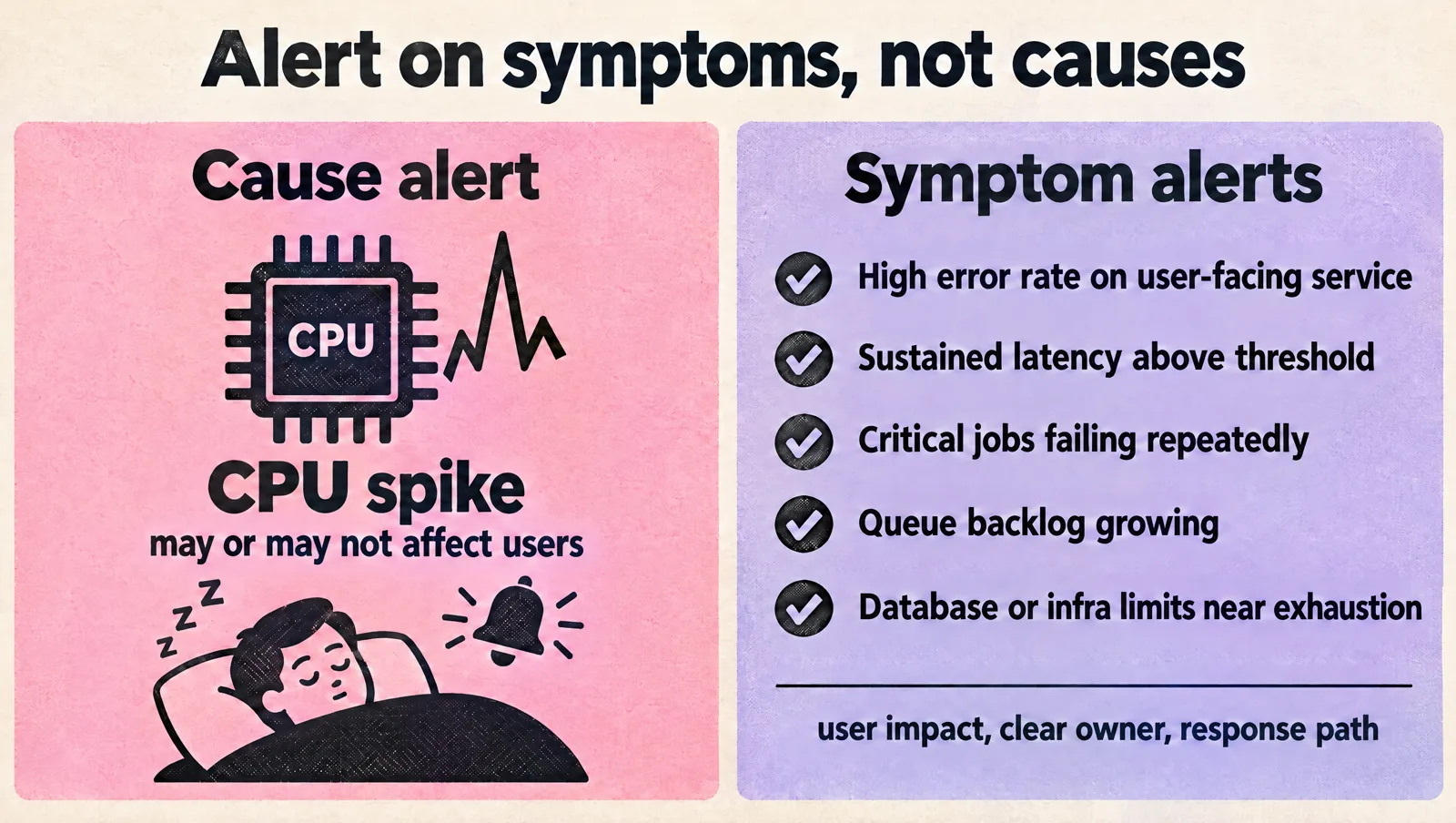
Alerts turn signals into action. Bad alerts wake people up for conditions that do not matter. Good alerts point to user impact, clear ownership, and a response path.
Early alerting should focus on symptoms rather than every possible cause:
- High error rate on a user-facing service
- Sustained latency above an agreed threshold
- Critical background jobs failing repeatedly
- Queue backlog growing beyond normal recovery
- Database or infrastructure limits close to exhaustion
If alerts are already noisy, fix that before adding more. A practical guide to handling alert fatigue can help you separate useful pages from low-value notifications.
Choose tools that match your stage
The right observability tools depend on your architecture, cloud provider, team size, budget, and operational maturity. A two-person engineering team should not run a complex observability platform unless there is a strong reason. A larger team with multiple services may need stronger standards and deeper query options.
Use these criteria when comparing options:
- Setup effort: How long does it take to instrument one service and get useful dashboards?
- Operational burden: Who patches, scales, backs up, and maintains the observability components?
- Data model: Can the tool connect logs, metrics, and traces through shared fields like service name, environment, and request ID?
- Cost controls: Can you manage retention, sampling, indexing, and ingestion limits?
- Developer workflow: Can engineers find what they need without learning a complex query language on day one?
- Integration fit: Does it work cleanly with your cloud, deployment pipeline, container platform, and incident process?
Managed tools are often a good fit early because they reduce maintenance work. Open source tools can be a good fit when you have the skills and time to operate them well. The main risk is choosing based on what looks powerful in a demo, then discovering the team cannot keep it clean in production.
Tool choice should follow the same discipline as the rest of your platform decisions. If you need a broader framework, use the same thinking you would apply when you choose DevOps tools for your team: match the tool to the team’s current workload, not an imagined future state.
Instrument the application, not just the infrastructure
Cloud dashboards can tell you that a container restarted, a database used more CPU, or a load balancer returned more 5xx responses. That is useful, but it rarely tells the whole story. Most startup incidents need application context.
For example, a latency spike may come from a slow database query, a third-party API timeout, a feature flag path, a cache miss pattern, or a single tenant sending unusual traffic. Infrastructure metrics alone will not explain those differences.
Good application instrumentation should include:
- Clear service names and environment names, such as production, staging, and development.
- Correlation IDs passed through requests, logs, and traces.
- Consistent error handling with useful messages and stack traces where appropriate.
- Custom metrics for important workflows, such as signup completion, checkout failure, import job duration, or notification delivery failure.
- Deployment markers so teams can compare behavior before and after a release.
Do this incrementally. Pick one important user flow, such as login, checkout, data import, or report generation. Add logs, metrics, and traces around that path. Then repeat for the next critical flow. This produces value faster than trying to instrument every service perfectly before anyone can use the data.
Set sensible defaults before the stack grows
Observability gets harder to clean up later. Naming, retention, labels, and alert conventions should be simple enough for every engineer to follow.
Define these defaults early:
- Service naming: Use consistent names across logs, metrics, traces, dashboards, and alerts.
- Environment naming: Avoid mixing production and non-production data in the same views unless the distinction is clear.
- Log levels: Decide what counts as debug, info, warning, error, and critical.
- Retention: Keep high-value data long enough for debugging and reviews, but avoid keeping noisy data by default.
- Sampling: Sample traces where volume is high, but keep enough detail for failed and slow requests.
- Alert routing: Send pages to people who can act. Send lower-priority notifications somewhere that does not interrupt sleep.
- Dashboard ownership: Every dashboard should have a purpose and an owner, or it will become stale.
If your startup uses Azure DevOps or is still setting up delivery foundations, observability should sit beside source control, pipelines, and release practices. The setup advice in Azure DevOps for startups can help keep those foundations organized.
Avoid the common startup observability traps
Most observability problems come from over-collecting, under-owning, or alerting on the wrong things.
- Too many dashboards: A dashboard is useful only if someone uses it during incidents or reviews. Keep the main views focused on service health, user impact, and recent changes.
- Logs without structure: Plain text logs are harder to query and correlate. Structured logs make production debugging faster.
- Metrics with uncontrolled labels: High-cardinality metrics can increase cost and slow down queries. Review labels before they spread across services.
- Alerts tied to causes instead of symptoms: CPU spikes may or may not affect users. Error rates, failed jobs, and latency usually make better primary alerts.
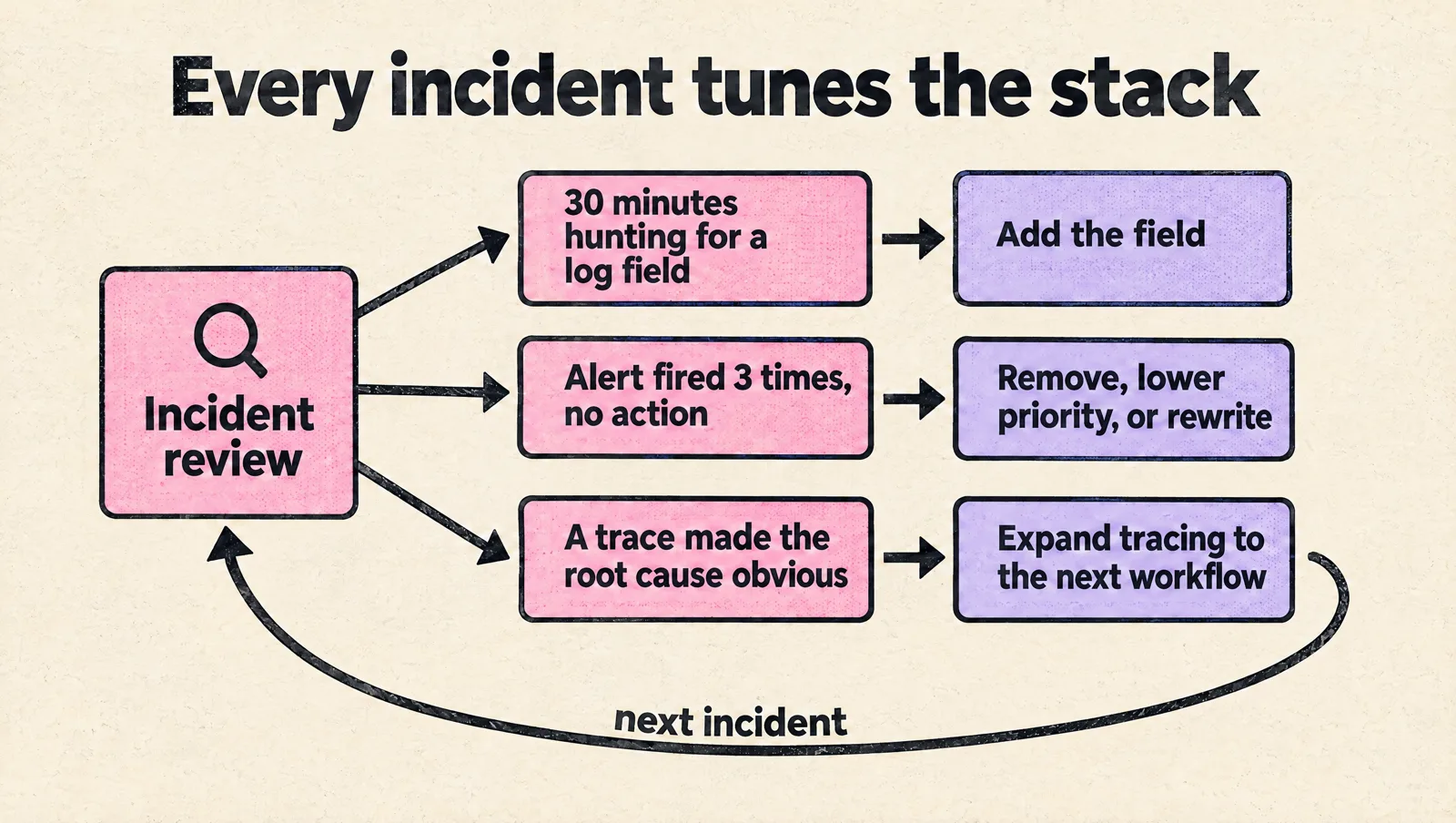
- No incident feedback loop: After each incident, ask which signal was missing, which alert was noisy, and which dashboard helped. Then adjust the stack.
- No cost review: Observability bills can grow quietly. Review ingestion, retention, and indexing on a regular schedule.
A simple review after each incident is often the best way to improve. If engineers spent 30 minutes looking for the right log field, add the field. If an alert fired three times with no action taken, remove it, lower its priority, or rewrite it. If a trace made the root cause obvious, expand tracing to the next important workflow.
FAQ
What observability should a five-person startup set up first?
Error tracking, structured JSON logs with a request ID, the four golden signals for each user-facing service, an uptime check on the main user flow, and a handful of alerts on user-facing symptoms (error rate, latency, failed critical jobs). Use one managed platform so nobody has to run monitoring infrastructure.
Should a startup self-host Prometheus and Grafana?
Usually not at first. Self-hosting is cheaper in software but costs engineer time for upgrades, storage, scaling and on-call for the monitoring itself. It starts to pay off when your managed bill is larger than a meaningful share of a platform engineer's time, or when data residency requires it.
Do we need distributed tracing from day one?
No. Tracing pays off once a request crosses several services, queues or external APIs. Start with OpenTelemetry SDKs at service entry points and outbound calls, and put trace IDs in your logs so you can jump between them.
How do we build one observability platform that combines alerts, logs, metrics and traces?
Standardize on OpenTelemetry for instrumentation, send everything through an OpenTelemetry Collector, and use shared resource attributes (service.name, deployment.environment) so the backend can link logs, metrics and traces. Grafana Cloud and Datadog both accept OTLP, which keeps you portable.
How do we keep observability costs predictable?
Set log retention and indexing rules per environment, drop debug logs in production, keep high-cardinality values (user IDs, raw URLs) out of metric labels, sample traces while keeping errors and slow requests, and review the bill monthly with the engineers who generate the data.
Takeaway
Build your startup observability stack around the questions your team needs to answer in production. Start with structured logs, essential metrics, targeted tracing, and alerts tied to real user impact. Keep the setup small enough to operate, but consistent enough to scale.
The goal is not to collect every signal. The goal is to shorten the path between “something is wrong” and “we know what changed, who is affected, and what to fix next.”